Cloudron makes it easy to run web apps like WordPress, Nextcloud, GitLab on your server. Find out more or install now.


Skip to content
  • Categories
  • Recent
  • Tags
  • Popular
  • Bookmarks
  • Search
Skins
  • Light
  • Brite
  • Cerulean
  • Cosmo
  • Flatly
  • Journal
  • Litera
  • Lumen
  • Lux
  • Materia
  • Minty
  • Morph
  • Pulse
  • Sandstone
  • Simplex
  • Sketchy
  • Spacelab
  • United
  • Yeti
  • Zephyr
  • Dark
  • Cyborg
  • Darkly
  • Quartz
  • Slate
  • Solar
  • Superhero
  • Vapor

  • Default (No Skin)
  • No Skin
Collapse
Brand Logo

Cloudron Forum

Apps - Status | Demo | Docs | Install
  1. Cloudron Forum
  2. App Wishlist
  3. Castopod Host - open-source hosting platform made for podcasters who want engage and interact with their audience.

Castopod Host - open-source hosting platform made for podcasters who want engage and interact with their audience.

Scheduled Pinned Locked Moved Solved App Wishlist
activitypubfediversepodcast
47 Posts 14 Posters 18.1k Views 16 Watching
  • Oldest to Newest
  • Newest to Oldest
  • Most Votes
Reply
  • Reply as topic
Log in to reply
This topic has been deleted. Only users with topic management privileges can see it.
  • steinhmorS steinhmor

    @privsec I've installed castopod in a LAMP app - it works fine 🙂

    P Offline
    P Offline
    privsec
    wrote on last edited by
    #12

    @steinhmor

    Awesome!! I’ll have to give it try next weekend.

    It looks promising

    micmcM 1 Reply Last reply
    1
    • P privsec

      @steinhmor

      Awesome!! I’ll have to give it try next weekend.

      It looks promising

      micmcM Offline
      micmcM Offline
      micmc
      wrote on last edited by
      #13

      @privsec It's now reached version 1.0 BETA and it sounds great indeed.
      https://castopod.org/

      AI Intelligencia RED PILL Podcast
      (coming soon...)

      1 Reply Last reply
      3
      • ajtatumA Offline
        ajtatumA Offline
        ajtatum
        wrote on last edited by
        #14

        This is something I would absolutely love to see in Cloudron. I'll give the LAMP stack a go though!

        1 Reply Last reply
        2
        • steinhmorS steinhmor

          @privsec I've installed castopod in a LAMP app - it works fine 🙂

          P Offline
          P Offline
          privsec
          wrote on last edited by
          #15

          @steinhmor
          How did you do it?

          murgeroM steinhmorS 2 Replies Last reply
          1
          • P privsec

            @steinhmor
            How did you do it?

            murgeroM Offline
            murgeroM Offline
            murgero
            App Dev
            wrote on last edited by
            #16

            @privsec It's a PHP script, so you can install as any other script, unzip and upload to the /app/data/public/ dir and run the installer via the web 🙂

            --
            https://urgero.org
            ~ Professional Nerd. Freelance Programmer. ~

            martinkbsM 1 Reply Last reply
            1
            • murgeroM murgero

              @privsec It's a PHP script, so you can install as any other script, unzip and upload to the /app/data/public/ dir and run the installer via the web 🙂

              martinkbsM Offline
              martinkbsM Offline
              martinkbs
              wrote on last edited by
              #17

              @murgero How do you do this installation step in Cloudron? How modify the parameters so that root folder points to Castopod's public/ subfolder.
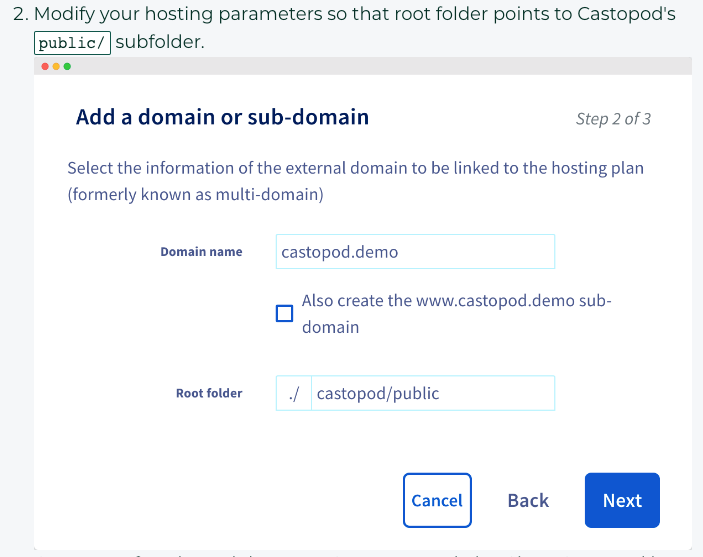
              bc49fd2f-134b-48d9-88bd-0b5325a5a2ba-image.png

              If you upload the castopod folder to /app/data/public/ ¿?
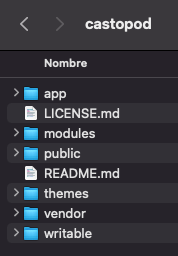
              16c090e6-32bd-466d-ab62-6bc1525b5f65-image.png

              Thanks!

              murgeroM 1 Reply Last reply
              1
              • martinkbsM martinkbs

                @murgero How do you do this installation step in Cloudron? How modify the parameters so that root folder points to Castopod's public/ subfolder.

                bc49fd2f-134b-48d9-88bd-0b5325a5a2ba-image.png

                If you upload the castopod folder to /app/data/public/ ¿?

                16c090e6-32bd-466d-ab62-6bc1525b5f65-image.png

                Thanks!

                murgeroM Offline
                murgeroM Offline
                murgero
                App Dev
                wrote on last edited by
                #18

                @martinkbs Ah forgot about that, upload the script to /app/data/ instead so the castopod public folder goes into /app/data/public

                --
                https://urgero.org
                ~ Professional Nerd. Freelance Programmer. ~

                P 1 Reply Last reply
                1
                • murgeroM murgero

                  @martinkbs Ah forgot about that, upload the script to /app/data/ instead so the castopod public folder goes into /app/data/public

                  P Offline
                  P Offline
                  privsec
                  wrote on last edited by
                  #19

                  @murgero I’ll try this again, but I did that and it just gave me an Oops error screen

                  murgeroM 1 Reply Last reply
                  1
                  • P privsec

                    @murgero I’ll try this again, but I did that and it just gave me an Oops error screen

                    murgeroM Offline
                    murgeroM Offline
                    murgero
                    App Dev
                    wrote on last edited by
                    #20

                    @privsec Once you are done uploading make sure the permissions are www-data:www-data with 755.

                    --
                    https://urgero.org
                    ~ Professional Nerd. Freelance Programmer. ~

                    P 1 Reply Last reply
                    1
                    • murgeroM murgero

                      @privsec Once you are done uploading make sure the permissions are www-data:www-data with 755.

                      P Offline
                      P Offline
                      privsec
                      wrote on last edited by
                      #21

                      @murgero I have looked through the docs, but cant find the answer.

                      Within the console view of the app, how do I grant those permissions?

                      Sorry I am asking really dumb questions.

                      robiR 1 Reply Last reply
                      1
                      • P privsec

                        @murgero I have looked through the docs, but cant find the answer.

                        Within the console view of the app, how do I grant those permissions?

                        Sorry I am asking really dumb questions.

                        robiR Offline
                        robiR Offline
                        robi
                        wrote on last edited by
                        #22

                        @privsec use the File Manager app instead of console to make it much easier and obvious.

                        Conscious tech

                        1 Reply Last reply
                        2
                        • P Offline
                          P Offline
                          privsec
                          wrote on last edited by
                          #23

                          So I copied the files from the download I got from here
                          https://code.castopod.org/adaures/castopod/uploads/d10a3e7cc8c5d8ff57b5d76dcdfeaa58/castopod-1.0.0-beta.20.zip
                          into the app/data/ folder. This is what it looks like 55fa0886-47da-4a4f-9e71-b03859b58860-image.png
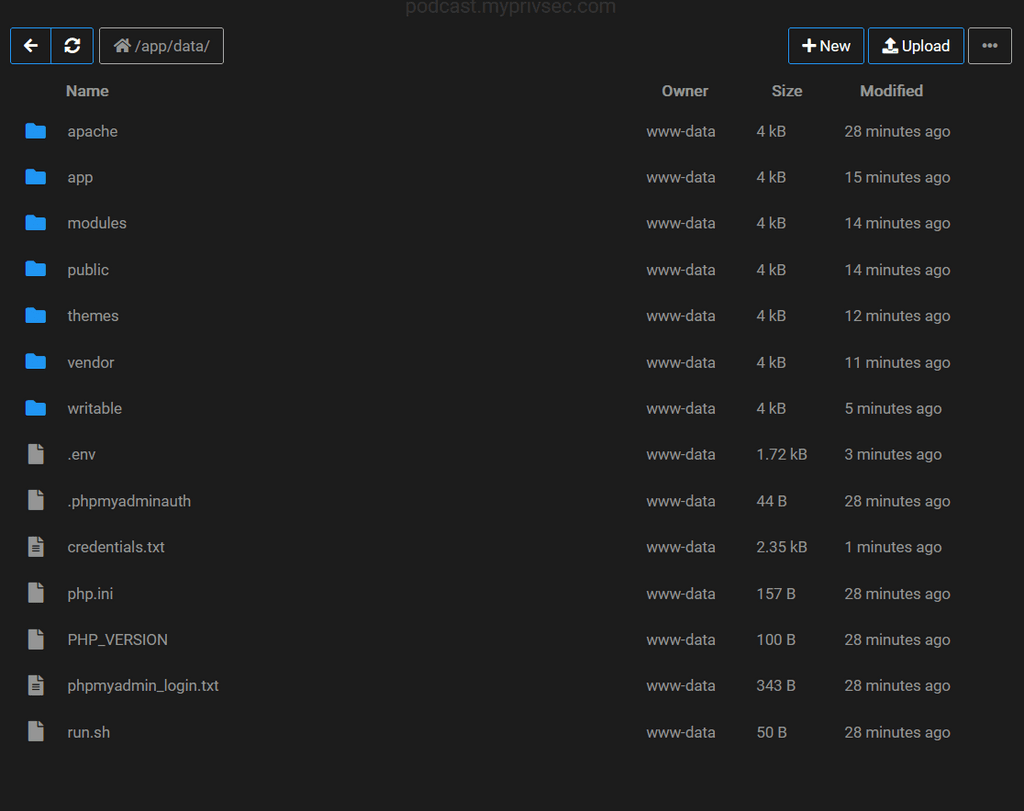
                          I confirmed all files are assigned www-data owner

                          I then went to my.domain.com/cp-install and I get c8ca76b9-6b08-4789-a8f6-3fb502278c85-image.png
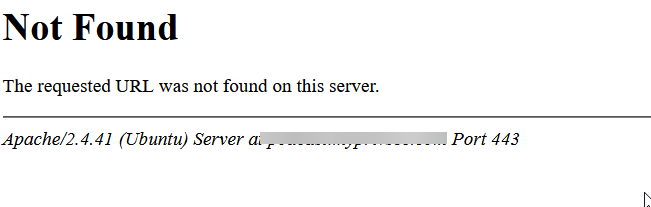
                          I know that I must be missing something simple, but I dont see what.

                          murgeroM 1 Reply Last reply
                          1
                          • P privsec

                            So I copied the files from the download I got from here
                            https://code.castopod.org/adaures/castopod/uploads/d10a3e7cc8c5d8ff57b5d76dcdfeaa58/castopod-1.0.0-beta.20.zip
                            into the app/data/ folder. This is what it looks like 55fa0886-47da-4a4f-9e71-b03859b58860-image.png

                            I confirmed all files are assigned www-data owner

                            I then went to my.domain.com/cp-install and I get c8ca76b9-6b08-4789-a8f6-3fb502278c85-image.png

                            I know that I must be missing something simple, but I dont see what.

                            murgeroM Offline
                            murgeroM Offline
                            murgero
                            App Dev
                            wrote on last edited by
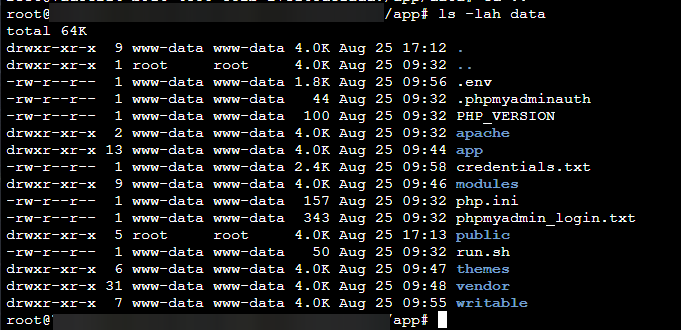
                            #24

                            @privsec Can you use CLI to run the following command in /app/data/ and /app/data/public/?

                            Run ls -lah <folder> and report back?

                            --
                            https://urgero.org
                            ~ Professional Nerd. Freelance Programmer. ~

                            P 2 Replies Last reply
                            2
                            • murgeroM murgero

                              @privsec Can you use CLI to run the following command in /app/data/ and /app/data/public/?

                              Run ls -lah <folder> and report back?

                              P Offline
                              P Offline
                              privsec
                              wrote on last edited by
                              #25

                              @murgero absolutely!

                              1 Reply Last reply
                              0
                              • murgeroM murgero

                                @privsec Can you use CLI to run the following command in /app/data/ and /app/data/public/?

                                Run ls -lah <folder> and report back?

                                P Offline
                                P Offline
                                privsec
                                wrote on last edited by privsec
                                #26

                                @murgero said in Castopod Host - open-source hosting platform made for podcasters who want engage and interact with their audience.:

                                ls -lah <folder>

                                This is the public folder
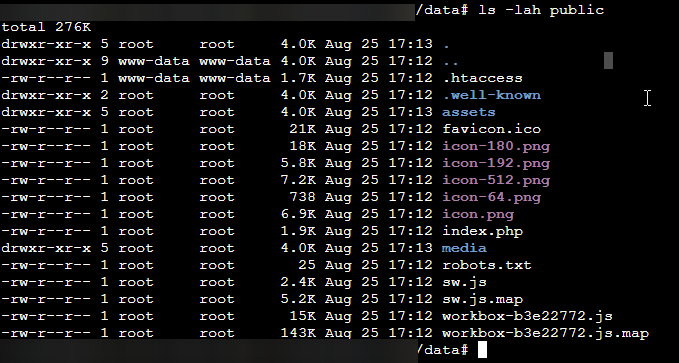
                                189631cc-d8b6-4455-a7cb-a22defc9f5f8-image.png

                                This is the app/data folder

                                a250f308-34df-4c27-a718-d5e947ea1cc0-image.png

                                P 1 Reply Last reply
                                1
                                • P privsec

                                  @murgero said in Castopod Host - open-source hosting platform made for podcasters who want engage and interact with their audience.:

                                  ls -lah <folder>

                                  This is the public folder

                                  189631cc-d8b6-4455-a7cb-a22defc9f5f8-image.png

                                  This is the app/data folder

                                  a250f308-34df-4c27-a718-d5e947ea1cc0-image.png

                                  P Offline
                                  P Offline
                                  privsec
                                  wrote on last edited by
                                  #27

                                  I know reuploaded the public folder and corrected the permissions to be www-data.

                                  I am not back to the Whoops page, it displays Whoops in the tab of the webpage, and only presents a blank white screen in the tab itself.

                                  When I travel to the /cp-admin url, it presents a login screen, I then login with the credentials of my cloudron account and it acts as if it logs in, but takes me to a blank white page and the URL is cp-auth/login

                                  I am grateful for your help.

                                  murgeroM 1 Reply Last reply
                                  1
                                  • P privsec

                                    I know reuploaded the public folder and corrected the permissions to be www-data.

                                    I am not back to the Whoops page, it displays Whoops in the tab of the webpage, and only presents a blank white screen in the tab itself.

                                    When I travel to the /cp-admin url, it presents a login screen, I then login with the credentials of my cloudron account and it acts as if it logs in, but takes me to a blank white page and the URL is cp-auth/login

                                    I am grateful for your help.

                                    murgeroM Offline
                                    murgeroM Offline
                                    murgero
                                    App Dev
                                    wrote on last edited by
                                    #28

                                    @privsec

                                    1. Castopod has no integration with cloudron, don't do that.
                                    2. your permissions on the public folder are bad, gotta fix those. (chown -R www-data:www-data /app/data/public)
                                    3. you need to run the install script, which will ask you to setup a new user and password. Use that to login.

                                    --
                                    https://urgero.org
                                    ~ Professional Nerd. Freelance Programmer. ~

                                    P 1 Reply Last reply
                                    4
                                    • murgeroM murgero

                                      @privsec

                                      1. Castopod has no integration with cloudron, don't do that.
                                      2. your permissions on the public folder are bad, gotta fix those. (chown -R www-data:www-data /app/data/public)
                                      3. you need to run the install script, which will ask you to setup a new user and password. Use that to login.
                                      P Offline
                                      P Offline
                                      privsec
                                      wrote on last edited by
                                      #29

                                      @murgero HUZZAH!

                                      I can now access the admin dashboard, thank you!

                                      1 Reply Last reply
                                      4
                                      • P privsec

                                        @steinhmor
                                        How did you do it?

                                        steinhmorS Offline
                                        steinhmorS Offline
                                        steinhmor
                                        wrote on last edited by steinhmor
                                        #30

                                        @privsec Sorry for the late reaction.
                                        I just changed some settings in app/data/apache/app.conf

                                        <VirtualHost *:80>
                                        DocumentRoot /app/data/public/castopod/public
                                        

                                        I also added these lines at the end of the app.conf:

                                        php_value post_max_size 200M
                                        php_value upload_max_filesize 200M
                                        php_value memory_limit 128M
                                        

                                        I think I found the hint in the cloudron docs for lamp and the castopod docs.

                                        Happy to read that you found another solution.

                                        Edit: specified the filename.

                                        P 1 Reply Last reply
                                        4
                                        • steinhmorS steinhmor

                                          @privsec Sorry for the late reaction.
                                          I just changed some settings in app/data/apache/app.conf

                                          <VirtualHost *:80>
                                          DocumentRoot /app/data/public/castopod/public
                                          

                                          I also added these lines at the end of the app.conf:

                                          php_value post_max_size 200M
                                          php_value upload_max_filesize 200M
                                          php_value memory_limit 128M
                                          

                                          I think I found the hint in the cloudron docs for lamp and the castopod docs.

                                          Happy to read that you found another solution.

                                          Edit: specified the filename.

                                          P Offline
                                          P Offline
                                          privsec
                                          wrote on last edited by
                                          #31

                                          @steinhmor
                                          Those lines you added, is that in the php file?

                                          steinhmorS 1 Reply Last reply
                                          0

                                          Hello! It looks like you're interested in this conversation, but you don't have an account yet.

                                          Getting fed up of having to scroll through the same posts each visit? When you register for an account, you'll always come back to exactly where you were before, and choose to be notified of new replies (either via email, or push notification). You'll also be able to save bookmarks and upvote posts to show your appreciation to other community members.

                                          With your input, this post could be even better 💗

                                          Register Login
                                          Reply
                                          • Reply as topic
                                          Log in to reply
                                          • Oldest to Newest
                                          • Newest to Oldest
                                          • Most Votes


                                          • Login

                                          • Don't have an account? Register

                                          • Login or register to search.
                                          • First post
                                            Last post
                                          0
                                          • Categories
                                          • Recent
                                          • Tags
                                          • Popular
                                          • Bookmarks
                                          • Search