
Cloudron makes it easy to run web apps like WordPress, Nextcloud, GitLab on your server. Find out more or install now.


Skip to content
  • Categories
  • Recent
  • Tags
  • Popular
  • Bookmarks
  • Search
Skins
  • Light
  • Brite
  • Cerulean
  • Cosmo
  • Flatly
  • Journal
  • Litera
  • Lumen
  • Lux
  • Materia
  • Minty
  • Morph
  • Pulse
  • Sandstone
  • Simplex
  • Sketchy
  • Spacelab
  • United
  • Yeti
  • Zephyr
  • Dark
  • Cyborg
  • Darkly
  • Quartz
  • Slate
  • Solar
  • Superhero
  • Vapor

  • Default (No Skin)
  • No Skin
Collapse
Brand Logo

Cloudron Forum

Apps - Status | Demo | Docs | Install
  1. Cloudron Forum
  2. Support
  3. Error restoring (via Minio) a version of cloudron on another version

Error restoring (via Minio) a version of cloudron on another version

Scheduled Pinned Locked Moved Solved Support
restore
13 Posts 3 Posters 4.2k Views 3 Watching
  • Oldest to Newest
  • Newest to Oldest
  • Most Votes
Reply
  • Reply as topic
Log in to reply
This topic has been deleted. Only users with topic management privileges can see it.
  • F Offline
    F Offline
    FortyTwo
    wrote on last edited by girish
    #1

    Hi,

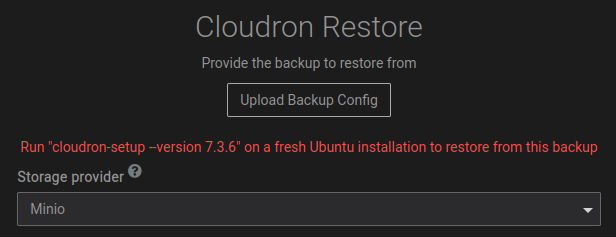
    I have a backup of a cloudron installation on a Minio server, but when I try to restore it I get an error because in the meantime a new version was released.
    cloudron_version_restore.png

    I need to restore my backup and all my data from Cloudron 7.3.6.

    How can I restore my cloudron backup?

    Thanks to the Cloudron team

    M 1 Reply Last reply
    1
    • F FortyTwo

      Hi,

      I have a backup of a cloudron installation on a Minio server, but when I try to restore it I get an error because in the meantime a new version was released.
      cloudron_version_restore.png

      I need to restore my backup and all my data from Cloudron 7.3.6.

      How can I restore my cloudron backup?

      Thanks to the Cloudron team

      M Offline
      M Offline
      msbt
      App Dev
      wrote on last edited by
      #2

      @FortyTwo you have to reinstall Cloudron with the same version, as documented here: https://docs.cloudron.io/backups/#restore-cloudron

      so you'd run ./cloudron-setup --version 7.3.6 and then hit restore after

      Happy Hosting & Web Development

      F 1 Reply Last reply
      2
      • M msbt

        @FortyTwo you have to reinstall Cloudron with the same version, as documented here: https://docs.cloudron.io/backups/#restore-cloudron

        so you'd run ./cloudron-setup --version 7.3.6 and then hit restore after

        F Offline
        F Offline
        FortyTwo
        wrote on last edited by
        #3

        Thanks a lot @msbt

        I will reinstall the correct version of cloudron at home tonight! And I didn't know that we can install an old version with this command.

        I will make a return here in this topic when it is done !

        Have a nice day Cloudron team :))

        1 Reply Last reply
        1
        • girishG girish marked this topic as a question on
        • girishG girish has marked this topic as solved on
        • F FortyTwo has marked this topic as unsolved on
        • F Offline
          F Offline
          FortyTwo
          wrote on last edited by FortyTwo
          #4

          Hi,

          I deploy Cloudron 7.3.6 but I have an error when I try to restore my backup from Minio :

          Error put object cloudron-testfile. Message: S3 API Requests must be made to API port. HTTP Code: InvalidArgument

          Any idea to help me please ?

          Thanks,

          Edit : I added the port 9000 in the link of my minio instance, my-minio-domain.com:9000! Testing backup config in process...waiting for the end

          girishG 1 Reply Last reply
          0
          • F FortyTwo

            Hi,

            I deploy Cloudron 7.3.6 but I have an error when I try to restore my backup from Minio :

            Error put object cloudron-testfile. Message: S3 API Requests must be made to API port. HTTP Code: InvalidArgument

            Any idea to help me please ?

            Thanks,

            Edit : I added the port 9000 in the link of my minio instance, my-minio-domain.com:9000! Testing backup config in process...waiting for the end

            girishG Offline
            girishG Offline
            girish
            Staff
            wrote on last edited by girish
            #5

            @FortyTwo said in Error restoring (via Minio) a version of cloudron on another version:

            Error put object cloudron-testfile. Message: S3 API Requests must be made to API port. HTTP Code: InvalidArgument

            I think the minio domain you put in restore UI is probably not correct. See https://docs.cloudron.io/apps/minio/#domains . There are two domains, I think you have put the console domain instead of the API domain.

            F 2 Replies Last reply
            0
            • girishG girish

              @FortyTwo said in Error restoring (via Minio) a version of cloudron on another version:

              Error put object cloudron-testfile. Message: S3 API Requests must be made to API port. HTTP Code: InvalidArgument

              I think the minio domain you put in restore UI is probably not correct. See https://docs.cloudron.io/apps/minio/#domains . There are two domains, I think you have put the console domain instead of the API domain.

              F Offline
              F Offline
              FortyTwo
              wrote on last edited by
              #6

              Thanks @girish

              I'm trying to restore it with the good domain, but I fortget to save the domain, I only save my Key access and secret key !

              1 Reply Last reply
              0
              • girishG girish

                @FortyTwo said in Error restoring (via Minio) a version of cloudron on another version:

                Error put object cloudron-testfile. Message: S3 API Requests must be made to API port. HTTP Code: InvalidArgument

                I think the minio domain you put in restore UI is probably not correct. See https://docs.cloudron.io/apps/minio/#domains . There are two domains, I think you have put the console domain instead of the API domain.

                F Offline
                F Offline
                FortyTwo
                wrote on last edited by FortyTwo
                #7

                @girish

                I must add the port on my api domain ? For example :

                https://minio-api.my-minio-domain.com:9000
                or
                https://minio-api.my-minio-domain.com

                I have an error after system trying test backup config :

                Error put object cloudron-testfile. Message: Socket timed out without establishing a connection HTTP Code: TimeoutError
                
                girishG 1 Reply Last reply
                0
                • F FortyTwo

                  @girish

                  I must add the port on my api domain ? For example :

                  https://minio-api.my-minio-domain.com:9000
                  or
                  https://minio-api.my-minio-domain.com

                  I have an error after system trying test backup config :

                  Error put object cloudron-testfile. Message: Socket timed out without establishing a connection HTTP Code: TimeoutError
                  
                  girishG Offline
                  girishG Offline
                  girish
                  Staff
                  wrote on last edited by
                  #8

                  @FortyTwo Is the minio on Cloudron or external? How did you set it up (if outside Cloudron?) .

                  F 1 Reply Last reply
                  0
                  • girishG girish

                    @FortyTwo Is the minio on Cloudron or external? How did you set it up (if outside Cloudron?) .

                    F Offline
                    F Offline
                    FortyTwo
                    wrote on last edited by
                    #9

                    @girish

                    I set up in an other server with Cloudron!

                    girishG 1 Reply Last reply
                    0
                    • F FortyTwo

                      @girish

                      I set up in an other server with Cloudron!

                      girishG Offline
                      girishG Offline
                      girish
                      Staff
                      wrote on last edited by
                      #10

                      @FortyTwo ah ok, then it's most like https://minio-api.my-minio-domain.com (that's the default , unless you changed it). No port number needed.

                      F 1 Reply Last reply
                      0
                      • girishG girish

                        @FortyTwo ah ok, then it's most like https://minio-api.my-minio-domain.com (that's the default , unless you changed it). No port number needed.

                        F Offline
                        F Offline
                        FortyTwo
                        wrote on last edited by
                        #11

                        @girish

                        The problem is that I'm not sure of the api domain, from memory I left by default https://minio-api.my-minio-domain.com but I'm not sure anymore.

                        Is there a place on the server where I can find the API link?

                        girishG 1 Reply Last reply
                        0
                        • F FortyTwo

                          @girish

                          The problem is that I'm not sure of the api domain, from memory I left by default https://minio-api.my-minio-domain.com but I'm not sure anymore.

                          Is there a place on the server where I can find the API link?

                          girishG Offline
                          girishG Offline
                          girish
                          Staff
                          wrote on last edited by
                          #12

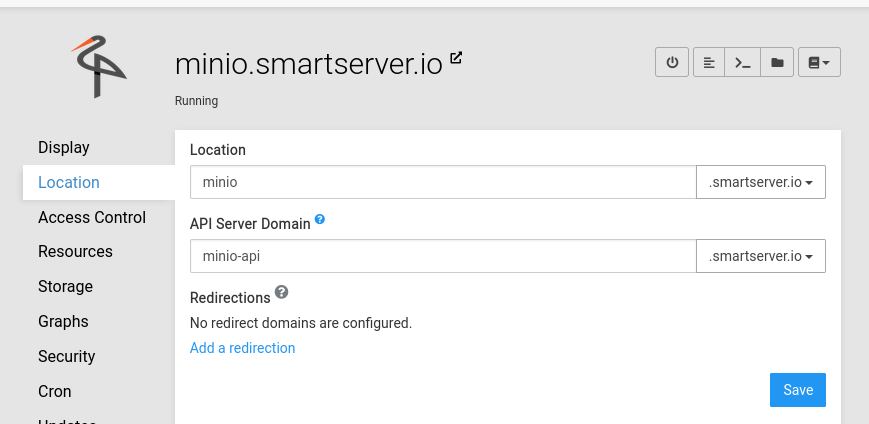
                          @FortyTwo yes, it's in the Cloudron dashboard. Go to the Location section of the app. The API server domain is what you should use.
                          1c8c0958-17d1-4126-8e09-9f23500e130d-image.png

                          F 1 Reply Last reply
                          0
                          • girishG girish

                            @FortyTwo yes, it's in the Cloudron dashboard. Go to the Location section of the app. The API server domain is what you should use.

                            1c8c0958-17d1-4126-8e09-9f23500e130d-image.png

                            F Offline
                            F Offline
                            FortyTwo
                            wrote on last edited by
                            #13

                            @girish

                            Thanks, it's the good domain !

                            1 Reply Last reply
                            0
                            • jamesJ james has marked this topic as solved on

                            Hello! It looks like you're interested in this conversation, but you don't have an account yet.

                            Getting fed up of having to scroll through the same posts each visit? When you register for an account, you'll always come back to exactly where you were before, and choose to be notified of new replies (either via email, or push notification). You'll also be able to save bookmarks and upvote posts to show your appreciation to other community members.

                            With your input, this post could be even better 💗

                            Register Login
                            Reply
                            • Reply as topic
                            Log in to reply
                            • Oldest to Newest
                            • Newest to Oldest
                            • Most Votes


                            • Login

                            • Don't have an account? Register

                            • Login or register to search.
                            • First post
                              Last post
                            0
                            • Categories
                            • Recent
                            • Tags
                            • Popular
                            • Bookmarks
                            • Search

