
Dify.ai, a self-hosted prompt-management tool
-
Sandbox issue resolved
Pushed v0.0.25
tcmbp132021/cloudron-dify:v0.0.25 (or :latest)
More real-world testing needed, but hopefully we're making progress towards a v1.0.0 release
Install via 1 line install :
curl -fsSL https://customappgateway.appx.uk/install.sh | bash -s -- --install-app "dify" -
Added Playwright to the build (so playwright plugin can be used : needs URI in plugin config of
ws://localhost:3003)pushed v0.0.28
tcmbp132021/cloudron-dify:v0.0.28 (or :latest)Indie app dev, huge fan of Cloudron PaaS, scratching my itches : communityapps.appx.uk
-
Added Playwright to the build (so playwright plugin can be used : needs URI in plugin config of
ws://localhost:3003)pushed v0.0.28
tcmbp132021/cloudron-dify:v0.0.28 (or :latest)@timconsidine will look into it later.
-
Added Playwright to the build (so playwright plugin can be used : needs URI in plugin config of
ws://localhost:3003)pushed v0.0.28
tcmbp132021/cloudron-dify:v0.0.28 (or :latest)@timconsidine anything wrong on my side?
Installing App to diffy.example.org ...
Image: tcmbp132021/cloudron-dify:latest
✘ Installation failed: No such route
Details: {
  "status": "Not Found",
  "message": "No such route"
}
This it the output of
curl -fsSL https://customappgateway.appx.uk/install.sh | bash -s -- --install-app "Dify AI"but same error from insie CCAI-PPronouns: he/him | Primary language: German
-
@timconsidine anything wrong on my side?
Installing App to diffy.example.org ...
Image: tcmbp132021/cloudron-dify:latest
✘ Installation failed: No such route
Details: {
  "status": "Not Found",
  "message": "No such route"
}
This it the output of
curl -fsSL https://customappgateway.appx.uk/install.sh | bash -s -- --install-app "Dify AI"but same error from insie CCAI-P -
@timconsidine anything wrong on my side?
Installing App to diffy.example.org ...
Image: tcmbp132021/cloudron-dify:latest
✘ Installation failed: No such route
Details: {
  "status": "Not Found",
  "message": "No such route"
}
This it the output of
curl -fsSL https://customappgateway.appx.uk/install.sh | bash -s -- --install-app "Dify AI"but same error from insie CCAI-P% curl -fsSL https://customappgateway.appx.uk/install.sh | bash -s -- --install-app "Dify AI" CustomAppGateway Universal Installer ---------------------------------------- Detected OS: Darwin (arm64) Downloading installer from: https://customappgateway.appx.uk/cag-installer-macos Running Installer... ---------------------------------------- Welcome to the Custom App Gateway (CAG) Installer ----------------------------------------------- Fetching catalogue to find app: Dify AI... ✔ Found App: Dify AI (undefined) NOTE: You will need an API Token from your Cloudron Profile. Go to https://my.your-cloudron.com/#/profile to generate one. ? Enter your Cloudron Domain (e.g., my.example.com): my.example.uk ? Enter your Cloudron API Token: **************************************************************** ? Enter the subdomain to install the app (e.g., ccai.example.com): jumble.xapps.uk Validating connection... ✔ Connection successful Fetching App Manifest... Fetching manifest from: https://customappgateway.appx.uk/deploy/dify/CloudronManifest.json ✔ Manifest fetched successfully Resolving manifest file references... Installing App to jumble.xapps.uk... Image: tcmbp132021/cloudron-dify:latest ✔ Installation Started! (This may take a few minutes) App ID: 35125028-84f0-4fb7-a307-eb6adaa6d691 You can check the progress in your Cloudron Dashboard. Please wait for the app to enter "Running" state before using it. SECURITY REMINDER: Please DELETE the API Token you used for this installation now. ---------------------------------------- Cleaning up... Done.Takes a while to download image because it's a BIG image.
Then :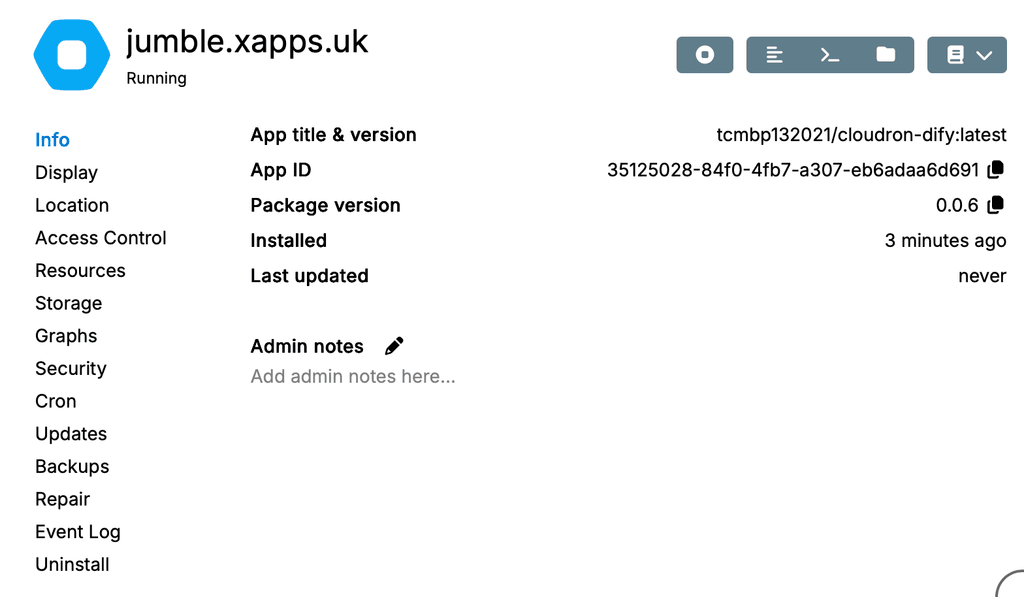
So ... I don't know for sure
 but I would suspect network issue somewhere.
Indie app dev, huge fan of Cloudron PaaS, scratching my itches : communityapps.appx.uk
-
@timconsidine anything wrong on my side?
Installing App to diffy.example.org ... Image: tcmbp132021/cloudron-dify:latest ✘ Installation failed: No such route Details: { "status": "Not Found", "message": "No such route" }This it the output of
curl -fsSL https://customappgateway.appx.uk/install.sh | bash -s -- --install-app "Dify AI"but same error from insie CCAI-PInstalling App to diffy.example.org ...
Image: tcmbp132021/cloudron-dify:latest
✘ Installation failed: No such route[I assume
diffy.example.orgis just obfuscation for the forum. ]
]Compared to this :
Installing App to jumble.xapps.uk...
Image: tcmbp132021/cloudron-dify:latest Installation Started! (This may take a few minutes)
I think this suggests / confirms network issue.
Try again, maybe ?The first part of the sequence (the script) runs in seconds, so re-trying is do-able.
The second part (the cloudron install) takes few minutes because of image size.Are you running the install on your desktop/laptop ? Or on your Cloudron instance ?
Either way, I suspect temporary network failure connecting to hub.docker.com
Edit : I would do some standard network diagnostics.
% ping hub.docker.com
PING hub.docker.com.cdn.cloudflare.net (104.18.43.187): 56 data bytes
64 bytes from 104.18.43.187: icmp_seq=0 ttl=58 time=11.143 ms
64 bytes from 104.18.43.187: icmp_seq=1 ttl=58 time=11.543 ms
64 bytes from 104.18.43.187: icmp_seq=2 ttl=58 time=10.148 ms
^C
--- hub.docker.com.cdn.cloudflare.net ping statistics ---
3 packets transmitted, 3 packets received, 0.0% packet loss
round-trip min/avg/max/stddev = 10.148/10.945/11.543/0.587 ms
Hmmm, possibly a Cloudflare issue ?
Indie app dev, huge fan of Cloudron PaaS, scratching my itches : communityapps.appx.uk
-
Installing App to diffy.example.org ...
Image: tcmbp132021/cloudron-dify:latest
✘ Installation failed: No such route[I assume
diffy.example.orgis just obfuscation for the forum. ]Compared to this :
Installing App to jumble.xapps.uk...
Image: tcmbp132021/cloudron-dify:latest Installation Started! (This may take a few minutes)I think this suggests / confirms network issue.
Try again, maybe ?The first part of the sequence (the script) runs in seconds, so re-trying is do-able.
The second part (the cloudron install) takes few minutes because of image size.Are you running the install on your desktop/laptop ? Or on your Cloudron instance ?
Either way, I suspect temporary network failure connecting to hub.docker.com
Edit : I would do some standard network diagnostics.
% ping hub.docker.com
PING hub.docker.com.cdn.cloudflare.net (104.18.43.187): 56 data bytes
64 bytes from 104.18.43.187: icmp_seq=0 ttl=58 time=11.143 ms
64 bytes from 104.18.43.187: icmp_seq=1 ttl=58 time=11.543 ms
64 bytes from 104.18.43.187: icmp_seq=2 ttl=58 time=10.148 ms
^C
--- hub.docker.com.cdn.cloudflare.net ping statistics ---
3 packets transmitted, 3 packets received, 0.0% packet loss
round-trip min/avg/max/stddev = 10.148/10.945/11.543/0.587 ms
Hmmm, possibly a Cloudflare issue ?
@timconsidine can you check your chats?
-
% curl -fsSL https://customappgateway.appx.uk/install.sh | bash -s -- --install-app "Dify AI"
CustomAppGateway Universal Installer
----------------------------------------
Detected OS: Darwin (arm64)
Downloading installer from: https://customappgateway.appx.uk/cag-installer-macos
Running Installer...
----------------------------------------
Welcome to the Custom App Gateway (CAG) Installer
-----------------------------------------------
Fetching catalogue to find app: Dify AI...
✔ Found App: Dify AI (undefined)
NOTE: You will need an API Token from your Cloudron Profile.
      Go to https://my.your-cloudron.com/#/profile to generate one.
? Enter your Cloudron Domain (e.g., my.example.com): my.example.uk
? Enter your Cloudron API Token: ****************************************************************
? Enter the subdomain to install the app (e.g., ccai.example.com): jumble.xapps.uk

Validating connection...
✔ Connection successful

Fetching App Manifest...
Fetching manifest from: https://customappgateway.appx.uk/deploy/dify/CloudronManifest.json
✔ Manifest fetched successfully
Resolving manifest file references...

Installing App to jumble.xapps.uk...
Image: tcmbp132021/cloudron-dify:latest

✔ Installation Started! (This may take a few minutes)
App ID: 35125028-84f0-4fb7-a307-eb6adaa6d691
You can check the progress in your Cloudron Dashboard.
Please wait for the app to enter "Running" state before using it.

SECURITY REMINDER: Please DELETE the API Token you used for this installation now.

----------------------------------------
Cleaning up...
Done.
Takes a while to download image because it's a BIG image.
Then :So ... I don't know for sure
but I would suspect network issue somewhere.@timconsidine same on the third network:
curl -fsSL https://customappgateway.appx.uk/install.sh | bash -s -- --install-app "Dify AI"
CustomAppGateway Universal Installer
----------------------------------------
Detected OS: Linux (x86_64)
Downloading installer from: https://customappgateway.appx.uk/cag-installer-linux
Running Installer...
----------------------------------------
Welcome to the Custom App Gateway (CAG) Installer
-----------------------------------------------
Fetching catalogue to find app: Dify AI...
✔ Found App: Dify AI (undefined)
NOTE: You will need an API Token from your Cloudron Profile.
      Go to https://my.your-cloudron.com/#/profile to generate one.
? Enter your Cloudron Domain (e.g., my.example.com): my.example.org
? Enter your Cloudron API Token: ****************************************************************
? Enter the subdomain to install the app (e.g., ccai.example.com): dify.example.org

Validating connection...
✔ Connection successful

Fetching App Manifest...
Fetching manifest from: https://customappgateway.appx.uk/deploy/dify/CloudronManifest.json
✔ Manifest fetched successfully
Resolving manifest file references...

Installing App to dify.example.org...
Image: tcmbp132021/cloudron-dify:latest
✘ Installation failed: No such route
Details: {
  "status": "Not Found",
  "message": "No such route"
}
ping hub.docker.com PING hub.docker.com (2606:4700:4409::ac40:9045) 56 Datenbytes 64 Bytes von 2606:4700:4409::ac40:9045: icmp_seq=1 ttl=56 Zeit=43.1 ms 64 Bytes von 2606:4700:4409::ac40:9045: icmp_seq=2 ttl=56 Zeit=48.4 ms 64 Bytes von 2606:4700:4409::ac40:9045: icmp_seq=3 ttl=56 Zeit=47.0 msI have no idea what the difference is between your network and mine.
Pronouns: he/him | Primary language: German
-
@timconsidine same on the third network:
curl -fsSL https://customappgateway.appx.uk/install.sh | bash -s -- --install-app "Dify AI"
CustomAppGateway Universal Installer
----------------------------------------
Detected OS: Linux (x86_64)
Downloading installer from: https://customappgateway.appx.uk/cag-installer-linux
Running Installer...
----------------------------------------
Welcome to the Custom App Gateway (CAG) Installer
-----------------------------------------------
Fetching catalogue to find app: Dify AI...
✔ Found App: Dify AI (undefined)
NOTE: You will need an API Token from your Cloudron Profile.
      Go to https://my.your-cloudron.com/#/profile to generate one.
? Enter your Cloudron Domain (e.g., my.example.com): my.example.org
? Enter your Cloudron API Token: ****************************************************************
? Enter the subdomain to install the app (e.g., ccai.example.com): dify.example.org

Validating connection...
✔ Connection successful

Fetching App Manifest...
Fetching manifest from: https://customappgateway.appx.uk/deploy/dify/CloudronManifest.json
✔ Manifest fetched successfully
Resolving manifest file references...

Installing App to dify.example.org...
Image: tcmbp132021/cloudron-dify:latest
✘ Installation failed: No such route
Details: {
  "status": "Not Found",
  "message": "No such route"
}
ping hub.docker.com PING hub.docker.com (2606:4700:4409::ac40:9045) 56 Datenbytes 64 Bytes von 2606:4700:4409::ac40:9045: icmp_seq=1 ttl=56 Zeit=43.1 ms 64 Bytes von 2606:4700:4409::ac40:9045: icmp_seq=2 ttl=56 Zeit=48.4 ms 64 Bytes von 2606:4700:4409::ac40:9045: icmp_seq=3 ttl=56 Zeit=47.0 msI have no idea what the difference is between your network and mine.
-
Re-packaged as a community app :
Cloudron Versions:
https://communityapps.appx.uk/cloudron-dify/CloudronVersions.jsonWARNING : it's a big 3.6Gb image to pull down : be patient.
Community Apps Website:
https://communityapps.appx.uk[ @community-apps ]
@luckow does the community app solve your image download ?
@James, how do we communicate updates available ? Just push new details to CloudronVersions.json and Cloudron platform will pick them up and advise those who installed it ? (no update in this one - just a repackage)
Indie app dev, huge fan of Cloudron PaaS, scratching my itches : communityapps.appx.uk
-
Re-packaged as a community app :
Cloudron Versions:
https://communityapps.appx.uk/cloudron-dify/CloudronVersions.jsonWARNING : it's a big 3.6Gb image to pull down : be patient.
Community Apps Website:
https://communityapps.appx.uk[ @community-apps ]
@luckow does the community app solve your image download ?
@James, how do we communicate updates available ? Just push new details to CloudronVersions.json and Cloudron platform will pick them up and advise those who installed it ? (no update in this one - just a repackage)
@timconsidine Yes. Great. The download and installation went smoothly.
Pronouns: he/him | Primary language: German
-
@timconsidine Yes. Great. The download and installation went smoothly.
-
Re-packaged as a community app :
Cloudron Versions:
https://communityapps.appx.uk/cloudron-dify/CloudronVersions.jsonWARNING : it's a big 3.6Gb image to pull down : be patient.
Community Apps Website:
https://communityapps.appx.uk[ @community-apps ]
@luckow does the community app solve your image download ?
@James, how do we communicate updates available ? Just push new details to CloudronVersions.json and Cloudron platform will pick them up and advise those who installed it ? (no update in this one - just a repackage)
Hello @timconsidine
When you update the
CloudronManifest.jsonfile at e.g.: https://communityapps.appx.uk/cloudron-dify/CloudronVersions.json installation that used this URL will pickup the update automatically. -
FWIW, Dify.ai is licensed under a modified version of the Apache License 2.0 with additional conditions:-
https://github.com/langgenius/dify/blob/main/LICENSE -
For all developers who work with large language models and prompts, there are graphical user interfaces that can make life easier.
Dify.ai is especially good and, that's the best part, it can be self-hosted.
Self-hosting documentation: https://docs.dify.ai/getting-started/install-self-hostedFeature overview:
- Building visual prompt workflows
- Supports multiple LLMs, incl. open-source ones
- Supports RAGs and vector databases
- It has an API that you can use to integrate into your own application
- You can log and evaluate your user's requests
I searched for a long time for a good open solution, and came to the conclusion that this is my favourite.
I would love to see this on cloudron and maybe other developers who work with LLMs might agree.
-
@LoudLemur also already packaged as community app
If you don’t check before posting, you risk becoming a bot posting slop -
@LoudLemur also already packaged as community app
If you don’t check before posting, you risk becoming a bot posting slop@timconsidine This is a good point. If I do try these in the future, I shall be sure of checking if they are packaged first. It is useful to check if the estimates prove accurate though.
Can you remember if this was actually hard?
-
@ekevu123 https://forum.cloudron.io/topic/12472/please-use-this-template-to-make-an-app-wishlist-request/13
Thank you for pointing out the template, but when I posted this, this didn't exist yet and I didn't want to go through my posts retroactively.





 ), you can open a separate package updates thread for a package.
Hello! It looks like you're interested in this conversation, but you don't have an account yet.
Getting fed up of having to scroll through the same posts each visit? When you register for an account, you'll always come back to exactly where you were before, and choose to be notified of new replies (either via email, or push notification). You'll also be able to save bookmarks and upvote posts to show your appreciation to other community members.
With your input, this post could be even better 💗
Register Login