Cloudron makes it easy to run web apps like WordPress, Nextcloud, GitLab on your server. Find out more or install now.


Skip to content
  • Categories
  • Recent
  • Tags
  • Popular
  • Bookmarks
  • Search
Skins
  • Light
  • Brite
  • Cerulean
  • Cosmo
  • Flatly
  • Journal
  • Litera
  • Lumen
  • Lux
  • Materia
  • Minty
  • Morph
  • Pulse
  • Sandstone
  • Simplex
  • Sketchy
  • Spacelab
  • United
  • Yeti
  • Zephyr
  • Dark
  • Cyborg
  • Darkly
  • Quartz
  • Slate
  • Solar
  • Superhero
  • Vapor

  • Default (No Skin)
  • No Skin
Collapse
Brand Logo

Cloudron Forum

Apps - Status | Demo | Docs | Install
  1. Cloudron Forum
  2. Support
  3. Receive Email

Receive Email

Scheduled Pinned Locked Moved Solved Support
email
4 Posts 3 Posters 2.1k Views 3 Watching
  • Oldest to Newest
  • Newest to Oldest
  • Most Votes
Reply
  • Reply as topic
Log in to reply
This topic has been deleted. Only users with topic management privileges can see it.
  • T Offline
    T Offline
    thetomester13
    App Dev
    wrote on last edited by girish
    #1

    I'm trying to use the built-in email feature. I am hosting my Cloudron on AWS and filled out the appropriate forms. I have all check marks down the email page and am able to send email from my Cloudron account just fine, but when I try to email my Cloudron account, I get a 'Mail delivery failed' message a few days later. Has anyone had something similar happen?

    1 Reply Last reply
    1
    • TomT Offline
      TomT Offline
      Tom
      wrote on last edited by Tom
      #2

      Hey,
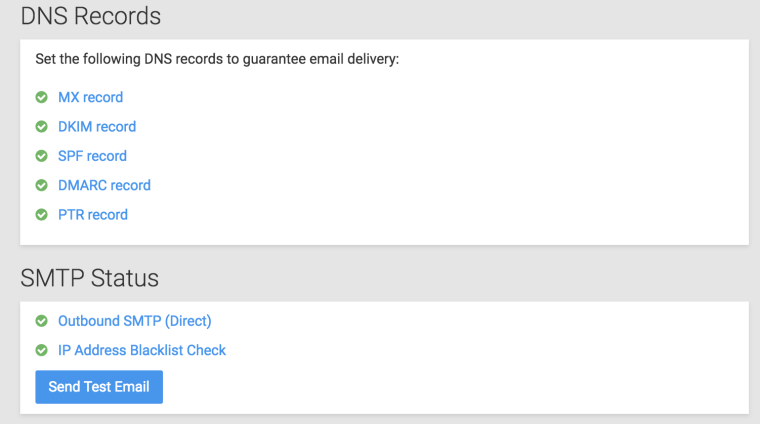
      check the dns records and the smtp status:

      0_1523046640160_Bildschirmfoto 2018-04-06 um 22.30.18.png

      Cloudron <3

      1 Reply Last reply
      0
      • girishG Offline
        girishG Offline
        girish
        Staff
        wrote on last edited by
        #3

        @thetomester13 If this is EC2, then make sure that the security group has incoming port 25 open to receive email. You can easily test this on the console using:

        $ telnet my.domain.io 25
        Trying 45.55.2.141...
        Connected to my.domain.com.
        Escape character is '^]'.
        220 ****************************************
        ^]
        
        1 Reply Last reply
        1
        • T Offline
          T Offline
          thetomester13
          App Dev
          wrote on last edited by
          #4

          Yep! I am on a Lightsail instance and simply needed to open up port 25 for traffic. Thanks!

          1 Reply Last reply
          0

          Hello! It looks like you're interested in this conversation, but you don't have an account yet.

          Getting fed up of having to scroll through the same posts each visit? When you register for an account, you'll always come back to exactly where you were before, and choose to be notified of new replies (either via email, or push notification). You'll also be able to save bookmarks and upvote posts to show your appreciation to other community members.

          With your input, this post could be even better 💗

          Register Login
          Reply
          • Reply as topic
          Log in to reply
          • Oldest to Newest
          • Newest to Oldest
          • Most Votes


          • Login

          • Don't have an account? Register

          • Login or register to search.
          • First post
            Last post
          0
          • Categories
          • Recent
          • Tags
          • Popular
          • Bookmarks
          • Search