Cloudron makes it easy to run web apps like WordPress, Nextcloud, GitLab on your server. Find out more or install now.


Skip to content
  • Categories
  • Recent
  • Tags
  • Popular
  • Bookmarks
  • Search
Skins
  • Light
  • Brite
  • Cerulean
  • Cosmo
  • Flatly
  • Journal
  • Litera
  • Lumen
  • Lux
  • Materia
  • Minty
  • Morph
  • Pulse
  • Sandstone
  • Simplex
  • Sketchy
  • Spacelab
  • United
  • Yeti
  • Zephyr
  • Dark
  • Cyborg
  • Darkly
  • Quartz
  • Slate
  • Solar
  • Superhero
  • Vapor

  • Default (No Skin)
  • No Skin
Collapse
Brand Logo

Cloudron Forum

Apps - Status | Demo | Docs | Install
  1. Cloudron Forum
  2. Discuss
  3. Cloudron 9.0 (beta) bug reports

Cloudron 9.0 (beta) bug reports

Scheduled Pinned Locked Moved Discuss
205 Posts 32 Posters 16.0k Views 26 Watching
  • Oldest to Newest
  • Newest to Oldest
  • Most Votes
Reply
  • Reply as topic
Log in to reply
This topic has been deleted. Only users with topic management privileges can see it.
  • girishG girish

    @dylightful are you on 9.0.10 ? I thought we fixed this bug.

    Can you give the output of mysql -uroot -ppassword -e "select schedule from box.backupSites" (run this on server via ssh, please).

    D Offline
    D Offline
    dylightful
    wrote on last edited by
    #134

    @girish said in Cloudron 9.0 (beta) bug reports:

    mysql -uroot -ppassword -e "select schedule from box.backupSites"

    Yep version 9.0.10;
    Command response below. Interestingly the backup looks to have been successful, however I still cannot see the 'Backup Sites' section of backups

    root@my:~#  mysql -uroot -ppassword -e "select schedule from box.backupSites"
    mysql: [Warning] Using a password on the command line interface can be insecure.
    +--------------+
    | schedule     |
    +--------------+
    | 00 00  * * * |
    +--------------+
    
    girishG 1 Reply Last reply
    0
    • D dylightful

      @girish said in Cloudron 9.0 (beta) bug reports:

      mysql -uroot -ppassword -e "select schedule from box.backupSites"

      Yep version 9.0.10;
      Command response below. Interestingly the backup looks to have been successful, however I still cannot see the 'Backup Sites' section of backups

      root@my:~#  mysql -uroot -ppassword -e "select schedule from box.backupSites"
      mysql: [Warning] Using a password on the command line interface can be insecure.
      +--------------+
      | schedule     |
      +--------------+
      | 00 00  * * * |
      +--------------+
      
      girishG Offline
      girishG Offline
      girish
      Staff
      wrote on last edited by
      #135

      @dylightful thanks! fixed in https://git.cloudron.io/platform/box/-/commit/c5f97e8bb0368e515027a33721c3b4002de54ff6 . Yes, it's a UI issue and not a backend problems. The UI had a bug parsing that cron schedule (not sure why it has a double space but maybe there was a bug in some old UI).

      D 1 Reply Last reply
      1
      • girishG girish

        @dylightful thanks! fixed in https://git.cloudron.io/platform/box/-/commit/c5f97e8bb0368e515027a33721c3b4002de54ff6 . Yes, it's a UI issue and not a backend problems. The UI had a bug parsing that cron schedule (not sure why it has a double space but maybe there was a bug in some old UI).

        D Offline
        D Offline
        dylightful
        wrote on last edited by
        #136

        @girish Thank you! Looking forward to the next update!

        1 Reply Last reply
        0
        • imc67I Offline
          imc67I Offline
          imc67
          translator
          wrote on last edited by
          #137

          GUI bug?

          Event list in Email > Event Log: there is a list of email events but you can't scroll down to older events because somehow it has no focus on mouse over (MacOS -Safari). Only when you open an Event and close it you can scroll down the list.

          1 Reply Last reply
          1
          • nebulonN Offline
            nebulonN Offline
            nebulon
            Staff
            wrote on last edited by
            #138

            huh good catch, I can reproduce that when zooming out to load the view without any overflow, then the scrollhandler won't kick it it seems

            1 Reply Last reply
            0
            • nebulonN Offline
              nebulonN Offline
              nebulon
              Staff
              wrote on last edited by
              #139

              Fixed with https://git.cloudron.io/platform/box/-/commit/b53da61e7cec3c919ac11ebd65a8ccce03f7f611

              1 Reply Last reply
              3
              • imc67I Offline
                imc67I Offline
                imc67
                translator
                wrote on last edited by
                #140

                In System > Eventlog the OIDC app logins showing this:

                User ***** logged in to 8a60ee4d-7e33-4199-ab15-*****-oidc
                

                Any idea which app this is 😉😂?

                It would be useful to have the app name here I guess?

                1 Reply Last reply
                1
                • jamesJ Offline
                  jamesJ Offline
                  james
                  Staff
                  wrote on last edited by
                  #141

                  Hello @imc67
                  You can actually take the id or part of the ID and search for it in the dashboard.
                  Here:
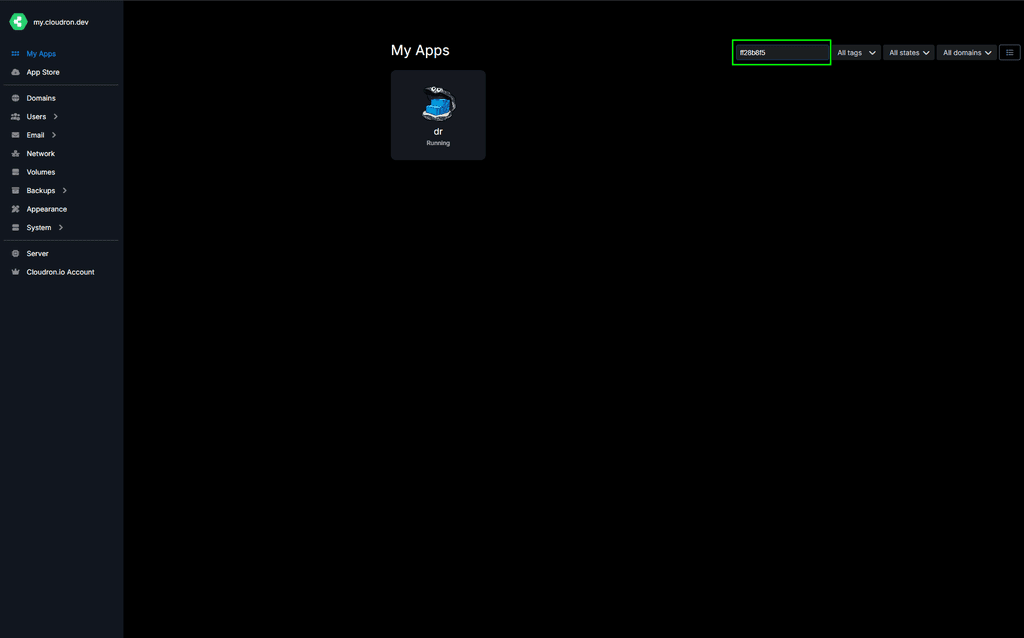
                  image.png

                  imc67I 1 Reply Last reply
                  1
                  • jamesJ james

                    Hello @imc67
                    You can actually take the id or part of the ID and search for it in the dashboard.
                    Here:

                    image.png

                    imc67I Offline
                    imc67I Offline
                    imc67
                    translator
                    wrote on last edited by imc67
                    #142

                    @james said in Cloudron 9.0 (beta) bug reports:

                    Hello @imc67
                    You can actually take the id or part of the ID and search for it in the dashboard.
                    Here:

                    Yes ofcourse I know but for every login of the 30 users to one of the 35 apps (ID) check to corresponding name is ridiculous 😂

                    In version 8 it like this:

                    User **** logged in to crm.****.com
                    
                    1 Reply Last reply
                    3
                    • nebulonN Offline
                      nebulonN Offline
                      nebulon
                      Staff
                      wrote on last edited by
                      #143

                      Fixed now with https://git.cloudron.io/platform/box/-/commit/2b4f8ff00de78b191b4528940c664a0c90a45565 so it would correctly find the app and print the more readable domain like before.

                      1 Reply Last reply
                      4
                      • imc67I Offline
                        imc67I Offline
                        imc67
                        translator
                        wrote on last edited by
                        #144

                        GUI bug?
                        In the app's Filemanager the 3 dots (menu) on file are hardly visible (MacOS+Safari)
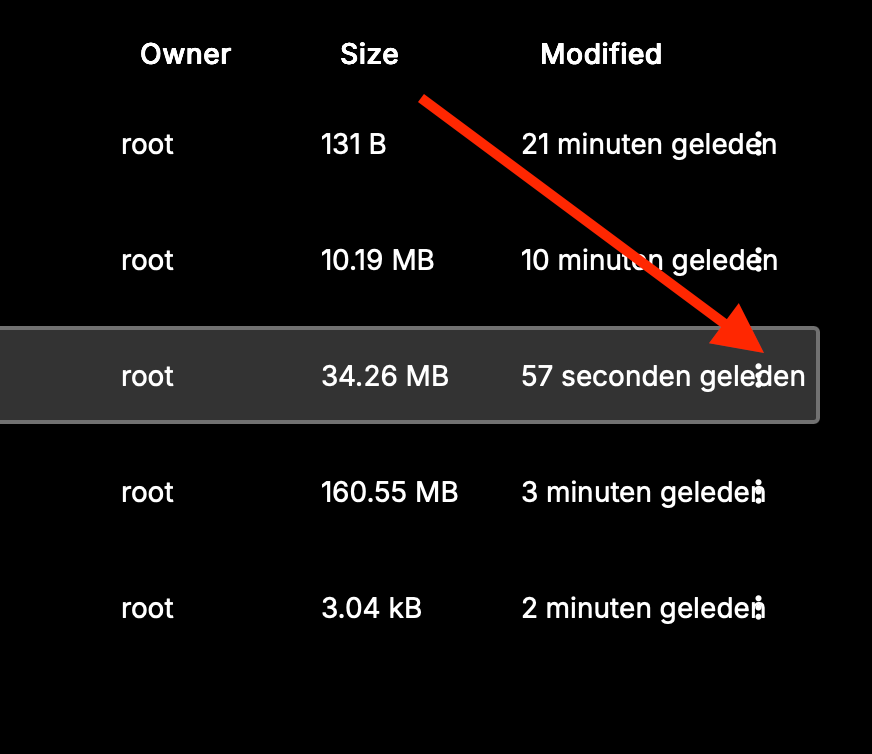
                        63c5d118-9c61-4452-acdc-bb1154544a0b-Scherm­afbeelding 2025-11-20 om 13.00.18.png Scherm­afbeelding 2025-11-20 om 13.00.18

                        imc67I 1 Reply Last reply
                        1
                        • luckowL Online
                          luckowL Online
                          luckow
                          translator
                          wrote on last edited by luckow
                          #145

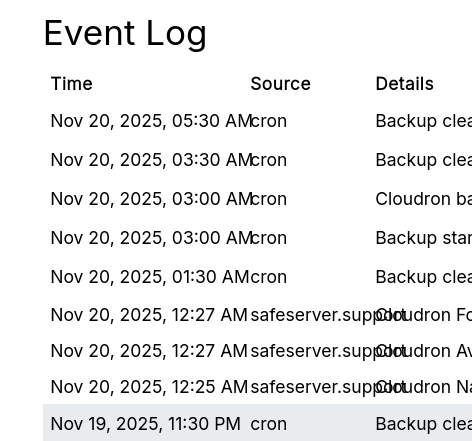
                          slight glitch in the event log

                          image.png

                          Cloudron v. 9.0.11 / Firefox

                          Pronouns: he/him | Primary language: German

                          d19dotcaD 1 Reply Last reply
                          0
                          • nebulonN Offline
                            nebulonN Offline
                            nebulon
                            Staff
                            wrote on last edited by
                            #146

                            thanks, currently reworking the eventlog table to give us more flexibility. We have a couple of things to improve there: https://git.cloudron.io/platform/box/-/issues/874

                            1 Reply Last reply
                            1
                            • luckowL luckow

                              slight glitch in the event log

                              image.png

                              Cloudron v. 9.0.11 / Firefox

                              d19dotcaD Offline
                              d19dotcaD Offline
                              d19dotca
                              wrote on last edited by
                              #147

                              @luckow I reported this a couple weeks ago too. Hoping it gets fixed soon as it’s a bit hard to read.

                              --
                              Dustin Dauncey
                              www.d19.ca

                              1 Reply Last reply
                              1
                              • imc67I imc67

                                GUI bug?
                                In the app's Filemanager the 3 dots (menu) on file are hardly visible (MacOS+Safari)
                                63c5d118-9c61-4452-acdc-bb1154544a0b-Scherm­afbeelding 2025-11-20 om 13.00.18.png Scherm­afbeelding 2025-11-20 om 13.00.18

                                imc67I Offline
                                imc67I Offline
                                imc67
                                translator
                                wrote on last edited by
                                #148

                                said in Cloudron 9.0 (beta) bug reports:

                                GUI bug?
                                In the app's Filemanager the 3 dots (menu) on file are hardly visible (MacOS+Safari)
                                63c5d118-9c61-4452-acdc-bb1154544a0b-Scherm­afbeelding 2025-11-20 om 13.00.18.png Scherm­afbeelding 2025-11-20 om 13.00.18

                                @nebulon @girish did you got this?

                                1 Reply Last reply
                                1
                                • imc67I Offline
                                  imc67I Offline
                                  imc67
                                  translator
                                  wrote on last edited by
                                  #149

                                  Bug?
                                  In System > Services > nginx > logs

                                  All the logs start with:

                                  Nov 21 01:00:00 ***
                                  Nov 21 01:00:00 ***
                                  
                                  1 Reply Last reply
                                  0
                                  • luckowL Online
                                    luckowL Online
                                    luckow
                                    translator
                                    wrote on last edited by
                                    #150

                                    haha. same same but different

                                    [no timestamp]  89.xxx.xxx.xxx - - [21/Nov/2025:11:09:52 +0100] "GET /assets/...."
                                    [no timestamp]  89.xxx.xxx.xxx  - - [21/Nov/2025:11:09:52 +0100] "GET /assets/...."
                                    [no timestamp]  89.xxx.xxx.xxx - - [21/Nov/2025:11:09:52 +0100] "GET /api/v1/...."
                                    [no timestamp] 
                                    

                                    Pronouns: he/him | Primary language: German

                                    1 Reply Last reply
                                    1
                                    • J Offline
                                      J Offline
                                      jayonrails
                                      translator
                                      wrote on last edited by
                                      #151

                                      I think I might have found another bug. I am running version 9.0.11.

                                      Let's say you install a new app on "test.example.tld", let it be WordPress Managed. You noticed you installed the wrong app, then your uninstall it. Then you need to install LAMP on the same domain.

                                      After a few minutes working on your new LAMP project, you realize the connection is not working anymore. You check for DNS, seeing that the DNS record (A/AAAA) has been removed.

                                      How can I debug this?

                                      girishG 1 Reply Last reply
                                      1
                                      • J Offline
                                        J Offline
                                        jayonrails
                                        translator
                                        wrote on last edited by
                                        #152

                                        Might be wrong, it just came back. The DNS entry was surely gone, I verified it though some external server as well.

                                        1 Reply Last reply
                                        1
                                        • J jayonrails referenced this topic on

                                        • humptydumptyH Offline
                                          humptydumptyH Offline
                                          humptydumpty
                                          wrote on last edited by
                                          #153

                                          Major bug report - I can't add a background image to my Cloudron anymore!

                                          girishG 1 Reply Last reply
                                          0
                                          Reply
                                          • Reply as topic
                                          Log in to reply
                                          • Oldest to Newest
                                          • Newest to Oldest
                                          • Most Votes


                                          • Login

                                          • Don't have an account? Register

                                          • Login or register to search.
                                          • First post
                                            Last post
                                          0
                                          • Categories
                                          • Recent
                                          • Tags
                                          • Popular
                                          • Bookmarks
                                          • Search