
Scaleway backup
-
Hi,
My Scaleway backup keeps failing with this error:
box:tasks updating task 64 with: {"completed":true,"result":null,"error":{"message":"Backup endpoint is not active: Error listing objects. code: undefined message: HTTP: undefined","reason":"External Error"},"percent":100}cloudron-support --troubleshoot shows everything green/OK
I have tried deleting and recreating the backup in Cloudron, also the bucket in Scaleway. API key is set up and active in Scaleway
curl https://s3.fr-par.scw.cloud works
curl https://s3.fr-par.scw.cloud/cloudron-backup-jf gives same access denied message. -
Hi James,
Here's the config:
File encryption used
Storage: scaleway-objectstorage (tgz) at Paris (FR-PAR) / cloudron-backup-jf
Content: Everything
Schedule: Every day @ 02:00
Retention Policy: 7 daily, 4 weekly, 12 monthly
Last run: 23 Feb 2026, 02:00 am -
It was a fresh install of Cloudron 9 only last week.
I tried the open/save thing above. It got to about 58% complete and then failed again with the above. All I can see in the bucket is cloudron-testfile so I believe the token I am using is correct?
-
Unfortunately I deleted that backup and the log is gone, but here is the new backup log.
-
Hello @cloudron_jf
You can use https://paste.cloudron.io to paste larger files and share the URL here.
Also, please share a screenshot of the backup site configuration for scaleway with redacted sensitive details. -
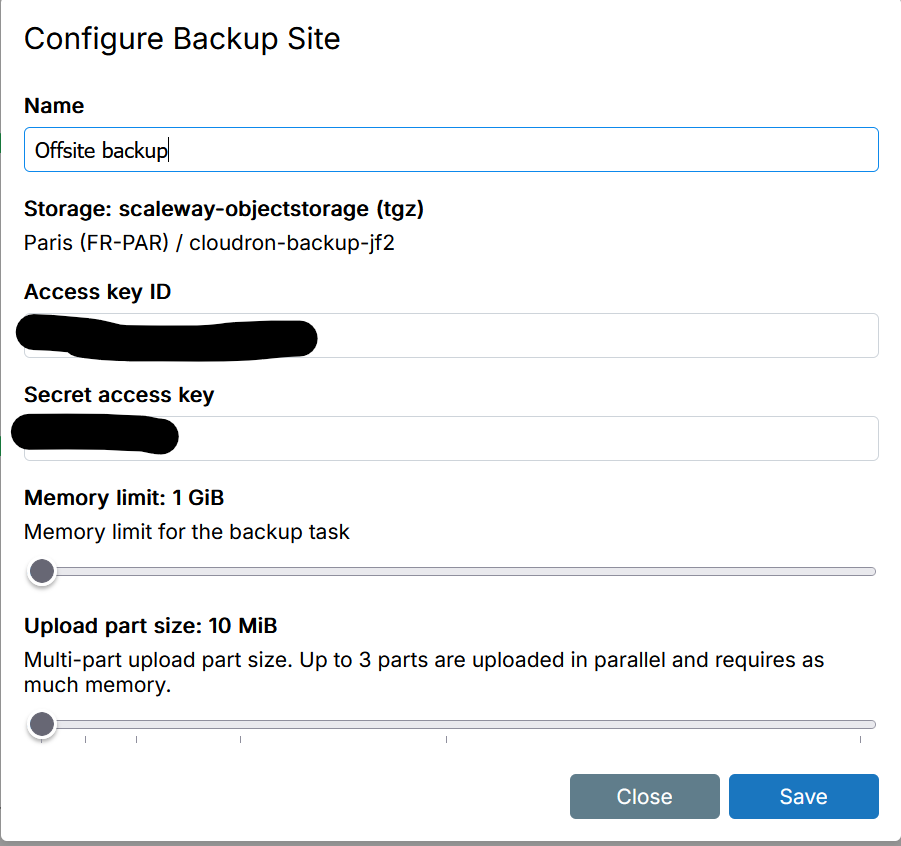
-
Any update on this at all?
-
I'm on 9.0.18
-
BTW a backup config on iDrive e2 works
-
 G girish has marked this topic as solved on
-
I'd guess this was due to Cloudron's small default part size. I think Scaleway has a limit of 1000 parts per bucket.
@cloudron_jf try increasing part size.
-
Did you ensure that the IAM policy attached to your api token in scaleway has access to your object storage?
See: https://www.scaleway.com/en/docs/iam/api-cli/using-api-key-object-storage/@james Yes, I have a policy set up with storage "ObjectStorageFullAccess" permission. This policy is set up against the API key for the bucket.
-
I can't reproduce this problem either. Most likely this is an IAM set up issue but if not @cloudron_jf please contact us on support@
@girish I still am unable to get this to work with Scaleway
-
I'd guess this was due to Cloudron's small default part size. I think Scaleway has a limit of 1000 parts per bucket.
@cloudron_jf try increasing part size.
jdaviescoates said:
@cloudron_jf try increasing part size
Have you tried that?



Hello! It looks like you're interested in this conversation, but you don't have an account yet.
Getting fed up of having to scroll through the same posts each visit? When you register for an account, you'll always come back to exactly where you were before, and choose to be notified of new replies (either via email, or push notification). You'll also be able to save bookmarks and upvote posts to show your appreciation to other community members.
With your input, this post could be even better 💗
Register Login