Cloudron makes it easy to run web apps like WordPress, Nextcloud, GitLab on your server. Find out more or install now.


Skip to content
  • Categories
  • Recent
  • Tags
  • Popular
  • Bookmarks
  • Search
Skins
  • Light
  • Brite
  • Cerulean
  • Cosmo
  • Flatly
  • Journal
  • Litera
  • Lumen
  • Lux
  • Materia
  • Minty
  • Morph
  • Pulse
  • Sandstone
  • Simplex
  • Sketchy
  • Spacelab
  • United
  • Yeti
  • Zephyr
  • Dark
  • Cyborg
  • Darkly
  • Quartz
  • Slate
  • Solar
  • Superhero
  • Vapor

  • Default (No Skin)
  • No Skin
Collapse
Brand Logo

Cloudron Forum

Offical apps | Community apps | Demo | Docs | Install
  1. Cloudron Forum
  2. Feature Requests
  3. Per Application CPU Usage in Server Graphs

Per Application CPU Usage in Server Graphs

Scheduled Pinned Locked Moved Feature Requests
cloudrongraphsdashboard
5 Posts 3 Posters 332 Views 3 Watching
  • Oldest to Newest
  • Newest to Oldest
  • Most Votes
Reply
  • Reply as topic
Log in to reply
This topic has been deleted. Only users with topic management privileges can see it.
  • L Offline
    L Offline
    LoudLemur
    wrote last edited by
    #1

    Currently, Cloudron displays the totality of CPU usage of applications but not which ones are using most CPU.

    It would be helpful to have some colour indicators to gain a clearer idea of which ones are the main CPU cycle hogs and which ones might be responsible for recurring spikes in usage.

    1 Reply Last reply
    0
    • jamesJ Offline
      jamesJ Offline
      james
      Staff
      wrote last edited by james
      #2

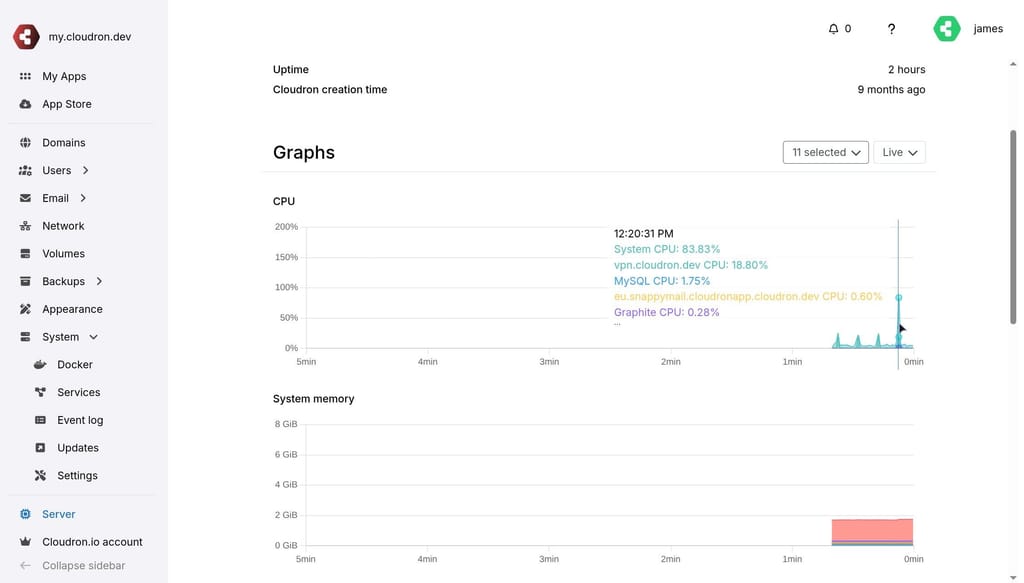
      Hello @loudlemur
      Like this?

      b7af5b0f-e1a4-4ad5-9464-15c3b630d99a-image.jpeg

      This does already exist.
      In the Dashboard under Server you can select what apps to display in the graphs.

      1 Reply Last reply
      3
      • L Offline
        L Offline
        LoudLemur
        wrote last edited by LoudLemur
        #3

        That would work well. I didn't know about this.

        I had in mind something like this:
        https://echarts.apache.org/examples/en/editor.html?c=area-stack

        And now i see it, i can select applications and create a chart just like i wanted.

        The problem is that it is showing high usage for system CPU, not for applications in particular. It is quite an old cpu so maybe that is why.

        1 Reply Last reply
        0
        • girishG Offline
          girishG Offline
          girish
          Staff
          wrote last edited by
          #4

          I have tried to make the UI a bit more obvious now where it says "Select apps"

          44ea80b9-994b-4e63-8bf7-986dc434026a-image.jpeg

          L 1 Reply Last reply
          3
          • girishG girish

            I have tried to make the UI a bit more obvious now where it says "Select apps"

            44ea80b9-994b-4e63-8bf7-986dc434026a-image.jpeg

            L Offline
            L Offline
            LoudLemur
            wrote last edited by
            #5

            @girish Thanks. The graph was able to do what I wanted, I just didn't realize it. It does show the usage per application each in its own colour. Great!

            1 Reply Last reply
            1

            Hello! It looks like you're interested in this conversation, but you don't have an account yet.

            Getting fed up of having to scroll through the same posts each visit? When you register for an account, you'll always come back to exactly where you were before, and choose to be notified of new replies (either via email, or push notification). You'll also be able to save bookmarks and upvote posts to show your appreciation to other community members.

            With your input, this post could be even better 💗

            Register Login
            Reply
            • Reply as topic
            Log in to reply
            • Oldest to Newest
            • Newest to Oldest
            • Most Votes


            • Login

            • Don't have an account? Register

            • Login or register to search.
            • First post
              Last post
            0
            • Categories
            • Recent
            • Tags
            • Popular
            • Bookmarks
            • Search