Cloudron makes it easy to run web apps like WordPress, Nextcloud, GitLab on your server. Find out more or install now.


Skip to content
  • Categories
  • Recent
  • Tags
  • Popular
  • Bookmarks
  • Search
Skins
  • Light
  • Brite
  • Cerulean
  • Cosmo
  • Flatly
  • Journal
  • Litera
  • Lumen
  • Lux
  • Materia
  • Minty
  • Morph
  • Pulse
  • Sandstone
  • Simplex
  • Sketchy
  • Spacelab
  • United
  • Yeti
  • Zephyr
  • Dark
  • Cyborg
  • Darkly
  • Quartz
  • Slate
  • Solar
  • Superhero
  • Vapor

  • Default (No Skin)
  • No Skin
Collapse
Brand Logo

Cloudron Forum

Offical apps | Community apps | Demo | Docs | Install
  1. Cloudron Forum
  2. Feature Requests
  3. Add delete backup Action in Backup List

Add delete backup Action in Backup List

Scheduled Pinned Locked Moved Feature Requests
backups
12 Posts 5 Posters 4.9k Views 5 Watching
  • Oldest to Newest
  • Newest to Oldest
  • Most Votes
Reply
  • Reply as topic
Log in to reply
This topic has been deleted. Only users with topic management privileges can see it.
  • jdaviescoatesJ jdaviescoates

    Yes!

    I'd really like to be able to see a list of backups and and then to be able to manually delete ones I don't need anymore.

    I want to keep the retention policy as-is because I like that it's cautious just in case...

    But I keep running out of space on my backup disk and I'm fairly certain they'll be some things in there I don't need anymore!

    jdaviescoatesJ
    jdaviescoatesJ
    jdaviescoates
    wrote on last edited by
    #3

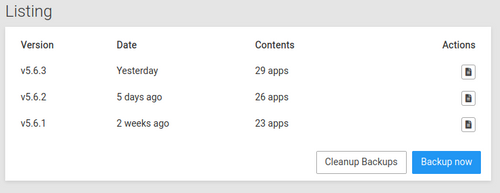
    Like, I'd be very happy to (in fact, I'd really like to - given I'm out of space and so new backups are failing!) now delete the 5.6.1 backup listed here:
    delete_v5.6.1.png

    I guess this is possible using the terminal but it'd be nice to just be able to click delete.

    Would it even be possible to have an option somewhere that says "automatically delete oldest backups if current backup fails due to lack of disk space". I'd like that.

    I use Cloudron with Gandi & Hetzner

    1 Reply Last reply
    0
    • d19dotcaD
      d19dotcaD
      d19dotca
      wrote on last edited by
      #4

      Similar discussions/requests here already, FYI:

      • https://forum.cloudron.io/post/6873
      • https://forum.cloudron.io/post/5547

      I suppose this proposal though, would love to see a way to remove backups through the GUI. 🙂

      --
      Dustin Dauncey
      www.d19.ca

      1 Reply Last reply
      0
      • LonkleL
        LonkleL
        Lonkle
        wrote on last edited by
        #5

        Yeah, there’s an area for it and if you’re saying there’s a way through the CLI. Then there’s a way through the website since both the CLI and web interface exclusively use Cloudron’s REST API.

        1 Reply Last reply
        1
        • robiR
          robiR
          robi
          wrote on last edited by
          #6

          Now might be a good time to revisit this FR.

          Conscious tech

          1 Reply Last reply
          0
          • d19dotcaD
            d19dotcaD
            d19dotca
            wrote on last edited by
            #7

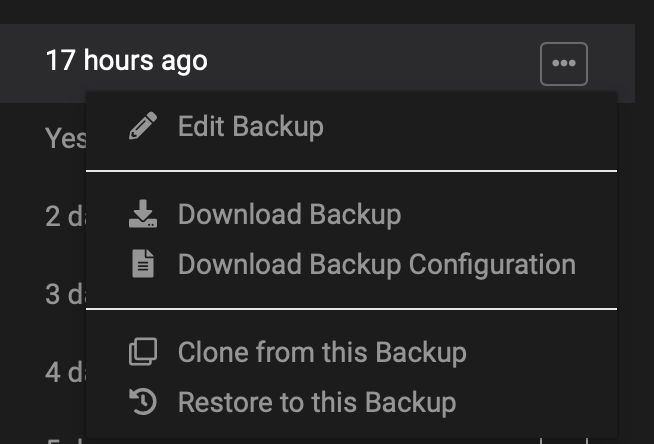
            Looks like this still isn't available even with all the other improvements to app-level backup options. Hopefully his gets added soon-ish. 🙂

            65856aa3-9907-41a1-b97d-a8fcd23b136c-image.png

            --
            Dustin Dauncey
            www.d19.ca

            1 Reply Last reply
            2
            • girishG
              girishG
              girish
              Staff
              wrote on last edited by
              #8

              The delete is easy to implement as such. But we hit this UX issue. There are two backups:

              • App backup. Basically, app -> backup
              • Cloudron backups. This is the box+mail+app backups. The app backups are here are listed in the app backups listing UI as well.

              One cannot delete the latter app backups because this will leave a "hole" in the Cloudron backup. Maybe we should just show an error when trying to delete such app backups.

              robiR 1 Reply Last reply
              0
              • girishG girish

                The delete is easy to implement as such. But we hit this UX issue. There are two backups:

                • App backup. Basically, app -> backup
                • Cloudron backups. This is the box+mail+app backups. The app backups are here are listed in the app backups listing UI as well.

                One cannot delete the latter app backups because this will leave a "hole" in the Cloudron backup. Maybe we should just show an error when trying to delete such app backups.

                robiR
                robiR
                robi
                wrote on last edited by
                #9

                @girish said in Add delete backup Action in Backup List:

                One cannot delete the latter app backups because this will leave a "hole" in the Cloudron backup.

                Why can the "hole" not be handled?
                Can the backup manifest not be adjusted for removing an app from it?
                Can the backup location not be cleaned of that particular app backup?
                If there's a small bit of the app config left in some bundle, leave it without a reference, and it will rotate out eventually.

                Conscious tech

                girishG 1 Reply Last reply
                0
                • robiR robi

                  @girish said in Add delete backup Action in Backup List:

                  One cannot delete the latter app backups because this will leave a "hole" in the Cloudron backup.

                  Why can the "hole" not be handled?
                  Can the backup manifest not be adjusted for removing an app from it?
                  Can the backup location not be cleaned of that particular app backup?
                  If there's a small bit of the app config left in some bundle, leave it without a reference, and it will rotate out eventually.

                  girishG
                  girishG
                  girish
                  Staff
                  wrote on last edited by girish
                  #10

                  @robi i think users expect the box backups (the ones listed in the backups view) to be complete backups. If one of the apps is missing, it would be unexpected.

                  Of course, alternately, we have to set expectations... When you restore from such backups, the apps will start our empty or something.

                  robiR 1 Reply Last reply
                  1
                  • girishG girish

                    @robi i think users expect the box backups (the ones listed in the backups view) to be complete backups. If one of the apps is missing, it would be unexpected.

                    Of course, alternately, we have to set expectations... When you restore from such backups, the apps will start our empty or something.

                    robiR
                    robiR
                    robi
                    wrote on last edited by
                    #11

                    @girish said in Add delete backup Action in Backup List:

                    @robi i think users expect the box backups (the ones listed in the backups view) to be complete backups. If one of the apps is missing, it would be unexpected.

                    Yes, unless one goes and edits them.
                    Why would that be an expectation problem? If I remove an app from a backup that means I don't want to restore it either.

                    Of course, alternately, we have to set expectations... When you restore from such backups, the apps will start our empty or something.

                    Uhh, why not leave it out completely? Just skip that app from the restore, it's been removed, right?

                    The backup, after the app removal, should decrement the app count, right?

                    Neat and tidy.

                    Conscious tech

                    1 Reply Last reply
                    2
                    • robiR
                      robiR
                      robi
                      wrote last edited by
                      #12

                      Is now a better time to revisit this?

                      Conscious tech

                      1 Reply Last reply
                      1

                      Hello! It looks like you're interested in this conversation, but you don't have an account yet.

                      Getting fed up of having to scroll through the same posts each visit? When you register for an account, you'll always come back to exactly where you were before, and choose to be notified of new replies (either via email, or push notification). You'll also be able to save bookmarks and upvote posts to show your appreciation to other community members.

                      With your input, this post could be even better 💗

                      Register Login
                      Reply
                      • Reply as topic
                      Log in to reply
                      • Oldest to Newest
                      • Newest to Oldest
                      • Most Votes


                      • Login

                      • Don't have an account? Register

                      • Login or register to search.
                      • First post
                        Last post
                      0
                      • Categories
                      • Recent
                      • Tags
                      • Popular
                      • Bookmarks
                      • Search