Cloudron makes it easy to run web apps like WordPress, Nextcloud, GitLab on your server. Find out more or install now.


Skip to content
  • Categories
  • Recent
  • Tags
  • Popular
  • Bookmarks
  • Search
Skins
  • Light
  • Brite
  • Cerulean
  • Cosmo
  • Flatly
  • Journal
  • Litera
  • Lumen
  • Lux
  • Materia
  • Minty
  • Morph
  • Pulse
  • Sandstone
  • Simplex
  • Sketchy
  • Spacelab
  • United
  • Yeti
  • Zephyr
  • Dark
  • Cyborg
  • Darkly
  • Quartz
  • Slate
  • Solar
  • Superhero
  • Vapor

  • Default (No Skin)
  • No Skin
Collapse
Brand Logo

Cloudron Forum

Apps - Status | Demo | Docs | Install
  1. Cloudron Forum
  2. Support
  3. Cannot enforce 2FA on 7.1.3

Cannot enforce 2FA on 7.1.3

Scheduled Pinned Locked Moved Solved Support
2fauser management
5 Posts 4 Posters 1.5k Views 3 Watching
  • Oldest to Newest
  • Newest to Oldest
  • Most Votes
Reply
  • Reply as topic
Log in to reply
This topic has been deleted. Only users with topic management privileges can see it.
  • njN Offline
    njN Offline
    nj
    wrote on last edited by girish
    #1

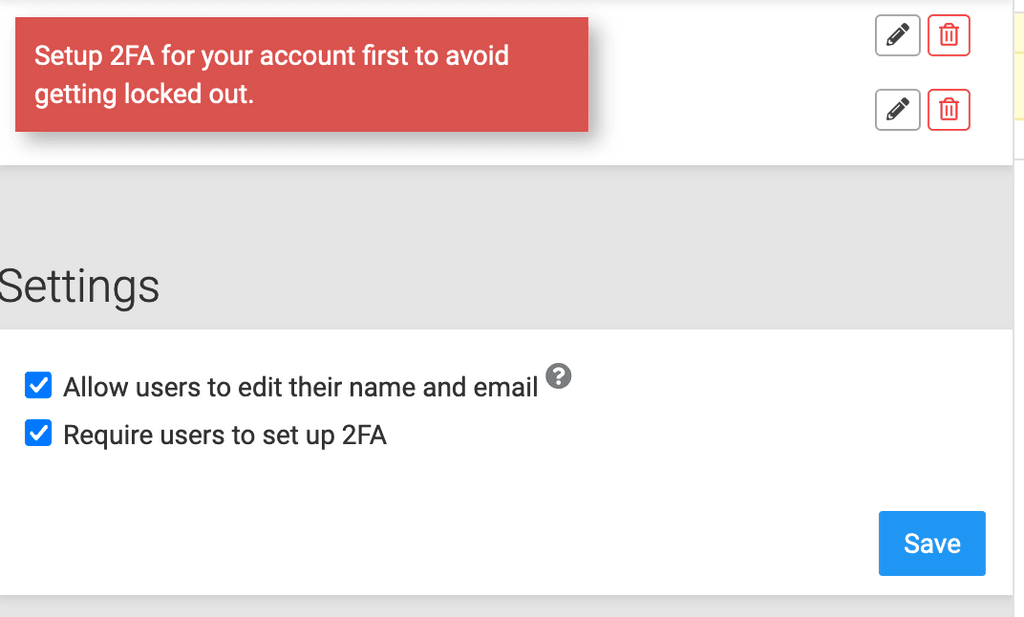
    Previously I had enforced 2FA for all users. Today, I saw that the checkbox was turned off. I turned it on. Then clicked "Save". The following error is shown, without any network request.
    Note: My account has 2FA enabled. I don't know why the message is shown when I have enabled 2FA in my admin account. I disabled and re-enabled 2FA to see if this error goes away, but it doesn't.

    After refreshing the page, the "Require users to set up 2FA" is automatically turned off.
    0ed41f2f-9cda-4028-9aa6-f21cffaaee5a-image.png

    Founder / Coder • My Apps

    nebulonN girishG 2 Replies Last reply
    1
    • njN nj

      Previously I had enforced 2FA for all users. Today, I saw that the checkbox was turned off. I turned it on. Then clicked "Save". The following error is shown, without any network request.
      Note: My account has 2FA enabled. I don't know why the message is shown when I have enabled 2FA in my admin account. I disabled and re-enabled 2FA to see if this error goes away, but it doesn't.

      After refreshing the page, the "Require users to set up 2FA" is automatically turned off.

      0ed41f2f-9cda-4028-9aa6-f21cffaaee5a-image.png

      nebulonN Offline
      nebulonN Offline
      nebulon
      Staff
      wrote on last edited by
      #2

      @nj we did some rework there for the latest release. Essentially if 2fa was enforced but the admin would not have it enabled, he/she would get locked out of the system.

      Clearly there is some regression though, interestingly I cannot reproduce it one, but in another Cloudron I can....still investigating.

      1 Reply Last reply
      2
      • nebulonN Offline
        nebulonN Offline
        nebulon
        Staff
        wrote on last edited by
        #3

        Actually can you try to hard refresh the dashboard? On firefox and chrome this would be ctrl+shift+r. Could this just be some asset caching issue? I was hitting this in one of my Cloudrons...the check and notification is purely client side.

        1 Reply Last reply
        2
        • njN nj

          Previously I had enforced 2FA for all users. Today, I saw that the checkbox was turned off. I turned it on. Then clicked "Save". The following error is shown, without any network request.
          Note: My account has 2FA enabled. I don't know why the message is shown when I have enabled 2FA in my admin account. I disabled and re-enabled 2FA to see if this error goes away, but it doesn't.

          After refreshing the page, the "Require users to set up 2FA" is automatically turned off.

          0ed41f2f-9cda-4028-9aa6-f21cffaaee5a-image.png

          girishG Offline
          girishG Offline
          girish
          Staff
          wrote on last edited by
          #4

          @nj this was a bug in 7.1.3 and it's been fixed in 7.1.4. We should have this out in a day or two.

          1 Reply Last reply
          2
          • nebulonN nebulon referenced this topic on
          • marcusquinnM Offline
            marcusquinnM Offline
            marcusquinn
            wrote on last edited by
            #5

            Tested and confirmed fixed - thanks!

            Web Design & Development: https://www.evergreen.je
            Technology & Apps: https://www.marcusquinn.com

            1 Reply Last reply
            1

            Hello! It looks like you're interested in this conversation, but you don't have an account yet.

            Getting fed up of having to scroll through the same posts each visit? When you register for an account, you'll always come back to exactly where you were before, and choose to be notified of new replies (either via email, or push notification). You'll also be able to save bookmarks and upvote posts to show your appreciation to other community members.

            With your input, this post could be even better 💗

            Register Login
            Reply
            • Reply as topic
            Log in to reply
            • Oldest to Newest
            • Newest to Oldest
            • Most Votes


            • Login

            • Don't have an account? Register

            • Login or register to search.
            • First post
              Last post
            0
            • Categories
            • Recent
            • Tags
            • Popular
            • Bookmarks
            • Search