
Cloudron makes it easy to run web apps like WordPress, Nextcloud, GitLab on your server. Find out more or install now.


Skip to content
  • Categories
  • Recent
  • Tags
  • Popular
  • Bookmarks
  • Search
Skins
  • Light
  • Brite
  • Cerulean
  • Cosmo
  • Flatly
  • Journal
  • Litera
  • Lumen
  • Lux
  • Materia
  • Minty
  • Morph
  • Pulse
  • Sandstone
  • Simplex
  • Sketchy
  • Spacelab
  • United
  • Yeti
  • Zephyr
  • Dark
  • Cyborg
  • Darkly
  • Quartz
  • Slate
  • Solar
  • Superhero
  • Vapor

  • Default (No Skin)
  • No Skin
Collapse
Brand Logo

Cloudron Forum

Apps - Status | Demo | Docs | Install
  1. Cloudron Forum
  2. Support
  3. Error when saving IPv6 address... "ipv6 must be a string"

Error when saving IPv6 address... "ipv6 must be a string"

Scheduled Pinned Locked Moved Solved Support
ipv6
3 Posts 2 Posters 982 Views 2 Watching
  • Oldest to Newest
  • Newest to Oldest
  • Most Votes
Reply
  • Reply as topic
Log in to reply
This topic has been deleted. Only users with topic management privileges can see it.
  • d19dotcaD Offline
    d19dotcaD Offline
    d19dotca
    wrote on last edited by girish
    #1

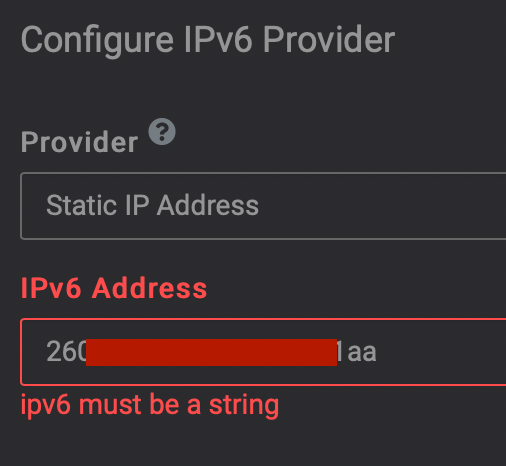
    I was adding in my IPv6 address to Cloudron on 7.1.3, and am getting an error of ipv6 must be a string. It is a string, though it contained the : symbol in it, so I removed all those so it was only the alphanumeric characters, but the same error was seen. I'm not sure what I'm missing here, it seems like a string. I've ensured there are no spaces or blank characters in it as well. Any ideas?
    59cabba1-e789-42c1-9132-1171f4cfd33e-image.png

    --
    Dustin Dauncey
    www.d19.ca

    1 Reply Last reply
    2
    • girishG Offline
      girishG Offline
      girish
      Staff
      wrote on last edited by
      #2

      Oops, there is a typo in the UI. I have fixed this now. As a workaround, you can use the interface method.

      Alternately:

      • Edit /home/yellowtent/box/dashboard/dist/js/index.js
      • Line 10925 reads config.ipv4 = $scope.ipv6Configure.newIPv4. Change it to config.ipv6 = $scope.ipv6Configure.newIPv6

      No need to restart anything.

      d19dotcaD 1 Reply Last reply
      1
      • girishG girish marked this topic as a question on
      • girishG girish has marked this topic as solved on
      • girishG girish

        Oops, there is a typo in the UI. I have fixed this now. As a workaround, you can use the interface method.

        Alternately:

        • Edit /home/yellowtent/box/dashboard/dist/js/index.js
        • Line 10925 reads config.ipv4 = $scope.ipv6Configure.newIPv4. Change it to config.ipv6 = $scope.ipv6Configure.newIPv6

        No need to restart anything.

        d19dotcaD Offline
        d19dotcaD Offline
        d19dotca
        wrote on last edited by
        #3

        @girish Thanks Girish. I assume that'll be fixed in the next bug-fix release as it looks fixed already in the code from this bug report (referencing for others): https://git.cloudron.io/cloudron/dashboard/-/commit/b62da8ba70dd8b4a8964de5a2c01e6ff7afa0e99

        --
        Dustin Dauncey
        www.d19.ca

        1 Reply Last reply
        1

        Hello! It looks like you're interested in this conversation, but you don't have an account yet.

        Getting fed up of having to scroll through the same posts each visit? When you register for an account, you'll always come back to exactly where you were before, and choose to be notified of new replies (either via email, or push notification). You'll also be able to save bookmarks and upvote posts to show your appreciation to other community members.

        With your input, this post could be even better 💗

        Register Login
        Reply
        • Reply as topic
        Log in to reply
        • Oldest to Newest
        • Newest to Oldest
        • Most Votes


        • Login

        • Don't have an account? Register

        • Login or register to search.
        • First post
          Last post
        0
        • Categories
        • Recent
        • Tags
        • Popular
        • Bookmarks
        • Search

