Cloudron makes it easy to run web apps like WordPress, Nextcloud, GitLab on your server. Find out more or install now.


Skip to content
  • Categories
  • Recent
  • Tags
  • Popular
  • Bookmarks
  • Search
Skins
  • Light
  • Brite
  • Cerulean
  • Cosmo
  • Flatly
  • Journal
  • Litera
  • Lumen
  • Lux
  • Materia
  • Minty
  • Morph
  • Pulse
  • Sandstone
  • Simplex
  • Sketchy
  • Spacelab
  • United
  • Yeti
  • Zephyr
  • Dark
  • Cyborg
  • Darkly
  • Quartz
  • Slate
  • Solar
  • Superhero
  • Vapor

  • Default (No Skin)
  • No Skin
Collapse
Brand Logo

Cloudron Forum

Offical apps | Community apps | Demo | Docs | Install
  1. Cloudron Forum
  2. IT-Tools
  3. Access Control

Access Control

Scheduled Pinned Locked Moved Solved IT-Tools
15 Posts 7 Posters 6.6k Views 7 Watching
  • Oldest to Newest
  • Newest to Oldest
  • Most Votes
Reply
  • Reply as topic
Log in to reply
This topic has been deleted. Only users with topic management privileges can see it.
  • randyjcR
    randyjcR
    randyjc
    wrote on last edited by
    #1

    IT-Tools is currently only usable for Cloudron users, but I would like it to be accessible to anyone who visits my URL.

    Therefore, the option "Leave user management to the app" actually means that this app is open for use by anyone.

    girishG 1 Reply Last reply
    3
    • randyjcR randyjc

      IT-Tools is currently only usable for Cloudron users, but I would like it to be accessible to anyone who visits my URL.

      Therefore, the option "Leave user management to the app" actually means that this app is open for use by anyone.

      girishG
      girishG
      girish
      Staff
      wrote on last edited by
      #2

      @randyjc added the optional flag. Unfortunately, you have to re-install to enable/disable the sso at this point.

      1 Reply Last reply
      1
      • E
        E
        EntityPacket
        wrote on last edited by
        #3

        I want the opposite. I want user to have to login to access this page. Setting it to "Only allow the following users and groups" to use Cloudron does nothing to stop the app from being hit by another computer on the internet.

        fbartelsF 1 Reply Last reply
        0
        • E EntityPacket

          I want the opposite. I want user to have to login to access this page. Setting it to "Only allow the following users and groups" to use Cloudron does nothing to stop the app from being hit by another computer on the internet.

          fbartelsF
          fbartelsF
          fbartels
          App Dev
          wrote on last edited by
          #4

          @EntityPacket said in Access Control:

          does nothing to stop the app from being hit by another computer on the internet

          But all they see is a login page, isn't it?

          1 Reply Last reply
          0
          • E
            E
            EntityPacket
            wrote on last edited by
            #5

            No, takes you straight into the app.

            1 Reply Last reply
            0
            • fbartelsF
              fbartelsF
              fbartels
              App Dev
              wrote on last edited by
              #6

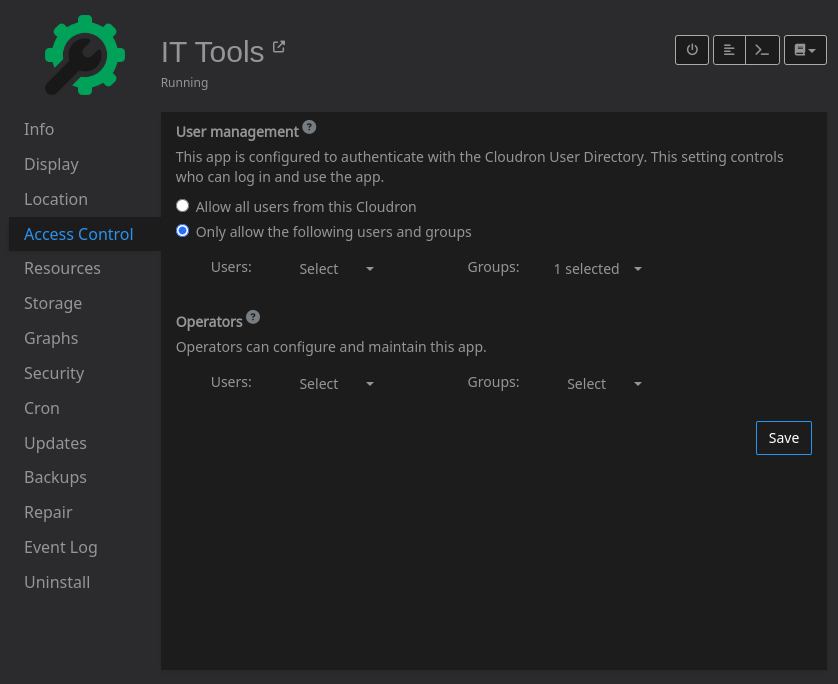
              Can you post a screenshot from your "access control" tab in Cloudron for this app? It should look like this:

              image.png

              1 Reply Last reply
              0
              • nebulonN
                nebulonN
                nebulon
                Staff
                wrote on last edited by
                #7

                @EntityPacket have you tried to open the app in a browser session like a private session, where you are not already logged into the Cloudron and thus the OpenID provider?

                1 Reply Last reply
                1
                • nebulonN nebulon marked this topic as a question on
                • E
                  E
                  EntityPacket
                  wrote on last edited by
                  #8

                  It's working now. I must have been mistaken. My bad.

                  1 Reply Last reply
                  2
                  • nebulonN nebulon has marked this topic as solved on
                  • I
                    I
                    IniBudi
                    translator
                    wrote on last edited by IniBudi
                    #9

                    Hi, is there a tutorial on how to open IT tools for public access without the need to log in?

                    1 Reply Last reply
                    0
                    • J
                      J
                      joseph
                      Staff
                      wrote on last edited by joseph
                      #10

                      @IniBudi when installing choose 'Leave user management to the app and then after installing change enableLogin in config/settings.yml to false.

                      I 1 Reply Last reply
                      0
                      • J joseph

                        @IniBudi when installing choose 'Leave user management to the app and then after installing change enableLogin in config/settings.yml to false.

                        I
                        I
                        IniBudi
                        translator
                        wrote on last edited by
                        #11

                        @joseph how to access the config/settings.yml file? I can't find it on SSH sever, is there a clue?

                        J 1 Reply Last reply
                        0
                        • I IniBudi

                          @joseph how to access the config/settings.yml file? I can't find it on SSH sever, is there a clue?

                          J
                          J
                          joseph
                          Staff
                          wrote on last edited by
                          #12

                          @IniBudi use the filemanager - https://docs.cloudron.io/apps/#file-manager

                          1 Reply Last reply
                          0
                          • I
                            I
                            IniBudi
                            translator
                            wrote on last edited by
                            #13

                            However there's no file manager feature on IT-Tools, is it?
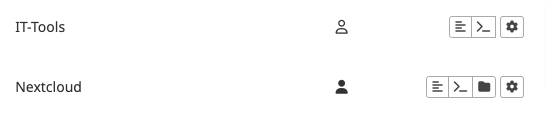
                            1fb3d0e0-c15a-4acd-8e02-b32d63c7a8e6-image.png

                            1 Reply Last reply
                            0
                            • J
                              J
                              joseph
                              Staff
                              wrote on last edited by
                              #14

                              @IniBudi 🤦 sorry, I got the app mixed up with Stirling-PDF .

                              When you install IT-Tools, simply choose 'Leave user management to the app' and that makes it public.


                              I 1 Reply Last reply
                              1
                              • J joseph

                                @IniBudi 🤦 sorry, I got the app mixed up with Stirling-PDF .

                                When you install IT-Tools, simply choose 'Leave user management to the app' and that makes it public.

                                I
                                I
                                IniBudi
                                translator
                                wrote on last edited by
                                #15

                                @joseph Thank you @joseph it can now be accessed by the public. Yay!

                                1 Reply Last reply
                                0

                                Hello! It looks like you're interested in this conversation, but you don't have an account yet.

                                Getting fed up of having to scroll through the same posts each visit? When you register for an account, you'll always come back to exactly where you were before, and choose to be notified of new replies (either via email, or push notification). You'll also be able to save bookmarks and upvote posts to show your appreciation to other community members.

                                With your input, this post could be even better 💗

                                Register Login
                                Reply
                                • Reply as topic
                                Log in to reply
                                • Oldest to Newest
                                • Newest to Oldest
                                • Most Votes


                                • Login

                                • Don't have an account? Register

                                • Login or register to search.
                                • First post
                                  Last post
                                0
                                • Categories
                                • Recent
                                • Tags
                                • Popular
                                • Bookmarks
                                • Search