Cloudron makes it easy to run web apps like WordPress, Nextcloud, GitLab on your server. Find out more or install now.


Skip to content
  • Categories
  • Recent
  • Tags
  • Popular
  • Bookmarks
  • Search
Skins
  • Light
  • Brite
  • Cerulean
  • Cosmo
  • Flatly
  • Journal
  • Litera
  • Lumen
  • Lux
  • Materia
  • Minty
  • Morph
  • Pulse
  • Sandstone
  • Simplex
  • Sketchy
  • Spacelab
  • United
  • Yeti
  • Zephyr
  • Dark
  • Cyborg
  • Darkly
  • Quartz
  • Slate
  • Solar
  • Superhero
  • Vapor

  • Default (No Skin)
  • No Skin
Collapse
Brand Logo

Cloudron Forum

Apps | Demo | Docs | Install
I

IniBudi

@IniBudi
About
Posts
152
Topics
55
Shares
0
Groups
0
Followers
0
Following
1

Posts

Recent Best Controversial

  • Vaultwarden fails to start after update – DB migration error (SSO)
    I IniBudi

    @james said in Vaultwarden fails to start after update – DB migration error (SSO):

    Hello @archos
    I think, I have the same issue.
    This is the log:

    [2025-12-29 19:23:43.075][panic][ERROR] thread 'main' panicked at 'Error running migrations: QueryError(DieselMigrationName { name: "2024-03-06-170000_add_sso_users", version: MigrationVersion("20240306170000") }, DatabaseError(Unknown, "Referencing column 'user_uuid' and referenced column 'uuid' in foreign key constraint 'sso_users_ibfk_1' are incompatible."))': src/db/mod.rs:505
    

    And seems to be already reported upstream: https://github.com/dani-garcia/vaultwarden/issues/6611


    EDIT:
    I followed the guided instructions and was able to fix it => https://github.com/dani-garcia/vaultwarden/wiki/Using-the-MariaDB-(MySQL)-Backend#foreign-key-errors-collation-and-charset

    be sure to replace "vaultwarden" in the SQL querries with your cloudron database name.

    I experienced the exact same issue when upgrading to the latest version. I managed to resolve it following @james's suggestion.

    Here is a recap of the step-by-step process I executed, which might help others:

      1. Enter Recovery Mode
        Go to the Cloudron dashboard and enable Recovery Mode for your Vaultwarden application.
      1. Access the MySQL Database
        Open the application Terminal and click the MySQL button to access the database console..
      1. Identify the Vaultwarden Database Name
        Run the following command to see the list of databases:
    SHOW DATABASES;
    

    Note the database name that appears (it is usually a random string like 9121d...). You will need this for the next steps.

      1. Change the Database Charset

    Replace YourDatabaseVaultwarden in the command below with the actual database name retrieved in Step 3, then run:

    ALTER DATABASE `YourDatabaseVaultwarden` CHARACTER SET utf8mb4 COLLATE utf8mb4_unicode_ci; 
    
      1. Generate Table Modification Commands
        Run this query to generate the specific ALTER TABLE commands for your existing tables:
    SELECT CONCAT('ALTER TABLE `', TABLE_NAME,'` CONVERT TO CHARACTER SET utf8mb4 COLLATE utf8mb4_unicode_ci;') 
    FROM INFORMATION_SCHEMA.TABLES
    WHERE TABLE_SCHEMA="YourDatabaseVaultwarden"
    AND TABLE_TYPE="BASE TABLE";
    

    Copy the output generated by this command. You can paste this list into ChatGPT or Gemini and ask it to format it for the next step (wrapping it between the foreign key check commands).

      1. Execute the Final Fix
        The final command block should follow this structure:
    SET foreign_key_checks=0;
    -- Copy/Paste the output from above here
    SET foreign_key_checks=1;
    

    If you are unsure about the formatting, I simply copied the raw table list from the terminal in Step 5 and asked an AI to format it into valid MySQL syntax using the structure above.

    Here is an example of what the final command looks like (Note: Do not copy-paste the specific table list below; use the one generated from your own database in Step 5, as your tables might differ):

    SET foreign_key_checks=0;
    ALTER TABLE `__diesel_schema_migrations` CONVERT TO CHARACTER SET utf8mb4 COLLATE utf8mb4_unicode_ci;
    ALTER TABLE `attachments` CONVERT TO CHARACTER SET utf8mb4 COLLATE utf8mb4_unicode_ci;
    ALTER TABLE `ciphers_collections` CONVERT TO CHARACTER SET utf8mb4 COLLATE utf8mb4_unicode_ci;
    ALTER TABLE `ciphers` CONVERT TO CHARACTER SET utf8mb4 COLLATE utf8mb4_unicode_ci;
    ALTER TABLE `collections` CONVERT TO CHARACTER SET utf8mb4 COLLATE utf8mb4_unicode_ci;
    ALTER TABLE `devices` CONVERT TO CHARACTER SET utf8mb4 COLLATE utf8mb4_unicode_ci;
    ALTER TABLE `emergency_access` CONVERT TO CHARACTER SET utf8mb4 COLLATE utf8mb4_unicode_ci;
    ALTER TABLE `favorites` CONVERT TO CHARACTER SET utf8mb4 COLLATE utf8mb4_unicode_ci;
    ALTER TABLE `folders_ciphers` CONVERT TO CHARACTER SET utf8mb4 COLLATE utf8mb4_unicode_ci;
    ALTER TABLE `folders` CONVERT TO CHARACTER SET utf8mb4 COLLATE utf8mb4_unicode_ci;
    ALTER TABLE `invitations` CONVERT TO CHARACTER SET utf8mb4 COLLATE utf8mb4_unicode_ci;
    ALTER TABLE `org_policies` CONVERT TO CHARACTER SET utf8mb4 COLLATE utf8mb4_unicode_ci;
    ALTER TABLE `organizations` CONVERT TO CHARACTER SET utf8mb4 COLLATE utf8mb4_unicode_ci;
    ALTER TABLE `sends` CONVERT TO CHARACTER SET utf8mb4 COLLATE utf8mb4_unicode_ci;
    ALTER TABLE `twofactor_incomplete` CONVERT TO CHARACTER SET utf8mb4 COLLATE utf8mb4_unicode_ci;
    ALTER TABLE `twofactor` CONVERT TO CHARACTER SET utf8mb4 COLLATE utf8mb4_unicode_ci;
    ALTER TABLE `users_collections` CONVERT TO CHARACTER SET utf8mb4 COLLATE utf8mb4_unicode_ci;
    ALTER TABLE `users_organizations` CONVERT TO CHARACTER SET utf8mb4 COLLATE utf8mb4_unicode_ci;
    ALTER TABLE `users` CONVERT TO CHARACTER SET utf8mb4 COLLATE utf8mb4_unicode_ci;
    SET foreign_key_checks=1;
    

    Once you have adapted the command to your specific tables, execute it in the MySQL terminal.

    Finally, disable Recovery Mode and restart your Vaultwarden app. Hopefully, this serves as a solution for you as well.

    Apologies if there are any technical inaccuracies; I utilized AI to guide me through this solution, and thankfully, it worked perfectly.

    Thanks,
    Regards

    Vaultwarden

  • Newbie Question: Why Do We Need to Request Apps on Cloudron?
    I IniBudi

    Thank you to @perelin and @james for the very detailed and thorough explanations.

    Now I understand why installation and update processes on Cloudron rarely run into issues. It turns out that a series of tests is performed beforehand to ensure that software installation and updates work smoothly and without any problems.

    Regarding the event organized by @BrutalBirdie ide, I’ll consider joining, although it will likely take place around 3 AM Southeast Asia time for me.

    I really enjoy learning through local community events like WordPress meetups, and if Cloudron ever hosts something similar, I’d be very excited to learn and connect with other professionals here.

    Thanks again for all the help and explanations.

    Best regards.

    Discuss

  • Passkey Support for Faster, More Secure Sign-In
    I IniBudi

    I recently installed Bitwarden on my Cloudron instance, and it got me thinking.

    Would it be possible to use existing passkeys, either those stored in Bitwarden or on a smartphone, to replace manually entering 2FA codes?

    The idea is to make the sign-in process faster and more convenient, for example, by using a fingerprint or device-based passkey instead of typing in an authentication code every time.

    I believe this could improve both security and user experience, and I hope this idea can be considered and potentially implemented in Cloudron. 🙂

    Feature Requests

  • Tags and Notes Fields for Mailing Lists
    I IniBudi

    I’d like to suggest an enhancement to the mailing list feature in Cloudron.

    Would it be possible to add:

    1. A “Tag” field, so each mailing list can be labeled with simple tags (e.g., “internal”, “customers”, “project-X”, “billing”).

    This would make it easier to:

    • Group mailing lists by purpose or department
    • Quickly filter or search mailing lists based on these tags
    • Keep large numbers of mailing lists more organized
    1. A “Notes” or “Description” field, so we can add a short explanation for each mailing list, for example:
    • What the list is used for
    • Who should be added or not added
    • Any specific rules or context

    These two fields could be very helpful for admins managing many mailing lists, especially over time or across multiple domains and teams.

    They would also make it easier for new admins to understand the existing setup without guessing from the mailing list name alone.

    I hope this suggestion can be considered for a future Cloudron update. Thank you. 😄

    Feature Requests mail

  • Improving the Cloudron File Manager UX
    I IniBudi

    I really like the new menu design in the latest Cloudron release. The layout feels very similar to Cloudflare; it’s cleaner, easier to navigate, and it makes switching between sections noticeably faster.

    Would it be possible to bring a similar structure and usability improvements to the File Manager as well?

    Right now, the File Manager works fine, but compared with something like the cPanel file manager, navigation could be more flexible. For example, cPanel offers:

    • A collapsible folder tree on the left, so you can quickly jump between directories without repeatedly going “up” and “down” the path
    • Clear information about each item, such as:
      • File permissions (e.g., 0644, 0755)
      • File type (file, directory, symlink, etc.)
      • Optional metadata like size and last modified time, all in one view

    Having a similar folder-tree view and basic file details directly visible in Cloudron’s File Manager would make it much easier to manage files.

    Some ideas that might fit well with the new UI direction:

    • Left-hand sidebar with an expandable folder tree.
    • Main panel showing:
      • Name
      • Type (file/folder)
      • Size
      • Last modified
      • Permissions/owner (even read‑only would already be very helpful)

    Thank you for all the work on the new UI, it’s a great step forward already.

    Feature Requests filemanager userinterface

  • Show Server Time Information in the Cloudron Server Menu
    I IniBudi

    I’d like to suggest adding a small piece of information to the Server menu: the current server time and timezone.

    When I move to a new hosting provider, I often forget whether I have already adjusted the server time settings or not.

    If Cloudron showed the current server time and timezone directly in the Server section, I could immediately see whether the server is still using the hosting provider’s default timezone or if it has already been changed to my own country’s timezone.

    Even a simple read‑only display like:

    • Current server time: 2025-12-19 14:32
    • Timezone: Europe/Berlin (UTC+1)

    would help a lot. This could:

    • Reduce confusion when checking logs, backups, and scheduled tasks (cron, app restarts, etc.)
    • Help ensure that all time‑based operations are aligned with the admin’s local time
    • Make it easier to verify the configuration quickly after migrating to a new server

    I believe this little detail could be very helpful for many users.

    Thank you for considering this suggestion and for all the work you put into improving Cloudron. 😄

    Feature Requests

  • Discourse Plugin Compability?
    I IniBudi

    I already tested the below plugins and it's compatible with Cloudron

    https://github.com/discourse/discourse-staff-alias https://github.com/discourse/discourse-solved https://github.com/discourse/discourse-chat-integration https://github.com/discourse/discourse-automation https://github.com/discourse/discourse-follow https://github.com/discourse/discourse-yearly-review https://github.com/discourse/discourse-zoom https://github.com/discourse/discourse-oauth2-basic https://github.com/discourse/discourse-cakeday https://github.com/discourse/discourse-topic-voting https://github.com/discourse/discourse-translator https://github.com/discourse/discourse-bcc https://github.com/discourse/discourse-assign https://github.com/discourse/discourse-bbcode https://github.com/discourse/discourse-signatures https://github.com/discourse/discourse-encrypt
    https://github.com/discourse/discourse-user-notes
    https://github.com/discourse/discourse-teambuild

    The below plugins are not compatible with Cloudron

    https://github.com/discourse/discourse-ai https://github.com/discourse/discourse-prometheus

    Discourse

  • Newbie Question: Why Do We Need to Request Apps on Cloudron?
    I IniBudi

    Hello everyone,
    I’d like to ask something about the app request process on Cloudron.

    Why do we actually need to submit a request for an application to be added to Cloudron’s app installation list?

    Is it possible to add custom applications to Cloudron? If yes or no, is it something difficult for beginners or is there another reason behind it?

    This is a genuine newbie question, and I don’t have an IT background. I hope someone can shed some light on this for me. 😊

    Thank you!
    Best regards.

    Discuss

  • File Manager Suggestion Ideas
    I IniBudi

    Hi, I would like to give some suggestions for Cloudron File Manager:

    1. It would be nice to have a back button to the App page after we click the file manager. I know that clicking the File Manager button will open a new tab. But after we're on File Manager, there's no option to back to the App page.

    alt text

    1. Copy file location, I get the idea when I use FileZilla there's an option to "copy URL(s) to clipboard". I think it would be nice if we could copy the file location on File Manager. So, we can know exactly the file location easily.
      alt text
    Feature Requests filemanager

  • Sharing custom SpamAssassin Rules
    I IniBudi

    @d19dotca thank you for the present, I will try in my Cloudron. 😁

    Discuss mail spam

  • Add Bulk Start/Stop Controls for Multiple Apps
    I IniBudi

    I’d like to suggest a feature to start or stop multiple apps at once.

    At the moment (please cmiiw), if we want to stop an app, we have to open the app’s settings and then click the Stop/Running button for each app individually.

    This works, but it can be time‑consuming when managing many apps.

    It would be very helpful if Cloudron provided a way to:

    • Select multiple apps from the app list (for example with checkboxes), and
    • Perform actions on all selected apps at once, such as:
      • Stop apps
      • Start/Restart apps
      • (Optionally) Recovery mode or Task error

    Some possible use cases:

    • Temporarily stopping a group of non‑critical apps during maintenance or server load issues
    • Quickly bringing multiple apps back online after maintenance
    • Managing apps across different clients or projects more efficiently

    This bulk action feature would save a lot of clicks and time, especially for users hosting many apps on a single Cloudron instance.

    Thank you for considering this suggestion, and thanks again for all the work on Cloudron.

    Best Regards.

    Feature Requests user interface

  • Show Server Time Information in the Cloudron Server Menu
    I IniBudi

    @joseph said in Show Server Time Information in the Cloudron Server Menu:

    The server timezone is always UTC 🤔 no? Or do you want System -> Settings to also be shown in Server page?
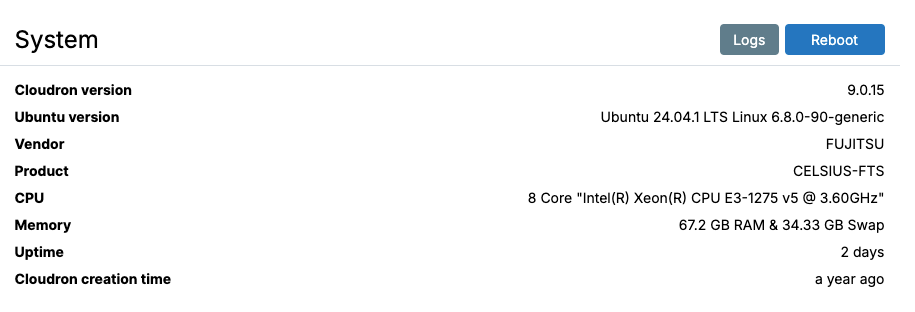

    Maybe the current time can be shown on Server > System Information

    ed5ba88c-8fa0-496b-bbca-a045a4791271-image.png

    It displays like:
    Current server time: 2025-12-19 14:32
    Timezone: Europe/Berlin (UTC+1)

    Feature Requests

  • Allow Saving and Re‑Using Custom Filters on the Dashboard
    I IniBudi

    I have a suggestion regarding the filter function in Cloudron.

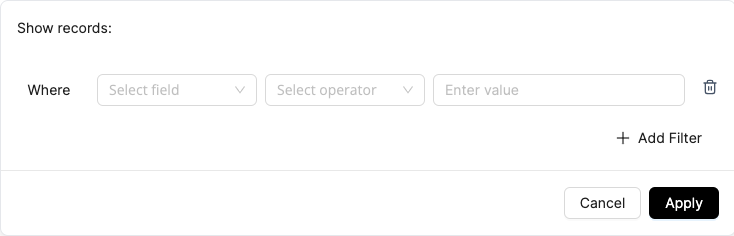
    df656ca5-8210-47ef-acff-8d7b781ae5f4-image.png

    Would it be possible to improve the current filter so that we can save filter presets and access them later from the dashboard?

    f5e68f97-4d22-4fdf-8bf7-33d6284302b0-image.png

    Right now, filters are temporary. Once we move to another page or refresh, the filter is lost, and we have to set it up again.

    What I’m imagining is something like this:

    • We define a filter based on certain criteria (for example:
      • only show apps on a specific domain,
      • that have updates available,
      • and include a particular tag).
    • Then we can save this filter with a name (e.g. “Client A – apps with pending updates”).
    • Later, we can quickly select this saved filter from a dropdown or sidebar and apply it with a single click.

    Possible use cases:

    • Quickly checking which apps for a specific client or domain need updates
    • Grouping apps by tags (e.g. production, staging, internal tools) and switching views easily
    • Having different saved views for different admins or workflows

    A simple “Save filter” / “Manage saved filters” option on the dashboard would already make daily management much easier, especially for users handling many apps and domains.

    I hope this feature can be useful for others as well.

    Thank you.
    Regards.

    Feature Requests

  • N8N - Unlock Paid Features for Free!! - TIME LIMITED OFFER
    I IniBudi

    @jagan it works!

    N8N

  • Investigating Multi-Recipient Email Delivery Issues on Cloudron v8.2.4
    I IniBudi

    @joseph I think the problem came from my SMTP provider.

      "message": "Message Queued (BD37BA83-C51B-465E-BB2F-9AF424226800.1)"
    }
    

    After change the SMTP using the default server, the problem is solved.

    Support email

  • Upgrade to Ubuntu 24.04 - Share your experience!
    I IniBudi

    Already upgraded tp 24.04 and there's no problem with Cloudron 8.0 🥳

    Discuss

  • Adding Security Key Authentication on Cloudron
    I IniBudi

    Hi, I wanna suggest a new feature for Cloudron. It will be nice if there's new security method that you can implement for 2FA in addition to mobile app authentication, maybe Cloudron can support Security Key Authentication like Yubikey, fingerprint on mobile, and desktop for 2FA. Thank you. 🙏

    Feature Requests

  • Is It Possible To Keep A Backup For The Deleting App?
    I IniBudi

    Hi, I want to know if I delete an app on the other hand I want to keep the backup of the app on the Cloudron backup system. Is it possible to do so? Thank you.

    Discuss

  • Add SSH Keys/Disable Password login in Cloudron Dashboard (similar to Hetzner)
    I IniBudi

    Yes, I also support this idea, so we can login using SSH key on FTP service

    Feature Requests ssh

  • Adding File Permission Settings to Cloudron File Manager
    I IniBudi

    Dear Cloudron Team,

    I would like to suggest an enhancement to the existing Cloudron File Manager feature — the ability to manage file permissions directly within it.

    Currently, I still rely on the manual approach of logging into FileZilla to configure file permissions.

    Having this functionality built into the Cloudron LAMP File Manager would make things much more efficient and user-friendly.

    Would it be possible to consider adding this feature in future updates?

    Thank you for the awesome product!

    Feature Requests filemanager
  • Login

  • Don't have an account? Register

  • Login or register to search.
  • First post
    Last post
0
  • Categories
  • Recent
  • Tags
  • Popular
  • Bookmarks
  • Search