Cloudron makes it easy to run web apps like WordPress, Nextcloud, GitLab on your server. Find out more or install now.


Skip to content

Paperless-ngx

66 Topics 555 Posts
  • Paperless-ngx - Package Updates

    Pinned Locked
    164
    0 Votes
    164 Posts
    107k Views
    Package UpdatesP
    [1.53.0] Update gotenberg to 8.33.0
  • WebSocket Connection Error

    4
    1 Votes
    4 Posts
    156 Views
    M
    @james said: Is there something 'unique' about your Cloudron set up? Also no Cloudflare. Not that I'm aware of. The check looks good. Vendor: QEMU Product: Standard PC (i440FX + PIIX, 1996) Linux: 6.8.0-111-generic Ubuntu: noble 24.04 Cloudron: 9.1.7 Execution environment: kvm Processor: Intel(R) Xeon(R) Gold 6126 CPU @ 2.60GHz BIOS pc-i440fx-9.2 CPU @ 2.0GHz x 4 RAM: 12248260KB Disk: /dev/sda2 232G [OK] node version is correct [OK] IPv6 is enabled in kernel. No public IPv6 address [OK] docker is running [OK] docker version is correct [OK] MySQL is running [OK] netplan is good [OK] DNS is resolving via systemd-resolved [OK] unbound is running [OK] nginx is running [OK] dashboard cert is valid [OK] dashboard is reachable via loopback [OK] No pending database migrations [OK] Service 'mysql' is running and healthy [OK] Service 'postgresql' is running and healthy [OK] Service 'mongodb' is running and healthy [OK] Service 'mail' is running and healthy [OK] Service 'graphite' is running and healthy [OK] Service 'sftp' is running and healthy [OK] box v9.1.7 is running [OK] Dashboard is reachable via domain name [WARN] Domain *******.com expiry check skipped because whois does not have this information
  • gotenberg process failing to start in paperless container

    Moved Solved
    4
    0 Votes
    4 Posts
    949 Views
    nebulonN
    This should be fixed now with latest package.
  • Access consume folder from scanner/network

    8
    0 Votes
    8 Posts
    2k Views
    nebulonN
    So using a volume with a folder for consumption is supported. Basically add the volume (in my case extradisk) to the app. This would mount it to /media/extradisk then I created a folder called consume/ in that disk and you have to give it read/write permissions for all users (so chmod it). After this adjust the corresponding env var in the paperless.conf in /app/data. In my case PAPERLESS_CONSUMPTION_DIR=/media/extradisk/consume then restart the app. Also note the volume in Cloudron has to be read/write mounted! If paperless cannot write to it (for document deletion) it would simply not even attempt to consume documents.
  • installed paperless-ngx with Cloudron user management but it is not working

    Solved
    3
    1 Votes
    3 Posts
    1k Views
    jamesJ
    Closed due to inactivity
  • Export / Import

    2
    1 Votes
    2 Posts
    684 Views
    J
    Maybe obvious but I don't have experience with the app. What do you mean by "configuration like paths" ? What does document links have to do with these paths?
  • Import of documents with ASN failed

    4
    1 Votes
    4 Posts
    1k Views
    hpz24H
    No, there is no special plugin. I justed added (or uncomment) the specific options in the paperless.conf. I checked my installation: The app had already 4GB, I changed to 6 and tried it again. Works. So maybe the solution was really "Add more RAM if problem exists" Thx
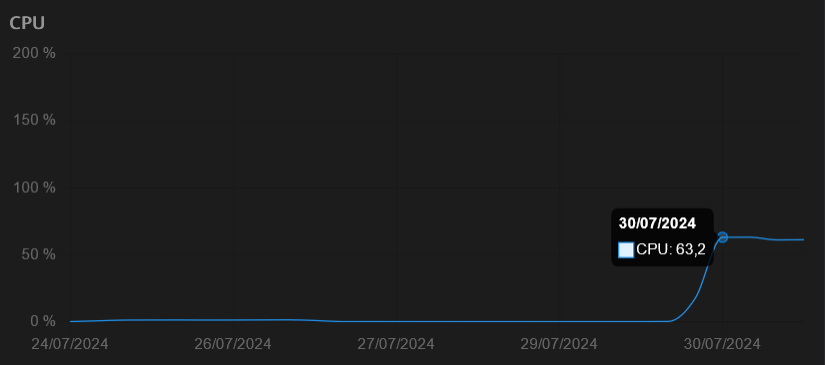
  • High cpu utilization since update 1.25.1

    Solved
    42
    1
    1 Votes
    42 Posts
    17k Views
    perelinP
    Yup, its up again. Took 1 day. Maybe cron/automating the deletion of the .db.db file is something that I will try.
  • Gotenberg Permission Issue and large log volume

    Solved
    14
    1 Votes
    14 Posts
    4k Views
    robiR
    @nebulon perhaps pasting the code into one of the AIs can help spot the problem
  • Quick fix for sudden stops in document classification

    1
    2 Votes
    1 Posts
    875 Views
    No one has replied
  • 400 Bad Request error when trying to access documents vie GUI

    Solved
    6
    0 Votes
    6 Posts
    2k Views
    nebulonN
    Glad it worked out in the end though!
  • Swift Paperless iOS app

    3
    3 Votes
    3 Posts
    2k Views
    imc67I
    Since the availability of the app on Cloudron I found this iOS app and it’s perfect for me! https://apps.apple.com/nl/app/paperparrot/id1663665267
  • Import via Web UI (Ghostscript rasterizing) failed

    7
    0 Votes
    7 Posts
    3k Views
    andreasduerenA
    @nebulon I have not yet. I need to troubleshoot this further but I haven't had the time yet.
  • Add Apache Tika to Paperless-ngx package.

    Solved
    9
    4 Votes
    9 Posts
    5k Views
    scookeS
    @nebulon This is super Nebulon. There are so many apps Cloudron has made available. But adding "small" requests like this to existing apps makes Cloudron all that more appealing. You've just saved me the cost of a separate VPS on which I had been running Tika and Gotenburg! Has there been a better improvement of any app than this?! Thank you! PAPERLESS_TIKA_ENABLED=true PAPERLESS_TIKA_ENDPOINT=http://localhost:9998 PAPERLESS_TIKA_GOTENBERG_ENDPOINT=http://localhost:3000
  • 0 Votes
    3 Posts
    1k Views
    S
    Hipp Hipp Hooray for the community, I did restart last night, but that didn't work. Now it works! Thanks Stephan and greetings to the fat B.
  • Gotenberg fails not start

    Solved
    3
    0 Votes
    3 Posts
    2k Views
    nebulonN
    Should be fixed with latest package version
  • Increase recommended default RAM

    1
    1 Votes
    1 Posts
    372 Views
    No one has replied
  • Config User rights Paperless

    Solved

    2
    0 Votes
    2 Posts
    1k Views
    nebulonN
    Yes unfortunately the upstream project decided to keep it this way. We had a discussion at https://github.com/paperless-ngx/paperless-ngx/discussions/7032 but apparently they do not want to change this. So after first login via the UI it will fail like this. Then an admin has to give the missing permissions to that user, then it works
  • Get API key for Paperles-NGX

    2
    1
    1 Votes
    2 Posts
    2k Views
    luckowL
    Have you tried if creating a token via the Django admin interface works? admin -> settings -> Django-Adminpanel [image: 1728130465641-ff8759bf-2b05-4a68-b727-fff78cb04600-image-resized.png]
  • Paperless doesn't fetch mail anymore

    Solved
    5
    0 Votes
    5 Posts
    2k Views
    nebulonN
    Ok, I will close this one then. We really have to get down to that other issue again.