Cloudron makes it easy to run web apps like WordPress, Nextcloud, GitLab on your server. Find out more or install now.


Skip to content
  • Categories
  • Recent
  • Tags
  • Popular
  • Bookmarks
  • Search
Skins
  • Light
  • Brite
  • Cerulean
  • Cosmo
  • Flatly
  • Journal
  • Litera
  • Lumen
  • Lux
  • Materia
  • Minty
  • Morph
  • Pulse
  • Sandstone
  • Simplex
  • Sketchy
  • Spacelab
  • United
  • Yeti
  • Zephyr
  • Dark
  • Cyborg
  • Darkly
  • Quartz
  • Slate
  • Solar
  • Superhero
  • Vapor

  • Default (No Skin)
  • No Skin
Collapse
Brand Logo

Cloudron Forum

Offical apps | Community apps | Demo | Docs | Install
  1. Cloudron Forum
  2. Support
  3. Cloudron won't update - No backup site for update

Cloudron won't update - No backup site for update

Scheduled Pinned Locked Moved Solved Support
backupupdate
27 Posts 9 Posters 3.8k Views 8 Watching
  • Oldest to Newest
  • Newest to Oldest
  • Most Votes
Reply
  • Reply as topic
Log in to reply
This topic has been deleted. Only users with topic management privileges can see it.
  • J joseph

    image.png

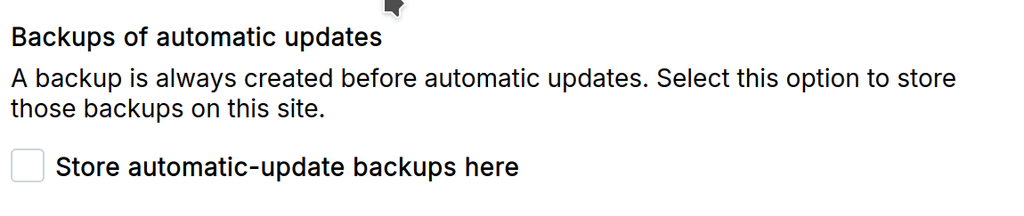
    The above has to be checked in atleast one of your backup sites.

    swheeler78S
    swheeler78S
    swheeler78
    wrote on last edited by
    #6

    @joseph Thanks. That was it. I had a backup setup and working but even when I told it to skip backup on the upgrade it still gave me an error. Had to check the box for storing automatic backups even though I chose to skip the backup.

    1 Reply Last reply
    0
    • jamesJ james has marked this topic as solved on
    • G
      G
      goseph10
      wrote on last edited by
      #7

      Same problem for me but i don't have a Backup set up at all.
      "Skip Backup" does nothing and does not let me update. Can you please fix that?

      And i don't need a backup since i use Proxmox Backup Server.

      1 Reply Last reply
      1
      • girishG
        girishG
        girish
        Staff
        wrote on last edited by
        #8

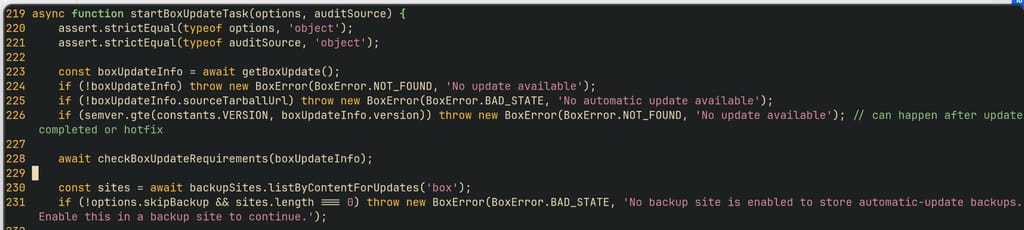
        @goseph10 that was a bug. I have fixed this in https://git.cloudron.io/platform/box/-/commit/1594d190eb29071c0aa11ff0a0e48554bb5fc04f

        You can edit /home/yellowtent/box/src/updater.js and fix line 229:

            if (!options.skipBackup && sites.length === 0) throw new BoxError(BoxError.BAD_STATE, 'No backup site is enabled to store automatic-update backups. Enable this in a backup site to continue.');
        

        After that systemctl restart box

        1 Reply Last reply
        0
        • potemkin_aiP
          potemkin_aiP
          potemkin_ai
          wrote on last edited by
          #9

          @girish , thanks! Is there an estimate which version will fix that?
          "Next one" is fine for me 🙂

          1 Reply Last reply
          0
          • potemkin_aiP
            potemkin_aiP
            potemkin_ai
            wrote on last edited by
            #10

            Cloudron 9.1.5 - seems to have the patch in place?
            77da67fa-6f5c-4e34-baf2-3585f702b8c4-image.jpeg

            1 Reply Last reply
            0
            • J
              J
              joseph
              Staff
              wrote on last edited by
              #11

              Yes, it's already 9.1.7 now

              1 Reply Last reply
              1
              • potemkin_aiP
                potemkin_aiP
                potemkin_ai
                wrote on last edited by
                #12

                Thanks. Since missing backup blocks automatic updates, platform update get blocked as well...

                1 Reply Last reply
                1
                • potemkin_aiP
                  potemkin_aiP
                  potemkin_ai
                  wrote on last edited by
                  #13

                  failed.png.jpg Screenshot From 2026-05-11 13-31-53.png

                  I'm still getting this error... =/

                  1 Reply Last reply
                  0
                  • nebulonN
                    nebulonN
                    nebulon
                    Staff
                    wrote on last edited by
                    #14

                    can you double check if any of your configured backup sites have that app included and also have set the checkbox to use for automatic updates?

                    1 Reply Last reply
                    0
                    • potemkin_aiP
                      potemkin_aiP
                      potemkin_ai
                      wrote on last edited by
                      #15

                      ahm... there are no backup sites...

                      1 Reply Last reply
                      0
                      • nebulonN
                        nebulonN
                        nebulon
                        Staff
                        wrote on last edited by
                        #16

                        that would explain it, then you have to first add a backup site. Any auto-update will only work if a backup can be made.

                        1 Reply Last reply
                        0
                        • potemkin_aiP
                          potemkin_aiP
                          potemkin_ai
                          wrote on last edited by
                          #17

                          but I don't need a backup for that site... any way to specify some kind of /dev/null for such a case?

                          robiR 1 Reply Last reply
                          0
                          • potemkin_aiP potemkin_ai

                            but I don't need a backup for that site... any way to specify some kind of /dev/null for such a case?

                            robiR
                            robiR
                            robi
                            wrote on last edited by
                            #18

                            @potemkin_ai you try local?

                            Frequency tech

                            1 Reply Last reply
                            0
                            • potemkin_aiP
                              potemkin_aiP
                              potemkin_ai
                              wrote on last edited by
                              #19

                              apart from the fact that it's not needed - there is not enough space for that 🙂

                              1 Reply Last reply
                              0
                              • nebulonN
                                nebulonN
                                nebulon
                                Staff
                                wrote on last edited by
                                #20

                                So Cloudron will always require a backup for auto-updates, there is no way to skip that unless you update manually.

                                1 Reply Last reply
                                1
                                • potemkin_aiP
                                  potemkin_aiP
                                  potemkin_ai
                                  wrote on last edited by
                                  #21

                                  Ok... it's a pity thought...

                                  G 1 Reply Last reply
                                  0
                                  • potemkin_aiP potemkin_ai

                                    Ok... it's a pity thought...

                                    G
                                    G
                                    goseph10
                                    wrote on last edited by goseph10
                                    #22

                                    @potemkin_ai Idea: Use Amazon S3 Glacier Deep Archive. Its only 1$ per 1TB. Adds some more cheap Backup.

                                    Or local should work, just exclude your Apps and only backup Cloudron. Its small.

                                    1 Reply Last reply
                                    0
                                    • potemkin_aiP
                                      potemkin_aiP
                                      potemkin_ai
                                      wrote on last edited by
                                      #23

                                      @joseph , thank you! It's not that I don't have space (I have a few TBs idle) - it's that I don't need it.

                                      Local won't work - because the server has not enough space for the local. And Amazon is only cheap, unless you really start to use it 😉

                                      robiR 1 Reply Last reply
                                      0
                                      • potemkin_aiP potemkin_ai

                                        @joseph , thank you! It's not that I don't have space (I have a few TBs idle) - it's that I don't need it.

                                        Local won't work - because the server has not enough space for the local. And Amazon is only cheap, unless you really start to use it 😉

                                        robiR
                                        robiR
                                        robi
                                        wrote on last edited by
                                        #24

                                        @potemkin_ai then install rustfs, minio, or seaweedfs on another Cloudron with space and do a backup. Easy peasy.

                                        Even as a one time thing the demo server can help.
                                        Frequency tech

                                        potemkin_aiP 1 Reply Last reply
                                        0
                                        • robiR robi

                                          @potemkin_ai then install rustfs, minio, or seaweedfs on another Cloudron with space and do a backup. Easy peasy.

                                          Even as a one time thing the demo server can help.

                                          potemkin_aiP
                                          potemkin_aiP
                                          potemkin_ai
                                          wrote on last edited by
                                          #25

                                          @robi like I’ve told - I do have where (few TBs served via S3).

                                          It’s just that I do not need a backup for that.
                                          Given that I can do update skipping the backup, an artificial limit on automatic backup is something I’m not clear about.

                                          robiR 1 Reply Last reply
                                          0

                                          Hello! It looks like you're interested in this conversation, but you don't have an account yet.

                                          Getting fed up of having to scroll through the same posts each visit? When you register for an account, you'll always come back to exactly where you were before, and choose to be notified of new replies (either via email, or push notification). You'll also be able to save bookmarks and upvote posts to show your appreciation to other community members.

                                          With your input, this post could be even better 💗

                                          Register Login
                                          Reply
                                          • Reply as topic
                                          Log in to reply
                                          • Oldest to Newest
                                          • Newest to Oldest
                                          • Most Votes


                                          • Login

                                          • Don't have an account? Register

                                          • Login or register to search.
                                          • First post
                                            Last post
                                          0
                                          • Categories
                                          • Recent
                                          • Tags
                                          • Popular
                                          • Bookmarks
                                          • Search