Cloudron makes it easy to run web apps like WordPress, Nextcloud, GitLab on your server. Find out more or install now.


Skip to content
  • Categories
  • Recent
  • Tags
  • Popular
  • Bookmarks
  • Search
Skins
  • Light
  • Brite
  • Cerulean
  • Cosmo
  • Flatly
  • Journal
  • Litera
  • Lumen
  • Lux
  • Materia
  • Minty
  • Morph
  • Pulse
  • Sandstone
  • Simplex
  • Sketchy
  • Spacelab
  • United
  • Yeti
  • Zephyr
  • Dark
  • Cyborg
  • Darkly
  • Quartz
  • Slate
  • Solar
  • Superhero
  • Vapor

  • Default (No Skin)
  • No Skin
Collapse
Brand Logo

Cloudron Forum

Apps - Status | Demo | Docs | Install
  1. Cloudron Forum
  2. Support
  3. Cloudron won't update - No backup site for update

Cloudron won't update - No backup site for update

Scheduled Pinned Locked Moved Solved Support
backupupdate
8 Posts 7 Posters 136 Views 7 Watching
  • Oldest to Newest
  • Newest to Oldest
  • Most Votes
Reply
  • Reply as topic
Log in to reply
This topic has been deleted. Only users with topic management privileges can see it.
  • swheeler78S Offline
    swheeler78S Offline
    swheeler78
    wrote last edited by james
    #1

    I'm running Cloudron 9.0.13 and I see that version 9.0.15 is available. Every time I try to upgrade I get "Cloudron update failed, No backup site for update".

    Please advise.

    1 Reply Last reply
    0
    • J Offline
      J Offline
      joseph
      Staff
      wrote last edited by
      #5

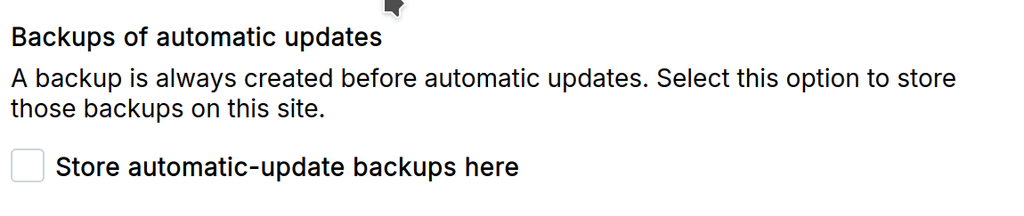
      image.png

      The above has to be checked in atleast one of your backup sites.

      swheeler78S 1 Reply Last reply
      1
      • humptydumptyH Offline
        humptydumptyH Offline
        humptydumpty
        wrote last edited by
        #2

        I think that means that no backup destinations have been set up or no successful backups have completed. Cloudron won’t update if there’s no backup to roll back to.

        1 Reply Last reply
        2
        • robiR Offline
          robiR Offline
          robi
          wrote last edited by
          #3

          Create a backup site.

          Conscious tech

          1 Reply Last reply
          1
          • jamesJ Offline
            jamesJ Offline
            james
            Staff
            wrote last edited by
            #4

            Hello @swheeler78

            Please visit your Cloudron domain under https://my.$DOMAIN.$TLD#/backup-sites or use the sidebar navigation in your Cloudron dashboard and click Backups->Sites.

            Please share a screenshot of this configuration.
            After that, you can attempt to fix it with the suggestions made by @humptydumpty and @robi.

            1 Reply Last reply
            1
            • J Offline
              J Offline
              joseph
              Staff
              wrote last edited by
              #5

              image.png

              The above has to be checked in atleast one of your backup sites.

              swheeler78S 1 Reply Last reply
              1
              • J joseph

                image.png

                The above has to be checked in atleast one of your backup sites.

                swheeler78S Offline
                swheeler78S Offline
                swheeler78
                wrote last edited by
                #6

                @joseph Thanks. That was it. I had a backup setup and working but even when I told it to skip backup on the upgrade it still gave me an error. Had to check the box for storing automatic backups even though I chose to skip the backup.

                1 Reply Last reply
                0
                • jamesJ james has marked this topic as solved
                • G Offline
                  G Offline
                  goseph10
                  wrote last edited by
                  #7

                  Same problem for me but i don't have a Backup set up at all.
                  "Skip Backup" does nothing and does not let me update. Can you please fix that?

                  And i don't need a backup since i use Proxmox Backup Server.

                  1 Reply Last reply
                  1
                  • girishG Offline
                    girishG Offline
                    girish
                    Staff
                    wrote last edited by
                    #8

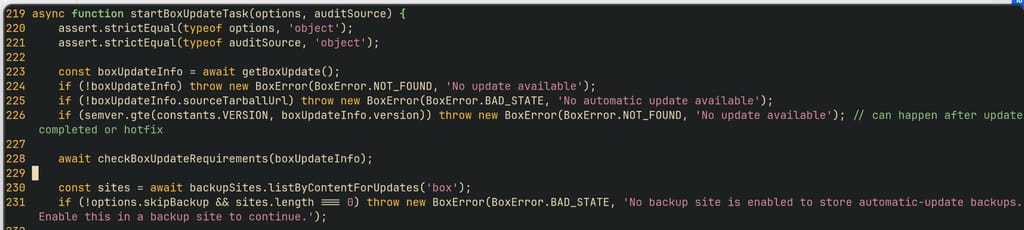
                    @goseph10 that was a bug. I have fixed this in https://git.cloudron.io/platform/box/-/commit/1594d190eb29071c0aa11ff0a0e48554bb5fc04f

                    You can edit /home/yellowtent/box/src/updater.js and fix line 229:

                        if (!options.skipBackup && sites.length === 0) throw new BoxError(BoxError.BAD_STATE, 'No backup site is enabled to store automatic-update backups. Enable this in a backup site to continue.');
                    

                    After that systemctl restart box

                    1 Reply Last reply
                    0
                    Reply
                    • Reply as topic
                    Log in to reply
                    • Oldest to Newest
                    • Newest to Oldest
                    • Most Votes


                    • Login

                    • Don't have an account? Register

                    • Login or register to search.
                    • First post
                      Last post
                    0
                    • Categories
                    • Recent
                    • Tags
                    • Popular
                    • Bookmarks
                    • Search