Cloudron makes it easy to run web apps like WordPress, Nextcloud, GitLab on your server. Find out more or install now.


Skip to content
  • Categories
  • Recent
  • Tags
  • Popular
  • Bookmarks
  • Search
Skins
  • Light
  • Brite
  • Cerulean
  • Cosmo
  • Flatly
  • Journal
  • Litera
  • Lumen
  • Lux
  • Materia
  • Minty
  • Morph
  • Pulse
  • Sandstone
  • Simplex
  • Sketchy
  • Spacelab
  • United
  • Yeti
  • Zephyr
  • Dark
  • Cyborg
  • Darkly
  • Quartz
  • Slate
  • Solar
  • Superhero
  • Vapor

  • Default (No Skin)
  • No Skin
Collapse
Brand Logo

Cloudron Forum

Offical apps | Community apps | Demo | Docs | Install
  1. Cloudron Forum
  2. Support
  3. issue with mailing list delivery when using external SMTP server

issue with mailing list delivery when using external SMTP server

Scheduled Pinned Locked Moved Solved Support
mailmail relaysmtpmailing-lists
32 Posts 5 Posters 3.8k Views 5 Watching
  • Oldest to Newest
  • Newest to Oldest
  • Most Votes
Reply
  • Reply as topic
Log in to reply
This topic has been deleted. Only users with topic management privileges can see it.
  • jamesJ
    jamesJ
    james
    Staff
    wrote last edited by
    #23

    Hello @msbt
    I need to understand the set up first to reproduce it.

    1. domain in Cloudron e.g.: cloudron.dev
    2. mail settings for cloudron.dev smart host configured to use postmark
    3. 2x mailboxes on Cloudron for group@cloudron.dev and team@cloudron.dev
      3a. (group|team)@cloudron.dev are configured to forward to e.g.: someinbox@gmail.com
    4. a mail is sent to (group|team)@cloudron.dev and 2x cc e.g.: cc1@gmail.com and cc2@outlook.com

    Resulting in:

    • cc1 and cc2 delivered
    • group and team saved locally on Cloudron, but never forwarded to someinbox@gmail.com

    Did I get this right?

    M 1 Reply Last reply
    1
    • jamesJ
      jamesJ
      james
      Staff
      wrote last edited by james
      #24

      Hello @msbt
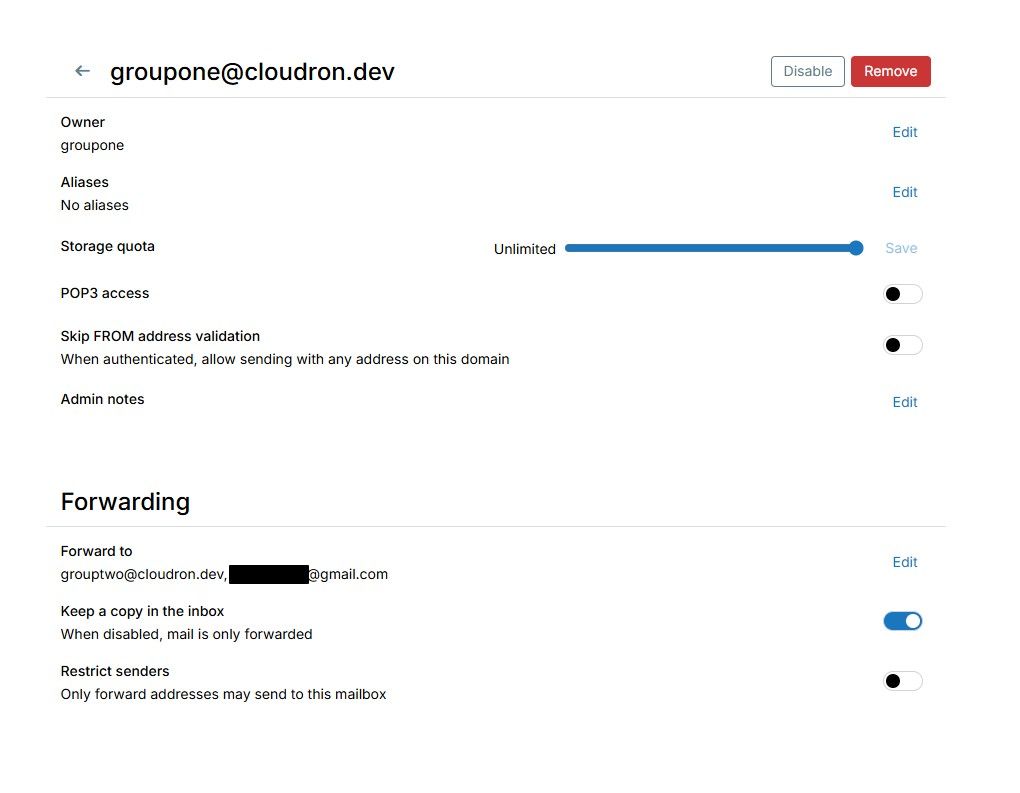
      I have tested the following set up on Cloudron 10.0.4:

      • domain cloudron.dev smart host configured for postmark
      • local inbox groupone@cloudron.dev owned by a group named groupone
      • local inbox grouptwo@cloudron.dev owned by a group named grouptwo

      Forward settings:

      • groupone@cloudron.dev forward settings to grouptwo@cloudron.dev and external@gmail.com
      • grouptwo@cloudron.dev forward settings to external@outlook.com

      Sending a mail to groupone@cloudron.dev is delivered to:

      • groupone@cloudron.dev
      • grouptwo@cloudron.dev
      • external@gmail.com
      • external@outlook.com

      From this set up I was not able to reproduce your issue.

      1 Reply Last reply
      1
      • jamesJ james

        Hello @msbt
        I need to understand the set up first to reproduce it.

        1. domain in Cloudron e.g.: cloudron.dev
        2. mail settings for cloudron.dev smart host configured to use postmark
        3. 2x mailboxes on Cloudron for group@cloudron.dev and team@cloudron.dev
          3a. (group|team)@cloudron.dev are configured to forward to e.g.: someinbox@gmail.com
        4. a mail is sent to (group|team)@cloudron.dev and 2x cc e.g.: cc1@gmail.com and cc2@outlook.com

        Resulting in:

        • cc1 and cc2 delivered
        • group and team saved locally on Cloudron, but never forwarded to someinbox@gmail.com

        Did I get this right?

        M
        M
        msbt
        App Dev
        wrote last edited by msbt
        #25

        @james thanks for testing! In my setup the groupone@ is a regular user with 40 forwarding addresses and grouptwo@ is a shared mailbox without any forwards, but other than that you're right.

        So the only difference is that groupone is owned by a single user, not a group and grouptwo is a shared mailbox with no forwards.

        I can't imagine how single user vs group owners would make a difference. Did you chance anything else, like FROM address validation? Keep a copy in the inbox? Restrict senders?

        Happy Hosting & Web Development

        jamesJ girishG 2 Replies Last reply
        0
        • M msbt

          @james thanks for testing! In my setup the groupone@ is a regular user with 40 forwarding addresses and grouptwo@ is a shared mailbox without any forwards, but other than that you're right.

          So the only difference is that groupone is owned by a single user, not a group and grouptwo is a shared mailbox with no forwards.

          I can't imagine how single user vs group owners would make a difference. Did you chance anything else, like FROM address validation? Keep a copy in the inbox? Restrict senders?

          jamesJ
          jamesJ
          james
          Staff
          wrote last edited by
          #26

          Hello @msbt

          image.jpeg
          All default.

          1 Reply Last reply
          1
          • M
            M
            msbt
            App Dev
            wrote last edited by msbt
            #27

            @james can you try again without the "Keep a copy in the inbox", that's the only difference I'm seeing

            edit: and maybe remove grouptwo from forwarding as well, but again, no idea how that could make a difference 😆

            Happy Hosting & Web Development

            1 Reply Last reply
            2
            • jamesJ
              jamesJ
              james
              Staff
              wrote last edited by
              #28

              Hello @msbt
              No difference. Still working just fine.

              1 Reply Last reply
              1
              • M msbt

                @james thanks for testing! In my setup the groupone@ is a regular user with 40 forwarding addresses and grouptwo@ is a shared mailbox without any forwards, but other than that you're right.

                So the only difference is that groupone is owned by a single user, not a group and grouptwo is a shared mailbox with no forwards.

                I can't imagine how single user vs group owners would make a difference. Did you chance anything else, like FROM address validation? Keep a copy in the inbox? Restrict senders?

                girishG
                girishG
                girish
                Staff
                wrote last edited by girish
                #29

                @msbt said:

                @james thanks for testing! In my setup the groupone@ is a regular user with 40 forwarding addresses and grouptwo@ is a shared mailbox without any forwards, but other than that you're right.

                This stood out. There is a cap of 64 forwards in the code. Could you be hitting this limit? Specifically sieve_max_redirects is 64 . I thought this was a very high number, may be not?

                1 Reply Last reply
                0
                • M
                  M
                  msbt
                  App Dev
                  wrote last edited by
                  #30

                  @girish unsure, it really is 40. Would there be something in a log and if so, where? 😉

                  Happy Hosting & Web Development

                  1 Reply Last reply
                  0
                  • girishG
                    girishG
                    girish
                    Staff
                    wrote last edited by girish
                    #31

                    @msbt the errors if any should be in /run/dovecot/dovecot.log or the main docker logs -f mail . You can also check if the mail is stuck in the mail queue at /app/data/haraka-queue (these are mails which are being "retried") .

                    1 Reply Last reply
                    0
                    • M
                      M
                      msbt
                      App Dev
                      wrote last edited by
                      #32

                      @girish thanks, the queue is empty and the dovecot.log only has yesterday and todays events in there. I'll ask the people to do a test, they switched to manual bcc as a workaround atm

                      Happy Hosting & Web Development

                      1 Reply Last reply
                      0

                      Hello! It looks like you're interested in this conversation, but you don't have an account yet.

                      Getting fed up of having to scroll through the same posts each visit? When you register for an account, you'll always come back to exactly where you were before, and choose to be notified of new replies (either via email, or push notification). You'll also be able to save bookmarks and upvote posts to show your appreciation to other community members.

                      With your input, this post could be even better 💗

                      Register Login
                      Reply
                      • Reply as topic
                      Log in to reply
                      • Oldest to Newest
                      • Newest to Oldest
                      • Most Votes


                      • Login

                      • Don't have an account? Register

                      • Login or register to search.
                      • First post
                        Last post
                      0
                      • Categories
                      • Recent
                      • Tags
                      • Popular
                      • Bookmarks
                      • Search