
-
Just tried also on a fresh installation and as far as I can tell nothing really changed there and it works at least from the gnome filemanager with the uri
davs://surfer.domain.com/_webdavand username (which is not relevant) and the api token for the password.@nebulon said in webdav on surfer:
Just tried also on a fresh installation and as far as I can tell nothing really changed there and it works at least from the gnome filemanager with the uri
davs://surfer.domain.com/_webdavand username (which is not relevant) and the api token for the password.It does work. But unlike other webdav mounts (i.e. my various Nextcloud accounts) it doesn't stay connect/ remember the password like it used to before you moved to Access Tokens only.
I find this rather frustrating as every time I want to do anything on my local machine, like save a file to my Surfer app, I first have to login via the web and copy the Access Token again.
-
-
-
-
-
most likely this is a client issue, where for some reason your webdav client does not cache the password (now password is that access token)
-
@nebulon but it does cache it for Nextcloud username/ passwords and used to cache it for Surfer too before you changed it to acess token/ pw only.
The only thing that has changed in my set up is Surfer itself.
-
-
@jdaviescoates yeah, that is what is strange. for the client, the access token is no different from a password. there's no difference.
@girish said in webdav on surfer:
@jdaviescoates yeah, that is what is strange. for the client, the access token is no different from a password. there's no difference.
I worked it out!
When clicking Connect in Nautilus, it wasn't prompt/ asking if I wanted to save my password at all, I was just presented with this:
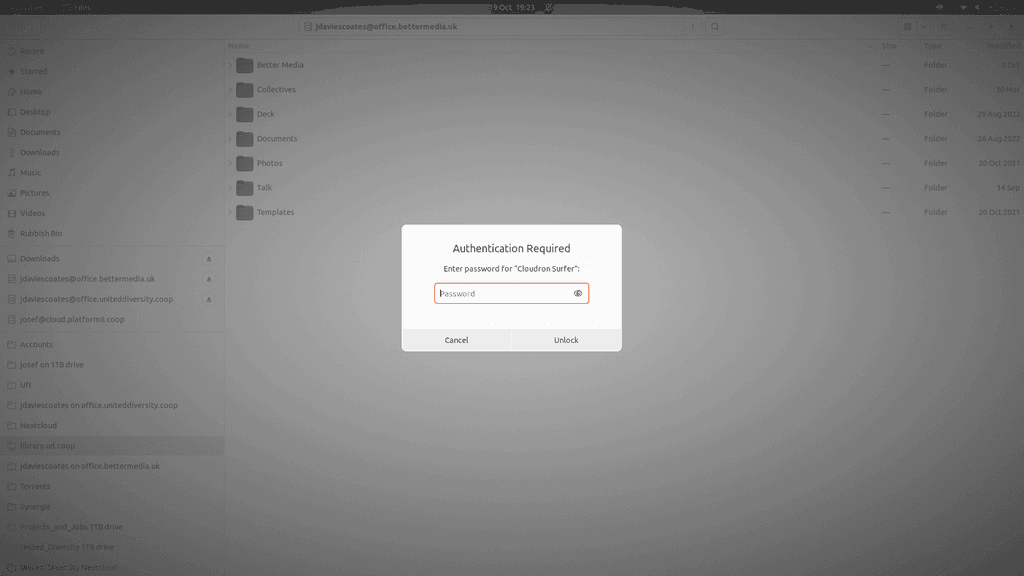
And the only thing possible to do when that screen is displayed it to either enter a password or cancel, it's not even possible to view another app or anything.
But it seems it should as per e.g. this image from this guide https://www.knthost.com/nextcloud/setup-gnome-nautilus-access-nextcloud-files-webdav
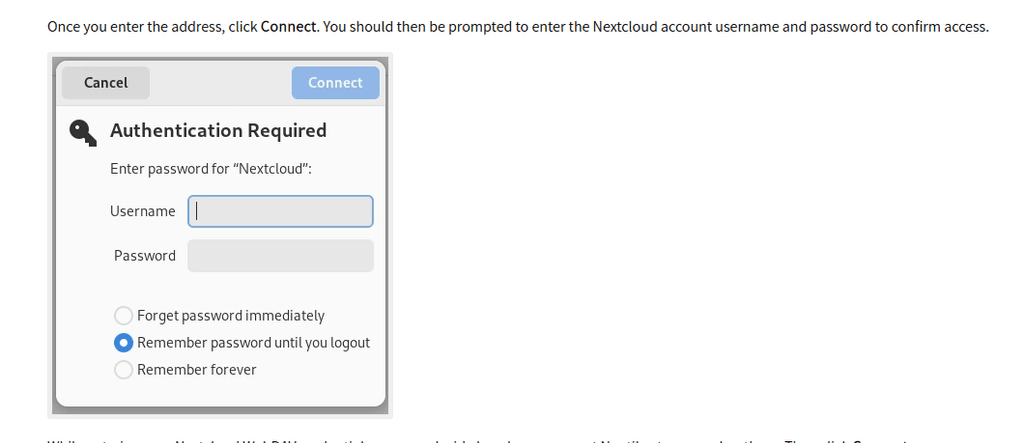
And because I must've chosen "Remember forever" when setting up Nextcloud mount (either that or just adding Nextcloud Accounts via Ubuntu Online Account settings does that anyway), when I tried testing it with an instance of Nextcloud instead of Surfer it doesn't even ask for a password at all. So I figured it must've remember the password somewhere...
So I searched for Passwords and found this Passwords and Keys app that I've never seen/ used before
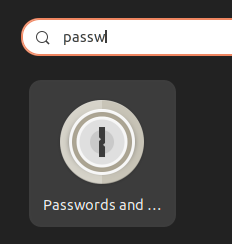
And I saw there was a pw stored for library.uniteddiversity.coop

But of course that was the old password before Surfer updated to just use access tokens. So I edited the pw to be the new access token, and now it all works again! Phew.
And just to test, I decided to try and connect to a Surfer app that I've never tried to mount locally before, and lo and behold this time it did show this:
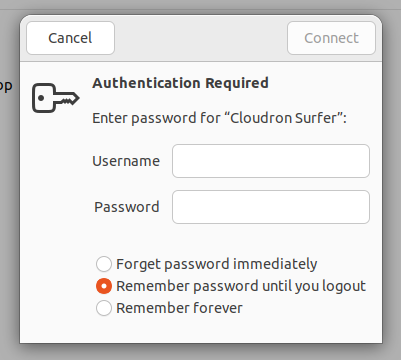
Although I note that Nautilus required me to add a Username before being able to hit the Connect button (the button remained greyed out until both a Username and Password were entered into the fields).
Anyways, all working again now (and now I now where to find/ how to change the "Remembered forever" passwords too, so bonus!)

-
From all the Surfer changes, does this work for folks?
I was able to connect and mount webdav to a new surfer instance via user/app password, but I can't write to it.
It mounts as empty when it should show what we see in /app/data or /app/data/public?
Then it seems Surfer app crashes and restarts.
Logs:
Oct 09 10:02:04 ==> Starting Surfer Oct 09 10:02:05 2026-10-09T15:02:05Z Oct 09 10:02:05 Alias domains: angelfalls.toldyouso.com Oct 09 10:02:05 Base path: /app/data/public Oct 09 10:02:05 Listening on http://localhost:3000 Oct 09 10:02:05 Loading rich mime-types from /usr/share/mime/globs2 Oct 09 10:02:05 Using database at: /app/data/db.sqlite Oct 09 10:03:49 2026-10-09T15:03:49Z Oct 09 10:03:49 2026-10-09T15:03:49Z Oct 09 10:03:49 /app/code/node_modules/webdav-server/lib/server/v2/webDAVServer/WebDAVServer.js:237 Oct 09 10:03:49 Node.js v24.21.0 Oct 09 10:03:49 PROPFIND /_webdav/._. 404 Oct 09 10:03:49 PROPFIND /_webdav/._untitled%20folder 404 Oct 09 10:03:49 PROPFIND /_webdav/._untitled%20folder 404 Oct 09 10:03:49 PROPFIND /_webdav/untitled%20folder 404 Oct 09 10:03:49 TypeError: Cannot read properties of undefined (reading 'paths') Oct 09 10:03:49 ^ Oct 09 10:03:49 at /app/code/node_modules/webdav-server/lib/helper/v2/IfParser.js:132:28 Oct 09 10:03:49 at /app/code/node_modules/webdav-server/lib/server/v2/commands/Put.js:12:17 Oct 09 10:03:49 at /app/code/node_modules/webdav-server/lib/server/v2/webDAVServer/WebDAVServer.js:90:13 Oct 09 10:03:49 at HTTPRequestContext.checkIfHeader (/app/code/node_modules/webdav-server/lib/server/v2/RequestContext.js:226:43) Oct 09 10:03:49 at HTTPRequestContext.getResource (/app/code/node_modules/webdav-server/lib/server/v2/RequestContext.js:100:21) Oct 09 10:03:49 at WebDAVServer.getFileSystem (/app/code/node_modules/webdav-server/lib/server/v2/webDAVServer/WebDAVServer.js:221:29) Oct 09 10:03:49 at WebDAVServer.getFileSystem (/app/code/node_modules/webdav-server/lib/server/v2/webDAVServer/WebDAVServer.js:222:9) Oct 09 10:03:49 at WebDAVServer.getFileSystemSync (/app/code/node_modules/webdav-server/lib/server/v2/webDAVServer/WebDAVServer.js:237:22) Oct 09 10:03:49 at WebDAVServer.getResource (/app/code/node_modules/webdav-server/lib/server/v2/webDAVServer/WebDAVServer.js:89:14) Oct 09 10:03:49 at default_1.chunked (/app/code/node_modules/webdav-server/lib/server/v2/commands/Put.js:11:13) Oct 09 10:03:49 if (path.paths.length < pfsPath.paths.length) Oct 09 10:03:52 ==> Ensure permissions Oct 09 10:03:52 ==> Starting Surfer Oct 09 10:03:53 2026-10-09T15:03:53Z Oct 09 10:03:53 Alias domains: angelfalls.toldyouso.com Oct 09 10:03:53 Base path: /app/data/public Oct 09 10:03:53 Listening on http://localhost:3000 Oct 09 10:03:53 Loading rich mime-types from /usr/share/mime/globs2 Oct 09 10:03:53 Using database at: /app/data/db.sqlite -
From all the Surfer changes, does this work for folks?
I was able to connect and mount webdav to a new surfer instance via user/app password, but I can't write to it.
It mounts as empty when it should show what we see in /app/data or /app/data/public?
Then it seems Surfer app crashes and restarts.
Logs:
Oct 09 10:02:04 ==> Starting Surfer Oct 09 10:02:05 2026-10-09T15:02:05Z Oct 09 10:02:05 Alias domains: angelfalls.toldyouso.com Oct 09 10:02:05 Base path: /app/data/public Oct 09 10:02:05 Listening on http://localhost:3000 Oct 09 10:02:05 Loading rich mime-types from /usr/share/mime/globs2 Oct 09 10:02:05 Using database at: /app/data/db.sqlite Oct 09 10:03:49 2026-10-09T15:03:49Z Oct 09 10:03:49 2026-10-09T15:03:49Z Oct 09 10:03:49 /app/code/node_modules/webdav-server/lib/server/v2/webDAVServer/WebDAVServer.js:237 Oct 09 10:03:49 Node.js v24.21.0 Oct 09 10:03:49 PROPFIND /_webdav/._. 404 Oct 09 10:03:49 PROPFIND /_webdav/._untitled%20folder 404 Oct 09 10:03:49 PROPFIND /_webdav/._untitled%20folder 404 Oct 09 10:03:49 PROPFIND /_webdav/untitled%20folder 404 Oct 09 10:03:49 TypeError: Cannot read properties of undefined (reading 'paths') Oct 09 10:03:49 ^ Oct 09 10:03:49 at /app/code/node_modules/webdav-server/lib/helper/v2/IfParser.js:132:28 Oct 09 10:03:49 at /app/code/node_modules/webdav-server/lib/server/v2/commands/Put.js:12:17 Oct 09 10:03:49 at /app/code/node_modules/webdav-server/lib/server/v2/webDAVServer/WebDAVServer.js:90:13 Oct 09 10:03:49 at HTTPRequestContext.checkIfHeader (/app/code/node_modules/webdav-server/lib/server/v2/RequestContext.js:226:43) Oct 09 10:03:49 at HTTPRequestContext.getResource (/app/code/node_modules/webdav-server/lib/server/v2/RequestContext.js:100:21) Oct 09 10:03:49 at WebDAVServer.getFileSystem (/app/code/node_modules/webdav-server/lib/server/v2/webDAVServer/WebDAVServer.js:221:29) Oct 09 10:03:49 at WebDAVServer.getFileSystem (/app/code/node_modules/webdav-server/lib/server/v2/webDAVServer/WebDAVServer.js:222:9) Oct 09 10:03:49 at WebDAVServer.getFileSystemSync (/app/code/node_modules/webdav-server/lib/server/v2/webDAVServer/WebDAVServer.js:237:22) Oct 09 10:03:49 at WebDAVServer.getResource (/app/code/node_modules/webdav-server/lib/server/v2/webDAVServer/WebDAVServer.js:89:14) Oct 09 10:03:49 at default_1.chunked (/app/code/node_modules/webdav-server/lib/server/v2/commands/Put.js:11:13) Oct 09 10:03:49 if (path.paths.length < pfsPath.paths.length) Oct 09 10:03:52 ==> Ensure permissions Oct 09 10:03:52 ==> Starting Surfer Oct 09 10:03:53 2026-10-09T15:03:53Z Oct 09 10:03:53 Alias domains: angelfalls.toldyouso.com Oct 09 10:03:53 Base path: /app/data/public Oct 09 10:03:53 Listening on http://localhost:3000 Oct 09 10:03:53 Loading rich mime-types from /usr/share/mime/globs2 Oct 09 10:03:53 Using database at: /app/data/db.sqlite@robi my existing webdav connection to https://library.uniteddiversity.coop had broken. But works again (including writing) after creating and using a new App password for it (GNOME Files didn't actually prompt for a username, just a password)
-
@robi my existing webdav connection to https://library.uniteddiversity.coop had broken. But works again (including writing) after creating and using a new App password for it (GNOME Files didn't actually prompt for a username, just a password)
@jdaviescoates Thanks, could be MacOS specific, I'll try a remount and see what happens.
UPDATE: it still makes it crash, the files display in the mount for a second then disappear as it bombs.
-
-





Hello! It looks like you're interested in this conversation, but you don't have an account yet.
Getting fed up of having to scroll through the same posts each visit? When you register for an account, you'll always come back to exactly where you were before, and choose to be notified of new replies (either via email, or push notification). You'll also be able to save bookmarks and upvote posts to show your appreciation to other community members.
With your input, this post could be even better 💗
Register Login