
Cloudron makes it easy to run web apps like WordPress, Nextcloud, GitLab on your server. Find out more or install now.


Skip to content
  • Categories
  • Recent
  • Tags
  • Popular
  • Bookmarks
  • Search
Skins
  • Light
  • Brite
  • Cerulean
  • Cosmo
  • Flatly
  • Journal
  • Litera
  • Lumen
  • Lux
  • Materia
  • Minty
  • Morph
  • Pulse
  • Sandstone
  • Simplex
  • Sketchy
  • Spacelab
  • United
  • Yeti
  • Zephyr
  • Dark
  • Cyborg
  • Darkly
  • Quartz
  • Slate
  • Solar
  • Superhero
  • Vapor

  • Default (No Skin)
  • No Skin
Collapse
Brand Logo

Cloudron Forum

Apps - Status | Demo | Docs | Install
  1. Cloudron Forum
  2. App Packaging & Development
  3. Custom app: docker volume mapping

Custom app: docker volume mapping

Scheduled Pinned Locked Moved App Packaging & Development
13 Posts 4 Posters 4.0k Views 4 Watching
  • Oldest to Newest
  • Newest to Oldest
  • Most Votes
Reply
  • Reply as topic
Log in to reply
This topic has been deleted. Only users with topic management privileges can see it.
  • J Offline
    J Offline
    jbrichez
    wrote on last edited by
    #1

    Hi,
    I'm trying to create a custom cloudron app for this app: jellyseerr.
    I successfully created the CloudronManifest.json file

    {
      "id": "jellyseerr.com",
      "title": "Jellyseerr",
      "author": "Girish Ramakrishnan <girish@cloudron.io>",
      "description": "Jellyseerr app",
      "tagline": "A great beginning",
      "version": "0.0.1",
      "healthCheckPath": "/",
      "httpPort": 5055,
      "addons": {
        "localstorage": {}
      },
      "manifestVersion": 2,
      "website": "https://www.example.com",
      "contactEmail": "support@clourdon.io",
      "icon": "file://icon.png",
      "tags": [ "test", "collaboration" ],
      "mediaLinks": [ "https://images.rapgenius.com/fd0175ef780e2feefb30055be9f2e022.520x343x1.jpg" ]
    }
    

    But I have some trouble: the app crashed:
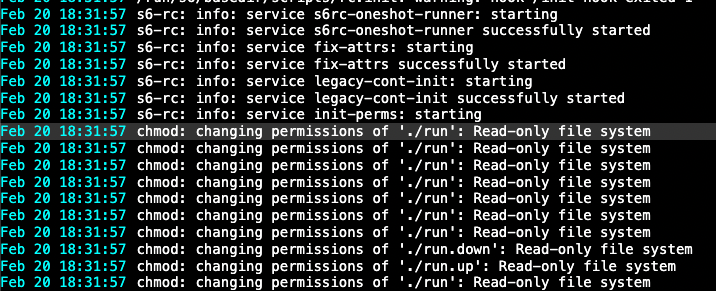
    Capture d’écran 2024-02-20 à 18.32.24.png.

    It's seems to be because the docker image need to configure "/config" folder when running:

    docker run --rm \
        --name jellyseerr \
        -p 5055:5055 \
        -e PUID=1000 \
        -e PGID=1000 \
        -e UMASK=002 \
        -e TZ="Etc/UTC" \
        -v /<host_folder_config>:/config \
        ghcr.io/hotio/jellyseerr
    

    I checked some image from cloudron image hub but i still didn't understand where the mapping is done.
    How do I manage to link the volume ?

    Thank you.

    1 Reply Last reply
    1
    • timconsidineT Online
      timconsidineT Online
      timconsidine
      App Dev
      wrote on last edited by
      #2

      If the config can change, it should be under /app/data

      Indie app dev, scratching my itches, lover of Cloudron PaaS, communityapps.appx.uk

      1 Reply Last reply
      0
      • timconsidineT Online
        timconsidineT Online
        timconsidine
        App Dev
        wrote on last edited by
        #3

        Are you running docker from the host ?
        Normally you should build a Dockerfile

        Indie app dev, scratching my itches, lover of Cloudron PaaS, communityapps.appx.uk

        J 1 Reply Last reply
        0
        • timconsidineT timconsidine

          Are you running docker from the host ?
          Normally you should build a Dockerfile

          J Offline
          J Offline
          jbrichez
          wrote on last edited by jbrichez
          #4

          @timconsidine I have connected my cloudron cli to my cloudron instance and i'm running command from my computer:

          cloudron install --image hotio/jellyseerr
          

          No i don't think the config will change

          1 Reply Last reply
          0
          • timconsidineT Online
            timconsidineT Online
            timconsidine
            App Dev
            wrote on last edited by
            #5

            Ok but is this image built for Cloudron ? Or you’re using a pre-built image ?

            Indie app dev, scratching my itches, lover of Cloudron PaaS, communityapps.appx.uk

            J 1 Reply Last reply
            0
            • timconsidineT timconsidine

              Ok but is this image built for Cloudron ? Or you’re using a pre-built image ?

              J Offline
              J Offline
              jbrichez
              wrote on last edited by
              #6

              @timconsidine I'm using a pre-built image from docker hub

              1 Reply Last reply
              0
              • timconsidineT Online
                timconsidineT Online
                timconsidine
                App Dev
                wrote on last edited by
                #7

                If the config is not ever going to change, it can be read-only and included in the app’s files under /app/code.

                Indie app dev, scratching my itches, lover of Cloudron PaaS, communityapps.appx.uk

                1 Reply Last reply
                0
                • J Offline
                  J Offline
                  jbrichez
                  wrote on last edited by jbrichez
                  #8

                  Ok i understant but where is made the mapping exactly ?

                  EDIT: after some research, yes the app need to store some files

                  1 Reply Last reply
                  0
                  • girishG girish moved this topic from Support on
                  • girishG Do not disturb
                    girishG Do not disturb
                    girish
                    Staff
                    wrote on last edited by
                    #9

                    @jbrichez in the Dockerfile, you can just symlink /config (or whatever) to say /app/data/config . The mapping is created in the Dockerfile.

                    1 Reply Last reply
                    0
                    • J Offline
                      J Offline
                      jbrichez
                      wrote on last edited by
                      #10

                      I successfully started the app then when i check the container's volume I can see that:

                      [{bind  /media/movies /media/movies   true rprivate} {bind  /home/yellowtent/appsdata/4a224e49-5a30-49ae-bb2b-2b22731ab6ed/data /app/data   true rprivate} {volume 585faa40fe07d43726062f11d0530fad796806b03a3c1c39daab3a9a86b14542 /var/lib/docker/volumes/585faa40fe07d43726062f11d0530fad796806b03a3c1c39daab3a9a86b14542/_data /tmp local  true } {volume 28fcf47257a3b52162a2998df0eff0b325570c0cef49478f37cff3ecea7d0fda /var/lib/docker/volumes/28fcf47257a3b52162a2998df0eff0b325570c0cef49478f37cff3ecea7d0fda/_data /run local  true }]
                      

                      There is my question answer probably...
                      This is the mapping I was looking for 🙂

                      When we used the cloudron cli, behind you automatically create a volume and attached it my custom app...
                      I didn't see that in the doc. Is it written somewhere ?

                      1 Reply Last reply
                      0
                      • girishG Do not disturb
                        girishG Do not disturb
                        girish
                        Staff
                        wrote on last edited by
                        #11

                        @jbrichez maybe you are asking for https://docs.cloudron.io/packaging/cheat-sheet/#filesystem ?

                        J 1 Reply Last reply
                        0
                        • girishG girish

                          @jbrichez maybe you are asking for https://docs.cloudron.io/packaging/cheat-sheet/#filesystem ?

                          J Offline
                          J Offline
                          jbrichez
                          wrote on last edited by
                          #12

                          @girish I think it is. But this was not really clear when i read it the first time

                          1 Reply Last reply
                          0
                          • BrutalBirdieB Offline
                            BrutalBirdieB Offline
                            BrutalBirdie
                            Partner
                            wrote on last edited by
                            #13

                            Still, a Cloudron App should not need a volume by default.

                            Like my work? Consider donating a drink. Cheers!

                            1 Reply Last reply
                            0

                            Hello! It looks like you're interested in this conversation, but you don't have an account yet.

                            Getting fed up of having to scroll through the same posts each visit? When you register for an account, you'll always come back to exactly where you were before, and choose to be notified of new replies (either via email, or push notification). You'll also be able to save bookmarks and upvote posts to show your appreciation to other community members.

                            With your input, this post could be even better 💗

                            Register Login
                            Reply
                            • Reply as topic
                            Log in to reply
                            • Oldest to Newest
                            • Newest to Oldest
                            • Most Votes


                            • Login

                            • Don't have an account? Register

                            • Login or register to search.
                            • First post
                              Last post
                            0
                            • Categories
                            • Recent
                            • Tags
                            • Popular
                            • Bookmarks
                            • Search

