Cloudron makes it easy to run web apps like WordPress, Nextcloud, GitLab on your server. Find out more or install now.


Skip to content
  • Categories
  • Recent
  • Tags
  • Popular
  • Bookmarks
  • Search
Skins
  • Light
  • Brite
  • Cerulean
  • Cosmo
  • Flatly
  • Journal
  • Litera
  • Lumen
  • Lux
  • Materia
  • Minty
  • Morph
  • Pulse
  • Sandstone
  • Simplex
  • Sketchy
  • Spacelab
  • United
  • Yeti
  • Zephyr
  • Dark
  • Cyborg
  • Darkly
  • Quartz
  • Slate
  • Solar
  • Superhero
  • Vapor

  • Default (No Skin)
  • No Skin
Collapse
Brand Logo

Cloudron Forum

Apps - Status | Demo | Docs | Install
  1. Cloudron Forum
  2. Docker Registry
  3. Unusable application

Unusable application

Scheduled Pinned Locked Moved Docker Registry
44 Posts 8 Posters 3.1k Views 8 Watching
  • Oldest to Newest
  • Newest to Oldest
  • Most Votes
Reply
  • Reply as topic
Log in to reply
This topic has been deleted. Only users with topic management privileges can see it.
  • J Online
    J Online
    joseph
    Staff
    wrote on last edited by
    #11

    @lanhild We have to debug this step by step.

    1. Does host registry.cloudron.local resolve to public IP?
    2. Check if nginx can reach the container.. docker ps | grep com.docker.registry to get container ID. docker inspect bea487bec441 | grep IPAddress to get local IP. curl http://172.18.20.34:5000/asdf -v should get some response for the registry. It will have Docker-Distribution-Api-Version header.
    3. Then curl https://registry.cloudron.local ? This should give some UI page or login page of the registry

    Depending on where it fails, we have to proceed. FWIW, docker login to same cloudron registry works fine on my servers.

    LanhildL 1 Reply Last reply
    0
    • J joseph

      @lanhild We have to debug this step by step.

      1. Does host registry.cloudron.local resolve to public IP?
      2. Check if nginx can reach the container.. docker ps | grep com.docker.registry to get container ID. docker inspect bea487bec441 | grep IPAddress to get local IP. curl http://172.18.20.34:5000/asdf -v should get some response for the registry. It will have Docker-Distribution-Api-Version header.
      3. Then curl https://registry.cloudron.local ? This should give some UI page or login page of the registry

      Depending on where it fails, we have to proceed. FWIW, docker login to same cloudron registry works fine on my servers.

      LanhildL Offline
      LanhildL Offline
      Lanhild
      App Dev
      wrote on last edited by Lanhild
      #12

      @joseph My answers, step-by-step as you formatted it in your message:

      1. Yes.
      2. Reachable, Docker-Distribution-Api-Version: registry/2.0
      <html>
      <head><title>302 Found</title></head>
      <body>
      <center><h1>302 Found</h1></center>
      <hr><center>nginx</center>
      </body>
      </html>
      

      docker login from the Cloudron server results in the following

      Error response from daemon: Get "https:/registry.cloudron.local/v2/": net/http: request canceled while waiting for connection (Client.Timeout exceeded while awaiting headers)

      docker login from any other remote works perfectly fine.

      LanhildL 1 Reply Last reply
      0
      • LanhildL Lanhild

        @joseph My answers, step-by-step as you formatted it in your message:

        1. Yes.
        2. Reachable, Docker-Distribution-Api-Version: registry/2.0
        <html>
        <head><title>302 Found</title></head>
        <body>
        <center><h1>302 Found</h1></center>
        <hr><center>nginx</center>
        </body>
        </html>
        

        docker login from the Cloudron server results in the following

        Error response from daemon: Get "https:/registry.cloudron.local/v2/": net/http: request canceled while waiting for connection (Client.Timeout exceeded while awaiting headers)

        docker login from any other remote works perfectly fine.

        LanhildL Offline
        LanhildL Offline
        Lanhild
        App Dev
        wrote on last edited by
        #13

        I can't repro the issue on the demo server.

        1 Reply Last reply
        0
        • J Online
          J Online
          joseph
          Staff
          wrote on last edited by
          #14

          Out of ideas, since I can't reproduce this anywhere. You can contact me on support@ if you want me to debug on the server.

          klawitterbK 1 Reply Last reply
          0
          • J joseph

            Out of ideas, since I can't reproduce this anywhere. You can contact me on support@ if you want me to debug on the server.

            klawitterbK Offline
            klawitterbK Offline
            klawitterb
            wrote on last edited by
            #15

            @joseph I've now also noticed problems with the docker registry. In my case I'm also running a builderbot on the same cloudron instance. Seems like it can't connect to the docker registry, my logs on the builderbot are simply saying:

            Mar 28 08:42:05 build-1774683724218 Build stream finished
            Mar 28 08:42:05 build-1774683724218 Pushing...
            Mar 28 08:42:20 build-1774683724218 Push stream finished
            Mar 28 08:42:20 build-1774683724218 Get "https://docker.apehost.de/v2/": net/http: request canceled while waiting for connection (Client.Timeout exceeded while awaiting headers)
            Mar 28 08:42:20 build-1774683724218 Push failed
            

            Probably not related I've also noticed that the logs on the docker registry container get spammed with this error:

            Mar 28 08:46:32 time="2026-03-28T07:46:32.467979729Z" level=error msg="traces export: Post \"https://localhost:4318/v1/traces\": dial tcp [::1]:4318: connect: connection refused" go.version=go1.23.7 instance.id=401bc88b-1bfe-4713-ae09-1cffdf628884 service=registry version=3.0.0
            Mar 28 08:46:35 2026/03/28 07:46:35 [info] 71#71: *109 client 172.18.0.1 closed keepalive connection
            
            LanhildL 1 Reply Last reply
            0
            • klawitterbK klawitterb

              @joseph I've now also noticed problems with the docker registry. In my case I'm also running a builderbot on the same cloudron instance. Seems like it can't connect to the docker registry, my logs on the builderbot are simply saying:

              Mar 28 08:42:05 build-1774683724218 Build stream finished
              Mar 28 08:42:05 build-1774683724218 Pushing...
              Mar 28 08:42:20 build-1774683724218 Push stream finished
              Mar 28 08:42:20 build-1774683724218 Get "https://docker.apehost.de/v2/": net/http: request canceled while waiting for connection (Client.Timeout exceeded while awaiting headers)
              Mar 28 08:42:20 build-1774683724218 Push failed
              

              Probably not related I've also noticed that the logs on the docker registry container get spammed with this error:

              Mar 28 08:46:32 time="2026-03-28T07:46:32.467979729Z" level=error msg="traces export: Post \"https://localhost:4318/v1/traces\": dial tcp [::1]:4318: connect: connection refused" go.version=go1.23.7 instance.id=401bc88b-1bfe-4713-ae09-1cffdf628884 service=registry version=3.0.0
              Mar 28 08:46:35 2026/03/28 07:46:35 [info] 71#71: *109 client 172.18.0.1 closed keepalive connection
              
              LanhildL Offline
              LanhildL Offline
              Lanhild
              App Dev
              wrote on last edited by
              #16

              @klawitterb said:
              Probably not related I've also noticed that the logs on the docker registry container get spammed with this error:

              Mar 28 08:46:32 time="2026-03-28T07:46:32.467979729Z" level=error msg="traces export: Post \"https://localhost:4318/v1/traces\": dial tcp [::1]:4318: connect: connection refused" go.version=go1.23.7 instance.id=401bc88b-1bfe-4713-ae09-1cffdf628884 service=registry version=3.0.0
              

              I'm also encountering these.

              girishG 1 Reply Last reply
              0
              • robiR Offline
                robiR Offline
                robi
                wrote on last edited by
                #17

                Assuming it is listening on port 4318, you can't do https with localhost.

                Dropping the 's' should work if the API route is available.

                Conscious tech

                1 Reply Last reply
                0
                • LanhildL Lanhild

                  @klawitterb said:
                  Probably not related I've also noticed that the logs on the docker registry container get spammed with this error:

                  Mar 28 08:46:32 time="2026-03-28T07:46:32.467979729Z" level=error msg="traces export: Post \"https://localhost:4318/v1/traces\": dial tcp [::1]:4318: connect: connection refused" go.version=go1.23.7 instance.id=401bc88b-1bfe-4713-ae09-1cffdf628884 service=registry version=3.0.0
                  

                  I'm also encountering these.

                  girishG Offline
                  girishG Offline
                  girish
                  Staff
                  wrote on last edited by
                  #18

                  @Lanhild https://git.cloudron.io/packages/docker-registry-app/-/merge_requests/15 . I think that probably fixes it per upstream reports - https://github.com/distribution/distribution/issues/4270 , https://github.com/distribution/distribution-library-image/issues/187 . I don't think this related to your original DNS issue though. This traces export is just some log spam .

                  1 Reply Last reply
                  0
                  • girishG Offline
                    girishG Offline
                    girish
                    Staff
                    wrote on last edited by
                    #19

                    OK, with the update that log message is gone (in our registry)

                    1 Reply Last reply
                    0
                    • klawitterbK Offline
                      klawitterbK Offline
                      klawitterb
                      wrote on last edited by
                      #20

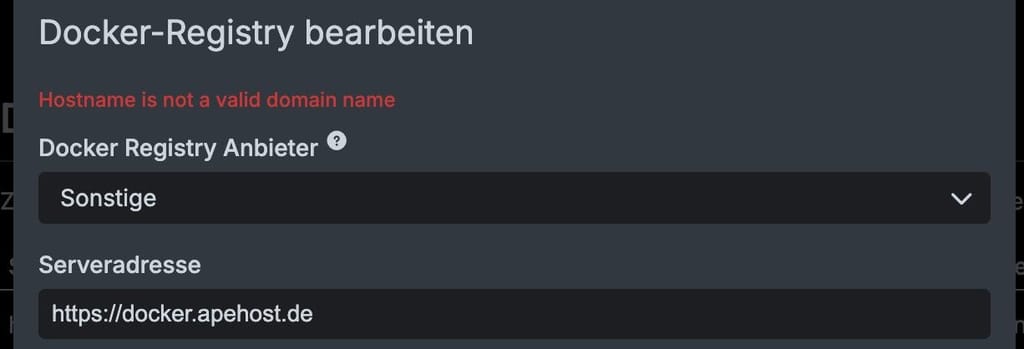
                      Log spam seems to be gone now, still having trouble with the actual connection to the registry on my cloudron:
                      7fa1485f-516f-4695-a564-1250df9fd355-image.jpeg

                      Docker registry resides on the same cloudron

                      M 1 Reply Last reply
                      0
                      • klawitterbK klawitterb

                        Log spam seems to be gone now, still having trouble with the actual connection to the registry on my cloudron:

                        7fa1485f-516f-4695-a564-1250df9fd355-image.jpeg

                        Docker registry resides on the same cloudron

                        M Offline
                        M Offline
                        msbt
                        App Dev
                        wrote on last edited by
                        #21

                        @klawitterb try without https://

                        Happy Hosting & Web Development

                        1 Reply Last reply
                        0
                        • klawitterbK Offline
                          klawitterbK Offline
                          klawitterb
                          wrote on last edited by
                          #22

                          Without https:// I'm getting: Invalid serverAddress: socket hang up

                          1 Reply Last reply
                          0
                          • M Offline
                            M Offline
                            msbt
                            App Dev
                            wrote on last edited by
                            #23

                            You got a typo in there maybe, or a firewall?

                            Happy Hosting & Web Development

                            1 Reply Last reply
                            0
                            • nebulonN Offline
                              nebulonN Offline
                              nebulon
                              Staff
                              wrote on last edited by
                              #24

                              So it should work without https:// there so the socket hang up is the issue somehow. Can you telnet via ssh to the registry from that server?

                              1 Reply Last reply
                              0
                              • klawitterbK Offline
                                klawitterbK Offline
                                klawitterb
                                wrote on last edited by
                                #25

                                Just tried, that just gives me a telnet: Unable to connect to remote host: Connection refused

                                1 Reply Last reply
                                0
                                • nebulonN Offline
                                  nebulonN Offline
                                  nebulon
                                  Staff
                                  wrote on last edited by
                                  #26

                                  If docker.apehost.de is the actual server, then I am able to contact that app from here at least. Does it correctly resolve on the system where it fails?

                                  1 Reply Last reply
                                  0
                                  • klawitterbK Offline
                                    klawitterbK Offline
                                    klawitterb
                                    wrote on last edited by
                                    #27

                                    From the server:
                                    ping -n docker.apehost.de -> works
                                    telnet idontexist.apehost.de -> Name or service not known
                                    telnet docker.apehost.de -> connection refused
                                    docker pull docker.apehost.de/path-to-exisiting-image -> Error response from daemon: Get "https://docker.apehost.de/v2/": context deadline exceeded (Client.Timeout exceeded while awaiting headers)

                                    From my local machine:
                                    docker pull docker.apehost.de/path-to-exisiting-image -> works just fine

                                    1 Reply Last reply
                                    0
                                    • nebulonN Offline
                                      nebulonN Offline
                                      nebulon
                                      Staff
                                      wrote on last edited by
                                      #28

                                      So then telnet docker.apehost.de 443 also times out I assume. Is hairpin correctly working for you? run cloudron-support --troubleshoot to see this

                                      1 Reply Last reply
                                      0
                                      • klawitterbK Offline
                                        klawitterbK Offline
                                        klawitterb
                                        wrote on last edited by klawitterb
                                        #29

                                        Indeed seems like hairpin doesn't work, from troubleshoot:
                                        [FAIL] Could not load dashboard domain.
                                        Hairpin NAT is not working. Please check if your router supports it

                                        I just tried the good old have you tried turning it off and on again, interestingly troubleshoot now errors with:
                                        [FAIL] Could not load dashboard website with loopback check

                                        1 Reply Last reply
                                        0
                                        • klawitterbK Offline
                                          klawitterbK Offline
                                          klawitterb
                                          wrote on last edited by
                                          #30

                                          So decided to upgrade my server to Ubuntu 24 and its working now again.

                                          1 Reply Last reply
                                          2

                                          Hello! It looks like you're interested in this conversation, but you don't have an account yet.

                                          Getting fed up of having to scroll through the same posts each visit? When you register for an account, you'll always come back to exactly where you were before, and choose to be notified of new replies (either via email, or push notification). You'll also be able to save bookmarks and upvote posts to show your appreciation to other community members.

                                          With your input, this post could be even better 💗

                                          Register Login
                                          Reply
                                          • Reply as topic
                                          Log in to reply
                                          • Oldest to Newest
                                          • Newest to Oldest
                                          • Most Votes


                                          • Login

                                          • Don't have an account? Register

                                          • Login or register to search.
                                          • First post
                                            Last post
                                          0
                                          • Categories
                                          • Recent
                                          • Tags
                                          • Popular
                                          • Bookmarks
                                          • Search