
App upgrade in an invalid state, app image upgraded and shows it is running new version under Info but under Updates it still believes an update is needed
-
I have paperless-ngx installed.
It tried to upgrade to package version 1.60.7 automatically and generated log entries for failed upgrades over and over.
The app has a volume that was not accessible during the automatic upgrade process which I believe was the cause of the failures.
I fixed the inaccessible volume, went to repair, and then I believe selected retry update task.
The app restarted and is now accessible.
Under info the app indicates its package version is com.paperlessng.cloudronapp@1.60.7.
Under updates it still shows a new package version of 1.60.7 as being available and not installed.
I have restarted cloudron, restarted the app, clicked check updates a number of times, but it still shows as the update being available.
When I try to click the green update button it errors with "Downgrades are not permitted for apps installed from AppStore or Community. force to override".
It seems like the app tried to update and actually succeeded in updating the image being used for the app but when it tried to start it failed because the volume was inaccessible so some part of the system flagged the update as not occurring but once the volume issue was resolved the app was able to restart the update task and something finished. After clicking the retry update task under repair it completed very quickly and didn't back up anything or download a new image which would have taken much longer to do.
We have already been adding documents and making changes this morning so I don't have a way of rolling back to the prior days backup and then upgrading from scratch again which I assume would resolve this.
What can I do to get this app back into a happy state as I assume it is going to start generating errors when it tries to auto update again tonight but cant as it is already upgraded and/or that it will prevent me from getting future updates as it things I haven't completed the previous required update?
-
@robi I believe so, the app is assigned 8Gb.
The upgrade finished already, for some reason the check for updates system is not aware of that having occurred.
@ChristopherMag what do the logs say?
Something may not be completing as needed, hence the version thing.
-
Hello @christophermag
Can you please give exact details on your Paperless-NGX configuration?- much much memory is assigned to the app
- much much memory is assigned to the PostgreSQL service
- what kind of volume are you using
- what provider is used for the volume
- was the app data moved to the volume (1) or was the volume mounted (2)
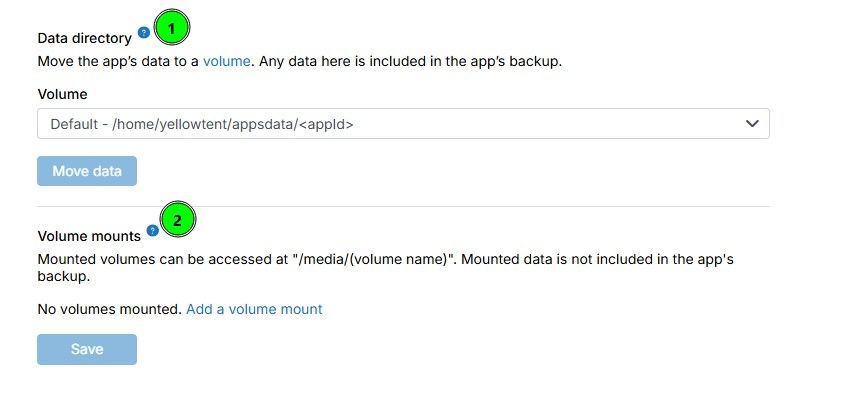
- what cloudron version are you running (just to be sure include the output of
cloudron-support --troubleshoot)
-
- paperless-ngx app has a memory limit of 7.806 GiB
{ "id": "e40353c4-d8bb-484c-8147-aeeb639c716a", "appStoreId": "com.paperlessng.cloudronapp", "versionsUrl": "", "installationState": "installed", "runState": "running", "health": "healthy", "memoryLimit": 8381975040, "cpuQuota": 100, "label": null, "notes": "", "taskId": null, "sso": false, "enableBackup": true, "crontab": null, "creationTime": "2022-06-22T15:00:41.000Z", "updateTime": "2026-07-29T10:13:52.000Z", "enableAutomaticUpdate": true, "upstreamUri": "", "enableMailbox": true, "mailboxDisplayName": "", "mailboxName": "paperless-ngx.app", "mailboxDomain": "redacted.com", "enableInbox": false, "inboxName": null, "inboxDomain": null, "enableTurn": 1, "enableRedis": 1, "storageVolumeId": null, "storageVolumePrefix": null, "ts": "2026-08-03T14:31:33.000Z", "manifest": { "id": "com.paperlessng.cloudronapp", "title": "Paperless-ngx", "author": "Paperless-ngx Team", "description": "### About\n\nPaperless-ngx is an application that manages your personal documents. With the help of a document scanner (see Scanner recommendations),\npaperless transforms your wieldy physical document binders into a searchable archive and provides many utilities for finding and managing your documents.\n\n### Why This Exists\n\nPaper is a nightmare. Environmental issues aside, there’s no excuse for it in the 21st century.\nIt takes up space, collects dust, doesn’t support any form of a search feature, indexing is tedious, it’s heavy and prone to damage & loss.\n\nI wrote this to make “going paperless” easier. I do not have to worry about finding stuff again.\nI feed documents right from the post box into the scanner and then shred them. Perhaps you might find it useful too.\n\n### Paperless-ngx\n\nPaperless-ngx forked from paperless-ng to continue the great work and distribute responsibility of supporting and advancing the project among a team of people.\n\n", "tagline": "Scan, index and archive documents", "version": "1.60.7", "upstreamVersion": "3.0.5", "healthCheckPath": "/", "httpPort": 8000, "minBoxVersion": "8.0.0", "addons": { "localstorage": { "ftp": { "uid": 1000, "uname": "cloudron" } }, "redis": { "noPassword": true }, "postgresql": {}, "oidc": { "loginRedirectUri": "/accounts/oidc/cloudron/login/callback/" }, "sendmail": { "supportsDisplayName": true } }, "optionalSso": true, "memoryLimit": 1000000000, "manifestVersion": 2, "website": "https://docs.paperless-ngx.com/", "contactEmail": "support@cloudron.io", "icon": "file://logo.png", "tags": [ "document", "ocr", "pdf", "archive" ], "mediaLinks": [ "https://screenshots.cloudron.io/com.paperlessng.cloudronapp/dashboard.png", "https://screenshots.cloudron.io/com.paperlessng.cloudronapp/documents-smallcards.png", "https://screenshots.cloudron.io/com.paperlessng.cloudronapp/documents-table.png" ], "checklist": { "change-default-password": { "message": "Change the default admin password" } }, "postInstallMessage": "This app is pre-setup with an admin account.\n\nThe initial credentials are:\n\n**Username**: admin<br/>\n**Password**: changeme123<br/>\n**Email**: admin@cloudron.local<br/>\n\n<sso>\nBy default, Cloudron users have no permissions. Users will only see a Loading screen. This can be changed by the Paperless-ngx admin in the `Users & Groups` tab.\n\nMinimal permissions to let users to login:\n**Add UISettings**\n**View UISettings**\n</sso>\n", "changelog": "* Update paperless-ngx to 3.0.5\n* [Full Changelog](https://github.com/paperless-ngx/paperless-ngx/releases/tag/v3.0.5)\n* Fix: accept Whoosh-era abbreviated relative-date units (yrs, mos, wks, etc) in search queries [@stumpylog](https://github.com/stumpylog) ([#13486](https://github.com/paperless-ngx/paperless-ngx/pull/13486))\n* Fix: fix edit dialog error change detection [@shamoon](https://github.com/shamoon) ([#13483](https://github.com/paperless-ngx/paperless-ngx/pull/13483))\n* Fix: key the AI suggestion cache by model and endpoint [@lunetics](https://github.com/lunetics) ([#13449](https://github.com/paperless-ngx/paperless-ngx/pull/13449))\n* Fix: validate custom field values in bulk operations [@shamoon](https://github.com/shamoon) ([#13457](https://github.com/paperless-ngx/paperless-ngx/pull/13457))\n* Fixhancement: better handle empty fields from AI suggestions [@shamoon](https://github.com/shamoon) ([#13454](https://github.com/paperless-ngx/paperless-ngx/pull/13454))\n* Fix: normalize monetary decimal symbol by locale [@shamoon](https://github.com/shamoon) ([#13427](https://github.com/paperless-ngx/paperless-ngx/pull/13427))\n* Fix: fold overflowing path text in sanity checker [@stumpylog](https://github.com/stumpylog) ([#13426](https://github.com/paperless-ngx/paperless-ngx/pull/13426))\n* Fix: correct delayed add field button for custom fields [@shamoon](https://github.com/shamoon) ([#13424](https://github.com/paperless-ngx/paperless-ngx/pull/13424))\n* Fix: consolidate born-digital PDF detection between archive decision and OCR [@stumpylog](https://github.com/stumpylog) ([#13409](https://github.com/paperless-ngx/paperless-ngx/pull/13409))\n* Fix: avoid NotSupportedError from document_importer on MariaDB [@stumpylog](https://github.com/stumpylog) ([#13400](https://github.com/paperless-ngx/paperless-ngx/pull/13400))\n", "forumUrl": "https://forum.cloudron.io/category/137/paperless-ng", "documentationUrl": "https://docs.cloudron.io/packages/paperless-ngx", "dockerImage": "cloudron/com.paperlessng.cloudronapp:202608020423090000" }, "tags": [ "Daily" ], "checklist": { "change-default-password": { "acknowledged": true, "message": "Change the default admin password", "changedAt": 1725990484671, "changedBy": "cmagnuson" } }, "updateInfo": { "id": "com.paperlessng.cloudronapp", "creationDate": "2026-08-02T10:07:22.000Z", "publishState": "approved", "manifest": { "id": "com.paperlessng.cloudronapp", "title": "Paperless-ngx", "author": "Paperless-ngx Team", "description": "### About\n\nPaperless-ngx is an application that manages your personal documents. With the help of a document scanner (see Scanner recommendations),\npaperless transforms your wieldy physical document binders into a searchable archive and provides many utilities for finding and managing your documents.\n\n### Why This Exists\n\nPaper is a nightmare. Environmental issues aside, there’s no excuse for it in the 21st century.\nIt takes up space, collects dust, doesn’t support any form of a search feature, indexing is tedious, it’s heavy and prone to damage & loss.\n\nI wrote this to make “going paperless” easier. I do not have to worry about finding stuff again.\nI feed documents right from the post box into the scanner and then shred them. Perhaps you might find it useful too.\n\n### Paperless-ngx\n\nPaperless-ngx forked from paperless-ng to continue the great work and distribute responsibility of supporting and advancing the project among a team of people.\n\n", "tagline": "Scan, index and archive documents", "version": "1.60.7", "upstreamVersion": "3.0.5", "healthCheckPath": "/", "httpPort": 8000, "minBoxVersion": "8.0.0", "addons": { "localstorage": { "ftp": { "uid": 1000, "uname": "cloudron" } }, "redis": { "noPassword": true }, "postgresql": {}, "oidc": { "loginRedirectUri": "/accounts/oidc/cloudron/login/callback/" }, "sendmail": { "supportsDisplayName": true } }, "optionalSso": true, "memoryLimit": 1000000000, "manifestVersion": 2, "website": "https://docs.paperless-ngx.com/", "contactEmail": "support@cloudron.io", "icon": "file://logo.png", "tags": [ "document", "ocr", "pdf", "archive" ], "mediaLinks": [ "https://screenshots.cloudron.io/com.paperlessng.cloudronapp/dashboard.png", "https://screenshots.cloudron.io/com.paperlessng.cloudronapp/documents-smallcards.png", "https://screenshots.cloudron.io/com.paperlessng.cloudronapp/documents-table.png" ], "checklist": { "change-default-password": { "message": "Change the default admin password" } }, "postInstallMessage": "This app is pre-setup with an admin account.\n\nThe initial credentials are:\n\n**Username**: admin<br/>\n**Password**: changeme123<br/>\n**Email**: admin@cloudron.local<br/>\n\n<sso>\nBy default, Cloudron users have no permissions. Users will only see a Loading screen. This can be changed by the Paperless-ngx admin in the `Users & Groups` tab.\n\nMinimal permissions to let users to login:\n**Add UISettings**\n**View UISettings**\n</sso>\n", "changelog": "* Update paperless-ngx to 3.0.5\n* [Full Changelog](https://github.com/paperless-ngx/paperless-ngx/releases/tag/v3.0.5)\n* Fix: accept Whoosh-era abbreviated relative-date units (yrs, mos, wks, etc) in search queries [@stumpylog](https://github.com/stumpylog) ([#13486](https://github.com/paperless-ngx/paperless-ngx/pull/13486))\n* Fix: fix edit dialog error change detection [@shamoon](https://github.com/shamoon) ([#13483](https://github.com/paperless-ngx/paperless-ngx/pull/13483))\n* Fix: key the AI suggestion cache by model and endpoint [@lunetics](https://github.com/lunetics) ([#13449](https://github.com/paperless-ngx/paperless-ngx/pull/13449))\n* Fix: validate custom field values in bulk operations [@shamoon](https://github.com/shamoon) ([#13457](https://github.com/paperless-ngx/paperless-ngx/pull/13457))\n* Fixhancement: better handle empty fields from AI suggestions [@shamoon](https://github.com/shamoon) ([#13454](https://github.com/paperless-ngx/paperless-ngx/pull/13454))\n* Fix: normalize monetary decimal symbol by locale [@shamoon](https://github.com/shamoon) ([#13427](https://github.com/paperless-ngx/paperless-ngx/pull/13427))\n* Fix: fold overflowing path text in sanity checker [@stumpylog](https://github.com/stumpylog) ([#13426](https://github.com/paperless-ngx/paperless-ngx/pull/13426))\n* Fix: correct delayed add field button for custom fields [@shamoon](https://github.com/shamoon) ([#13424](https://github.com/paperless-ngx/paperless-ngx/pull/13424))\n* Fix: consolidate born-digital PDF detection between archive decision and OCR [@stumpylog](https://github.com/stumpylog) ([#13409](https://github.com/paperless-ngx/paperless-ngx/pull/13409))\n* Fix: avoid NotSupportedError from document_importer on MariaDB [@stumpylog](https://github.com/stumpylog) ([#13400](https://github.com/paperless-ngx/paperless-ngx/pull/13400))\n", "forumUrl": "https://forum.cloudron.io/category/137/paperless-ng", "documentationUrl": "https://docs.cloudron.io/packages/paperless-ngx", "dockerImage": "cloudron/com.paperlessng.cloudronapp:202608020423090000" }, "iconUrl": "https://api.cloudron.io/api/v1/apps/com.paperlessng.cloudronapp/versions/1.60.7/icon", "featured": false, "byCloudron": false, "ranking": 0, "unstable": false, "isAutoUpdatable": true, "manualUpdateReason": "" }, "reverseProxyConfig": {}, "portBindings": {}, "accessRestriction": { "users": [], "groups": [ "gid-3f0e5242-a015-40a0-aabb-74d864859e0c" ] }, "operators": { "users": [ "uid-e4a8026b-8953-41d7-9edf-a411a47eb8fa", "uid-aec06813-4b57-4205-8660-943c054169a6", "uid-211e1113-db80-46bb-9499-1e6b066523e5", "uid-f2d6a2d6-c33f-48bc-9ef6-6c6eb12dd684", "uid-2c1ad5cd-5b09-4c13-ad68-abf1ed63f062" ], "groups": [] }, "debugMode": null, "buildConfig": { "buildArgs": [], "dockerfileName": null }, "secondaryDomains": [], "redirectDomains": [], "aliasDomains": [], "subdomain": "paperless-ngx", "domain": "redacted.com", "certificate": null, "env": {}, "mounts": [ { "volumeId": "b8df7b3f075b4f2d9b9248a0a96aa90d", "readOnly": false } ], "error": null, "devices": {}, "iconUrl": "/api/v1/apps/e40353c4-d8bb-484c-8147-aeeb639c716a/icon", "fqdn": "paperless-ngx.redacted.com", "accessLevel": "admin" }- Postgresql service has a memory limit set of 10.75 GiB and is using roughly 1.5 Gib
{ "service": { "name": "postgresql", "status": "active", "memoryUsed": 1693487104, "memoryPercent": 14, "error": null, "healthcheck": { "status": true }, "config": { "memoryLimit": 11542724608, "recoveryMode": false }, "defaultMemoryLimit": 2415919104 } }- The volume is a cifs type and is being provided by a Windows 11 Pro desktop in the same local network as the cloudron server
{ "id": "b8df7b3f075b4f2d9b9248a0a96aa90d", "name": "paperless-ngx", "hostPath": "/mnt/volumes/b8df7b3f075b4f2d9b9248a0a96aa90d", "creationTime": "2022-08-29T15:01:28.000Z", "mountType": "cifs", "mountOptions": { "host": "host.redacted.com", "remoteDir": "/paperless-ngx", "username": "paperless-ngx", "seal": false } }- App data was not moved to the volume
This volume is only used for the paperless consume directory, no data lives in it permanently, as soon as a file is written it is supposed to be pulled by paperless.
I have updated the config file to point the consume directory back at a local path relative to /app/data, removed the volume from the apps storage tab, restarted the app and confirmed it is working aside, and tried to update again and it gives the same error
Downgrades are not permitted for apps installed from AppStore or Community. force to override.I don't believe the volume has any effect on the current issue but I do believe it contributed to the app getting into this inconsistent state where it is using the image for the current package version but still things it needs to update to that version.
- Output of
cloudron-support --troubleshoot
Vendor: Dell Inc. Product: Inspiron 3030 Linux: 6.8.0-136-generic Ubuntu: noble 24.04 Cloudron: 9.2.0 Execution environment: none none Processor: Intel(R) Core(TM) i7-14700 BIOS Intel(R) Core(TM) i7-14700 CPU @ 4.0GHz x 28 RAM: 32542804KB Disk: /dev/mapper/ubuntu--vg-ubuntu--lv 1.6T [OK] Root disk usage is OK (8%) [OK] Memory usage is OK (41%) [OK] Clock is NTP-synchronized [OK] node version is correct [OK] IPv6 is enabled in kernel. No public IPv6 address [OK] docker is running [OK] docker version is correct [OK] MySQL is running [OK] netplan is good [OK] DNS is resolving via systemd-resolved [OK] unbound is running [OK] IPv4 HTTPS to api.cloudron.io/api/v1/helper/public_ip [SKIP] IPv6 HTTPS to api.cloudron.io/api/v1/helper/public_ip — no public IPv6 address [OK] IPv4 HTTPS to auth.docker.io/token [SKIP] IPv6 HTTPS to auth.docker.io/token — no public IPv6 address [OK] IPv4 HTTPS to acme-v02.api.letsencrypt.org [SKIP] IPv6 HTTPS to acme-v02.api.letsencrypt.org — no public IPv6 address [OK] nginx is running [OK] dashboard cert is valid [OK] dashboard is reachable via loopback [OK] No pending database migrations [OK] Service 'mysql' is running and healthy [OK] Service 'postgresql' is running and healthy [OK] Service 'mongodb' is running and healthy [OK] Service 'mail' is running and healthy [OK] Service 'graphite' is running and healthy [OK] Service 'sftp' is running and healthy [OK] box v9.2.0 is running [OK] Dashboard is reachable via IPv4 (https://my.redacted.com) [SKIP] Dashboard IPv6 reachability — no public IPv6 address [SKIP] Domain expiry check — whois did not return an expiry date for redacted.com ======== Summary ======== PASS: 26 WARN: 0 FAIL: 0 SKIP: 5 For troubleshooting tips, see https://docs.cloudron.io/troubleshooting To share a full diagnostic dump on the forum, run: cloudron-support --send-diagnostics -
I have paperless-ngx installed.
It tried to upgrade to package version 1.60.7 automatically and generated log entries for failed upgrades over and over.
The app has a volume that was not accessible during the automatic upgrade process which I believe was the cause of the failures.
I fixed the inaccessible volume, went to repair, and then I believe selected retry update task.
The app restarted and is now accessible.
Under info the app indicates its package version is com.paperlessng.cloudronapp@1.60.7.
Under updates it still shows a new package version of 1.60.7 as being available and not installed.
I have restarted cloudron, restarted the app, clicked check updates a number of times, but it still shows as the update being available.
When I try to click the green update button it errors with "Downgrades are not permitted for apps installed from AppStore or Community. force to override".
It seems like the app tried to update and actually succeeded in updating the image being used for the app but when it tried to start it failed because the volume was inaccessible so some part of the system flagged the update as not occurring but once the volume issue was resolved the app was able to restart the update task and something finished. After clicking the retry update task under repair it completed very quickly and didn't back up anything or download a new image which would have taken much longer to do.
We have already been adding documents and making changes this morning so I don't have a way of rolling back to the prior days backup and then upgrading from scratch again which I assume would resolve this.
What can I do to get this app back into a happy state as I assume it is going to start generating errors when it tries to auto update again tonight but cant as it is already upgraded and/or that it will prevent me from getting future updates as it things I haven't completed the previous required update?
@ChristopherMag I occasionally get something like this.
My “solution” is to navigate away from the app’s screen to another app, refresh the page, navigate back to the problem, go to updates, press updates and maybe it’s gone, if not, toggle automatic updates off/on (slight delay between). That usually stops the platform prompting an update which is already installed. -
@timconsidine I have had the same thing happen before to and done the same things. In those cases it felt like the local browser cached version of the application's state was out of sync and so taking those actions helped get everything in sync again.
In this case I had done everything you mentioned but hadn't tried disabling automatic updates. I have now disabled automatic updates, navigated away and back, restarted the app, restarted the server, clicked check for updates in between steps, etc. and it still shows as needing an update that has already been done and gives the same error message when clicking update.
I will leave automatic updates off for now in case that helps and at least it will stop the numerous alerts over and over again at night as the app tries to update and fails each hour.
-
Inside the apps table of the box database in the mysql server running on cloudron there is an updateInfoJson column that is set to null for apps that don't have a pending update but has a json value for apps that have a pending update.
It also looks like there is a config.json under the apps folder on the cloudron server located at
/home/yellowtent/appsdata/e40353c4-d8bb-484c-8147-aeeb639c716a/config.jsonthat contains a updateInfo key describing the update that is available.Documenting what I am finding here while waiting for a more specific direction but it seems like maybe setting updateInfoJson to null for this app in the box database as well as setting it to null in the config.json might result in this no longer being stuck.
In that same vein though I would imagine that maybe that would be the case if I backup and clone the existing app, I am going to try that and see what happens and if that works it is a pain but maybe I could do that after hours to force the apps state to get fixed.
-
I took a backup and restored it and then ran check for updates and it doesn't detect any updates as needed for the restored version of paperless.
I would still like to understand how to fix this via another means as I am not 100% sure of all the effects doing this will have as I need the domain name to stay the same so I would likely have to move the existing app to a new domain, back it up, and then restore it to its original domain.
Is there any less impactful way to fix this, like updating that table to null the value of the updateInfoJson column for the app?
-
 C ChristopherMag marked this topic as a regular topic on
-
@ChristopherMag what do the logs say?
Something may not be completing as needed, hence the version thing.
@robi Sorry I missed your message, when clicking the blue update button and then getting the red text error
Downgrades are not permitted for apps installed from AppStore or Community. force to overridethere are no logs generated under the apps event log or the shared cloudron service's logs.When the button is clicked the browser makes the following fetch:
fetch("https://redacted.com/api/v1/apps/e40353c4-d8bb-484c-8147-aeeb639c716a/update?access_token=redacted", {
  "headers": {
    "accept": "*/*",
    "accept-language": "en-US,en;q=0.9",
    "cache-control": "no-cache",
    "content-type": "application/json",
    "pragma": "no-cache",
    "priority": "u=1, i",
    "sec-ch-ua": "\"Not=A?Brand\";v=\"99\", \"Microsoft Edge\";v=\"151\", \"Chromium\";v=\"151\"",
    "sec-ch-ua-mobile": "?0",
    "sec-ch-ua-platform": "\"Windows\"",
    "sec-fetch-dest": "empty",
    "sec-fetch-mode": "cors",
    "sec-fetch-site": "same-origin"
  },
  "referrer": "https://redacted.com/",
  "body": "{\"skipBackup\":false,\"appStoreId\":\"com.paperlessng.cloudronapp@1.60.7\"}",
  "method": "POST",
  "mode": "cors",
  "credentials": "include"
});
And receives the following response:
{ "status": "Bad Request", "message": "Downgrades are not permitted for apps installed from AppStore or Community. force to override" } -
This morning I changed the "location" of the paperless app to be a different host under the same domain, created an additional backup location of type filesystem on local storage (the multiple backup location feature is a lifesaver for things like this), created a backup, cloned it to the original location, and stopped the old copy that constantly wants to update but can't.
The new copy appears to be working fine and no longer indicates it has an unapplied update.
I will wait till there is another new update to paperless and then start the old one and see if with a subsequent update being available it finds a way to clear its stuck state and/or test out any other ways that end up being provided to fix this issue but for now things are back working again.
Independent of this I am going to try to not use a volume for the consume directory with paperless and instead try to have n8n watch the cifs file share and then pull documents and upload them directly to paperless without ever using the filesystem of paperelss in the first place.
-
After working through options, n8n has no easy way to communicate with a cifs file share without mounting it as a local path to the docker container which would reintroduce all the same issues that the paperless app had.
There are community libraries for n8n that enable it to access cifs shares but none of them implement CHANGE_NOTIFY so they would all be polling based which I don't want as I want the system to respond to files being written, not have to poll to see if files are there as that is the way it was working with paperless before.
In theory the smbclient command line tool could be used to do this but I have not been able to find any single binary source for this that would include the libraries it needs to function as installing it into the n8n app container via a package manager isn't an option unless I fork the n8n cloudron app.
I have hit a number of dead ends and at this point have gone back to adding the volume back to the paperless app and updating the configuration to use that volume for the consume directory.
Hopefully something can be done so that if an app pacakge upgrade completes but fails to start after the upgrade because of a volume not being accessible, it still properly removes the pending update so that it doesn't get stuck trying to update to an update that was already installed.
-
@robi Unfortunately I don't have a way of using any other remote file transmission protocol aside from CIFS.
We use ScanSnap scanners (used to be Fujitsu, now owned by Ricoh) which have crummy support for anything other than local storage on the client endpoint or CIFS.
I would rather use another scanner vendor but in a comparison with Canon, various MFPs from Kycoera and Konica Minolta, HP, etc. the ScanSnap (like the ix 1600) consistently creates better pdfs with little or no configuration.
Better OCR (beats the OCR built into paperless), blank page removal, automatic rotation, image quality relative to the source (they do a bunch of dynamic tuning to adjust the dpi, contrast, etc. all dynamically and with better and more consistent results with less work than the alternatives), smaller size pdfs, etc.
It feels like the comparison of a canon DSLR camera from back in the day vs an iPhone where technically you have far more control and options with the canon but the iPhone for most circumstances does a better job overall without any extra expertise or configuration needed.
The downside of that is the that there is nothing like a twain driver for these ScanSnap scanners and so you have to use their not so great scan snap software which aside from local storage only supports scanning to CIFS shares unless, your willing to pass all your documents their their ScanSnap cloud which for compliance purposes we cannot do.
This leaves me in the crappy situation of either spending time working with all of those other scanner vendors and various software chains to try and recreate the processing chain built into a ScanSnap so that we can get the same quality of output with no additional work on behalf of the end user or dealing with the limitation of ScanSnap software and maintaining a CIFS share somewhere with the relative quirks that introduces when trying to get the files over into paperless.
I would love to have a better alternative and it feels like in the last 10 years we are getting closer to that point.
Hopefully one day I can treat a scanner as just a document feeder with an image sensor attached and everything else is handled with other open source software but I still haven't been able been able to accomplish that myself yet.
-
-
@robi Based on your prompting I have revisited the issue and now setup surfer with a shared volume and mapped a network drive to each client where the scan snap software runs via surfer's webdav url.
Now I can scan via scan snap, it writes to the local mounted drive letter, which goes through surfer to the volume attached to it and paperless, and paperless consumes the files written there in near real time.
No more CIFS mount as a part of the solution.
It means maintaining a mapped webdav directory on each client that needs to scan to paperless which isn't ideal but at this point I will take that over having to deal with any cifs based volumes.
Thank you for the questions and while not the solution I would prefer it is at least an incremental step better than where we were.
-
@robi Based on your prompting I have revisited the issue and now setup surfer with a shared volume and mapped a network drive to each client where the scan snap software runs via surfer's webdav url.
Now I can scan via scan snap, it writes to the local mounted drive letter, which goes through surfer to the volume attached to it and paperless, and paperless consumes the files written there in near real time.
No more CIFS mount as a part of the solution.
It means maintaining a mapped webdav directory on each client that needs to scan to paperless which isn't ideal but at this point I will take that over having to deal with any cifs based volumes.
Thank you for the questions and while not the solution I would prefer it is at least an incremental step better than where we were.
@ChristopherMag well done, good progress and definitely a ‘win’ (assuming that scan stations are relatively stable and not changing, the setup work seems tolerable).
Gives me some ideas also
-
@robi Based on your prompting I have revisited the issue and now setup surfer with a shared volume and mapped a network drive to each client where the scan snap software runs via surfer's webdav url.
Now I can scan via scan snap, it writes to the local mounted drive letter, which goes through surfer to the volume attached to it and paperless, and paperless consumes the files written there in near real time.
No more CIFS mount as a part of the solution.
It means maintaining a mapped webdav directory on each client that needs to scan to paperless which isn't ideal but at this point I will take that over having to deal with any cifs based volumes.
Thank you for the questions and while not the solution I would prefer it is at least an incremental step better than where we were.
@ChristopherMag You're welcome.
I invite all of us to listen to our intuition more carefully.
-
Late to the thread...
"body": "{"skipBackup":false,"appStoreId":"com.paperlessng.cloudronapp@1.60.7"}",
So this line indicates that the paperless app was in package version 1.60.7, which is the latest.
"message": "Downgrades are not permitted for apps installed from AppStore or Community. force to override"
The backend checks for updates periodically. It has a cache and passes on the cache to the frontend (for UI/display purposes). To prevent a race, eg you might have parallel tabs or another updated the app, the frontend passes back the version field to the backend before starting an update. What has happened here is that this cache is for some reason an older version and when it tries to update, the backend says that it's already updated to a more recent version.
This issue is mostly caused by either a frontend caching or the backend unable to reach the appstore. I don't think it's the latter because the cloudron-support diagnostics came out clean . Usually, you can also clear this cache by clicking 'Check for updates'.
I guess we have to debug further if someone gets this reproduced .




Hello! It looks like you're interested in this conversation, but you don't have an account yet.
Getting fed up of having to scroll through the same posts each visit? When you register for an account, you'll always come back to exactly where you were before, and choose to be notified of new replies (either via email, or push notification). You'll also be able to save bookmarks and upvote posts to show your appreciation to other community members.
With your input, this post could be even better 💗
Register Login