
So what am I doing wrong?
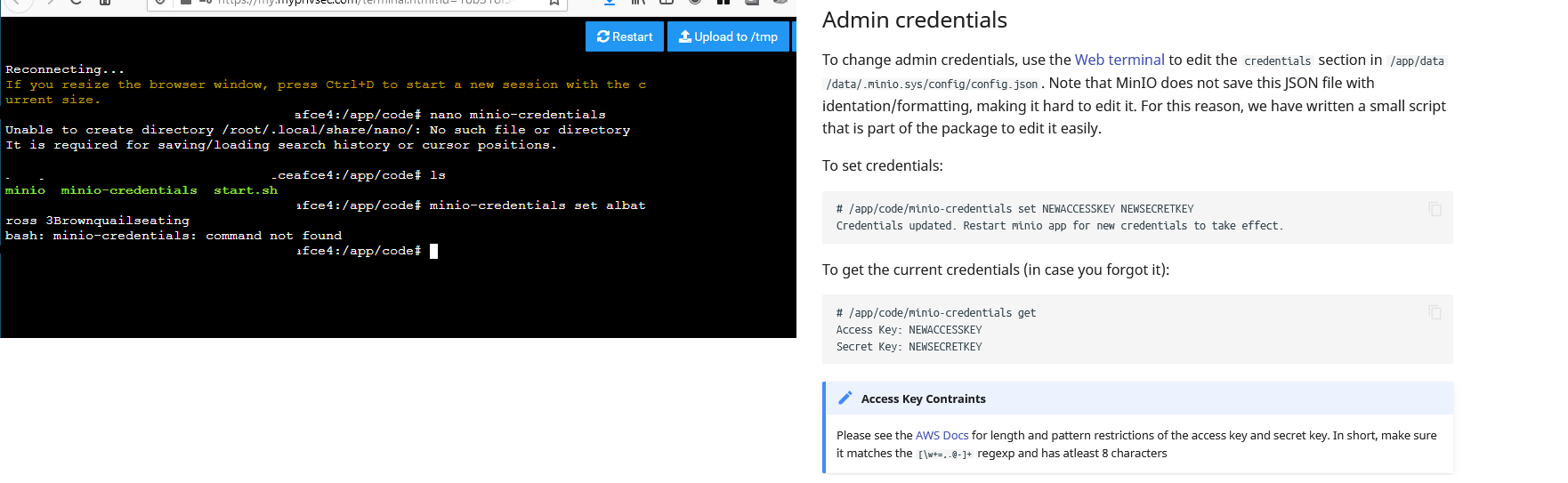
-
@privsec
/app/code/minio-credentialsis a binary/program to execute and not a file to edit using nano. -
@girish Yeah, no I get that
Three lines from the bottom, I ahve
minio-credentials set key1smapleinfo key2sampleinfoI keep getting command not found.
The terminal looks weird cause I blanked out some things
-
First of all, PLEASE DON'T USE PICTURES / SCREENSHOTS FOR LOGS!
This makes the information inaccessible to some users (for example blind ones) and also it's a pain to read.
Simply copy the output press theCodeButtonAnd put your copy-paste here.
@privsec simply said, you are using the shell incorrectly as pointed out by @fbartels
Also as @robi pointed out just read the docs.
You try to access
minio-credentialswhich does not exist in the context as for examplecp | rm | mv.
For example you can check ifmvdoes exist by doing this:/app/code# which mv /usr/bin/mvAnd the shell tells you
mvis located in/usr/bin/mv, when you try this withminio-credentialsyou will get this/app/code# which minio-credentials /app/code#aka no result. So
minio-credentialsdoes not exist as executable in the system paths context.minio-credentialsis a binary file in/app/code/minio-credentialswhich IS executable but the relative or full path is needed.So if you would have followed the doc and copy-pasted
/app/code/minio-credentials set NEWACCESSKEY NEWSECRETKEYit would have worked.
-
First of all, PLEASE DON'T USE PICTURES / SCREENSHOTS FOR LOGS!
This makes the information inaccessible to some users (for example blind ones) and also it's a pain to read.
Simply copy the output press theCodeButtonAnd put your copy-paste here.
@privsec simply said, you are using the shell incorrectly as pointed out by @fbartels
Also as @robi pointed out just read the docs.
You try to access
minio-credentialswhich does not exist in the context as for examplecp | rm | mv.
For example you can check ifmvdoes exist by doing this:/app/code# which mv /usr/bin/mvAnd the shell tells you
mvis located in/usr/bin/mv, when you try this withminio-credentialsyou will get this/app/code# which minio-credentials /app/code#aka no result. So
minio-credentialsdoes not exist as executable in the system paths context.minio-credentialsis a binary file in/app/code/minio-credentialswhich IS executable but the relative or full path is needed.So if you would have followed the doc and copy-pasted
/app/code/minio-credentials set NEWACCESSKEY NEWSECRETKEYit would have worked.
@brutalbirdie said in So what am I doing wrong?:
First of all, PLEASE DON'T USE PICTURES / SCREENSHOTS FOR LOGS!
This makes the information inaccessible to some users (for example blind ones) and also it's a pain to read.
Simply copy the output press theCodeButtonAnd put your copy-paste here.
@privsec simply said, you are using the shell incorrectly as pointed out by @fbartels
Also as @robi pointed out just read the docs.
You try to access
minio-credentialswhich does not exist in the context as for examplecp | rm | mv.
For example you can check ifmvdoes exist by doing this:/app/code# which mv /usr/bin/mvAnd the shell tells you
mvis located in/usr/bin/mv, when you try this withminio-credentialsyou will get this/app/code# which minio-credentials /app/code#aka no result. So
minio-credentialsdoes not exist as executable in the system paths context.minio-credentialsis a binary file in/app/code/minio-credentialswhich IS executable but the relative or full path is needed.So if you would have followed the doc and copy-pasted
/app/code/minio-credentials set NEWACCESSKEY NEWSECRETKEYit would have worked.
I never thought of accessibility issues, thanks for pointing that out. Ill adapt.
Ok, I will try that, thanks all.





Hello! It looks like you're interested in this conversation, but you don't have an account yet.
Getting fed up of having to scroll through the same posts each visit? When you register for an account, you'll always come back to exactly where you were before, and choose to be notified of new replies (either via email, or push notification). You'll also be able to save bookmarks and upvote posts to show your appreciation to other community members.
With your input, this post could be even better 💗
Register Login