Cloudron makes it easy to run web apps like WordPress, Nextcloud, GitLab on your server. Find out more or install now.


Skip to content
  • Categories
  • Recent
  • Tags
  • Popular
  • Bookmarks
  • Search
Skins
  • Light
  • Brite
  • Cerulean
  • Cosmo
  • Flatly
  • Journal
  • Litera
  • Lumen
  • Lux
  • Materia
  • Minty
  • Morph
  • Pulse
  • Sandstone
  • Simplex
  • Sketchy
  • Spacelab
  • United
  • Yeti
  • Zephyr
  • Dark
  • Cyborg
  • Darkly
  • Quartz
  • Slate
  • Solar
  • Superhero
  • Vapor

  • Default (No Skin)
  • No Skin
Collapse
Brand Logo

Cloudron Forum

Apps - Status | Demo | Docs | Install
  1. Cloudron Forum
  2. Support
  3. Can't login for the Apps Page

Can't login for the Apps Page

Scheduled Pinned Locked Moved Solved Support
appstorevultrdns
14 Posts 2 Posters 2.4k Views 2 Watching
  • Oldest to Newest
  • Newest to Oldest
  • Most Votes
Reply
  • Reply as topic
Log in to reply
This topic has been deleted. Only users with topic management privileges can see it.
  • M Offline
    M Offline
    MeeksFamily06
    wrote on last edited by
    #4

    I did check and I can log out and back in, so the issue seems to be between the server and cloudrons servers. I did notice when I look at the console and then click on the apps tab, it says "Failed to get apps. Will retry. " in the console

    1 Reply Last reply
    0
    • M Offline
      M Offline
      MeeksFamily06
      wrote on last edited by
      #5

      With the new information, I did some searching and decided to try host api.cloudron.io and it responded with

      ;; connection timed out; no servers could be reached

      Then I tried host api.cloudron.io 8.8.8.8 and it responded with

      Using domain server:
      Name: 8.8.8.8
      Address: 8.8.8.8#53
      Aliases:

      api.cloudron.io has address 3.209.21.239

      girishG 1 Reply Last reply
      0
      • M MeeksFamily06

        With the new information, I did some searching and decided to try host api.cloudron.io and it responded with

        ;; connection timed out; no servers could be reached

        Then I tried host api.cloudron.io 8.8.8.8 and it responded with

        Using domain server:
        Name: 8.8.8.8
        Address: 8.8.8.8#53
        Aliases:

        api.cloudron.io has address 3.209.21.239

        girishG Offline
        girishG Offline
        girish
        Staff
        wrote on last edited by
        #6

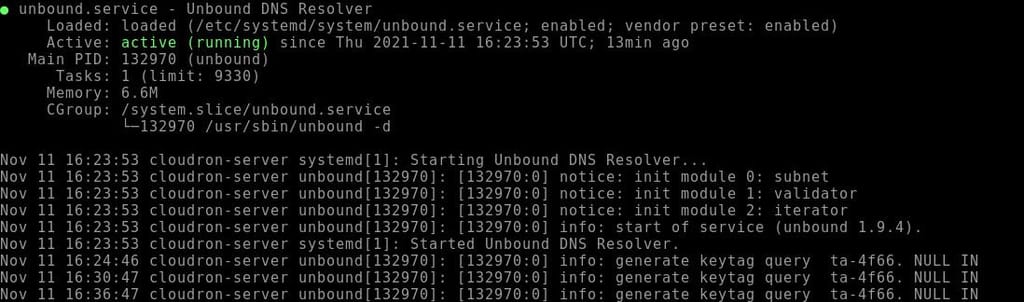
        @meeksfamily06 Ah, this can happen if unbound is not running/working. Can you please check systemctl status unbound ?

        1 Reply Last reply
        0
        • M Offline
          M Offline
          MeeksFamily06
          wrote on last edited by
          #7

          It says

          unbound.jpg

          girishG 2 Replies Last reply
          0
          • M MeeksFamily06

            It says

            unbound.jpg

            girishG Offline
            girishG Offline
            girish
            Staff
            wrote on last edited by girish
            #8

            @meeksfamily06 that seems good. Is your server on linode by any chance? We already got 2-3 reports here that DNS resolution fails on linode for some reason via unbound. The "workaround" is to snapshot the server and create a new server from the snapshot (to get a different IP). There is some issue on the linode side, I think we have to investigate a bit more and report to them.

            1 Reply Last reply
            1
            • M MeeksFamily06

              It says

              unbound.jpg

              girishG Offline
              girishG Offline
              girish
              Staff
              wrote on last edited by
              #9

              @meeksfamily06 If the server is on linode... if the snapshotting does not solve it, do you think you can give us access to the server? I would like to debug it further to find the root cause.

              1 Reply Last reply
              0
              • M Offline
                M Offline
                MeeksFamily06
                wrote on last edited by
                #10

                I sent you a private message

                1 Reply Last reply
                0
                • M Offline
                  M Offline
                  MeeksFamily06
                  wrote on last edited by
                  #11

                  I'm guessing you guys did something because it seems to be working again

                  girishG 1 Reply Last reply
                  0
                  • M MeeksFamily06

                    I'm guessing you guys did something because it seems to be working again

                    girishG Offline
                    girishG Offline
                    girish
                    Staff
                    wrote on last edited by
                    #12

                    @meeksfamily06 Interesting, we didn't actually do anything. Please let us know if you hit this again.

                    1 Reply Last reply
                    0
                    • M Offline
                      M Offline
                      MeeksFamily06
                      wrote on last edited by
                      #13

                      Figured I would add an update. I did figure out what was causing the issue.

                      If I ran the command

                      systemctl status systemd-resolved.service
                      

                      It said it was Active: inactive (dead)

                      So I ran

                      systemctl enable systemd-resolved.service
                      systemctl start systemd-resolved.service
                      systemctl status systemd-resolved.service
                      

                      That fixed the issue

                      girishG 1 Reply Last reply
                      1
                      • M MeeksFamily06

                        Figured I would add an update. I did figure out what was causing the issue.

                        If I ran the command

                        systemctl status systemd-resolved.service
                        

                        It said it was Active: inactive (dead)

                        So I ran

                        systemctl enable systemd-resolved.service
                        systemctl start systemd-resolved.service
                        systemctl status systemd-resolved.service
                        

                        That fixed the issue

                        girishG Offline
                        girishG Offline
                        girish
                        Staff
                        wrote on last edited by
                        #14

                        @meeksfamily06 Cloudron uses unbound and does not use systemd-resolved. You won't see any issues unless when trying to use the mail server (or maybe some apps like nextcloud might act strange when going to the apps section).

                        1 Reply Last reply
                        0

                        Hello! It looks like you're interested in this conversation, but you don't have an account yet.

                        Getting fed up of having to scroll through the same posts each visit? When you register for an account, you'll always come back to exactly where you were before, and choose to be notified of new replies (either via email, or push notification). You'll also be able to save bookmarks and upvote posts to show your appreciation to other community members.

                        With your input, this post could be even better 💗

                        Register Login
                        Reply
                        • Reply as topic
                        Log in to reply
                        • Oldest to Newest
                        • Newest to Oldest
                        • Most Votes


                        • Login

                        • Don't have an account? Register

                        • Login or register to search.
                        • First post
                          Last post
                        0
                        • Categories
                        • Recent
                        • Tags
                        • Popular
                        • Bookmarks
                        • Search