
Unable to complete update to v7.4.0 (Ubuntu 20.04.2 LTS)
-
Dear all,
I'm trying to update an instance to v7.3.6 (Ubuntu 20.04.2 LTS) to 7.4.0.
Not only the updated was not completed, but I had also full disk while performing update: the update himself fulled the disk.
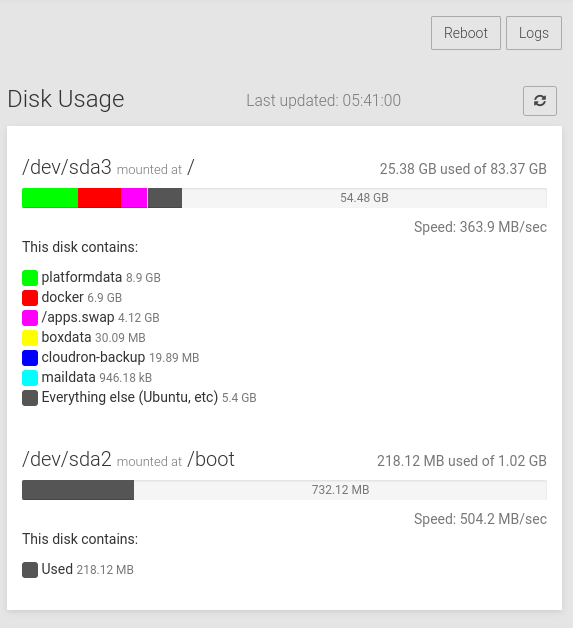
Before update

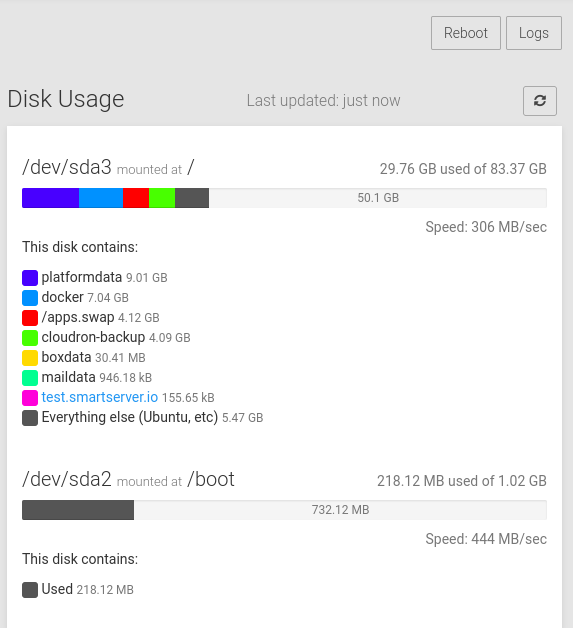
After (broken) update

As you can see, "Docker" jumped from 4.51GB to 10.4GB.
What I can do?
Edit: I find this post Docker Images Taking huge space and applied
docker image prune -a, so docker size is back to 4.15 GB, but still don't know what goes wrong in update.
Edit 2: Because of disk full, I had to restore unbound service following "Recovery after disk full" instructions here -
Dear all,
I'm trying to update an instance to v7.3.6 (Ubuntu 20.04.2 LTS) to 7.4.0.
Not only the updated was not completed, but I had also full disk while performing update: the update himself fulled the disk.
Before update
After (broken) update
As you can see, "Docker" jumped from 4.51GB to 10.4GB.
What I can do?
Edit: I find this post Docker Images Taking huge space and applied
docker image prune -a, so docker size is back to 4.15 GB, but still don't know what goes wrong in update.
Edit 2: Because of disk full, I had to restore unbound service following "Recovery after disk full" instructions here -
@p44 the update logs are at
/home/yellowtent/platformdata/logs/updater/. There are files namedcloudron-updater-<timestamp>.log. Can you check those files?@girish Thank's a lot, what I have to check ?
I saw different errors like this:
failed to register layer: Error processing tar file(exit status 1): write /root/.npm/_cacache/content-v2/sha512/74/89/c8...7b6560d2a8a8: no space left on deviceBut it seems this is an error due to space left on device, that occurred after lunched the update.
Edit: I tried to update again, but few seconds after lunching update, disk will be fulled again. I sent an email to support.
-
@girish Thank's a lot, what I have to check ?
I saw different errors like this:
failed to register layer: Error processing tar file(exit status 1): write /root/.npm/_cacache/content-v2/sha512/74/89/c8...7b6560d2a8a8: no space left on deviceBut it seems this is an error due to space left on device, that occurred after lunched the update.
Edit: I tried to update again, but few seconds after lunching update, disk will be fulled again. I sent an email to support.
-
I think this is just the server disk space being super low (~19GB). There was an exception in the logs:
[ERROR] AssertionError [ERR_ASSERTION]: ifError got unwanted exception: Create table/tablespace 'oidcClients' failed, as disk is full
    at /home/yellowtent/box/node_modules/db-migrate/lib/commands/on-complete.js:15:14
I managed to update it in a hacky way but I guess we need around 25GB total server space when transitioning over to new docker images.
-
 G girish marked this topic as a question on
-
G girish has marked this topic as solved on
-
I think this is just the server disk space being super low (~19GB). There was an exception in the logs:
[ERROR] AssertionError [ERR_ASSERTION]: ifError got unwanted exception: Create table/tablespace 'oidcClients' failed, as disk is full
    at /home/yellowtent/box/node_modules/db-migrate/lib/commands/on-complete.js:15:14
I managed to update it in a hacky way but I guess we need around 25GB total server space when transitioning over to new docker images.
-
@p44 It takes extra space for a short amount of time. It's like this:
- Old containers are running
- New images are downloaded
- Old containers are stopped.
- Old images are removed
- New containers are started
We can do step 3 and 4 before step 2. But this means that you will have more downtime. So, it's a compromise made assuming that servers have disk space (which most of them do).
-
@p44 It takes extra space for a short amount of time. It's like this:
- Old containers are running
- New images are downloaded
- Old containers are stopped.
- Old images are removed
- New containers are started
We can do step 3 and 4 before step 2. But this means that you will have more downtime. So, it's a compromise made assuming that servers have disk space (which most of them do).
I am running into the exact same problem that my disk space is running low. In this context, I want to switch to another VM. Is it possible to install a fresh copy of Cloudron 7.4.1 on the new server and then import a backup of one single app from the old Cloudron instance? The app version is the same, however, the cloudron version is different due to the fact that I cannot update the old instance.
-
I am running into the exact same problem that my disk space is running low. In this context, I want to switch to another VM. Is it possible to install a fresh copy of Cloudron 7.4.1 on the new server and then import a backup of one single app from the old Cloudron instance? The app version is the same, however, the cloudron version is different due to the fact that I cannot update the old instance.
-
@p44 It takes extra space for a short amount of time. It's like this:
- Old containers are running
- New images are downloaded
- Old containers are stopped.
- Old images are removed
- New containers are started
We can do step 3 and 4 before step 2. But this means that you will have more downtime. So, it's a compromise made assuming that servers have disk space (which most of them do).
-
@girish what I can see is that after update, "Docker" takes 9.25 GB disk space. Before update it was only 4.51 GB... So my question is: new release requires more disk space?

-
On my existing install, docker takes around 7GB.
On a fresh install:
root@ubuntu-s-1vcpu-2gb-sfo2-01:~# docker system df
TYPE TOTAL ACTIVE SIZE RECLAIMABLE
Images 9 0 6.905GB 6.905GB (100%)
Containers 0 0 0B 0B
Local Volumes 0 0 0B 0B
Build Cache 0 0 0B 0BSo, the size hasn't changed much (atleast for docker images). Not sure what apps you have installed. Maybe they are taking lots of space?
-
On my existing install, docker takes around 7GB.
On a fresh install:
root@ubuntu-s-1vcpu-2gb-sfo2-01:~# docker system df
TYPE TOTAL ACTIVE SIZE RECLAIMABLE
Images 9 0 6.905GB 6.905GB (100%)
Containers 0 0 0B 0B
Local Volumes 0 0 0B 0B
Build Cache 0 0 0B 0BSo, the size hasn't changed much (atleast for docker images). Not sure what apps you have installed. Maybe they are taking lots of space?
-
@girish Thank's Girish, I've only one VPN app. The docker before update it was 4.5 GB, now is around 7 (yesterday it was 9)...
-
 D d19dotca referenced this topic on
Hello! It looks like you're interested in this conversation, but you don't have an account yet.
Getting fed up of having to scroll through the same posts each visit? When you register for an account, you'll always come back to exactly where you were before, and choose to be notified of new replies (either via email, or push notification). You'll also be able to save bookmarks and upvote posts to show your appreciation to other community members.
With your input, this post could be even better 💗
Register Login