Cloudron makes it easy to run web apps like WordPress, Nextcloud, GitLab on your server. Find out more or install now.


Skip to content
  • Categories
  • Recent
  • Tags
  • Popular
  • Bookmarks
  • Search
Skins
  • Light
  • Brite
  • Cerulean
  • Cosmo
  • Flatly
  • Journal
  • Litera
  • Lumen
  • Lux
  • Materia
  • Minty
  • Morph
  • Pulse
  • Sandstone
  • Simplex
  • Sketchy
  • Spacelab
  • United
  • Yeti
  • Zephyr
  • Dark
  • Cyborg
  • Darkly
  • Quartz
  • Slate
  • Solar
  • Superhero
  • Vapor

  • Default (No Skin)
  • No Skin
Collapse
Brand Logo

Cloudron Forum

Offical apps | Community apps | Demo | Docs | Install
  1. Cloudron Forum
  2. Support
  3. Cloudron SPF record does not permit IP

Cloudron SPF record does not permit IP

Scheduled Pinned Locked Moved Solved Support
emailspf
36 Posts 8 Posters 16.1k Views 10 Watching
  • Oldest to Newest
  • Newest to Oldest
  • Most Votes
Reply
  • Reply as topic
Log in to reply
This topic has been deleted. Only users with topic management privileges can see it.
  • jaschaezraJ jaschaezra

    Hi.

    I just found the following from an E-Mail I sent from my cloudron managed server to another E-Mail-Server where I own an Email account:

    Received-SPF: SoftFail (mail.jascha.wtf: domain of jascha.wtf does not designate 84.57.85.124 as permitted sender) receiver=mail.jascha.wtf; identity=mailfrom; client-ip=84.57.85.124 helo=[10.0.0.10]; envelope-from=<jascha@jascha.wtf>
    

    The IP shown is my IP at home. I send Emails via Thunderbird. In my understanding the sending Ip should not be the IP of me at home but the one from the mailserver, right?

    Did I do something wrong? Or is it a problem with the cloudron Mailserver?

    girishG
    girishG
    girish
    Staff
    wrote on last edited by
    #2

    @jaschaezra said in Cloudron SPF record does not permit IP:

    The IP shown is my IP at home. I send Emails via Thunderbird. In my understanding the sending Ip should not be the IP of me at home but the one from the mailserver, right?

    That's correct. I wonder how it can even have the IP of your home server. This shouldn't be anywhere. Do you think you can send a test mail to test@cloudron.io , so I can look at the headers?

    KubernetesK jaschaezraJ 3 Replies Last reply
    0
    • girishG girish

      @jaschaezra said in Cloudron SPF record does not permit IP:

      The IP shown is my IP at home. I send Emails via Thunderbird. In my understanding the sending Ip should not be the IP of me at home but the one from the mailserver, right?

      That's correct. I wonder how it can even have the IP of your home server. This shouldn't be anywhere. Do you think you can send a test mail to test@cloudron.io , so I can look at the headers?

      KubernetesK
      KubernetesK
      Kubernetes
      App Dev
      wrote on last edited by
      #3

      @girish I have the same experience as @jaschaezra on my Cloudron Instance.

      1 Reply Last reply
      2
      • girishG girish

        @jaschaezra said in Cloudron SPF record does not permit IP:

        The IP shown is my IP at home. I send Emails via Thunderbird. In my understanding the sending Ip should not be the IP of me at home but the one from the mailserver, right?

        That's correct. I wonder how it can even have the IP of your home server. This shouldn't be anywhere. Do you think you can send a test mail to test@cloudron.io , so I can look at the headers?

        jaschaezraJ
        jaschaezraJ
        jaschaezra
        wrote on last edited by
        #4

        @girish done 🙂 sent from jascha@jascha.wtf, topic is the URL of this thread

        1 Reply Last reply
        0
        • girishG girish

          @jaschaezra said in Cloudron SPF record does not permit IP:

          The IP shown is my IP at home. I send Emails via Thunderbird. In my understanding the sending Ip should not be the IP of me at home but the one from the mailserver, right?

          That's correct. I wonder how it can even have the IP of your home server. This shouldn't be anywhere. Do you think you can send a test mail to test@cloudron.io , so I can look at the headers?

          jaschaezraJ
          jaschaezraJ
          jaschaezra
          wrote on last edited by
          #5

          @girish said in Cloudron SPF record does not permit IP:

          I wonder how it can even have the IP of your home server.

          It is not the IP of my server, this is the IP of my DSL at home.

          jaschaezraJ 1 Reply Last reply
          1
          • jaschaezraJ jaschaezra

            @girish said in Cloudron SPF record does not permit IP:

            I wonder how it can even have the IP of your home server.

            It is not the IP of my server, this is the IP of my DSL at home.

            jaschaezraJ
            jaschaezraJ
            jaschaezra
            wrote on last edited by
            #6

            @girish an news on this one?

            jaschaezraJ 1 Reply Last reply
            2
            • jaschaezraJ jaschaezra

              @girish an news on this one?

              jaschaezraJ
              jaschaezraJ
              jaschaezra
              wrote on last edited by
              #7

              @girish I do not want to bother you but any news on this?

              jaschaezraJ 1 Reply Last reply
              2
              • jaschaezraJ jaschaezra

                @girish I do not want to bother you but any news on this?

                jaschaezraJ
                jaschaezraJ
                jaschaezra
                wrote on last edited by
                #8

                @girish sorry but I have to ask: any update on this?

                matix131997M 1 Reply Last reply
                2
                • jaschaezraJ jaschaezra

                  @girish sorry but I have to ask: any update on this?

                  matix131997M
                  matix131997M
                  matix131997
                  wrote on last edited by
                  #9

                  @jaschaezra
                  I checked with myself. I confirm the problem with revealing the IP address of the home connection when sending emails from client mail -Thunderbird, K9 (Android), Gmail (iOS). It will probably be the same with other apps. When sending via webmail "Roundcube" the IP address of the home connection does not appear.

                  robiR 1 Reply Last reply
                  1
                  • matix131997M matix131997

                    @jaschaezra
                    I checked with myself. I confirm the problem with revealing the IP address of the home connection when sending emails from client mail -Thunderbird, K9 (Android), Gmail (iOS). It will probably be the same with other apps. When sending via webmail "Roundcube" the IP address of the home connection does not appear.

                    robiR
                    robiR
                    robi
                    wrote on last edited by
                    #10

                    @matix131997 this is correct as that is how the envelope is generated.

                    In some cases, very useful to use Snappy Mail or other client in Cloudron to avoid source IP issues.

                    Frequency tech

                    1 Reply Last reply
                    1
                    • girishG
                      girishG
                      girish
                      Staff
                      wrote on last edited by
                      #11

                      @jaschaezra @matix131997 I could reproduce this one. Looks like Haraka outbound is adding that header. Note that this is not a problem for mail delivery as such, but it's not nice that the mail client IP is revealed for no reason. Looking into a fix.

                      robiR jaschaezraJ 2 Replies Last reply
                      3
                      • girishG girish

                        @jaschaezra @matix131997 I could reproduce this one. Looks like Haraka outbound is adding that header. Note that this is not a problem for mail delivery as such, but it's not nice that the mail client IP is revealed for no reason. Looking into a fix.

                        robiR
                        robiR
                        robi
                        wrote on last edited by
                        #12

                        @girish that would be an interesting place to fix it as the last time I looked at it, the client (Thunderbird) needed modifying to accomplish that.

                        Frequency tech

                        1 Reply Last reply
                        0
                        • girishG girish

                          @jaschaezra @matix131997 I could reproduce this one. Looks like Haraka outbound is adding that header. Note that this is not a problem for mail delivery as such, but it's not nice that the mail client IP is revealed for no reason. Looking into a fix.

                          jaschaezraJ
                          jaschaezraJ
                          jaschaezra
                          wrote on last edited by
                          #13

                          @girish said in Cloudron SPF record does not permit IP:

                          @jaschaezra @matix131997 I could reproduce this one. Looks like Haraka outbound is adding that header. Note that this is not a problem for mail delivery as such, but it's not nice that the mail client IP is revealed for no reason. Looking into a fix.

                          And it gives a SPF-Soft-Fail which can at worst lead to being rejected.

                          C girishG 2 Replies Last reply
                          1
                          • jaschaezraJ jaschaezra

                            @girish said in Cloudron SPF record does not permit IP:

                            @jaschaezra @matix131997 I could reproduce this one. Looks like Haraka outbound is adding that header. Note that this is not a problem for mail delivery as such, but it's not nice that the mail client IP is revealed for no reason. Looking into a fix.

                            And it gives a SPF-Soft-Fail which can at worst lead to being rejected.

                            C
                            C
                            ccfu
                            wrote on last edited by
                            #14

                            @jaschaezra The receiving mailserver should be checking the the SPF record of the sending SMTP server, not the client, so you shouldn't get a (Soft)fail. Is the server IP not showing in the headers at all?

                            How often does the IP address of your home DSL connection change? Not a solution but at least a workaround would be to temporarily add that IP to the SPF record.

                            matix131997M 1 Reply Last reply
                            0
                            • C ccfu

                              @jaschaezra The receiving mailserver should be checking the the SPF record of the sending SMTP server, not the client, so you shouldn't get a (Soft)fail. Is the server IP not showing in the headers at all?

                              How often does the IP address of your home DSL connection change? Not a solution but at least a workaround would be to temporarily add that IP to the SPF record.

                              matix131997M
                              matix131997M
                              matix131997
                              wrote on last edited by
                              #15

                              @ccfu
                              This is a strange case. As you can see from Haraka screen shot, when sending from client mail it assigns an address, just for the forum I included via VPN as the address "SMTP"
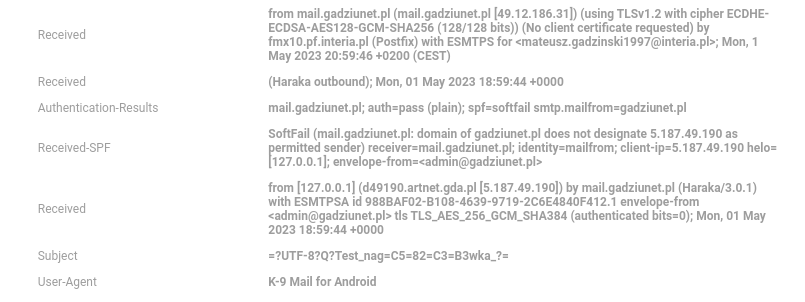
                              do forum smtp.png

                              C 1 Reply Last reply
                              0
                              • jaschaezraJ jaschaezra

                                @girish said in Cloudron SPF record does not permit IP:

                                @jaschaezra @matix131997 I could reproduce this one. Looks like Haraka outbound is adding that header. Note that this is not a problem for mail delivery as such, but it's not nice that the mail client IP is revealed for no reason. Looking into a fix.

                                And it gives a SPF-Soft-Fail which can at worst lead to being rejected.

                                girishG
                                girishG
                                girish
                                Staff
                                wrote on last edited by
                                #16

                                @jaschaezra It shouldn't affect mail delivery, afaik. As @ccfu said, the check is carried out by the receiving mail server and as such the added meta headers have no effect. But it's not desired to add the Client IP, that I agree. You can check this by sending mails to https://www.mail-tester.com/

                                matix131997M 1 Reply Last reply
                                0
                                • matix131997M matix131997

                                  @ccfu
                                  This is a strange case. As you can see from Haraka screen shot, when sending from client mail it assigns an address, just for the forum I included via VPN as the address "SMTP"
                                  do forum smtp.png

                                  C
                                  C
                                  ccfu
                                  wrote on last edited by ccfu
                                  #17

                                  @matix131997
                                  Interesting. I still can't get my head around why the recipient mailserver is incorrectly evaluating the client IP and not the server IP in the SPF record though. The mail is not being sent to the recipient by the client but by the SMTP server.

                                  1 Reply Last reply
                                  1
                                  • girishG girish

                                    @jaschaezra It shouldn't affect mail delivery, afaik. As @ccfu said, the check is carried out by the receiving mail server and as such the added meta headers have no effect. But it's not desired to add the Client IP, that I agree. You can check this by sending mails to https://www.mail-tester.com/

                                    matix131997M
                                    matix131997M
                                    matix131997
                                    wrote on last edited by
                                    #18

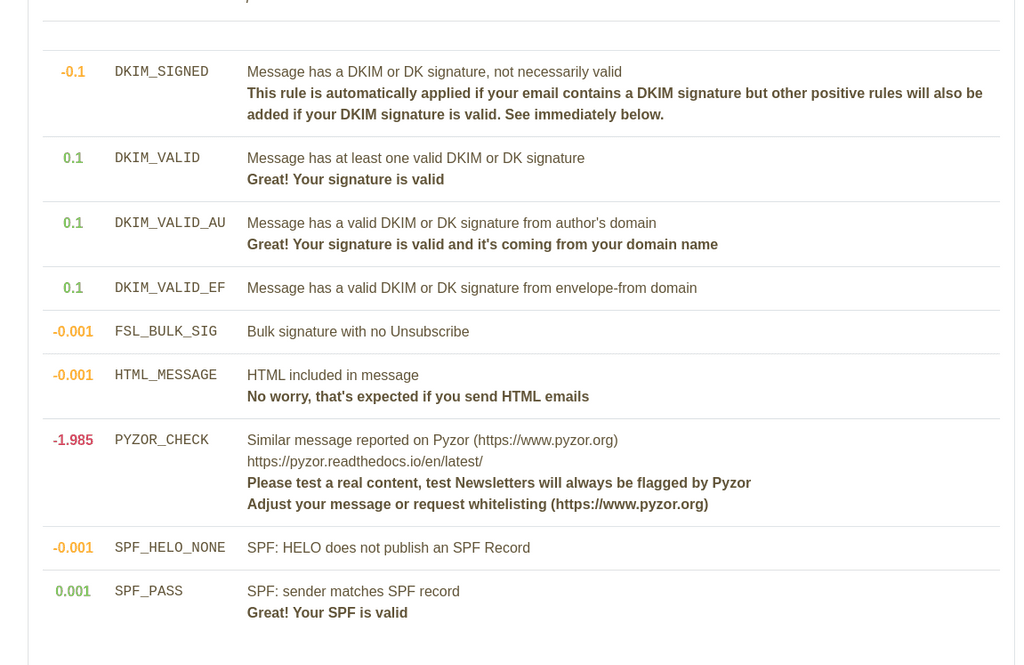
                                    @girish This is the result:
                                    result spf.png

                                    girishG 1 Reply Last reply
                                    0
                                    • matix131997M matix131997

                                      @girish This is the result:
                                      result spf.png

                                      girishG
                                      girishG
                                      girish
                                      Staff
                                      wrote on last edited by
                                      #19

                                      @matix131997 Yup, so the SPF is valid. The email header is only the results of Haraka/Cloudron mail server. This is not considered by the destination server.

                                      1 Reply Last reply
                                      1
                                      • girishG girish marked this topic as a question on
                                      • RoundHouse1924R
                                        RoundHouse1924R
                                        RoundHouse1924
                                        wrote on last edited by
                                        #20

                                        I have the exact same problem --- only since updating Cloudron to v7.4.1 from v7.3.6.
                                        So, this has clearly been introduced by v7.4.x.

                                        SPF is more important than @staff are making out above.

                                        Fundamentally, the point is that the SENDING Haraka/Cloudron is guilty of injecting the wrong header SPF details into OUTGOING emails.

                                        This needs a rapid solution, as domain and server reputation is at stake!

                                        Self-hoster with Cloudron, Hetzner, Exoscale, Porkbun & Gandi

                                        C 1 Reply Last reply
                                        1
                                        • RoundHouse1924R RoundHouse1924

                                          I have the exact same problem --- only since updating Cloudron to v7.4.1 from v7.3.6.
                                          So, this has clearly been introduced by v7.4.x.

                                          SPF is more important than @staff are making out above.

                                          Fundamentally, the point is that the SENDING Haraka/Cloudron is guilty of injecting the wrong header SPF details into OUTGOING emails.

                                          This needs a rapid solution, as domain and server reputation is at stake!

                                          C
                                          C
                                          ccfu
                                          wrote on last edited by ccfu
                                          #21

                                          @RoundHouse1924

                                          Nobody seems to be suggesting that SPF is not important but the SPF details are not injected by Cloudron or Haraka at all. These details are set in the domain's DNS records and can be checked by the receiving SMTP server when processing incoming email.

                                          If a receiving mailserver is checking the wrong headers then it is misconfigured. Alternatively, the SPF record may be incorrect.


                                          RoundHouse1924R 1 Reply Last reply
                                          0

                                          Hello! It looks like you're interested in this conversation, but you don't have an account yet.

                                          Getting fed up of having to scroll through the same posts each visit? When you register for an account, you'll always come back to exactly where you were before, and choose to be notified of new replies (either via email, or push notification). You'll also be able to save bookmarks and upvote posts to show your appreciation to other community members.

                                          With your input, this post could be even better 💗

                                          Register Login
                                          Reply
                                          • Reply as topic
                                          Log in to reply
                                          • Oldest to Newest
                                          • Newest to Oldest
                                          • Most Votes


                                          • Login

                                          • Don't have an account? Register

                                          • Login or register to search.
                                          • First post
                                            Last post
                                          0
                                          • Categories
                                          • Recent
                                          • Tags
                                          • Popular
                                          • Bookmarks
                                          • Search