
+1 - Great idea! Even the ability to automatically pull an IP list into the blocklist on a set cron schedule would be extremely beneficial.
D
dylightful
@dylightful
Posts
-
Improve firewall blocking capabilities and bad IP lists/sets -
Restoring Backups failsLog file for @joseph
It displays this error 3 times
Dec 16 00:01:24 box:backupformat/tgz Attempt 2 failed. Will retry: tarExtract pipeline error: invalid stored block lengthsAfter the 3rd time, it times out and fails with
Dec 16 00:01:49 box:apptask run: app error for state pending_restore: BoxError: tarExtract pipeline error: invalid stored block lengths at tarExtract (/home/yellowtent/box/src/backupformat/tgz.js:231:26) at process.processTicksAndRejections (node:internal/process/task_queues:105:5) at async /home/yellowtent/box/src/backupformat/tgz.js:252:9 at async promiseRetry (/home/yellowtent/box/src/promise-retry.js:17:20) at async Object.download (/home/yellowtent/box/src/backupformat/tgz.js:248:5) at async download (/home/yellowtent/box/src/backuptask.js:129:5) at async Object.downloadApp (/home/yellowtent/box/src/backuptask.js:169:5) at async installCommand (/home/yellowtent/box/src/apptask.js:350:9) { reason: 'External Error', details: {} } Dec 16 00:01:49 box:tasks setCompleted - 21001: {"result":null,"error":{"message":"tarExtract pipeline error: invalid stored block lengths","reason":"External Error"},"percent":100} Dec 16 00:01:49 box:tasks updating task 21001 with: {"completed":true,"result":null,"error":{"message":"tarExtract pipeline error: invalid stored block lengths","reason":"External Error"},"percent":100} Dec 16 00:01:49 box:taskworker Task took 57.836 seconds Dec 16 00:01:49 BoxError: tarExtract pipeline error: invalid stored block lengths Dec 16 00:01:49 at tarExtract (/home/yellowtent/box/src/backupformat/tgz.js:231:26) Dec 16 00:01:49 at process.processTicksAndRejections (node:internal/process/task_queues:105:5) Dec 16 00:01:49 at async /home/yellowtent/box/src/backupformat/tgz.js:252:9 Dec 16 00:01:49 at async promiseRetry (/home/yellowtent/box/src/promise-retry.js:17:20) Dec 16 00:01:49 at async Object.download (/home/yellowtent/box/src/backupformat/tgz.js:248:5) Dec 16 00:01:49 at async download (/home/yellowtent/box/src/backuptask.js:129:5) Dec 16 00:01:49 at async Object.downloadApp (/home/yellowtent/box/src/backuptask.js:169:5) Dec 16 00:01:49 at async installCommand (/home/yellowtent/box/src/apptask.js:350:9) Dec 16 00:01:49 Exiting with code 0 -
Restoring Backups fails@p44 tried hetzner now too. Same issue - backups fine, unable to restore (20GB LAMP stack)
-
Restoring Backups failsIt is to a self hosted SAN
-
Restoring Backups failsCIFS Mount to storage provider - Version 9.0.13
Backups work fine, restoration gives the above error.
-
Restoring Backups fails
Experiencing the same issue with CIFS mounts. Creating backups work seamlessly. When you go to restore it attempts to restore a small subset of files 3 times before displaying the error. I noticed when I go to restore the app it doesn't prompt for an encryption password, perhaps an internal issue with storing of the encryption hash?
-
Cloudron 9.0 (beta) bug reports@girish Thank you! Looking forward to the next update!
-
Cloudron 9.0 (beta) bug reports@girish said in Cloudron 9.0 (beta) bug reports:
mysql -uroot -ppassword -e "select schedule from box.backupSites"
Yep version 9.0.10;
Command response below. Interestingly the backup looks to have been successful, however I still cannot see the 'Backup Sites' section of backupsroot@my:~# mysql -uroot -ppassword -e "select schedule from box.backupSites" mysql: [Warning] Using a password on the command line interface can be insecure. +--------------+ | schedule | +--------------+ | 00 00 * * * | +--------------+ -
Cloudron 9.0 (beta) bug reportsUpdate: I can briefly see 'Backup Sites' if I refresh the page quickly, however it disappears and only displays the above screenshot.
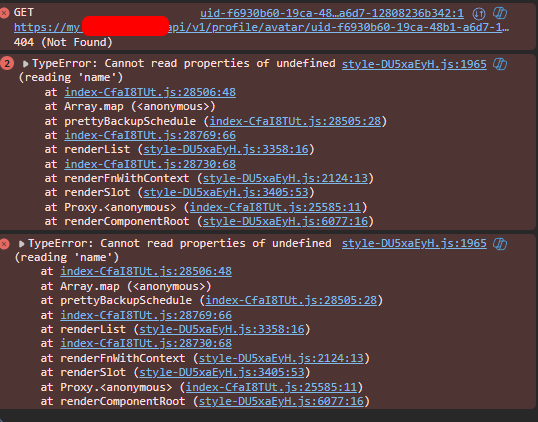
Browser console issue;
-
Cloudron 9.0 (beta) bug reportsHi all! Congrats on v9!
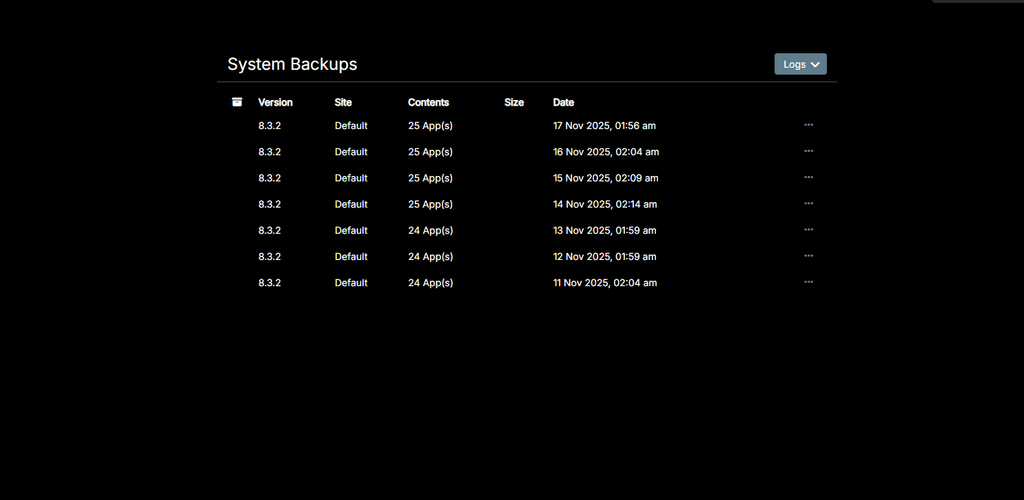
One bug I discovered so far - Backup Sites is completely missing from Backups -> Sites and only displays the latest System backups?
-
Unable to Install Older Versions of UptimeKumaDisregard this post, it appears the Cloudron version is different to the previous UptimeKuma version. 1.32.0 is the latest version before 2.0
-
Unable to Install Older Versions of UptimeKumaHi,
Version 2.0 broke our UptimeKuma site when attempting to update. I'm trying to install version 1.23.16 by changing the app store URL to: https://my.domainname.com/#/appstore/louislam.uptimekuma.app?version=1.23.16 however it is displaying an error that it doesn't exist. -
Beszel - lightweight server monitoring platform@timconsidine Yeah the Hub is what I'm looking at. Works flawlessly in conjunction with Uptime Kuma. Was able to setup the Hub and monitoring for a server within 5 minutes. Crazy simple.
-
Beszel - lightweight server monitoring platformBeszel is a lightweight server monitoring platform that includes Docker statistics, historical data, and alert functions.
It has a friendly web interface, simple configuration, and is ready to use out of the box. It supports automatic backup, multi-user, OAuth authentication, and API access.
-
Wireguard VPN@girish Maybe the greatest Christmas present one could ask for!
-
Wireguard VPN@RoundHouse1924 Hear hear!
The shear support behind WireGuard and the lack of updates as to its ETA is extremely disappointing.
-
Wireguard VPN@girish This just made my year

-
Wireguard VPNI think I may honestly cry when Wireguard gets added to Cloudron. It's still to this day the only application separate to Cloudron.