Cloudron makes it easy to run web apps like WordPress, Nextcloud, GitLab on your server. Find out more or install now.


Skip to content
  • Categories
  • Recent
  • Tags
  • Popular
  • Bookmarks
  • Search
Skins
  • Light
  • Brite
  • Cerulean
  • Cosmo
  • Flatly
  • Journal
  • Litera
  • Lumen
  • Lux
  • Materia
  • Minty
  • Morph
  • Pulse
  • Sandstone
  • Simplex
  • Sketchy
  • Spacelab
  • United
  • Yeti
  • Zephyr
  • Dark
  • Cyborg
  • Darkly
  • Quartz
  • Slate
  • Solar
  • Superhero
  • Vapor

  • Default (No Skin)
  • No Skin
Collapse
Brand Logo

Cloudron Forum

Apps - Status | Demo | Docs | Install
jamesJ

james

@james
Staff
About
Posts
1.5k
Topics
8
Shares
0
Groups
2
Followers
6
Following
3

Posts

Recent Best Controversial

  • Welcoming James to the team
    jamesJ james

    Hello Everyone (= Happy to be here and looking forward to help wherever I can.

    Announcements

  • Vaultwarden fails to start after update – DB migration error (SSO)
    jamesJ james

    Hello @vaultwarden users

    Since users have voiced their concerns about manually editing the database I have created a bash script that does it for you.
    Please follow these steps if you have this issue:

    1. create an app backup of your @vaultwarden Cloudron app
    2. put the erroring @vaultwarden app in recovery mode
    3. open the File Manager of your @vaultwarden app and create a fix_db.sh file
    4. copy and paste the following script into the just created fix_db.sh file:
      #!/bin/bash
      
      echo "=> Checking if DEFAULT_CHARACTER_SET_NAME and DEFAULT_COLLATION_NAME are set to utf8mb4 and utf8mb4_unicode_ci"
      
      CURRENT_DEFAULT_CHARACTER_SET_NAME=$(mysql --silent --skip-column-names --user=${CLOUDRON_MYSQL_USERNAME} --password=${CLOUDRON_MYSQL_PASSWORD} --host=${CLOUDRON_MYSQL_HOST} ${CLOUDRON_MYSQL_DATABASE} -e "SELECT DEFAULT_CHARACTER_SET_NAME FROM information_schema.SCHEMATA WHERE SCHEMA_NAME = '${CLOUDRON_MYSQL_DATABASE}';" 2>/dev/null)
      CURRENT_DEFAULT_COLLATION_NAME=$(mysql --silent --skip-column-names --user=${CLOUDRON_MYSQL_USERNAME} --password=${CLOUDRON_MYSQL_PASSWORD} --host=${CLOUDRON_MYSQL_HOST} ${CLOUDRON_MYSQL_DATABASE} -e "SELECT DEFAULT_COLLATION_NAME FROM information_schema.SCHEMATA WHERE SCHEMA_NAME = '${CLOUDRON_MYSQL_DATABASE}';" 2>/dev/null)
      FIX_NEEDED=0
      
      if [ "${CURRENT_DEFAULT_CHARACTER_SET_NAME}" != "utf8mb4" ] || [ "${CURRENT_DEFAULT_COLLATION_NAME}" != "utf8mb4_unicode_ci" ]; then
          echo "=> DEFAULT_CHARACTER_SET_NAME or DEFAULT_COLLATION_NAME is not set to utf8mb4 or utf8mb4_unicode_ci."
          echo "==> Current values are: DEFAULT_CHARACTER_SET_NAME=${CURRENT_DEFAULT_CHARACTER_SET_NAME}, DEFAULT_COLLATION_NAME=${CURRENT_DEFAULT_COLLATION_NAME}"
          FIX_NEEDED=1
      else
          echo "=> DEFAULT_CHARACTER_SET_NAME is ${CURRENT_DEFAULT_CHARACTER_SET_NAME} and DEFAULT_COLLATION_NAME is ${CURRENT_DEFAULT_COLLATION_NAME}"
          echo "=> Nothing to do - quitting."
          FIX_NEEDED=0
          exit 0
      fi
      
      if [ ${FIX_NEEDED} -eq 1 ]; then
          read -p "Have you created a backup of your Cloudron Vaultwarden app? (y/N): " yn
          case $yn in
              [Yy]* )
                  echo "=> Setting database character set and collation to utf8mb4 and utf8mb4_unicode_ci."
                  mysql --user=${CLOUDRON_MYSQL_USERNAME} --password=${CLOUDRON_MYSQL_PASSWORD} --host=${CLOUDRON_MYSQL_HOST} ${CLOUDRON_MYSQL_DATABASE} -e "ALTER DATABASE \`${CLOUDRON_MYSQL_DATABASE}\` CHARACTER SET utf8mb4 COLLATE utf8mb4_unicode_ci;" 2>/dev/null
                  echo "=> Converting all tables to character set utf8mb4 and collation utf8mb4_unicode_ci."
                  mysql --silent --skip-column-names \
        --user="${CLOUDRON_MYSQL_USERNAME}" \
        --password="${CLOUDRON_MYSQL_PASSWORD}" \
        --host="${CLOUDRON_MYSQL_HOST}" \
        "${CLOUDRON_MYSQL_DATABASE}" \
        -e "SELECT CONCAT('ALTER TABLE \`', TABLE_NAME,'\` CONVERT TO CHARACTER SET utf8mb4 COLLATE utf8mb4_unicode_ci;') AS CharSetConvert FROM INFORMATION_SCHEMA.TABLES WHERE TABLE_SCHEMA='${CLOUDRON_MYSQL_DATABASE}' AND TABLE_TYPE=\"BASE TABLE\";" 2>/dev/null | while read -r sql_command; do
                      echo "==> Executing: ${sql_command}"
                      mysql --user=${CLOUDRON_MYSQL_USERNAME} --password=${CLOUDRON_MYSQL_PASSWORD} --host=${CLOUDRON_MYSQL_HOST} ${CLOUDRON_MYSQL_DATABASE} -e "SET foreign_key_checks=0; ${sql_command} SET foreign_key_checks=1;" 2>/dev/null
                  done
                  ;;
              [Nn]* )
                  echo "=> Please create a backup of your database before proceeding with the fix. Exiting."
                  exit 1
                  ;;
              * )
                  echo "=> Invalid response. Please answer with y or n. Exiting."
                  exit 1
                  ;;
          esac
      fi
      
    5. open the Web Terminal of your @vaultwarden Cloudron app
    6. execute the following command:
      bash /app/data/fix_db.sh
      
    7. Execute the following command to start @vaultwarden:
      /app/pkg/start.sh
      
    8. Validate if your @vaultwarden is now working correctly
    9. If validated working, you can delete the fix_db.sh file and disable the recovery mode of your @vaultwarden Cloudron app

    If you run into any issues, copy the output of the terminal, post it here and restore your app from the backup created.

    Vaultwarden

  • Community Apps
    jamesJ james

    Community Apps

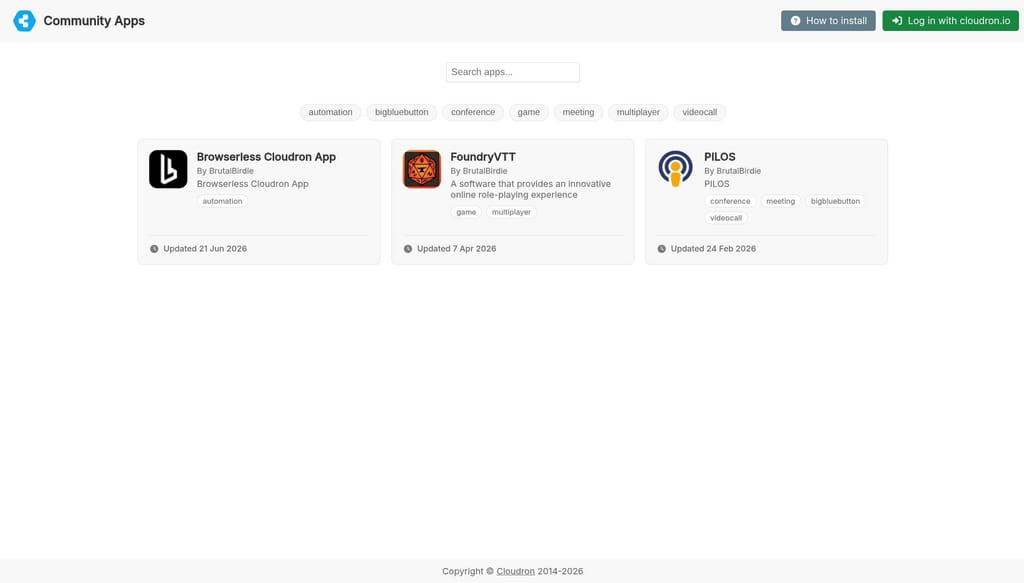
    This topic lists all Cloudron Community Apps that are maintained by the community.

    Use the replies below to find apps and install them via their CloudronVersions.json links according to the Community App documentation.

    How to use: Each reply in this topic is dedicated to one community app.
    To ask questions or report issues about a specific community app, open a new topic in the @community-apps category and link to that app’s reply from here.


    Full List

    App Name Author CloudronVersions.json
    Fizzy @pathab CloudronVersions.json
    IsoMan @vitetj CloudronVersions.json
    Foundry Virtual Tabletop @BrutalBirdie CloudronVersions.json
    RomM @eyecreate CloudronVersions.json
    HeCAPTe @themeerkat CloudronVersions.json
    MAS (install notes) @james CloudronVersions.json
    Baikal @timconsidine CloudronVersions.json
    Raneto @timconsidine CloudronVersions.json
    FacilMap @timconsidine CloudronVersions.json
    Ocular @timconsidine CloudronVersions.json
    THM-PILOS @brutalbirdie CloudronVersions.json
    Windmill @timconsidine CloudronVersions.json
    AgentZero @timconsidine CloudronVersions.json
    Dify @timconsidine CloudronVersions.json
    Nanobot @timconsidine CloudronVersions.json
    Garage S3 @timconsidine CloudronVersions.json
    Excalidraw @timconsidine CloudronVersions.json
    Bluesky Personal Data Server @sfeldkamp CloudronVersions.json
    Tymeslot @ekevu123 CloudronVersions.json
    Openclaw @andreasdueren CloudronVersions.json
    Ente @andreasdueren CloudronVersions.json
    BTCPayserver @nostrdev CloudronVersions.json
    Bitcoin Core @nostrdev CloudronVersions.json
    Mermaid @timconsidine CloudronVersions.json
    Community Apps

  • 🔥 MIROTALK ULTIMATE BUNDLE — LIMITED-TIME SALE — ENDS 23/01/2026! 🔥
    jamesJ james

    Hello @mirotalk
    We have added the group @validated-app-maintainer and force 2FA for users in this group to mitigate a hostile account takeover.
    I have enabled the display of this group next to your profile like for me with STAFF.
    The group @validated-app-maintainer is private, invite only and pre-vetted by the Cloudron Team to ensure only people verified by the Cloudron Team get into this group.
    Being in this group indicates that a user was validated by the Cloudron Team to be a maintainer of a Cloudron app.

    MiroTalk

  • Newbie Question: Why Do We Need to Request Apps on Cloudron?
    jamesJ james

    Hello @IniBudi

    @IniBudi said in Newbie Question: Why Do We Need to Request Apps on Cloudron?:

    This is a genuine newbie question, and I don’t have an IT background. I hope someone can shed some light on this for me.

    I will go into a bit of detail here, so be prepared for a wall of text.


    @IniBudi said in Newbie Question: Why Do We Need to Request Apps on Cloudron?:

    Why do we actually need to submit a request for an application to be added to Cloudron’s app installation list?

    Every app in the Cloudron App-Store is pre-vetted by the Cloudron team and comes with life-cycle testing before publishing updates to all the users of Cloudron to ensure as minimal friction as possible when using Cloudron and the apps available.
    This means, every app needs to be understood on an application and technical level by the Cloudron team and handled accordingly so the end-user of Cloudron has as minimal as possible issues with the apps.
    As you can imagine, these life-cycle tests don't just materialize out of thin air.
    From the understanding of the packaged application, the life-cycle tests are developed to ensure a seamless app update process.
    Let's take the Nextcloud app.
    For the Nextcloud app for each app update runs through the life-cycle test https://git.cloudron.io/packages/nextcloud-app/-/blob/master/test/test.js which needs to succeed before the app update is shipped to you the end-user.

        // no sso
        it('install app (NO SSO)', function () { execSync(`cloudron install --no-sso --location ${LOCATION}`, EXEC_ARGS); });
        it('can get app information', getAppInfo);
    
        it('can login as admin', login.bind(null, adminUser, adminPassword));
        it('can close wizard', closeWizard);
    
        it('can upload file', uploadFile.bind(null, adminUser, adminPassword));
        it('can check file', checkFile.bind(null, 'sticker'));
        it('can download previously uploaded file', testFileDownload.bind(null, adminUser, adminPassword));
        it('can logout', logout);
        it('uninstall app', async function () {
            await browser.get('about:blank'); // ensure we don't hit NXDOMAIN in the mean time
            execSync(`cloudron uninstall --app ${app.id}`, EXEC_ARGS);
        });
    
        // sso
        it('install app (SSO)', function () { execSync(`cloudron install --location ${LOCATION}`, EXEC_ARGS); });
        it('can get app information', getAppInfo);
    
        it('can login OIDC', loginOIDC.bind(null, username, password));
        it('can close the wizard', closeWizard);
        it('can logout', logout);
    
        it('can login as admin', login.bind(null, adminUser, adminPassword));
        it('can close wizard', closeWizard);
        it('can upload file', uploadFile.bind(null, adminUser, adminPassword));
        it('can check file', checkFile.bind(null, 'sticker'));
        it('can download previously uploaded file', testFileDownload.bind(null, adminUser, adminPassword));
    
        xit('can list users', listUsers);
        xit('has no setup warnings', checkSetupWarnings);
        it('can logout', logout);
    
        it('can restart app', function () { execSync(`cloudron restart --app ${app.id}`); });
    
        it('can login OIDC', loginOIDC.bind(null, username, password));
        it('can check file', checkFile.bind(null, 'Readme'));
        it('can logout', logout);
    
        it('can admin login', login.bind(null, adminUser, adminPassword));
        it('can check file', checkFile.bind(null, 'sticker'));
        it('can download previously uploaded file', testFileDownload.bind(null, adminUser, adminPassword));
        xit('can list users', listUsers);
        it('can logout', logout);
    
        it('backup app', function () { execSync(`cloudron backup create --app ${app.id}`); });
        it('restore app', function () {
            const backups = JSON.parse(execSync(`cloudron backup list --raw --app ${app.id}`));
            execSync('cloudron uninstall --app ' + app.id, EXEC_ARGS);
            execSync('cloudron install --location ' + LOCATION, EXEC_ARGS);
            getAppInfo();
            execSync(`cloudron restore --backup ${backups[0].id} --app ${app.id}`, EXEC_ARGS);
        });
    
        it('can login OIDC', loginOIDC.bind(null, username, password));
        it('can check file', checkFile.bind(null, 'Readme'));
        it('can logout', logout);
    
        it('can admin login', login.bind(null, adminUser, adminPassword));
        it('can check file', checkFile.bind(null, 'sticker'));
        it('can download previously uploaded file', testFileDownload.bind(null, adminUser, adminPassword));
        xit('can list users', listUsers);
        xit('has no setup warnings', checkSetupWarnings);
        it('can logout', logout);
    
        it('move to different location', async function () {
            browser.manage().deleteAllCookies();
            await browser.get('about:blank'); // ensure we don't hit NXDOMAIN in the mean time
    
            execSync(`cloudron configure --app ${app.id} --location ${LOCATION}2`, EXEC_ARGS);
            getAppInfo();
        });
    
    
        it('can login OIDC', loginOIDC.bind(null, username, password));
        it('can check file', checkFile.bind(null, 'Readme'));
        it('can logout', logout);
    
        it('can admin login', login.bind(null, adminUser, adminPassword));
        it('can check file', checkFile.bind(null, 'sticker'));
        it('can download previously uploaded file', testFileDownload.bind(null, adminUser, adminPassword));
        xit('can list users', listUsers);
        xit('has no setup warnings', checkSetupWarnings);
    
        it('uninstall app', async function () {
            await browser.get('about:blank'); // ensure we don't hit NXDOMAIN in the mean time
            execSync(`cloudron uninstall --app ${app.id}`, EXEC_ARGS);
        });
    
        // test update
        it('can install app for update', function () { execSync(`cloudron install --appstore-id com.nextcloud.cloudronapp --location ${LOCATION}`, EXEC_ARGS); });
        it('can get app information', getAppInfo);
    
        it('can admin login', login.bind(null, adminUser, adminPassword));
        it('can close the wizard', closeWizard);
        it('can upload file', uploadFile.bind(null, adminUser, adminPassword));
        it('can logout', logout);
    
        it('can update', function () { execSync(`cloudron update --no-backup --app ${LOCATION}`, EXEC_ARGS); });
    
        it('can login OIDC', loginOIDC.bind(null, username, password));
        it('can close the wizard', closeWizard);
        it('can check file', checkFile.bind(null, 'Readme'));
        it('can logout', logout);
    
        it('can admin login', login.bind(null, adminUser, adminPassword));
        xit('can close the wizard', closeWizard);
        it('can check file', checkFile.bind(null, 'sticker'));
        it('can download previously uploaded file', testFileDownload.bind(null, adminUser, adminPassword));
        xit('has no setup warnings', checkSetupWarnings);
    //    it('can logout', logout);
    
        it('uninstall app', async function () {
            await browser.get('about:blank'); // ensure we don't hit NXDOMAIN in the mean time
            execSync(`cloudron uninstall --app ${app.id}`, EXEC_ARGS);
        });
    

    And this could still be considered a very broad life-cycle test.
    Since Nextcloud has the capability to be unpredictably on the end-user part.
    You can install 562 "apps" / "plugins" for Nextcloud which in turn would need their own life-cycle test again.
    But since each of these "plugins" again is custom code from somewhere and in an unknown multiplication with other "plugins" makes it impossible to predict and thus test.
    The more complex the app and more extendable the app itself, the harder it gets to maintain and the Cloudron team needs to find a good balance for each app.

    This all needs to be handled by the Cloudron team so the end-user, you, can simply install and update an app without worrying.
    From this angle it might be more understandable that simply adding a new app to the app-store is not actually that simple.


    @IniBudi said in Newbie Question: Why Do We Need to Request Apps on Cloudron?:

    Is it possible to add custom applications to Cloudron? If yes or no, is it something difficult for beginners or is there another reason behind it?

    Possible, yes.
    Difficult? Depends.
    The user @timconsidine developed a custom app installer https://forum.cloudron.io/topic/14231/ccai-cloudron-custom-app-installer available at https://ccai.appx.uk/ which makes the installation of already existing custom Cloudron apps easier for "newbie" users.

    already existing custom Cloudron apps?

    From my previous explanation about the technicality of Cloudron apps and just the life-cycle tests.
    Each Cloudron app needs to follow the Cloudron app packaging rules.
    A small glimpse into the rules that can make it difficult to package an application for Cloudron.
    All source-code most exist in /app/code and only backup worthy data (user-data) should be stored in /app/data
    /app/code is read-only to ensure the security, see https://docs.cloudron.io/security/#app-isolation-and-sandboxing

    Apps run with a read-only rootfs preventing attacks where the application code can be tampered with.

    Meaning, when packaging an app for Cloudron, the packaging developer needs to understand the application he is packaging to certain degree to ensure this.
    The more complex the app and more extendable the app itself, the more difficult it can be to package and maintain the app.
    Broadly spoken, you can't just take the source-code of e.g. Agno - python-based open-source alternative to n8n and just make it an app for Cloudron.

    I know that @BrutalBirdie started the Community Event - Workshop / Webinar - App Packaging initiative, which might be something for people like you.


    Discuss

  • Community Apps
    jamesJ james

    Hi All,

    With the release of Cloudron 9.1, we are introducing Community Apps.

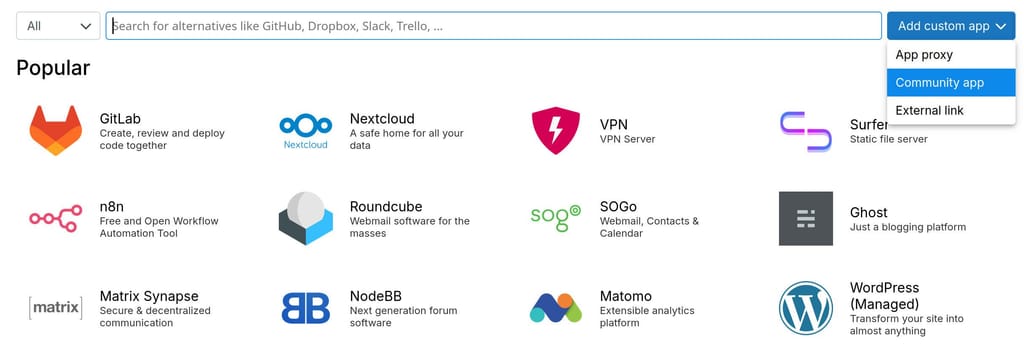
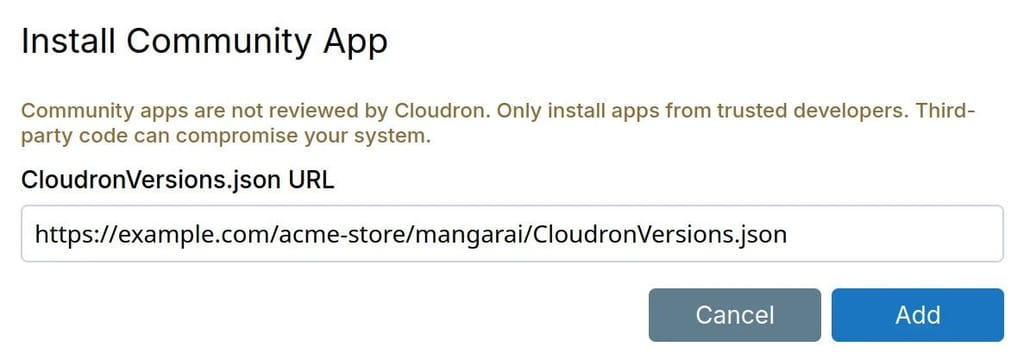
    Community Apps are developed by the Community. The idea is to distribute packages using a CloudronVersions.json . Users can add it in the Dashboard in the Appstore view:

    f1d775d0-0fd6-4ce2-9611-3b05dd0a1ebd-image.jpeg

    415bc462-280b-41c9-937e-ba82880eafad-image.jpeg

    Once added, the app appears alongside App Store apps and receives updates automatically when the developer publishes new versions.

    Finding Community apps

    Community Apps is the pinned topic where everyone can find details for available community apps.

    Sharing your app

    Follow the Packaging documentation and Publishing.

    Just share your CloudronVersions.json in the App Wishlist thread. @staff will pick it up and update the Community app list.

    Announcements

  • Installing custom Apps on Cloudron
    jamesJ james

    There is also this topic Proposal: The CUR - Cloudron User Repository

    What do you people think of the following?
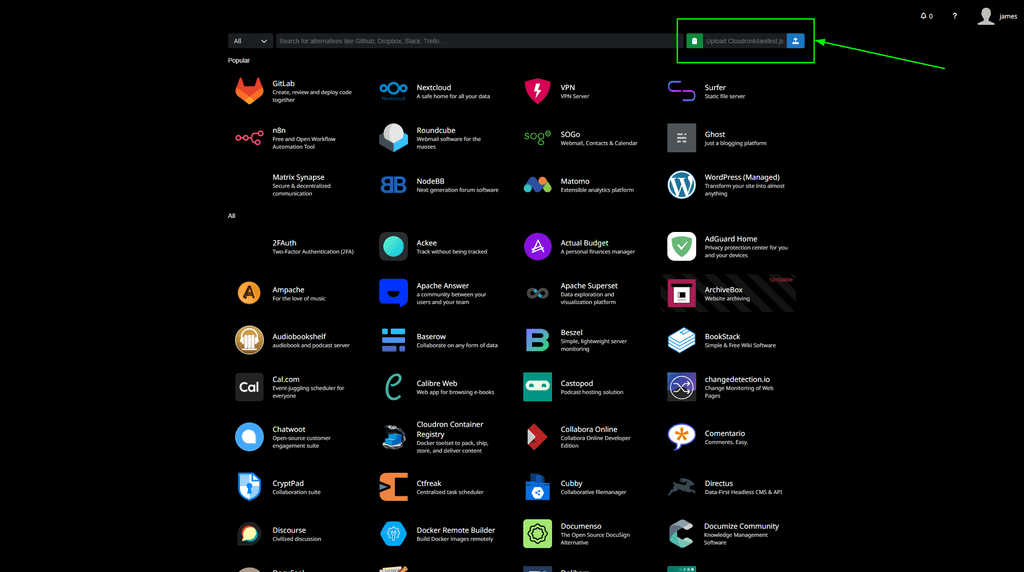
    Adding an input field in the app-store view to directly upload a CloudronManifest.json.

    Mockup:
    14b0808d-8e1e-4070-9542-14d525dbe461-image.png

    685a345b-7775-4bba-bff4-ae3678349845-image.png

    To make this work, a new optional 'key': 'value' in the CloudronManifest.json would be needed to add the Docker Image information so Cloudron knows where to pull the image from for this custom app.
    Example from @BrutalBirdie custom FounderyVTT app => https://forum.cloudron.io/topic/8296/foundry-virtual-tabletop // https://github.com/BrutalBirdie/cloudron-foundryvtt

    {
      "id": "foundryvtt.cloudron.app",
      "title": "FoundryVTT",
      "author": "Elias Hackradt ",
      "tagline": "FounderyVTT",
      "upstreamVersion": "13.345",
      "version": "1.2.0",
      "healthCheckPath": "/",
      "icon": "file://logo.png",
      "tags": [ "game", "multiplayer" ],
      "memoryLimit": 1342177280,
      "httpPort": 30000,
      "manifestVersion": 2,
      "minBoxVersion": "5.3.0",
      "addons": {
        "localstorage": {}
      },
      "dockerimage": "brutalbirdie/foundryvtt.cloudron.app:1.2.0"
    }
    

    This would make the barrier relatively small in my opinion.

    Looking forward to reading your opinions.

    App Packaging & Development

  • New Cloudron Docs Framework - Requesting feedback
    jamesJ james

    Hello Cloudron Community

    Currently, the Cloudron Docs at docs.cloudron.io are build with mkdocs and mkdocs-material.
    Unfortunately mkdocs-material is now in maintenance mode which means we have to look for alternatives.

    We have looked into Docusaurus and migrated the documentation and would appreciate some feedback from the community.

    Here is the URL: https://docs-ng.cloudron.io/


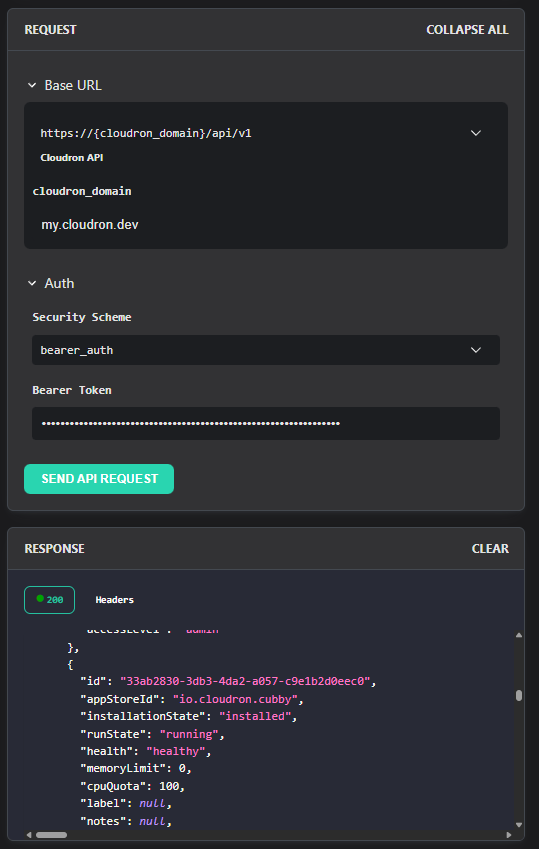
    My personal favourite is the new API Doc which has an interactive component to test the API.
    Example: https://docs-ng.cloudron.io/api/list-apps-by-user you can edit the URL and your token and actually use the API:
    3b4a71b1-6c55-4ca4-bd54-8f1592aef642-image.png

    Discuss

  • Happy New Year 2026 ~ The Cloudron Team
    jamesJ james

    Thank you very much @archos from the Cloudron Team.
    We'd like to extend the same wishes back to you and every Cloudron user.

    Stay healthy and jolly celebrations to everyone.

    Off-topic

  • ♥️ Support MiroTalk
    jamesJ james

    @mirotalk-57bab571 I have pinned the topic so it will always stay on top in this category.

    MiroTalk

  • BTCpayserver
    jamesJ james

    Hello @nostrdev and @timconsidine
    Signup to the git.cloudron.io instance was disabled due to an overwhelming amount of spam accounts.
    @nostrdev I will take this as a request for an account and access rights to create repositories.

    The @staff will create your account with the e-mail address used here in the forum.

    App Wishlist

  • What's coming in 9.1
    jamesJ james

    Hello @nostrdev
    We have tested the passkey support with the Bitwarden browser extension, YubiKey 5, Nitrokey and native support from some browsers and operating systems like Windows, Apple and Linux.
    Please note, we implemented passkey support and not the full WebAuthn/FIDO2 specification available options.

    Announcements

  • So Many Problems
    jamesJ james

    Hello @lewisl

    @lewisl said in So Many Problems:

    Cloudron itself has many UI problems and functional problems.

    Cloudron 9 brings a full new UI. I am looking forward to hearing your thoughts on that.


    @lewisl said in So Many Problems:

    During setup the switch from Cloudron.IO (the "business" site) to Cloudron Server Portal is not clear. Each requires its own password though the login pages for both are indentical.

    Suggestion: Simply make the login pages distinct with titles like: Cloudron Portal (the business site--pick anything you want) and Cloudron Server App Console.

    This is a good suggestion.


    @lewisl said in So Many Problems:

    The email setup is quite complex and unreliable. Required 2.5 hours to get everything working. Even though I had given Cloudron a correct Cloudflare API token with correct settings, Cloudron created all of the appropriate DNS records EXCEPT the needed MX record.

    This is rather unusual. Did you have an existing MX record?
    Since by default, Cloudron does not simply overwrite your DNS records if they are existent.
    When existent DNS records are found for e.g. apps, the user will get a notification informing that if they like to overwrite this record.
    This should also be added to the Mail setup records.
    Good catch.


    @lewisl said in So Many Problems:

    Cloudron email setup IS ESSENTIAL. Critical password changes can only be made via a change request email being sent. But, Catch-22: this can only be done with a correct setup. External SMTP did not work because the settings fields are incomplete or in accurate. Never did work. Don't blame Digital Ocean: I requested and obtained an exemption and 25, 587, etc were unblocked. I know this to be true because email sent by OnlyOffice worked through port 587.

    The "user 0" can always be accessed without any mail setup needed, even if the password is lost.
    When you ssh into your server and run the following command, a temporary password for the "user 0" will bet set and valid for exactly one use:

    cloudron-support --owner-login
    

    @lewisl said in So Many Problems:

    ...Suggestion: build outgoing email setup into the workflow of the initial setup. Make it something that can be skipped. have a better standalone setup for outgoing email (from the Cloudron Server Management console, not from applications) for those who may choose to defer it.

    This might be a good idea.
    Maybe like a "Cloudron Tour" that guides the user what he should setup, where he can find xyz.


    @lewisl said in So Many Problems:

    Another substantial confusion is the App Store accessible from Cloudron.io is basically a NOOP: it is non functional. clicking install does nothing. it is marketing. OK to do marketing--but point people to the proper creation of the managed server and the Cloudron server console--that's the only place where the market place works to install apps.

    I don't really understand this point.
    The https://www.cloudron.io/store/index.html does what it should do.
    Display all available apps and when you click one and install, you get the marketing message.
    Could you please elaborate?


    @lewisl said in So Many Problems:

    Suggestion: rather than the App Store just launching a setup, you should really launch a workflow of your own design to lead people through the essential steps. It's part of your value add.

    Like a guided step by step for each app what to do and configure in each app?


    @lewisl said in So Many Problems:

    The dashboard could also be more robust.

    In what sense? Could you please explain this a bit more?

    Discuss

  • Happy New Year 2026 ~ The Cloudron Team
    jamesJ james

    Happy New Year 2026

    Shall the new year bring health and prosperity.
    Users like you, who share knowledge, challenge ideas, and improve the platform through active participation in the forum are the engine that continually improves Cloudron.
    Your involvement turns individual usage into a collective effort.
    This shared effort is what carries Cloudron forward into the year ahead.


    We will also use this topic to merge all new year wishes topics into this one to keep the forum search clean.

    Off-topic

  • Critical Security Alert: n8n Authentication Bypass Vulnerability (CVE-2025-68613)
    jamesJ james

    Hello @zonzonzon
    The current latest version in the Cloudron app store 2.1.2 is not effected.
    Also, the latest N8N version for the old 1.123.7 is also not effected.

    If you have your N8N updated to the last 1.123.7 or 2.1.2 version, then you are save.

    N8N

  • Mark Change Detection app as unstable?
    jamesJ james

    Hello @dgtlmoon

    I am sorry that your experience started so negatively.
    This is normally not the standard in our forum and I believe we can turn this into a productive topic as it should be.


    @dgtlmoon said in Mark Change Detection app as unstable?:

    please let me know what those bugs were?

    That is what I asked of the users.


    @dgtlmoon said in Mark Change Detection app as unstable?:

    if you can not use such strong language I would probably appreciate it

    Only because of you I now know what the POS even means. I was unaware that it was "its a piece of SH...T". Thank you for that.
    This is indeed no productive way and does not improve anything.
    @svtx I have reviewed your previous topic on @change-detection, and it seems your overall negative view on this software stems from not getting it to work in the proper way.
    But nowhere did you explain your issues. Otherwise, we (the Cloudron Forum) would have been able to assist in a meaningful way.
    Could you please describe your issues so that we can work on that?


    Regarding the:
    @dgtlmoon said in Mark Change Detection app as unstable?:

    "unstable state"

    For clarification, if we Cloudron mark an app as unstable, it does not mean the software itself is unstable.
    Since we have to package the app to work within the Cloudron ecosystem the issue can be with us packaging the app.


    To improve future topics for @change-detection @dgtlmoon I took the liberty and took the official bug issue template from your GitHub and changed it a little to fit the Cloudron scope.
    If people create topic for @change-detection they can use the template.


    Once again @dgtlmoon I must apologize about this negative experience.
    Let's make it a productive one!

    Change Detection

  • Branding - Name in 2FA application
    jamesJ james

    Hello @teiluj
    Cloudron 9.1 will include the change for TOTP QR-Code Branding.
    The new default will be that it uses the Cloudron branding name.
    So if you set e.g.: Company Ltd. as the branding name, this will also be the name set for the TOTP QR-Code.

    Feature Requests

  • YouTube Tutorial on Email Hosting
    jamesJ james

    Hello @Dave-Swift
    A great video and I can see you respond to many skeptical comments.
    Keep it up!

    Discuss

  • Github Actions documentation/example for Surfer
    jamesJ james

    Hello @rosano
    We actually published a GitHub action for a more generic use-case.
    https://github.com/cloudron-io/cloudron-push-to-app

    Surfer

  • Matrix Authentication Service
    jamesJ james

    Hello @matrix users

    I have looked into the Matrix Authentication Service which is needed for the QR-Code device linking and more.
    Also related to these two forum topics: https://forum.cloudron.io/post/97697 and https://forum.cloudron.io/post/105680 and https://forum.cloudron.io/post/100138


    Matrix Authentication Service for Cloudron

    This will get complicated!

    ⚠️ WARNING ⚠️

    You need Cloudron version 9.1 to follow this guide.

    If you are not comfortable with installing custom apps, tinkering with configurations this is nothing for you.

    ❌ DANGER ❌

    Do not follow this guide with your production matrix synapse server!

    This could lead to a full failure of your synapse server where users will be unable to login.

    You should install an extra Element and Synapse app to follow this guide.

    Please note that the Matrix Authentication Service will be become part of synapse it self at some point =>

    .

    Also from https://areweoidcyet.com/

    At this stage, it is still a separate service, requiring a one-way migration from a classic Synapse deployment. It is designed to be lightweight enough (using Rust) that it will be embedded in Synapse at some point.

    So all this work will become obsolete at some point.

    Install the Matrix Authentication Service app

    Commnuity App

    Use the CloudronVersions.json file to install this Commnuity App:

    https://git.cloudron.io/playground/matrix-authentication-service/-/raw/master/CloudronVersions.json
    

    Cloudron cli

    1. Clone this repository
    git clone https://git.cloudron.io/playground/matrix-authentication-service.git
    cd matrix-authentication-service
    
    1. Login to your Cloudron server
    cloudron login my.cloudron.dev
    
    1. Install this app to a location
    cloudron install --location mas
    

    Configuration of MAS and Synapse

    The Matrix Authentication Service for Cloudron will setup the /app/data/config.yaml on the first run and will not edit it while the /app/data/.initialized file exists.

    The initial generated config is created to ensure that the baseline configuration is correct.

    It also configured the upstream_oauth2 provider for Cloudron so your Cloudron users can use the MAS app.

    Adding other upstream_oauth2 providers is semi supported.
    Each upstream_oauth2 needs a unique ULID which needs to be configured in the CloudronManifest.json - oidc addon section loginRedirectUri

    Regenerating the entire config file will lose secrets and encryption keys.
    This will cause all existing users to be inaccessible!

    Before tinkering with the /app/data/config.yaml create an app backup to ensure that if you make a mistake and cause damage you can revert to the backup.

    Synapse Homeserver

    Needed yaml configuration for the Synapse Homeserver /app/data/configs/homeserver.yaml:

    Example entries:

    # The matrix home server needs to delegate authentication to the MAS
    matrix_authentication_service:
      enabled: true
      endpoint: https://mas.cloudron.dev
      secret: "YDudMp7Kq3htKx7Z1lrqExATpQbuhzXZ"
      # Alternatively, using a file:
      # secret_file: /path/to/secret.txt
    # Config must disable password config in order to delegate everything to mas
    password_config:
      enabled: false
    # same with registration
    enable_registration: false
    # to enable the QR-Code device linking
    experimental_features:
      msc4108_enabled: true
    

    Obtain the secret for the synapse home server from your MAS app with either the Cloudron cli or use the File Manager from the /app/data/config.yaml:

    cloudron exec --app mas -- yq -r '.matrix.secret' /app/data/config.yaml
    YDudMp7Kq3htKx7Z1lrqExATpQbuhzXZ
    

    For the Cloudron Matrix Synapse App app, edit the /app/data/configs/homeserver.yaml manually with the File Manager or use this yq command:

    # Edit these two variables to match your domain and secret from the MAS app
    export MAS_ENDPOINT="https://mas.cloudron.dev"
    export MAS_SECRET="YDudMp7Kq3htKx7Z1lrqExATpQbuhzXZ"
    yq -i '
      .matrix_authentication_service.enabled = true |
      .matrix_authentication_service.endpoint = strenv(MAS_ENDPOINT) |
      .matrix_authentication_service.secret = strenv(MAS_SECRET) |
      .password_config.enabled = false |
      .enable_registration = false |
      .experimental_features.msc4108_enabled = true
    ' /app/data/configs/homeserver.yaml
    

    Restart the app to load the changed configuration.

    MAS

    Configure the /app/data/config.yaml with either the Cloudron cli or use the File Manager.

    The full configuration reference can be found here: https://element-hq.github.io/matrix-authentication-service/reference/configuration.html

    The yaml object should look like this in the /app/data/config.yaml:

    matrix:
      kind: synapse
      homeserver: matrix.cloudron.dev
      secret: YDudMp7Kq3htKx7Z1lrqExATpQbuhzXZ
      endpoint: https://matrix.cloudron.dev/
    
    cloudron exec --tty --app mas
    export MATRIX_HOMESERVER_DOMAIN="matrix.cloudron.dev"
    export MAS_MATRIX_SECRET="YDudMp7Kq3htKx7Z1lrqExATpQbuhzXZ"
    yq -i '
      .matrix.kind = "synapse" |
      .matrix.homeserver = strenv(MATRIX_HOMESERVER_DOMAIN) |
      .matrix.secret = strenv(MAS_MATRIX_SECRET) |
      .matrix.endpoint = "https://" + strenv(MATRIX_HOMESERVER_DOMAIN) + "/"
    ' /app/data/config.yaml
    

    Restart the app to load the changed configuration.

    Conclusion

    Now the Matrix Home Server will use the MAS app for authentication.

    This also enables Element to use the Link new device with the QR-Code feature and enables the Element X mobile app to fully work.

    Matrix (Synapse/Element)
  • Login

  • Don't have an account? Register

  • Login or register to search.
  • First post
    Last post
0
  • Categories
  • Recent
  • Tags
  • Popular
  • Bookmarks
  • Search