
Simple, open source error tracking
Collect every error from your project in real time, organize them to make them useful, and receive alerts when and where you want...without breaking the budget.
Can be used with Sentry SDK
Simple, open source error tracking
Collect every error from your project in real time, organize them to make them useful, and receive alerts when and where you want...without breaking the budget.
Can be used with Sentry SDK
Problem:
the current feature set only allows to exclude apps and schedule the frequency of backups.
At the same time all apps run one after the other and the backup speed is rather slow with 3-7 MBps.
This leads to two problems:
Featureset proposal:
I would be happy if something would improve on this topic.
Website: https://www.hanko.io
Repo: https://github.com/teamhanko/hanko
About passkey and demo: https://www.passkeys.io
Hanko is an open source user management system with a passkey-first approach that takes you on the journey beyond passwords. For better security, higher conversion rates, and happier users.
Passkeys are a new way to sign in that works completely without passwords. By using the security capabilities of your devices like fingerprint or face recognition, passkeys are more secure and are easier to use than both passwords and all current 2-factor authentication methods.
– Based on public key cryptography
– Natively supported on all major platforms
– Synchronized across your devices
Had the same issue — Umami stuck on "Not responding" with build-app exiting with code 137 during next build --turbo.
Fix: temporarily bump RAM to 8 GB for the first start, let the build complete, then reduce. In my case 3 GB is the minimum stable amount for ongoing operation — 2.5 GB still crashes.
Hope this saves someone some time. Would be great if the package could ship with a pre-compiled build to avoid this entirely.
the Wishlist looks promising! But is there also a timetable? If I'm not mistaken, no new app has been released in the last 12 months.
As a suggestion for the App-Store: a category "last released App" would be great.
I run Nextcloud via the Cloudron user administration. User integration works fine, but I can't access the cloudron groups in Nextcloud. Does anyone know a solution?
@joseph good idea. Thanks for the support.
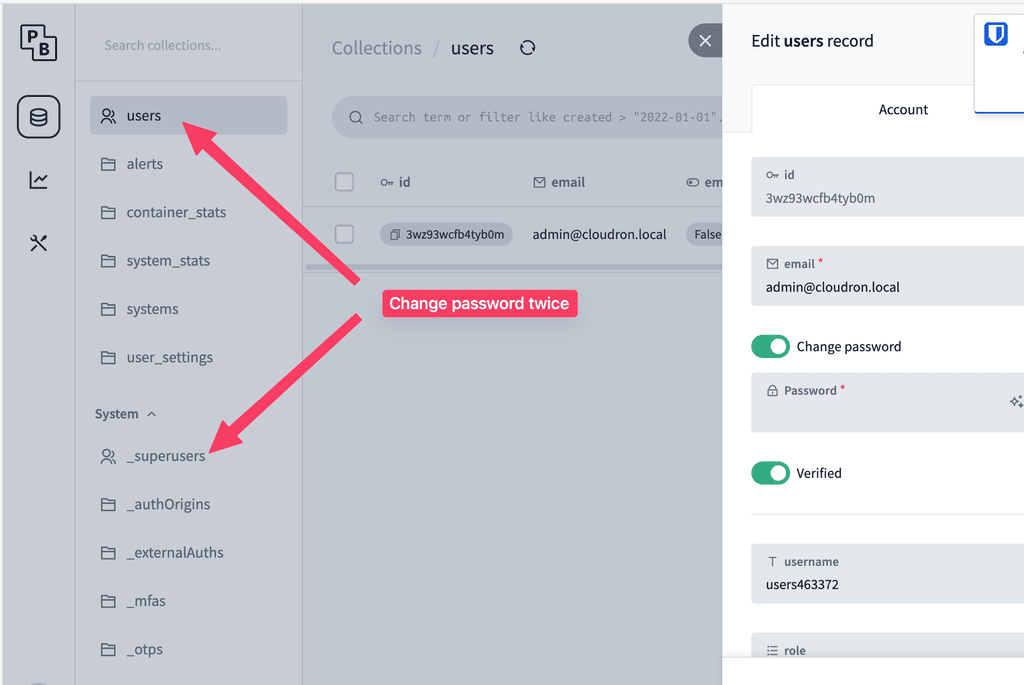
I got it. You have to change the password in two places. In Users and in Superusers. The user with the same email address appears in both tables.
Update on our end:
After the fix in 1.117.2/1.117.3, GitLab starts correctly and the worker count scales with available memory. On our 12-core server with 9.25GB assigned, we get 7 workers — which is mathematically correct per the formula.
However we keep getting OOM kills after several hours. With 7 workers × ~1GB each, plus Gitaly, Sidekiq and Redis, the container is consistently running at 85-90% of its limit. There's no headroom for load spikes.
The formula mem_gb - 2 assumes ~1GB per worker, but in practice workers grow beyond that under real load. Would it make sense to use a more conservative formula, e.g. mem_gb / 2 or capping at 4 workers for instances with fewer than 20 users?
and to mention it again: a Netdata installation could run in the OS of the Cloudron host system like on any other server, which sends metrics to a Netdata Cloudron app via a configured stream.conf. In this case, everything would remain isolated. But of course you would have to test it!
Hi,
my Cloudron GitLab is nagging about a critical patch:
You are currently on version 19.3.1! We strongly recommend upgrading your GitLab installation to one of the following versions immediately: 19.3.2.
But the latest Version on Cloudron is 19.3.1.
Details here: https://docs.gitlab.com/releases/patches/patch-release-gitlab-19-3-2-released/?nav=19.3.2 - came out Sep 10. The headline issue is an unauthenticated path traversal (CVSS 10.0) that's apparently already on CISA's known-exploited list, so probably worth bumping up the priority a bit.
No pressure, just a friendly nudge 
Thanks!
@girish said in netdata - real-time monitoring:
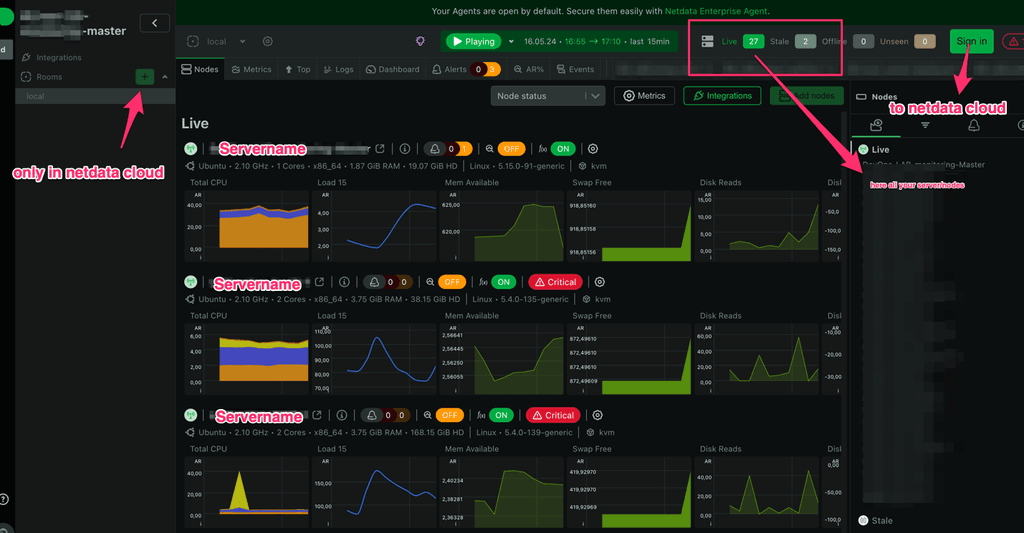
The add node button was disabled and it asks me to go to the cloud.
This is also part of the dark pattern. If you are logged into the cloud, you will find instructions on how to add nodes behind this button.
As far as I understand it correctly (I wouldn't call myself a professional either!), Netdata basically works as follows:
There is ONE application that can:
This is explained quite clearly at https://www.netdata.cloud/blog/netdata-parents-streaming-replication/.
It is also important to know that Netdata should always run behind a proxy: https://learn.netdata.cloud/docs/netdata-agent/configuration/running-the-netdata-agent-behind-a-reverse-proxy/
Summary: Vigilant is a self-hostable website monitoring tool that goes beyond simple uptime checks. It covers uptime from multiple locations, broken link detection, Google Lighthouse/performance tracking, SSL certificate monitoring, DNS change alerts, CVE/security tracking, and flow monitoring (automated testing of real user journeys like logins or checkouts). Notifications are supported via Slack, Discord, Email, MS Teams, Telegram, Ntfy and others.
Notes: The project is open source, built in Europe, and already ships with a Docker Compose setup, making it a straightforward candidate for a Cloudron package. The stack includes the main app, a Horizon worker, a Lighthouse container, MySQL 8 and Redis. Deployment docs: https://govigilant.io/documentation/deployment
Alternative to / Libhunt link: https://selfhosted.libhunt.com/uptime-kuma-alternatives
Screenshots: https://govigilant.io
I have about 50 monitors running. Monitoring is reliable, notifications are coming in.
However, the web UI regularly crashes after a little longer uptime (haha!). Then the entries/monitors are not updated, or are missing, or the whole app is not loaded.
Browser Reload does not help, Server Restart does.
The log is unremarkable. I couldn't find any comparable reports in the forum yet. Am I the only one with this problem?
Am I being stupid? I can't change the default password “changeme”. The change works in Pocket, and logging in there with the new password is no problem. However, even after restarting, Beszel only accepts the initial password. The Cloudron documentation is still empty, and the “First Time Usage” info after installation says that I should change the password, but not where.
Hi Joseph,
Thanks for your feedback. That's exactly what I did.
PocketBase accepts the password change. However, I can still log in to Beszel with “changeme” and NOT with the new password. Even after restarting Baszle.
Hi,
the 1.117.2 update introduced scaling Puma workers to the processor count. On my server with 12 cores this changed the worker count from the previous default of 3 to 12 — a 4x increase in RAM consumption, causing repeated OOM kills.
Setup:
What happened:
Before 1.117.2, GitLab ran stably for years with 7GB RAM limit (3 Puma workers by default via puma.rb). After the update, GitLab immediately started hitting OOM repeatedly — even after raising the memory limit to 14GB, it still consumed 13.99GB and got killed.
The root cause is in start.sh:
cpus=$(nproc 2>/dev/null || echo 2)
export PUMA_WORKERS=$(( cpus < 2 ? 2 : cpus ))
On a 12-core server this sets 12 Puma workers. Each worker consumes ~800MB–1GB RAM, so Puma alone needs ~12GB — before Gitaly, Sidekiq and Redis are counted.
Suggestion:
Either cap PUMA_WORKERS at a reasonable maximum (e.g. 4–6), or provide a way to override it via /app/data/ so admins can tune it for their setup.
Is there a recommended workaround in the meantime?
Thanks
To illustrate the problem a little more concretely:
I have about 10 apps in my Cloudron. The most important are Gitlab, Mattermost, Redmine and Nextcloud.
Mattermost and Redmine are constantly changing and a backup that is too old can be fatal. Therefore I would like to have many backups, at least every 12 hours.
Nextcloud is different. It's all about data exchange, and the files are usually still available locally on all clients. So here it would be enough to have a backup every few days.
If the creation of backups were very fast, the story would end here. Then I could just have a backup made every few hours.
But: the Nextcloud has 200 GB (external volume included) and a backup therefore runs very long (I already had a runtime of more than 24 hours). As a consequence, no other backup of the other apps is running either. If I now deactivate the regular backup for the Nextcloud, backups before an update will take much longer!
Currently I'm doing backups with rsync. I have also tested tgz, but it wasn't faster and much more expensive (more S3 requests?)
OneTimeSecrete as selfhosting would be a perfect Cloudron addition!
Securely distribute sensitive data such as passwords etc. with your own domain. Would be great!
https://github.com/onetimesecret/onetimesecret
Thanks for the hint
The GitLab docs describe configuring Puma via /etc/gitlab/gitlab.rb, but the Cloudron package doesn't use Omnibus — it has its own Docker-based setup with gitlab.yml and a start.sh script.
In start.sh, the worker count is set like this:
cpus=$(nproc 2>/dev/null || echo 2)
export PUMA_WORKERS=$(( cpus < 2 ? 2 : cpus ))
Since start.sh is read-only inside the container, I can't override PUMA_WORKERS directly. Is there a supported way in the Cloudron GitLab package to override this — for example via a file in /app/data/ or a similar mechanism?