
issue with mailing list delivery when using external SMTP server
-
@avatar1024 external relay services will only relay addresses that you added to them explicitly. So if you added foo.com into postmark, postmark will only relay email address which have From as *@foo.com .
The idea of mail forwarding is that the From address has to be that of the original. So, the From address has to set to say someone@posteo.com . Postmark will reject these emails (correctly).
So to summarize: domain-locked relays and keeping the original sender on forwards/lists do not go together. You can relay or you can transparently forward third-party mail, not both. There's nothing Cloudron can do about this from what I know.
@avatar1024 external relay services will only relay addresses that you added to them explicitly. So if you added foo.com into postmark, postmark will only relay email address which have From as *@foo.com .
The idea of mail forwarding is that the From address has to be that of the original. So, the From address has to set to say someone@posteo.com . Postmark will reject these emails (correctly).
So to summarize: domain-locked relays and keeping the original sender on forwards/lists do not go together. You can relay or you can transparently forward third-party mail, not both. There's nothing Cloudron can do about this from what I know.
Thanks for the explainer @girish. Does that means one cannot use an external relay to replace the built in SMTP server if we use mailing lists (or the mailbox + forward implementation in Cloudron 10) - given most likely senders and mailing lists members with use random email providers?
-
@avatar1024 external relay services will only relay addresses that you added to them explicitly. So if you added foo.com into postmark, postmark will only relay email address which have From as *@foo.com .
The idea of mail forwarding is that the From address has to be that of the original. So, the From address has to set to say someone@posteo.com . Postmark will reject these emails (correctly).
So to summarize: domain-locked relays and keeping the original sender on forwards/lists do not go together. You can relay or you can transparently forward third-party mail, not both. There's nothing Cloudron can do about this from what I know.
Thanks for the explainer @girish. Does that means one cannot use an external relay to replace the built in SMTP server if we use mailing lists (or the mailbox + forward implementation in Cloudron 10) - given most likely senders and mailing lists members with use random email providers?
Does that means one cannot use an external relay to replace the built in SMTP server if we use mailing lists (or the mailbox + forward implementation in Cloudron 10) - given most likely senders and mailing lists members with use random email providers?
Yes, with a typical smart host / relay you cannot keep the original sender on list/forward delivery to Gmail/Posteo/etc.
I want to mention that this is for the forwarding feature. Forwarding requires From address to be preserved. A mailing list behaves differently. It rewrites From/Reply-To etc and makes itself the originator of the email. This feature was never implemented in Cloudron. The forwarding feature was incorrectly labeled as mailing list and this misnaming is fixed in Cloudron 10.
I guess we have to look into Distribution lists/mailing lists for the next releases, if you are interested in this. But the From address will change, not sure if it will work for your use case. It's usually meant for group@example.com or list@example.com style workflows.
-
Does that means one cannot use an external relay to replace the built in SMTP server if we use mailing lists (or the mailbox + forward implementation in Cloudron 10) - given most likely senders and mailing lists members with use random email providers?
Yes, with a typical smart host / relay you cannot keep the original sender on list/forward delivery to Gmail/Posteo/etc.
I want to mention that this is for the forwarding feature. Forwarding requires From address to be preserved. A mailing list behaves differently. It rewrites From/Reply-To etc and makes itself the originator of the email. This feature was never implemented in Cloudron. The forwarding feature was incorrectly labeled as mailing list and this misnaming is fixed in Cloudron 10.
I guess we have to look into Distribution lists/mailing lists for the next releases, if you are interested in this. But the From address will change, not sure if it will work for your use case. It's usually meant for group@example.com or list@example.com style workflows.
Does that means one cannot use an external relay to replace the built in SMTP server if we use mailing lists (or the mailbox + forward implementation in Cloudron 10) - given most likely senders and mailing lists members with use random email providers?
Yes, with a typical smart host / relay you cannot keep the original sender on list/forward delivery to Gmail/Posteo/etc.
I want to mention that this is for the forwarding feature. Forwarding requires From address to be preserved. A mailing list behaves differently. It rewrites From/Reply-To etc and makes itself the originator of the email. This feature was never implemented in Cloudron. The forwarding feature was incorrectly labeled as mailing list and this misnaming is fixed in Cloudron 10.
I guess we have to look into Distribution lists/mailing lists for the next releases, if you are interested in this. But the From address will change, not sure if it will work for your use case. It's usually meant for group@example.com or list@example.com style workflows.
Thanks Girish, and yes a mailing list feature will be useful for some of my use case.
I guess the point here is that it's a shame there isn't a way to use an external relay as a blanket replacement (i.e. covering all email features including forwarding) to the built-in SMTP server cause those services have added features to ensure reliable delivery (say when the server has a bad IP rep and gets regularly blocked notably by Microsoft stupid IP range blacklist approach).
-
Just chiming in here because I ran into the same problem (i.e. a formerly working Postmark email forwarder for a group of externals is not working anymore, because none of them use the cloudrons' domain). What's the current solution, set up a separate mailinglist app? Or would switching to the internal mailserver solve it?
-
@msbt does postmark have more info on why it is rejecting the email?
so from all my research on this, forwarding via a smart host (especially postmark) is not solvable. Postmark doesn't allow the envelope from and the email from addresses to mismatch. Fundamentally, this means forwarding will not work the way you want.
-
@msbt does postmark have more info on why it is rejecting the email?
so from all my research on this, forwarding via a smart host (especially postmark) is not solvable. Postmark doesn't allow the envelope from and the email from addresses to mismatch. Fundamentally, this means forwarding will not work the way you want.
@girish but why was it working on Cloudron 9? It only stopped after upgrading to 10, when addresses got migrated from mailinglist to forwards.
That's the odd thing, there's not really a proper error message, no suppression in Postmark itself. In the mail logs it just says
[cloudron] final rcpt list is ["<group@example.com>","<cc1@somesite.com>","<cc2@gmail.com>"]. The mail arrived at the two cc'ed addresses, but the group@example.com forwards never make it. Maybe because LMTP bypasses the filters? -
@girish but why was it working on Cloudron 9? It only stopped after upgrading to 10, when addresses got migrated from mailinglist to forwards.
That's the odd thing, there's not really a proper error message, no suppression in Postmark itself. In the mail logs it just says
[cloudron] final rcpt list is ["<group@example.com>","<cc1@somesite.com>","<cc2@gmail.com>"]. The mail arrived at the two cc'ed addresses, but the group@example.com forwards never make it. Maybe because LMTP bypasses the filters?@msbt internally, the behavior of the previous mailing list and current forwarding is the same. It was only a rewording to clarify what the feature is doing. So, I think we have to investigate further why it has stopped working in Cloudron 10.
Don't you see anything on the postmark logs? You should see three separate emails coming to postmark (the to and the two ccs). You should also see the 3 events in the cloudron eventlog. Do you see a mail to
group@example.com? -
@girish no, postmark never sees the group@example.com because it's internal mail
-
@girish no, postmark never sees the group@example.com because it's internal mail
-
@girish in Cloudron everything looks normal, in the last row it lists the external group mailbox, internal team and the 2 external cc'ed users (cut off), the internal mails get saved, the cc'ed ones sent, but the group never attempts to forward the mails.

-
Hello @msbt
I need to understand the set up first to reproduce it.- domain in Cloudron e.g.:
cloudron.dev - mail settings for
cloudron.devsmart host configured to use postmark - 2x mailboxes on Cloudron for
group@cloudron.devandteam@cloudron.dev
3a.(group|team)@cloudron.devare configured to forward to e.g.:someinbox@gmail.com - a mail is sent to
(group|team)@cloudron.devand 2x cc e.g.:cc1@gmail.comandcc2@outlook.com
Resulting in:
cc1andcc2deliveredgroupandteamsaved locally on Cloudron, but never forwarded tosomeinbox@gmail.com
Did I get this right?
- domain in Cloudron e.g.:
-
Hello @msbt
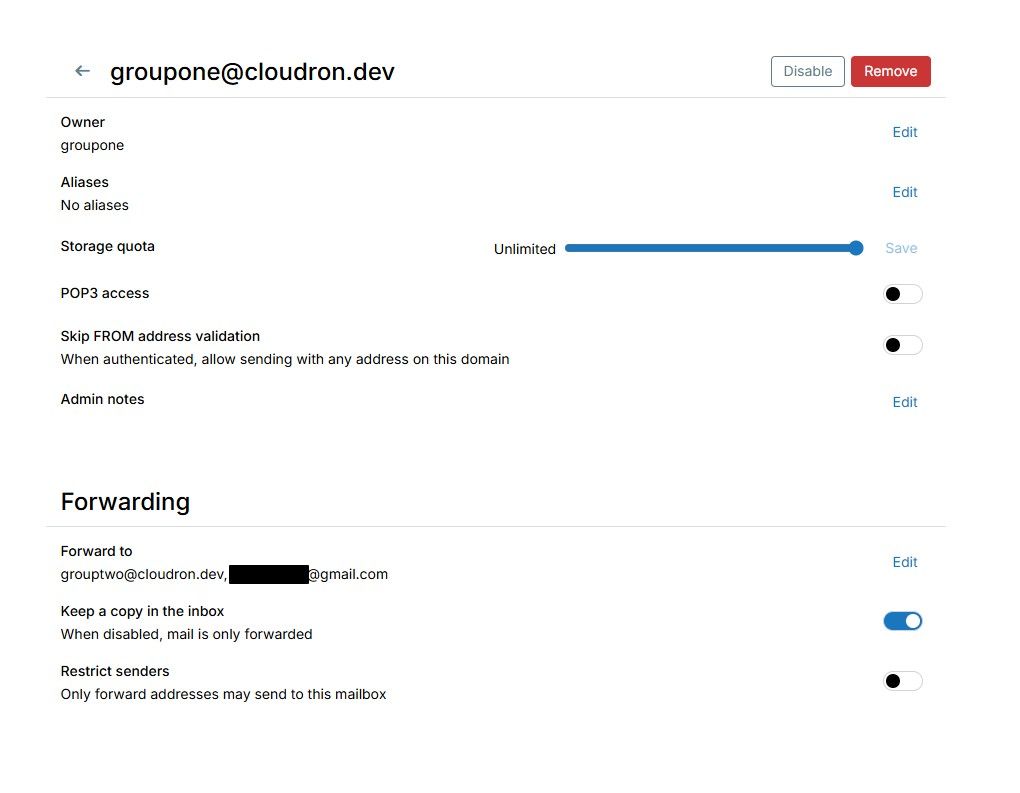
I have tested the following set up on Cloudron10.0.4:- domain
cloudron.devsmart host configured for postmark - local inbox
groupone@cloudron.devowned by a group namedgroupone - local inbox
grouptwo@cloudron.devowned by a group namedgrouptwo
Forward settings:
groupone@cloudron.devforward settings togrouptwo@cloudron.devandexternal@gmail.comgrouptwo@cloudron.devforward settings toexternal@outlook.com
Sending a mail to
groupone@cloudron.devis delivered to:groupone@cloudron.devgrouptwo@cloudron.devexternal@gmail.comexternal@outlook.com
From this set up I was not able to reproduce your issue.
- domain
-
Hello @msbt
I need to understand the set up first to reproduce it.- domain in Cloudron e.g.:
cloudron.dev - mail settings for
cloudron.devsmart host configured to use postmark - 2x mailboxes on Cloudron for
group@cloudron.devandteam@cloudron.dev
3a.(group|team)@cloudron.devare configured to forward to e.g.:someinbox@gmail.com - a mail is sent to
(group|team)@cloudron.devand 2x cc e.g.:cc1@gmail.comandcc2@outlook.com
Resulting in:
cc1andcc2deliveredgroupandteamsaved locally on Cloudron, but never forwarded tosomeinbox@gmail.com
Did I get this right?
@james thanks for testing! In my setup the
groupone@is a regular user with 40 forwarding addresses andgrouptwo@is a shared mailbox without any forwards, but other than that you're right.So the only difference is that groupone is owned by a single user, not a group and grouptwo is a shared mailbox with no forwards.
I can't imagine how single user vs group owners would make a difference. Did you chance anything else, like FROM address validation? Keep a copy in the inbox? Restrict senders?
- domain in Cloudron e.g.:
-
@james thanks for testing! In my setup the
groupone@is a regular user with 40 forwarding addresses andgrouptwo@is a shared mailbox without any forwards, but other than that you're right.So the only difference is that groupone is owned by a single user, not a group and grouptwo is a shared mailbox with no forwards.
I can't imagine how single user vs group owners would make a difference. Did you chance anything else, like FROM address validation? Keep a copy in the inbox? Restrict senders?
-
@james thanks for testing! In my setup the
groupone@is a regular user with 40 forwarding addresses andgrouptwo@is a shared mailbox without any forwards, but other than that you're right.So the only difference is that groupone is owned by a single user, not a group and grouptwo is a shared mailbox with no forwards.
I can't imagine how single user vs group owners would make a difference. Did you chance anything else, like FROM address validation? Keep a copy in the inbox? Restrict senders?
@james thanks for testing! In my setup the groupone@ is a regular user with 40 forwarding addresses and grouptwo@ is a shared mailbox without any forwards, but other than that you're right.
This stood out. There is a cap of 64 forwards in the code. Could you be hitting this limit? Specifically
sieve_max_redirectsis 64 . I thought this was a very high number, may be not? -
M msbt referenced this topic





Hello! It looks like you're interested in this conversation, but you don't have an account yet.
Getting fed up of having to scroll through the same posts each visit? When you register for an account, you'll always come back to exactly where you were before, and choose to be notified of new replies (either via email, or push notification). You'll also be able to save bookmarks and upvote posts to show your appreciation to other community members.
With your input, this post could be even better 💗
Register Login