Cloudron 9.0 (beta) bug reports
-
@nebulon Some UX-friendly approaches for the several table-related issues:
- Scrollable table wrappers (check)
- Consequently (tables can grow infinitely wide) limit column lengths with CSS to a readable size, e. g.
max-width: 40ch; word-wrap: break-word; - Consequently (rows can then have variable heights) top-align table cells
- Support orientation in table rows with either alternating backgrounds or subtle horizontal borders (hover bg is already helpful - but only when your device has a hover state)
- Wrap all concatenated data with markup (like group names in the users table, unlike aliases in the mailbox table) - reserving us the option to set entries inline or stacked. Ideally, use invisible list markup - commas can be added with CSS
Available screen space
Still focusing on tables, but to consider in general:
- When the task focus is on working with complex tables, the space should not be limited for the sake of the design
-> Let the content width be a subject of user preference: make .content max-width (900px) class-dependent and offer a per-user or per-session toggle to swap a body class. The design looks good without the max-width, so there's really not much to change
- Sidebar consumes too much space in narrow viewports (already mentioned here in this thread)
-> Option to reduce the sidebar width to the width of the icons (see Discourse or GitLab

-
@hexbin thanks a lot for the detailed info. We have reworked those table columns with better widths then and also made some of the tables
table-layout: fixed;to actually be able to control that overflow behavior.For "Wrap all concatenated data with markup", is this similar to the custom option to overwrite style based on user adding custom css? We currently don't have that option to customize like that, but it was also requested for other things already.
Finally for the sidebar, we will see how to make that collapsable. It would certainly help on "nowadays" laptops around the 14" screens.
-
Thank you for adding a "back" button on login pages. I keep my tabs pinned and that causes the OIDC string to expire and I had to manually delete that string from the URL. Now, I can simply click on back and then sign in. Less hassle now.


-
I have not seen it reported here and am also not able to reproduce it on the demo system, but when i search for an app and enter the second character the dashboard breaks with a javascript error.
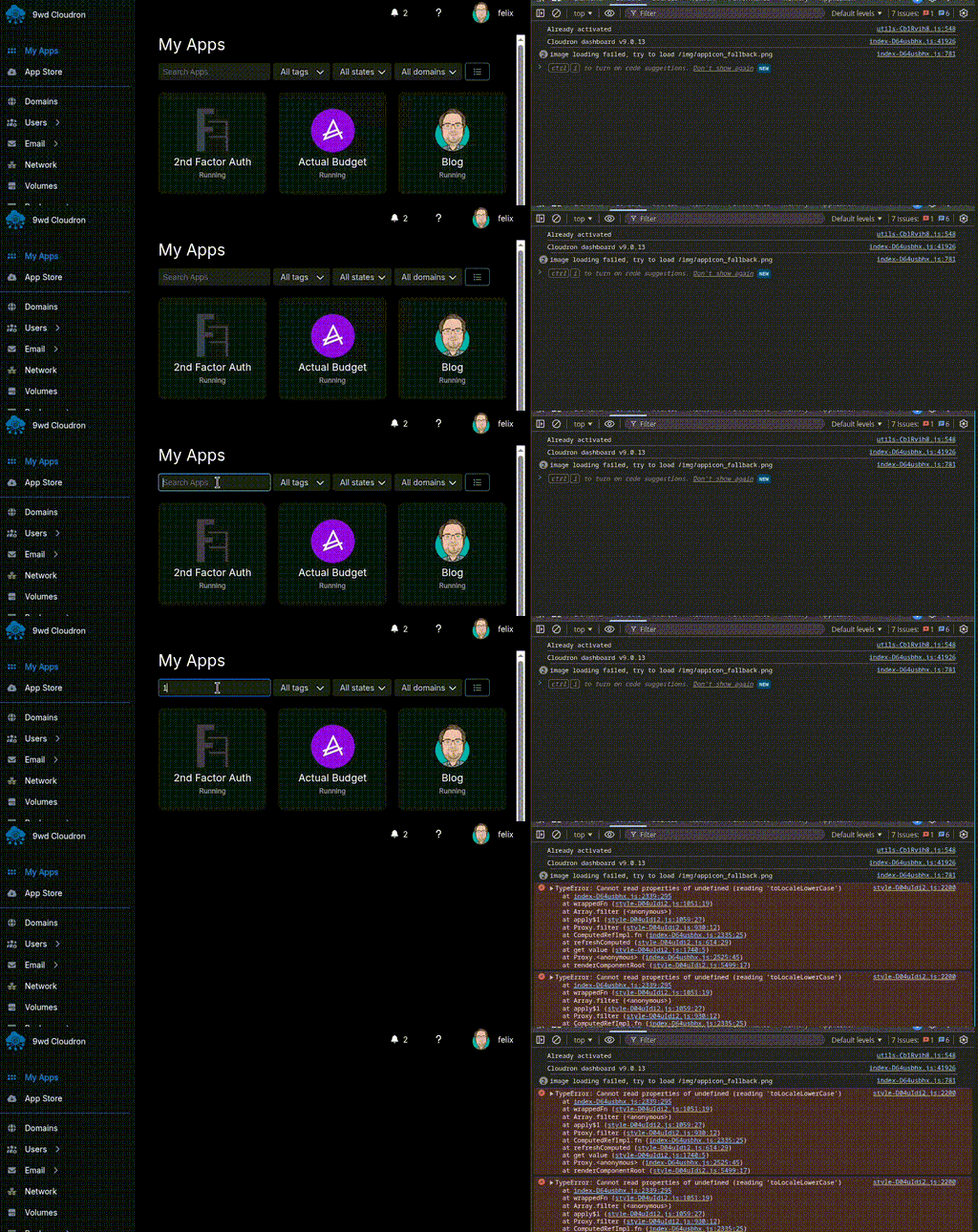
utils-Cb1Rvih8.js:548 Already activated index-D64usbhx.js:41926 Cloudron dashboard v9.0.13 index-D64usbhx.js:781 image loading failed, try to load /img/appicon_fallback.png index-D64usbhx.js:781 image loading failed, try to load /img/appicon_fallback.png style-D04uIdi2.js:2200 TypeError: Cannot read properties of undefined (reading 'toLocaleLowerCase') at index-D64usbhx.js:2339:295 at wrappedFn (style-D04uIdi2.js:1051:19) at Array.filter (<anonymous>) at apply$1 (style-D04uIdi2.js:1059:27) at Proxy.filter (style-D04uIdi2.js:930:12) at ComputedRefImpl.fn (index-D64usbhx.js:2335:25) at refreshComputed (style-D04uIdi2.js:614:29) at get value (style-D04uIdi2.js:1740:5) at Proxy.<anonymous> (index-D64usbhx.js:2525:45) at renderComponentRoot (style-D04uIdi2.js:5499:17) logError @ style-D04uIdi2.js:2200 handleError @ style-D04uIdi2.js:2194 renderComponentRoot @ style-D04uIdi2.js:5533 componentUpdateFn @ style-D04uIdi2.js:6728 run @ style-D04uIdi2.js:465 runIfDirty @ style-D04uIdi2.js:498 callWithErrorHandling @ style-D04uIdi2.js:2142 flushJobs @ style-D04uIdi2.js:2313 Promise.then queueFlush @ style-D04uIdi2.js:2245 queueJob @ style-D04uIdi2.js:2240 effect2.scheduler @ style-D04uIdi2.js:6764 trigger @ style-D04uIdi2.js:488 endBatch @ style-D04uIdi2.js:546 notify @ style-D04uIdi2.js:779 trigger @ style-D04uIdi2.js:766 set value @ style-D04uIdi2.js:1589 createVNode.onUpdate:modelValue._cache.<computed>._cache.<computed> @ index-D64usbhx.js:2477 callWithErrorHandling @ style-D04uIdi2.js:2142 callWithAsyncErrorHandling @ style-D04uIdi2.js:2149 emit @ style-D04uIdi2.js:5388 set @ style-D04uIdi2.js:5341 set value @ style-D04uIdi2.js:1635 createElementBlock.onUpdate:modelValue._cache.<computed>._cache.<computed> @ style-D04uIdi2.js:16237 (anonymous) @ style-D04uIdi2.js:10083 -
 N nebulon forked this topic
-
I have not seen it reported here and am also not able to reproduce it on the demo system, but when i search for an app and enter the second character the dashboard breaks with a javascript error.
utils-Cb1Rvih8.js:548 Already activated index-D64usbhx.js:41926 Cloudron dashboard v9.0.13 index-D64usbhx.js:781 image loading failed, try to load /img/appicon_fallback.png index-D64usbhx.js:781 image loading failed, try to load /img/appicon_fallback.png style-D04uIdi2.js:2200 TypeError: Cannot read properties of undefined (reading 'toLocaleLowerCase') at index-D64usbhx.js:2339:295 at wrappedFn (style-D04uIdi2.js:1051:19) at Array.filter (<anonymous>) at apply$1 (style-D04uIdi2.js:1059:27) at Proxy.filter (style-D04uIdi2.js:930:12) at ComputedRefImpl.fn (index-D64usbhx.js:2335:25) at refreshComputed (style-D04uIdi2.js:614:29) at get value (style-D04uIdi2.js:1740:5) at Proxy.<anonymous> (index-D64usbhx.js:2525:45) at renderComponentRoot (style-D04uIdi2.js:5499:17) logError @ style-D04uIdi2.js:2200 handleError @ style-D04uIdi2.js:2194 renderComponentRoot @ style-D04uIdi2.js:5533 componentUpdateFn @ style-D04uIdi2.js:6728 run @ style-D04uIdi2.js:465 runIfDirty @ style-D04uIdi2.js:498 callWithErrorHandling @ style-D04uIdi2.js:2142 flushJobs @ style-D04uIdi2.js:2313 Promise.then queueFlush @ style-D04uIdi2.js:2245 queueJob @ style-D04uIdi2.js:2240 effect2.scheduler @ style-D04uIdi2.js:6764 trigger @ style-D04uIdi2.js:488 endBatch @ style-D04uIdi2.js:546 notify @ style-D04uIdi2.js:779 trigger @ style-D04uIdi2.js:766 set value @ style-D04uIdi2.js:1589 createVNode.onUpdate:modelValue._cache.<computed>._cache.<computed> @ index-D64usbhx.js:2477 callWithErrorHandling @ style-D04uIdi2.js:2142 callWithAsyncErrorHandling @ style-D04uIdi2.js:2149 emit @ style-D04uIdi2.js:5388 set @ style-D04uIdi2.js:5341 set value @ style-D04uIdi2.js:1635 createElementBlock.onUpdate:modelValue._cache.<computed>._cache.<computed> @ style-D04uIdi2.js:16237 (anonymous) @ style-D04uIdi2.js:10083 -
N nebulon forked this topic
-
Is it just me or is version 9 using way more memory? Like I swear I wasn't swapping with 1 GB of memory before this but it could just be that I didn't notice it? All I have is Navidrome installed.
System
Cloudron version
9.0.13
Ubuntu version
Ubuntu 24.04.3 LTS Linux 6.8.0-88-generic
Vendor
VMware, Inc.
Product
VMware7,1
CPU
2 Core "Intel(R) Xeon(R) Gold 6138 CPU @ 2.00GHz"
Memory
1.01 GB RAM & 2.01 GB Swap -
Not sure if that already has been reported, but if I click on the refresh icon in the email event log page. the logs jump 2 hours back in time instead of refreshing to the current time.
@Kubernetes said in Cloudron 9.0 (beta) bug reports:
Not sure if that already has been reported, but if I click on the refresh icon in the email event log page. the logs jump 2 hours back in time instead of refreshing to the current time.
Yes, that definitely happens to me too! Good catch, as I noticed it but forgot to report it.
 I’m glad you brought it up.
@Jenova said in Cloudron 9.0 (beta) bug reports:
Is it just me or is version 9 using way more memory? Like I swear I wasn't swapping with 1 GB of memory before this but it could just be that I didn't notice it?
I can’t say I’ve noticed any increased memory usage, for what that’s worth.
 Interesting if it is though.
 -
Is it just me or is version 9 using way more memory? Like I swear I wasn't swapping with 1 GB of memory before this but it could just be that I didn't notice it? All I have is Navidrome installed.
System
Cloudron version
9.0.13
Ubuntu version
Ubuntu 24.04.3 LTS Linux 6.8.0-88-generic
Vendor
VMware, Inc.
Product
VMware7,1
CPU
2 Core "Intel(R) Xeon(R) Gold 6138 CPU @ 2.00GHz"
Memory
1.01 GB RAM & 2.01 GB Swap -
Is it just me or is version 9 using way more memory? Like I swear I wasn't swapping with 1 GB of memory before this but it could just be that I didn't notice it? All I have is Navidrome installed.
System
Cloudron version
9.0.13
Ubuntu version
Ubuntu 24.04.3 LTS Linux 6.8.0-88-generic
Vendor
VMware, Inc.
Product
VMware7,1
CPU
2 Core "Intel(R) Xeon(R) Gold 6138 CPU @ 2.00GHz"
Memory
1.01 GB RAM & 2.01 GB Swap@Jenova I can't believe you are running Cloudron with 1.01 GB RAM & 2.01 GB Swap. No wonder "nothing works". https://docs.cloudron.io/installation/ even says 2GB is required. SWAP is handy, but it doesn't replace actual RAM. If you head over to lowendtalk.com there are still deals on VPSes with nice amounts of ram, and possibly large enough disk space (you will definitely need an extra backup destination though, don't rely on the same server as Cloudron, it fills up fast). Some companies I've used are: RackNerd, Dedirock, Servarica, Chunkserve, OVH (https://www.ovhcloud.com/en-ie/vps/#config, see pic below), Hosthatch - these are just some on the first page. I don't recommend any company with a "weird" name. I know, thats subjective, but I think it works.
I myself am using an SSDNodes 48GB ram server, with over 70 apps, mostly personal use. I took the long way, long ago, of working my way up to these specs as I faced the reality that, for some software, you really just need to up the specs and pay the price to avoid the headaches. I'm running a free level of Cloudron on an older KimSufi KS-A server, with Intel ATOM N2800 CPU, 2c/4t - 1.86 GHz, and RAM 4 GB 1066 MHz, with just the Cloudron, a Wordpress site, and Mastodon (1TB disk) and that thing needs alot of careful attention to run ok.
Good luck!
-
@Kubernetes said in Cloudron 9.0 (beta) bug reports:
Not sure if that already has been reported, but if I click on the refresh icon in the email event log page. the logs jump 2 hours back in time instead of refreshing to the current time.
Yes, that definitely happens to me too! Good catch, as I noticed it but forgot to report it.
I’m glad you brought it up.@Jenova said in Cloudron 9.0 (beta) bug reports:
Is it just me or is version 9 using way more memory? Like I swear I wasn't swapping with 1 GB of memory before this but it could just be that I didn't notice it?
I can’t say I’ve noticed any increased memory usage, for what that’s worth.
Interesting if it is though.@d19dotca said in Cloudron 9.0 (beta) bug reports:
I can’t say I’ve noticed any increased memory usage, for what that’s worth.
Interesting if it is though.Yea might just be me then
@joseph said in Cloudron 9.0 (beta) bug reports:
This is actually the available system memory and Swap and not what is being used! I have asked the team to fix the title to make this clear.
Yep, I was actually just posting specs.
This is what it looks like:

@scooke said in Cloudron 9.0 (beta) bug reports:
I can't believe you are running Cloudron with 1.01 GB RAM & 2.01 GB Swap. No wonder "nothing works". https://docs.cloudron.io/installation/ even says 2GB is required. SWAP is handy, but it doesn't replace actual RAM.
Thanks for the information. I kinda figured this was the case. Don't really need the rest of the information as I use IONOs and get a 8GB RAM, 4vcore CPU, and 250GB space for $3.75 for 12 months (I wanted to leave and they said "Wait! Don't go!") and a free vps (the 1gb ram one) from Heliohost since I'm a moderator there and it's a perk. Thank you though.
-
2GB RAM is really not much these days. Have you analyzed further with tools like top/htop to see which process is consuming this? Also, linux does not let go of swap "easily" . I recommend just rebooting and it will clear the swap and see if the usage comes back up.
Also, can you open a new thread please, if you see the issue persists after the reboot? thanks!
-
J joseph unpinned this topic
-
J joseph locked this topic