
Yes, is something in .NET, but runs on many plattforms (Linux, Windows, Docker, macOS, RasPi...)
T
tecbox
@tecbox
Posts
-
Add Technitium DNS as DNS Provider -
Add Technitium DNS as DNS ProviderHey,
it would be great, if you can add Technitium DNS as DNS Provider to Cloudron!I host the most of my domains on self hosted Technitium DNS Server, but for my Cloudron-Domain I'm using deSEC... would be great to move this domain also to my own DNS.

More info provided on the project website and in the API Docs:
https://technitium.com/dns/https://github.com/TechnitiumSoftware/DnsServer/blob/master/APIDOCS.md
-
Immich not responding after update or Cloudron restart -
Immich not responding after update or Cloudron restart -
Immich not responding after update or Cloudron restart -
Immich not responding after update or Cloudron restartHi @james
thx for your reply, here the output:
Vendor: QEMU Product: Standard PC (i440FX + PIIX, 1996) Linux: 6.8.0-117-generic Ubuntu: noble 24.04 Cloudron: 9.1.7 Execution environment: kvm Processor: Intel(R) Xeon(R) Gold 6122 CPU @ 1.80GHz BIOS pc-i440fx-10.1 CPU @ 2.0GHz x 4 RAM: 16377032KB Disk: /dev/vda1 53G [OK] node version is correct [OK] IPv6 is enabled and public IPv6 address is working [OK] docker is running [OK] docker version is correct [OK] MySQL is running [OK] netplan is good [OK] DNS is resolving via systemd-resolved [OK] unbound is running [OK] nginx is running [OK] dashboard cert is valid [OK] dashboard is reachable via loopback [OK] No pending database migrations [OK] Service 'mysql' is running and healthy [OK] Service 'postgresql' is running and healthy [OK] Service 'mongodb' is running and healthy [OK] Service 'mail' is running and healthy [OK] Service 'graphite' is running and healthy [OK] Service 'sftp' is running and healthy [OK] box v9.1.7 is running [OK] Dashboard is reachable via domain name [WARN] Domain tecbox.de expiry check skipped because whois does not have this information -
Immich not responding after update or Cloudron restartHi,
my Immich-App constantly not respondig, after a restart of the app, the Cloudron server or after an app update. After amount of time (actually about 1,5h), the app is fully loaded and can used as nothing happens.
In the log self, I don't see anything, that prevents from fully loaded. Last entry ist loading of Redis, then only the health check error:May 24 09:44:02 13:C 24 May 2026 07:44:02.902 * Configuration loaded May 24 09:44:02 13:C 24 May 2026 07:44:02.902 * Redis version=8.4.0, bits=64, commit=00000000, modified=1, pid=13, just started May 24 09:44:02 13:C 24 May 2026 07:44:02.902 * oO0OoO0OoO0Oo Redis is starting oO0OoO0OoO0Oo May 24 09:44:02 13:M 24 May 2026 07:44:02.903 * Increased maximum number of open files to 10032 (it was originally set to 1024). May 24 09:44:02 13:M 24 May 2026 07:44:02.903 * monotonic clock: POSIX clock_gettime May 24 09:44:02 13:M 24 May 2026 07:44:02.969 # Failed to write PID file: Permission denied May 24 09:44:02 13:M 24 May 2026 07:44:02.969 * Running mode=standalone, port=6379. May 24 09:44:02 2026-05-24 07:44:02,546 INFO spawned: 'redis' with pid 13 May 24 09:44:02 2026-05-24 07:44:02,588 INFO spawned: 'redis-service' with pid 14 May 24 09:44:03 13:M 24 May 2026 07:44:03.062 * Server initialized May 24 09:44:03 13:M 24 May 2026 07:44:03.103 * Loading RDB produced by version 8.4.0 May 24 09:44:03 13:M 24 May 2026 07:44:03.103 * RDB age 62 seconds May 24 09:44:03 13:M 24 May 2026 07:44:03.103 * RDB memory usage when created 7.91 Mb May 24 09:44:03 13:M 24 May 2026 07:44:03.266 * DB loaded from disk: 0.203 seconds May 24 09:44:03 13:M 24 May 2026 07:44:03.266 * Done loading RDB, keys loaded: 49, keys expired: 18. May 24 09:44:03 13:M 24 May 2026 07:44:03.266 * Ready to accept connections tcp May 24 09:44:04 2026-05-24 07:44:04,276 INFO success: redis entered RUNNING state, process has stayed up for > than 1 seconds (startsecs) May 24 09:44:04 2026-05-24 07:44:04,276 INFO success: redis-service entered RUNNING state, process has stayed up for > than 1 seconds (startsecs) May 24 09:44:07 Redis service endpoint listening on http://:::3000 May 24 09:59:20 => Healthcheck error: Error: connect ECONNREFUSED 172.18.20.32:2283 May 24 09:59:30 => Healthcheck error: Error: connect ECONNREFUSED 172.18.20.32:2283 May 24 09:59:40 => Healthcheck error: Error: connect ECONNREFUSED 172.18.20.32:2283 May 24 09:59:50 => Healthcheck error: Error: connect ECONNREFUSED 172.18.20.32:2283 May 24 10:00:00 => Healthcheck error: Error: connect ECONNREFUSED 172.18.20.32:2283 May 24 10:00:10 => Healthcheck error: Error: connect ECONNREFUSED 172.18.20.32:2283 May 24 10:00:20 => Healthcheck error: Error: connect ECONNREFUSED 172.18.20.32:2283 After this, the log shows conutinuation of starting app and database, the app fully loaded: May 24 10:23:00 => Healthcheck error: Error: connect ECONNREFUSED 172.18.20.32:2283 May 24 10:23:00 => Setup environment May 24 10:23:00 => Disable update checker May 24 10:23:00 => Setup OpenID Connect May 24 10:23:00 => Setup Notification Email May 24 10:23:00 => Prepare database for VectorChord extension if exists May 24 10:23:00 ==> VectorChord extension does not exist or was successfully set up May 24 10:23:00 => Start supervisor May 24 10:23:01 2026-05-24 08:23:01,206 CRIT Supervisor is running as root. Privileges were not dropped because no user is specified in the config file. If you intend to run as root, you can set user=root in the config file to avoid this message. May 24 10:23:01 2026-05-24 08:23:01,210 INFO Included extra file "/etc/supervisor/conf.d/machine-learning.conf" during parsing May 24 10:23:01 2026-05-24 08:23:01,210 INFO Included extra file "/etc/supervisor/conf.d/server.conf" during parsing May 24 10:23:01 2026-05-24 08:23:01,218 INFO RPC interface 'supervisor' initialized May 24 10:23:01 2026-05-24 08:23:01,218 CRIT Server 'unix_http_server' running without any HTTP authentication checking May 24 10:23:01 2026-05-24 08:23:01,219 INFO supervisord started with pid 1 May 24 10:23:02 2026-05-24 08:23:02,261 INFO spawned: 'machine-learning' with pid 41 May 24 10:23:02 2026-05-24 08:23:02,271 INFO spawned: 'server' with pid 42 May 24 10:23:03 2026-05-24 08:23:03,275 INFO success: machine-learning entered RUNNING state, process has stayed up for > than 1 seconds (startsecs) May 24 10:23:03 2026-05-24 08:23:03,275 INFO success: server entered RUNNING state, process has stayed up for > than 1 seconds (startsecs) May 24 10:23:06 [05/24/26 08:23:05] INFO Starting gunicorn 25.1.0 May 24 10:23:06 [05/24/26 08:23:06] INFO Listening at: http://[::]:3003 (52) May 24 10:23:06 [05/24/26 08:23:06] INFO Using worker: immich_ml.config.CustomUvicornWorker May 24 10:23:06 [05/24/26 08:23:06] ERROR Control server error: [Errno 30] Read-only file May 24 10:23:06 system May 24 10:23:06 [05/24/26 08:23:06] INFO Booting worker with pid: 57 May 24 10:23:10 => Healthcheck error: Error: connect ECONNREFUSED 172.18.20.32:2283 May 24 10:23:16 [05/24/26 08:23:16] INFO Started server process [57] May 24 10:23:16 [05/24/26 08:23:16] INFO Waiting for application startup. May 24 10:23:16 [05/24/26 08:23:16] INFO Created in-memory cache with unloading after 300s May 24 10:23:16 of inactivity. May 24 10:23:16 [05/24/26 08:23:16] INFO Initialized request thread pool with 4 threads. May 24 10:23:16 [05/24/26 08:23:16] INFO Application startup complete. May 24 10:23:19 (node:42) ExperimentalWarning: WASI is an experimental feature and might change at any time May 24 10:23:19 (Use `node --trace-warnings ...` to show where the warning was created) May 24 10:23:20 => Healthcheck error: Error: connect ECONNREFUSED 172.18.20.32:2283 May 24 10:23:20 Starting api worker May 24 10:23:20 Starting microservices worker May 24 10:23:25 (node:42) ExperimentalWarning: WASI is an experimental feature and might change at any time May 24 10:23:25 (Use `node --trace-warnings ...` to show where the warning was created) May 24 10:23:25 (node:65) ExperimentalWarning: WASI is an experimental feature and might change at any time May 24 10:23:25 (Use `node --trace-warnings ...` to show where the warning was created) May 24 10:23:25 [Nest] 42 - 05/24/2026, 8:23:25 AM LOG [Microservices:WebsocketRepository] Initialized websocket server May 24 10:23:26 13:M 24 May 2026 08:23:26.237 * 1 changes in 900 seconds. Saving... May 24 10:23:26 13:M 24 May 2026 08:23:26.240 * Background saving started by pid 26 May 24 10:23:26 26:C 24 May 2026 08:23:26.290 * BGSAVE done, 49 keys saved, 0 keys skipped, 1483485 bytes written. May 24 10:23:26 26:C 24 May 2026 08:23:26.317 * DB saved on disk May 24 10:23:26 26:C 24 May 2026 08:23:26.318 * Fork CoW for RDB: current 0 MB, peak 0 MB, average 0 MB May 24 10:23:26 13:M 24 May 2026 08:23:26.340 * Background saving terminated with successHave anyone an idea what this can caused or were I can start to troubleshoot?
Some specs:
Cloudron 9.1.7
on KVM-VPS with Ubuntu 24.0.4, 4 Intel Xeon CPU-Cores and 16 GB of RAM.
The Immich-App himself has a RAM-limit of 4.25 GB which max. usage is round about 2 GB (Cloudron app graph says).Thanks for any hint!
-
App restore not successfulHello @all,
short feedback on this.After digging some days around, it seems the problem is related to the configured sshfs-backup to my storagebox.
The backup take very long in the past, but since process must backup aroun 360 GB, I didn't think about it.
But, after searching and looking for the actual problem, I found this topic: https://forum.cloudron.io/topic/14848/extremely-slow-backups-to-hetzner-storage-box-rsync-tar.gz-replacing-minio-used-on-a-dedicated-cloudronLong story short: I found that I configured the storagebox exact in the wrong way and the restore-process seems restored the right data (going to extra hdd), but also restores encrypted data (they look exact same as in the storagebox) and so the main ssd went full...
With another backup (puuh I had!) from another location, the restore went well and all is good.
I setup a new location to storagebox with recommendation to use the prefix and see, the first backup needs long time (as in the past), but the next backup, went successful in about 20 minutes! oONot so short, sry

-
App restore not successful@james Yeah, first I tried backup from the app-menu, this crashed. It was a bit difficult to remove the app / data, but after some time I get it it uninstalled.
After reinstalling, I changed all settings to previous settings manually - RAM and also data directory.Confusing is, the restore goes to the data directory, but after then, it created the mentioned other folders in appdata.
-
App restore not successfulHi,
yesterday my Immich-App crashed after aborted a backup process.
Since the app was not responding anymore, I tried to restore. After 6 hours (or more), I received mails about running out of disk space.Server Details:
Cloudron 9.0.17
2 disks: main (nvme) = 240 GB now (doubled after first crash) and a second hdd-disk on which immich is home (changed data directory)
Immich package version 1.96.0
about 360 GB of data, backup from Hetzner StorageboxThe restore proceed as expected, after upload the json and fill private key and encryption key, it downloads the backup and stores on the hdd. But since this is finished, it seems to beginn from start and stores data on the main ssd (where not enough space is).
In my case it creates some additional folders in appdata like "U+JFw4C6ztAgbImq73rqNenmK4orcV3TMLuNPiamLNI".
In that are many, many folders and files (photos?).
So the end is, the restore download until the main disk is full and crashed then.The data directory is, as mentioned, already moved to hdd disk.
Thanks for help!
-
DNS config error 502 bad gateway notifications@jdaviescoates
It is actually not resolved, opened ticket via mail, but did not received an anwser yet. -
DNS config error 502 bad gateway notifications -
DNS config error 502 bad gateway notifications -
DNS config error 502 bad gateway notificationsHi @james,
no problem, here the outputs from requested commands:
4:{"register":"https://desec.io/api/v1/auth/","login":"https://desec.io/api/v1/auth/login/","reset-password":"https://desec.io/api/v1/auth/account/reset-password/"}6:
{"register":"https://desec.io/api/v1/auth/","login":"https://desec.io/api/v1/auth/login/","reset-password":"https://desec.io/api/v1/auth/account/reset-password/"} -
DNS config error 502 bad gateway notifications -
DNS config error 502 bad gateway notificationsSince Cloudron 9, I get constantly notifications (messages in message center in Clodron Dashboard) about misconfigured Domain correlated to deSEC DNS:
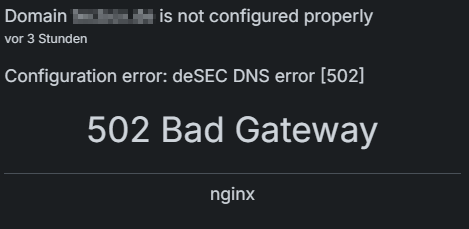
If I mark as read, the notification is gone and come back around next day, sometimes takes longer, 2-3 days.
I did not find any issues regarding DNS, new Apps and DNS working "normal", nothing I can find in logs.Logs
If applicable, attach relevant logs from
/home/yellowtent/platformdata/logs/box.logor the DashboardThere is nothing a can share here (didn't find anything).
Troubleshooting Already Performed
Mention any steps you have already tried (restarts, reboots, etc.). This prevents repeated suggestions
Server rebooted, DNS reconfigured, sync DNS, added new App to test DNS record creation. All ok / function.
System Details
Generate Diagnostics Data
WARNING
The command
cloudron-support --send-diagnosticsgenerated URL might contain sensitive details.When choosing this option, you can delete everything below.
Your https://paste.cloudron.io/ URL generated from
cloudron-support --send-diagnostics.generated, can I provide, if needed
Cloudron Version
9.0.15Ubuntu Version
Ubuntu 24.04.2 LTSCloudron installation method
Manual with
./cloudron-setupOutput of
cloudron-support --troubleshootVendor: netcup Product: KVM Server Linux: 6.8.0-90-generic Ubuntu: noble 24.04 Execution environment: kvm Processor: AMD EPYC-Rome Processor BIOS pc-i440fx-9.2 CPU @ 2.0GHz x 4 RAM: 8131816KB Disk: /dev/vda3 107G [OK] node version is correct [OK] IPv6 is enabled and public IPv6 address is working [OK] docker is running [OK] docker version is correct [OK] MySQL is running [OK] nginx is running [OK] dashboard cert is valid [OK] dashboard is reachable via loopback [OK] No pending database migrations [OK] Service 'mysql' is running and healthy [OK] Service 'postgresql' is running and healthy [OK] Service 'mongodb' is running and healthy [OK] Service 'mail' is running and healthy [OK] Service 'graphite' is running and healthy [OK] Service 'sftp' is running and healthy [OK] box v9.0.15 is running [OK] netplan is good [OK] DNS is resolving via systemd-resolved [OK] Dashboard is reachable via domain name [WARN] Domain xxx expiry check skipped because whois does not have this information [OK] unbound is running -
gcs: Old backup not found when updating app -
gcs: Old backup not found when updating app -
gcs: Old backup not found when updating appHi,
a bit different, but same error:
Since my storagebox are full, I added an additional backup site to an s3-bucket.
After starting backup, it fails shortly with the error FrenchyBear mentioned: "BoxError: Old backup not found"
For the new-s3-site i'm using rsync with encryption, the bucket is new, so there is nothing for cloudron to reference to.
The problem was with 9.0.12 and is also there, after installation of new version 9.0.13.So my account is new, it seems I can not add a screenshot.