Cloudron makes it easy to run web apps like WordPress, Nextcloud, GitLab on your server. Find out more or install now.


Skip to content
  • Latest cloudron cli doesn't accept --server and --token anymore

    Unsolved Support cli pipeline exec
    2
    0 Votes
    2 Posts
    12 Views
    LanhildL
    @msbt I'm using 8.2.0 just fine with these options. The regression most certainly comes from a minor in between that version and 8.2.3
  • `cloudron versions update` returns cli version

    Solved Support cli
    3
    3 Votes
    3 Posts
    34 Views
    nebulonN
    The fixed cli version is published now
  • 2 Votes
    5 Posts
    169 Views
    E
    Both. I want to understand if both are correct programmatically, but I can't test them against having an existing docker image, because I find that counter-intuitive - why would I build the docker image before knowing if everything is correct?
  • CLI ignores cloudron/Dockerfile

    Solved Support cli build
    7
    0 Votes
    7 Posts
    217 Views
    rosanoR
    Just tried updating the CLI via npm install -g cloudron@8.2.1 and it seems to work now Thanks for looking into it.
  • Can not pull a file via cloudron cli from a app

    Solved Support cli
    2
    1 Votes
    2 Posts
    118 Views
    nebulonN
    Good find, apparently std*.resume() is not available on recent nodejs versions anymore and was already obsolete. I've published a new cli version now with the fix.
  • Failed to install app: 409 message: Conflicting tcp port 7473

    Solved Support cli ports
    2
    1 Votes
    2 Posts
    280 Views
    J
    @nostrdev you can pass -p or --port-bindings to cloudron install . It will query it. You can also pass directly using -p NEO4J_BROWSER_PORT=someportnumber,BOLT_BROWSER_PORT=anotherport .
  • Running other web servers / Docker container?

    Solved Support cli packaging
    4
    1 Votes
    4 Posts
    1k Views
    perelinP
    @andreasdueren Cool, thx! Will try that approach and report back.
  • Cloudron cli no longer asks for 2fa?

    Solved Support cli
    7
    1 Votes
    7 Posts
    2k Views
    fbartelsF
    Ah, I just found the error. For whatever reason the 2fa got disabled for my user and therefore the cli app did not ask for it. My password manager always filled out the 2fa field so I was unaware that it had actually been deactivated.
  • OpenSSL version mismatch: impossible to use rsync or scp

    Solved Support cli openssl
    3
    0 Votes
    3 Posts
    1k Views
    BrutalBirdieB
    I never thought of this use-case. Using sftp inside a Cloudron app to move data away. Unique, I must admit. Testing inside a LAMP app to the new unstable SFTPgo app. mkdir -p /tmp/testing; cd /tmp/testing ssh-keygen -t ed25519 -f /tmp/testing/this -q -N "" # put the publickey into my profile in sftpgo.cloudron.dev sftp -i this -P 2022 elias.hackradt@sftpgo.cloudron.dev:/ sftp> put /app/data/tcl.zip [image: 1740783672764-e26df4a0-195d-43cb-9f69-46f3fa8516d4-image-resized.png] Seems to be working Sorry, where was I? Ah yes, your issue The error message OpenSSL version mismatch. Built against 30000020, you have 30100070 indicates that the version of OpenSSL used to build the sftp or related binary (such as ssh, libssh, openssh) is different from the version of OpenSSL currently installed on your system. Specifically: Built against 30000020: This means the binary was compiled against OpenSSL version 3.0.2 (I think don't pinpoint me on the semver). You have 30100070: This means your system currently has OpenSSL version 3.1.7 (same again, don't pinpoint me on the semver, not used to the 30100070 format). This mismatch can cause compatibility issues because the binary expects a specific version of OpenSSL but finds a different one at runtime. Running this in my LAMP App: openssl version OpenSSL 3.0.2 15 Mar 2022 (Library: OpenSSL 3.0.2 15 Mar 2022) and ssh -V OpenSSH_8.9p1 Ubuntu-3ubuntu0.4, OpenSSL 3.0.2 15 Mar 2022 Reveals, there is no issue inside the LAMP app. @chetbaker Could you maybe run openssl version, ssh -V and ldd $(which sftp) in your app with the id 23f10ac0-d9a3-4a1d-8265378464d7b1caasdasdas0 and post that output? Also can you tell us what app 23f10ac0-d9a3-4a1d-8265378464d7b1caasdasdas0 is? Since most apps are inherited from the Cloudron base image, that should be the same everywhere. So this error might be rather unique to your app. Could it be that your app is a custom packaged app? Since you are comfortable using the cloudron-cli, is this by chance an issue from your custom packaged app?

  • cloudron cli login timeout

    Solved Support cli
    2
    1
    0 Votes
    2 Posts
    259 Views
    J
    Seems like a connectivity issue. I assume you can connect via the browser. Is your system using a http proxy or anything like that? Does curl https://my.domain.com work ?
  • Exec/debug - Is it possible to use a shell other than bash?

    Solved Support cli exec debug
    9
    0 Votes
    9 Posts
    3k Views
    SansGuidonS
    Thanks for the explanation.
  • How to stop apps via SSH command line

    Solved Support cli apps
    20
    1 Votes
    20 Posts
    6k Views
    bmannB
    Well, apparently the only way to "fix" this, is to docker stop the yellow services Mail / Mongo / Postgres / MySQL and then restart them in the dashboard and they start up succesfully, and then you can start other apps that have been stopped.
  • How to restore mail from encrypted backups?

    Solved Support cli decrypt backups
    3
    1 Votes
    3 Posts
    1k Views
    T
    Ah, thanks! I hadn't seen the app-mail-folders before.
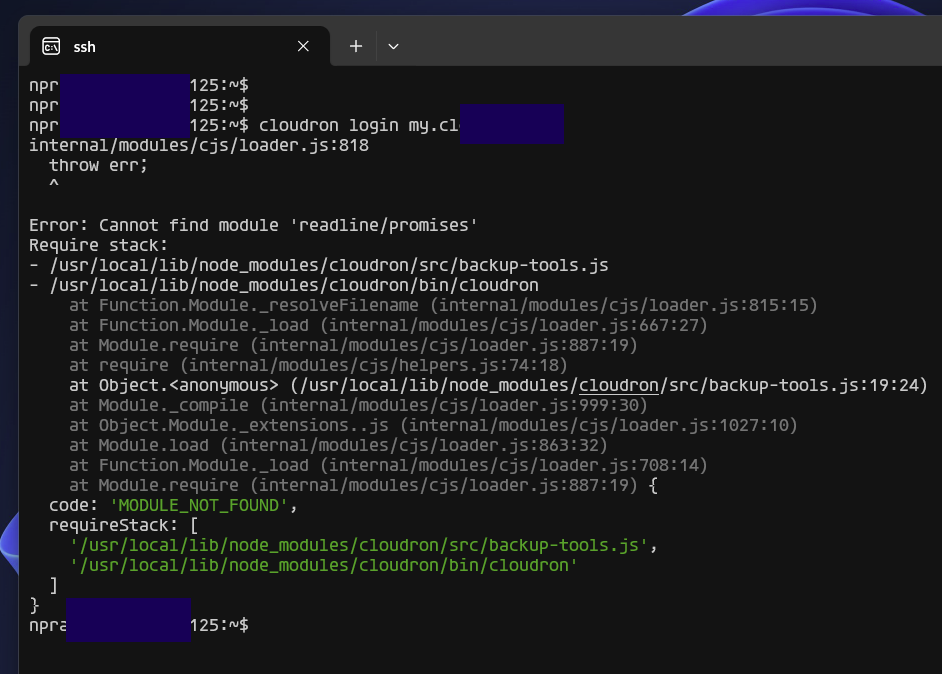
  • Cloudron CLI installation error

    Solved Support cli
    3
    1
    1 Votes
    3 Posts
    709 Views
    jagadeesh-s2104J
    @girish Thank you, Girish! After I updated the node, this error went away.
  • 2 Votes
    2 Posts
    745 Views
    girishG
    @luckow good catch. In fact, the sort function usage was entirely wrong. Fixed in https://git.cloudron.io/cloudron/cloudron-cli/-/commit/87dcb5f8cc8ae29f877a6f5b96c865ec48dd8846 I published a new CLI 5.5.0
  • App install from Cloudron Server cli?

    Solved Support cli
    4
    0 Votes
    4 Posts
    2k Views
    robiR
    Solution is to install the Cloudron CLI in a container, LAMP App or Surfer App work well. See: https://forum.cloudron.io/topic/10966/installing-custom-apps-on-cloudron/
  • CLI: Command not found

    Solved Support cli
    3
    1 Votes
    3 Posts
    1k Views
    L
    Got it, thanks!
  • Install apps using the API?

    Solved Support cli
    9
    1 Votes
    9 Posts
    3k Views
    robiR
    @nebulon Very cool upgrade to the API Docs since the last time I looked. Like @BrutalBirdie said, one should be able to copy and paste the examples into n8n, modify parameters and run it!
  • CLI Update command not working.

    Solved Support cli
    4
    0 Votes
    4 Posts
    1k Views
    girishG
    Please check if it's any better with CLI 5.4.1
  • cloudron cli error

    Solved Support cli api
    11
    1
    0 Votes
    11 Posts
    4k Views
    girishG
    @webvsnet Ah alright Remember that when you upgrade Cloudron, you will have to get back to CLI 5.4.0