
Got it! Might be worth to increase UX by putting a hint to this in the empty Group Folders view. Maybe just an addon sentence after "not part of any group folder yet"
 P
P
perelin
@perelin
Posts
-
How can I setup Group Folders? -
Linkwarden 1.21.1: monolith snapshots fail with spawn monolith EACCESAhoi! Ive run into an issue setting up linkwarden. Looked like no local copies of links could be created. I investigated with AI and found a permission issue. Tested the fix locally and it works. Here is the full report and patch (by Claude Opus4.7):
Symptom
For every bookmark you save, Linkwarden's worker creates four offline snapshots in the background and stores their paths on the link record:
image(PNG screenshot),pdf,readable(extracted plain-text/JSON), andmonolith(full self-contained HTML archive — the actual offline copy of the page, with images/CSS/JS inlined asdata:URIs). When a snapshot fails the corresponding field is set to the literal string"unavailable".On
app.linkwarden.cloudronapp@1.21.1the first three always succeed, but every link ends up withmonolith: "unavailable":GET /api/v1/links/14 { "id": 14, "url": "https://example.com/", "image": "archives/1/14.jpeg", "pdf": "archives/1/14.pdf", "readable": "archives/1/14_readability.json", "monolith": "unavailable", "lastPreserved": "2026-04-30T12:41:57.614Z" }In effect, the most useful preservation format — the offline HTML archive — is missing from every saved bookmark, while the UI just shows "unavailable" without surfacing why.
Worker logs show the underlying error:
Error: spawn monolith EACCESSource:
apps/worker/lib/preservationScheme/handleMonolith.tscallsspawn("monolith", …), which relies on the binary being resolvable throughPATHfor the worker process.Root cause
The
monolithbinary is installed viacargo install --locked monolithin theDockerfile. Cargo defaults to$CARGO_HOME/bin, which during the build is/root/.cargo/bin. The base image keeps/rootat mode700, and the runtime worker runs ascloudron(UID 1000) — so even though the binary itself is-rwxr-xr-x,cloudroncan't traverse/rootto reach it.Reproduce inside a 1.21.1 container:
$ ls -ld /root drwx------ 1 root root 4096 Apr 23 02:20 /root $ ls -la /root/.cargo/bin/monolith -rwxr-xr-x 1 root root 12384776 Apr 23 02:22 /root/.cargo/bin/monolith $ runuser -u cloudron -- /root/.cargo/bin/monolith --version runuser: failed to execute /root/.cargo/bin/monolith: Permission denied/rootis on the read-only image layer, sochmod o+x /rootat runtime is also rejected. This is purely a packaging issue — the binary is fine, just unreachable.Fix
One-line change in the
Dockerfile: pass--root /usr/localtocargo installso the binary lands in/usr/local/bin/monolith, which is on the defaultPATHand traversable for everyone.-# install rust and monolith (/root/.cargo/bin/monolith) +# install rust and monolith +# install monolith into /usr/local/bin so it is reachable for the runtime +# `cloudron` user (UID 1000); /root is mode 700 in the base image and would +# otherwise hide /root/.cargo/bin/monolith → spawn EACCES in the worker. RUN curl https://sh.rustup.rs -sSf | bash -s -- -y ENV PATH="/root/.cargo/bin:${PATH}" -RUN cargo install --locked monolith +RUN cargo install --locked --root /usr/local monolithFull patch attached:
linkwarden-monolith-eacces.patch(3 files, +9/−3 — Dockerfile + CHANGELOG entry + CloudronManifest version bump 1.21.1 → 1.21.2).I'd happily open a merge request directly, but I don't have a
git.cloudron.ioaccount — feel free to apply the patch withgit am linkwarden-monolith-eacces.patch(or just take the diff).Verification
Verified the fix on a running 1.21.1 container by approximating the post-patch state at runtime:
cp /root/.cargo/bin/monolith /app/data/bin/monolith(writable persistent volume)- Prepend
/app/data/binto the worker'sPATHvia a tinyNODE_OPTIONS=--require …shim (necessary becausedotenv-cliwon't overwrite an already-setPATH) - Restart the app
After that, a freshly created link preserves correctly:
{
  "id": 15,
  "url": "https://en.wikipedia.org/wiki/Monolith_(file_archive)",
  "monolith": "archives/1/15.html",
  "image":    "archives/1/15.jpeg",
  "pdf":      "archives/1/15.pdf",
  "readable": "archives/1/15_readability.json"
}
The resulting HTML is 600 KB and embeds data URIs as expected from monolith. Pre-existing "unavailable" links can be brought back with the
Re-preserve all brokenadmin action.Possibly related
Topic #13640 ("Missing HTML saved version and cookie popup in screenshots") describes the same observable symptom and was tentatively diagnosed as a resource issue. Based on the reproduction above I believe this
EACCESis the actual underlying cause for the missing HTML snapshots. -
Storage management in Immich?@joseph the
immich.jsondoes not expose a config setting for the file upload/storage path [1]. Looks like the way to go is the env varUPLOAD_LOCATION[2][1] https://immich.app/docs/install/config-file/
[2] https://immich.app/docs/install/environment-variables/#docker-compose -
Komga on Cloudron: How to upload comics held locally to your remote Komga -
Only Superadmins can change user rolesI noticed that only my superadmin can change the role of other users. Is this correct? I would expect that also regular admins can demote/elevate other users up until their pay grade.
It also not reflected in the docs: https://docs.cloudron.io/user-management/#roles
Thanks!
-
PostgREST - API the DBJust packaged it for myself. In case anyone wants to do this:
Basically follow the packaging Tutorial: https://docs.cloudron.io/packaging/tutorial/
CloudronManifest.json
{
    "title": "Postgrest",
    "version": "0.0.1",
    "healthCheckPath": "/",
    "httpPort": 3000,
    "manifestVersion": 2
}
install image directly from postgrest Docker Hub https://hub.docker.com/r/postgrest/postgrest
cloudron install --image postgrest/postgrestAnd then configure by setting env vars on the app via Cloudron CLI
https://postgrest.org/en/stable/references/configuration.htmleg
cloudron env set --app YourAppName "PGRST_DB_URI=postgresql://user:pwd@host:port/db" -
Open registrationThx @nebulon ! This could be part of the First Time Usage hints or docs at https://docs.cloudron.io/apps/postiz/ - just not a very obvious behaviour by Postiz
-
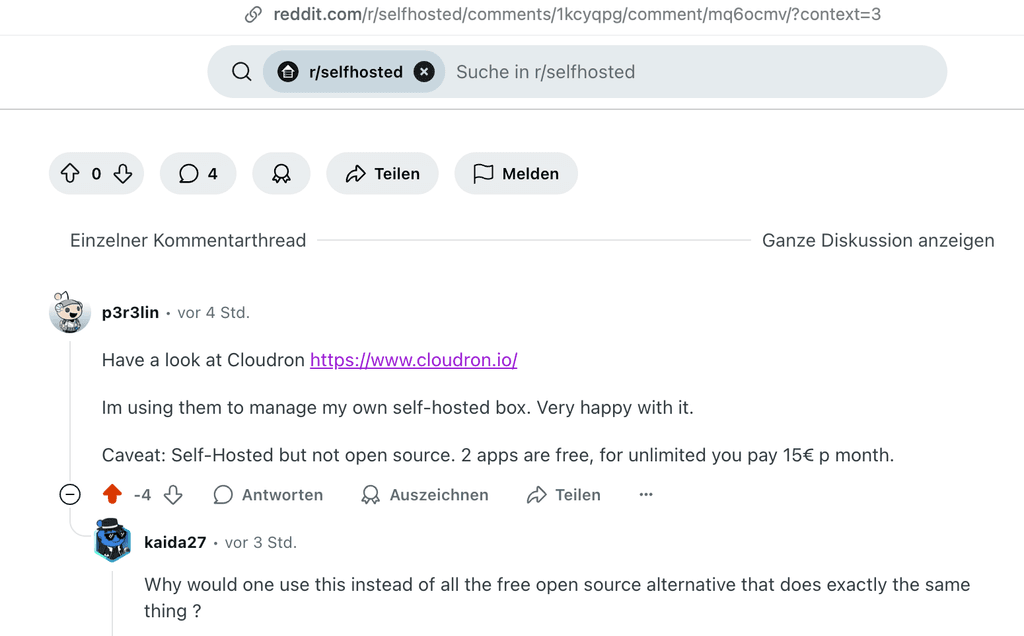
/r/selfhosted are not big Cloudron fansNot sure why, but the /r/selfhosted crowd is not big on Cloudron it seems. Got multiple downvotes and critical reply.

https://www.reddit.com/r/selfhosted/comments/1kcyqpg/what_optionsideas_for_personal_server/
-
Upgrade to Cloudron 9.0.7 stuck on "Removing containers for upgrade" + "Configuring"Ok, based on the box.log file I got a LLM/Claude debug session going and it was pretty quick showing me, that there was a docker container (postgres) running that was attached to the Cloudron Network, but not managed by Cloudron. I think that was something I set up super early, before I understood how Cloudron works. Claude helped me dettaching it and now the update went through without issues and everything is running again. Thanks for the hint with the box.log file @joseph !
-
Make Cloudron SSO login more explicitHey,
I recently started to give colleagues access to Cloudron apps. Did initial training on what Cloudron is, and how it relates to the actual apps. But more than once I got feedback like: "I dont know how log in to this app, I dont have credentials, or do I?"
In some login journeys (eg Penpot) its not immediately obvious that the users now need their Cloudron credentials.
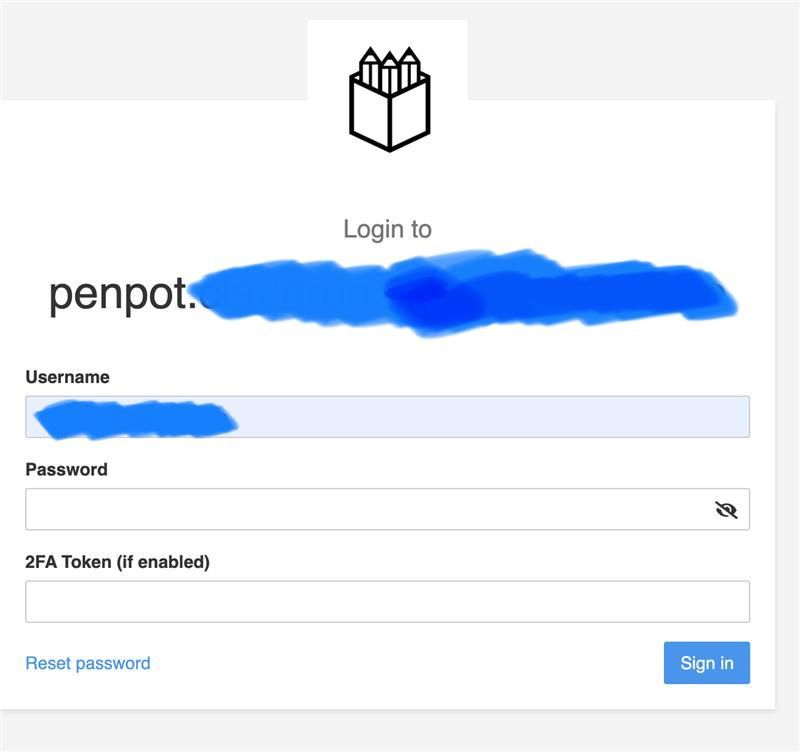
I think it would be an easy UX win to make it more obvious that this is the Cloudron login form and an app managed login.
Cheers, Sebastian
-
Impossible to log in any SM account on PostizFor our side I can say that we followed all steps at https://docs.postiz.com/providers/instagram and put the resulting credentials in the
env.shfile and reloaded the app. When we want to add Instagram as a channel we are linked out to an error page on meta/facebook that says "App ID invalid"
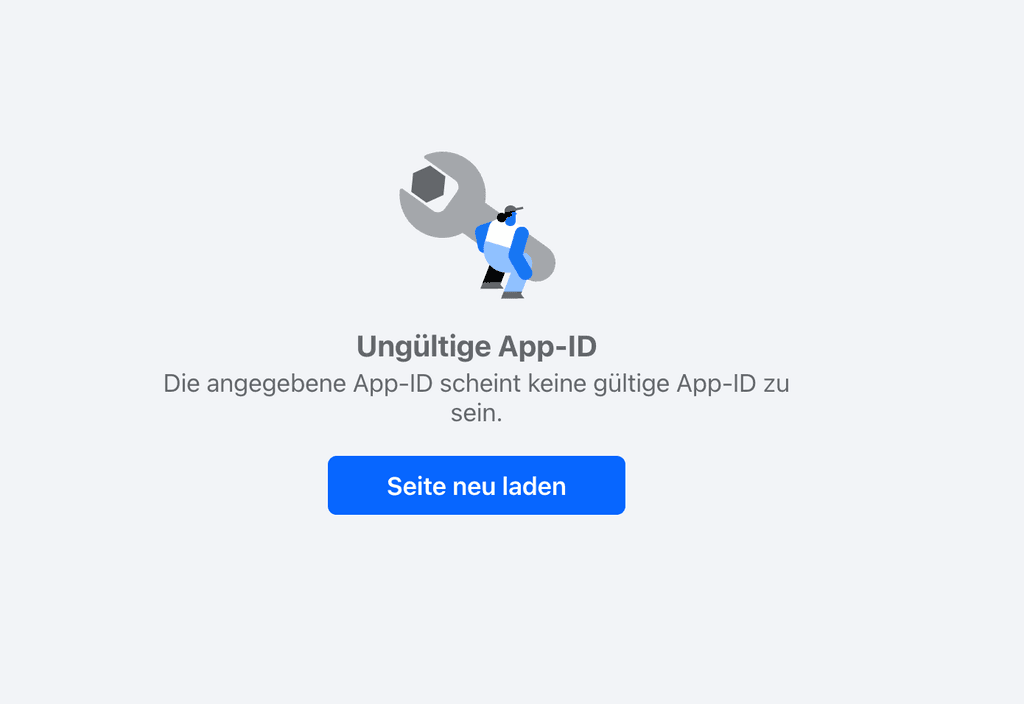
Looking at the linkout URL it seems the client_id is not set.
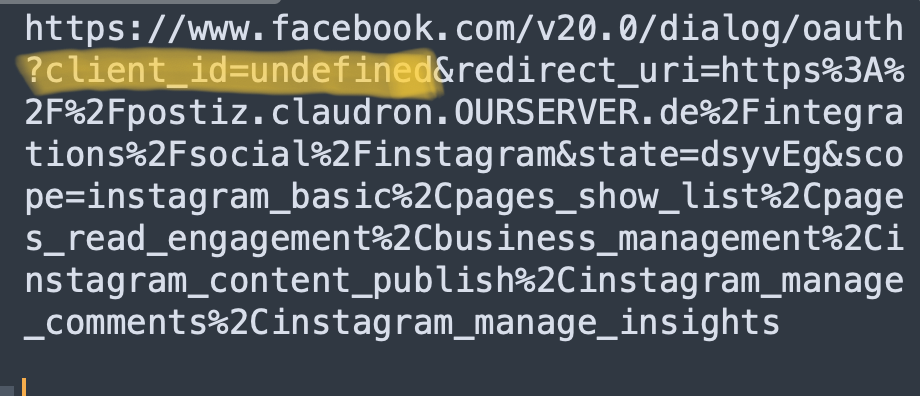
If I set the
client_idparameter manually to ourFACEBOOK_APP_IDfromenv.shthe authorisation process starts. At first it looks to go through, but after redirecting to Postiz I get this error:
Log file at this time:
Apr 24 09:36:34 13:M 24 Apr 2025 07:36:34.012 * 10 changes in 300 seconds. Saving...
Apr 24 09:36:34 13:M 24 Apr 2025 07:36:34.013 * Background saving started by pid 3078
Apr 24 09:36:34 13:M 24 Apr 2025 07:36:34.114 * Background saving terminated with success
Apr 24 09:36:34 3078:C 24 Apr 2025 07:36:34.020 * DB saved on disk
Apr 24 09:36:34 3078:C 24 Apr 2025 07:36:34.021 * Fork CoW for RDB: current 0 MB, peak 0 MB, average 0 MB
Apr 24 09:38:29 2025-04-24T07:38:29Z
Apr 24 09:38:29 2025-04-24T07:38:29Z
Apr 24 09:38:29 [Nest] 130 - 04/24/2025, 7:38:29 AM WARN OpenAI API key not set, chat functionality will not work
Apr 24 09:38:29 Node.js v20.18.2
Apr 24 09:38:29 UnhandledPromiseRejection: This error originated either by throwing inside of an async function without a catch block, or by rejecting a promise which was not handled with .catch(). The promise rejected with the reason "#<RefreshToken>".
Apr 24 09:38:29 ^
Apr 24 09:38:29 at process.processTicksAndRejections (node:internal/process/task_queues:96:32) {
Apr 24 09:38:29 at processPromiseRejections (node:internal/process/promises:470:17)
Apr 24 09:38:29 at throwUnhandledRejectionsMode (node:internal/process/promises:389:7)
Apr 24 09:38:29 code: 'ERR_UNHANDLED_REJECTION'
Apr 24 09:38:29 new UnhandledPromiseRejection(reason);
Apr 24 09:38:29 node:internal/process/promises:389
Apr 24 09:38:29 {"error":{"message":"Missing or invalid client id.","type":"OAuthException","code":101,"fbtrace_id":"AQjOzXIs8yqUOOGZn6sXIys"}}
Apr 24 09:38:29 }
Apr 24 09:38:30 TypeError: fetch failed
Apr 24 09:38:30 [cause]: SocketError: other side closed
Apr 24 09:38:30 at Socket.<anonymous> (node:internal/deps/undici/undici:6294:28)
Apr 24 09:38:30 at Socket.emit (node:events:530:35)
Apr 24 09:38:30 at async /app/code/dist/apps/frontend/.next/server/app/(site)/integrations/social/[provider]/continue/page.js:3:28297
Apr 24 09:38:30 at async ic (/app/code/dist/apps/frontend/.next/server/app/(site)/integrations/social/[provider]/continue/page.js:3:26983) {
Apr 24 09:38:30 at endReadableNT (node:internal/streams/readable:1698:12)
Apr 24 09:38:30 at node:internal/deps/undici/undici:13502:13
Apr 24 09:38:30 at process.processTicksAndRejections (node:internal/process/task_queues:82:21) {
Apr 24 09:38:30 bytesRead: 0
Apr 24 09:38:30 bytesWritten: 1844,
Apr 24 09:38:30 code: 'UND_ERR_SOCKET',
Apr 24 09:38:30 digest: '1372167340',
Apr 24 09:38:30 localAddress: '::1',
Apr 24 09:38:30 localPort: 55620,
Apr 24 09:38:30 npm notice
Apr 24 09:38:30 npm notice
Apr 24 09:38:30 npm notice Changelog: https://github.com/npm/cli/releases/tag/v11.3.0
Apr 24 09:38:30 npm notice New major version of npm available! 10.8.2 -> 11.3.0
Apr 24 09:38:30 npm notice To update run: npm install -g npm@11.3.0
Apr 24 09:38:30 remoteAddress: '::1',
Apr 24 09:38:30 remoteFamily: 'IPv6',
Apr 24 09:38:30 remotePort: 3000,
Apr 24 09:38:30 socket: {
Apr 24 09:38:30 timeout: undefined,
Apr 24 09:38:30 {"level":"error","ts":1745480310.3278437,"logger":"http.log.error","msg":"EOF","request":{"remote_ip":"172.18.0.1","remote_port":"35770","client_ip":"172.18.0.1","proto":"HTTP/1.1","method":"POST","host":"postiz.claudron.OURSERVER.de","uri":"/api/copilot/chat","headers":{"Origin":["https://postiz.claudron.OURSERVER.de"],"X-Forwarded-Host":["postiz.claudron.OURSERVER.de"],"X-Forwarded-Port":["443"],"Accept-Encoding":["gzip, deflate, br, zstd"],"Sec-Fetch-Mode":["cors"],"Priority":["u=1, i"],"User-Agent":["Mozilla/5.0 (Macintosh; Intel Mac OS X 10_15_7) AppleWebKit/537.36 (KHTML, like Gecko) Chrome/135.0.0.0 Safari/537.36"],"Sec-Ch-Ua-Platform":["\"macOS\""],"Accept":["application/graphql-response+json, application/graphql+json, application/json, text/event-stream, multipart/mixed"],"X-Forwarded-Proto":["https"],"Sec-Fetch-Site":["same-origin"],"Sec-Fetch-Dest":["empty"],"X-Real-Ip":["46.223.213.127"],"Connection":["close"],"Referer":["https://postiz.claudron.OURSERVER.de/integrations/social/instagram?code=AQBnG8A4zYRd27Sa7_7BS78Igi0DyhPcl3jdoC75v7nu9SXxTlRoih2h3SwYMXLe0RY2IShhTSyfrEWsdYPimvWBdacLR-fGJy1Pwz3nHj8DsxPnrgJT-2ymi0oXZy-gxkfBc5Fqiw9hGD3OnXWnFwnw-3QwFeWDLm3-uu5uoro2tO9PxQPPFftrCpHlwz26p86UiNkkJWrDY2VE9b04esMKejCKrWRtU7R8yBt3gz4tcGr1V97KFQASK-K7bsKBuSaIJZi8mpc-aiWLSBhvHc5pUux4g7gqKSGeM9kbvFnFy3F1PH7nxKWQLeIlARyRvGbi4-3nEPm8Rfw_ABah-GdN21sO-mWp3iqfhcSlHiHT0PwAVYhUHnZ59J-X_B9Zr41j0L3lbiDfVFdJqag0OOR_a9oWDKc7XCzT0FIAOCGvdg&state=zlLtoo"],"Sec-Ch-Ua":["\"Chromium\";v=\"135\", \"Not-A.Brand\";v=\"8\""],"Dnt":["1"],"X-Copilotkit-Runtime-Client-Gql-Version":["1.8.5"],"X-Forwarded-For":["46.223.213.127"],"X-Forwarded-Ssl":["on"],"Content-Length":["209"],"Cookie":["REDACTED"],"Accept-Language":["en-GB,en-US;q=0.9,en;q=0.8"],"Content-Type":["application/json"],"Sec-Ch-Ua-Mobile":["?0"]}},"duration":0.829163942,"status":502,"err_id":"nxr9zs32h","err_trace":"reverseproxy.statusError (reverseproxy.go:1373)"}
Apr 24 09:38:30 }
Apr 24 09:38:30 }
Apr 24 09:38:30 }
Apr 24 09:38:31 2025-04-24 07:38:31,012 WARN exited: backend (exit status 1; not expected)
Apr 24 09:38:32 2025-04-24 07:38:32,146 INFO spawned: 'backend' with pid 192
Apr 24 09:38:33 2025-04-24T07:38:33Z
Apr 24 09:38:33 2025-04-24T07:38:33Z
Apr 24 09:38:33 2025-04-24 07:38:33,120 INFO success: backend entered RUNNING state, process has stayed up for > than 1 seconds (startsecs)
Apr 24 09:38:33 > gitroom@0.0.0 start:prod
Apr 24 09:38:33 > node dist/apps/backend/main.js
After Postiz has restarted and I retry the redirect URL I get this error:
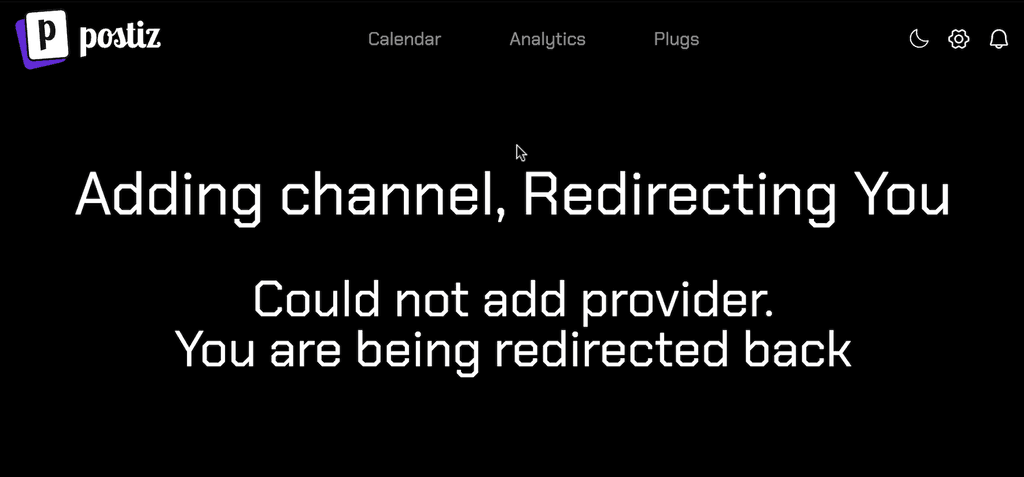
This is the redirect URL:
https://postiz.claudron.OURSERVER.de/integrations/social/instagram?code=AQDvNogLUgbQ-BA....Not sure what to try next.
-
Newbie Question: Why Do We Need to Request Apps on Cloudron?The "request app" Wishlist is for apps to get official Cloudron Dev Team support. Meaning, that the app will be available in the Cloudron App Store and all updates, etc are managed and provided automatically from the Cloudron team.
To get your own (or other 3rd party) apps run in Cloudron you can follow the packaging tutorial: https://docs.cloudron.io/packaging/tutorial/
-
How to create an admin user? -
Linkwarden 1.21.1: full-text search on archived content is silently unavailableHey, another thing that I stumbled upon: the full-text search is not working on Cloudron. The search engine/db Meilisearch is missing. Here is a write up about it done together with AI (Claude Opus4.7):
Symptom
Linkwarden's main selling point — beyond bookmarking — is that it preserves the full text of every saved page (
textContent, extracted via Mozilla Readability and stored in PostgreSQL). On Cloudron'sapp.linkwarden.cloudronapp@1.21.1this content is correctly archived and shows up on link records. But the search box does not actually search it.Easy way to reproduce on any 1.21.1 instance:
- Save a link whose article body contains a distinctive word that does not appear in the title, URL, description or any tag.
- Wait for preservation to finish; confirm via
GET /api/v1/links/<id>thattextContentis populated and contains the word. - Search for that word in the UI (or
GET /api/v1/links?searchQueryString=<word>). - Result: zero hits.
So the bookmarks are preserved, but the preserved content is functionally invisible to the search UI. That's surprising — and (as far as I can tell) not mentioned anywhere in the Cloudron app docs or in the forum.
Root cause
apps/web/lib/api/controllers/search/searchLinks.tshas two code paths:if (meiliClient && query.searchQueryString) { // → Meilisearch path: indexed search across all fields incl. textContent } else { // Fallback: No Meilisearch searchConditions.push({ name: { contains: q } }); searchConditions.push({ url: { contains: q } }); searchConditions.push({ description: { contains: q } }); searchConditions.push({ tags: { some: { name: { contains: q } } } }); // ← textContent is intentionally not in the WHERE clause }The switch is
MEILI_MASTER_KEY. Linkwarden's own env-vars docs state it plainly: "Linkwarden only initializes the MeiliSearch client when this value is set." The Cloudron package ships with noMEILI_*env vars, so the client isnull→ fallback path → archived body text is never queried.The indexing worker (
apps/worker/workers/linkIndexing.ts) is present in the image and ready to push records to a Meilisearch instance — it just has no instance to talk to.Upstream's position
Linkwarden's reference
docker-compose.ymltreats Meilisearch as a first-class sidecar, not an optional add-on:linkwarden: depends_on: - postgres - meilisearch meilisearch: image: getmeili/meilisearch:v1.12.8The docs describe content-level search ("Advanced Search") as the default expectation for self-hosters running ≥ 2.10.
Cloudron's single-container packaging model legitimately makes that hard, but the resulting feature gap isn't currently visible to users.
Suggestion
Three options, in increasing order of effort:
-
Doc-only fix. Add a "Limitations" / "Optional: full-text search" section to the Cloudron Linkwarden app docs explaining that the bundled image runs in the no-Meilisearch fallback mode, what that costs (no body-text search, no advanced operators), and pointing users at
MEILI_HOST/MEILI_MASTER_KEYif they want to bring their own instance. This already works today — the Linkwarden code reads those env vars unchanged, so a self-hoster can spin upgetmeili/meilisearchnext to Cloudron and point Linkwarden at it viacloudron env set. -
Make the integration discoverable. Document
MEILI_HOST/MEILI_MASTER_KEYas recognised env vars on the app page (they already work viacloudron env set— they're just not advertised). A startup log line on the worker — "Meilisearch disabled — full-text search on archived content will not be available" — would also turn the silent degradation into a visible one. -
Bundled sidecar. Ship Meilisearch alongside the Linkwarden container in the package. I understand from topic #2518 that a standalone Meilisearch app was deemed out of scope ("like a database … not really like a web app"), so I'm not asking for that — but bundling it as an internal dependency of the Linkwarden package would side-step that objection while bringing the package in line with upstream's expected architecture.
(1) seems strictly better than the current state regardless of whether (2) or (3) ever happen — right now users only learn the limitation by reading the source.
Verification offer
Happy to test any of the above on the 1.21.1 instance and report back. From reading the code I'd expect that pointing Linkwarden at an external Meilisearch via
cloudron env set MEILI_HOST=… MEILI_MASTER_KEY=…works without any package changes — the fallback should flip to the Meilisearch path on next restart and the indexing worker should backfill existing links — but I haven't tried it yet, and confirming this is exactly the kind of thing I'm offering to do.Possibly related
- docs.linkwarden.app/self-hosting/installation — upstream install guide listing Meilisearch as part of the standard setup.
- The Cloudron app currently runs
apps/worker/workers/linkIndexing.tsas a no-op every cycle; might be worth gating it (or at least the log lines) onMEILI_MASTER_KEYbeing set, to avoid future user confusion.
-
Storage management in Immich?Same use case here: would like to manage my photos with Immich, but want/need to store them on a Hetzner Storage Box (or any other external storage). My library is just to big to put it on the actual Cloudron Server. How can this be achieved? Did not find any clear path to this. Storage Templates maybe?
-
How can I setup Group Folders?Feeling a bit stupid, but I dont see any way to setup group folders. Where should I look?
In the Group Folders Section the NEW and UPLOAD buttons a inactive.
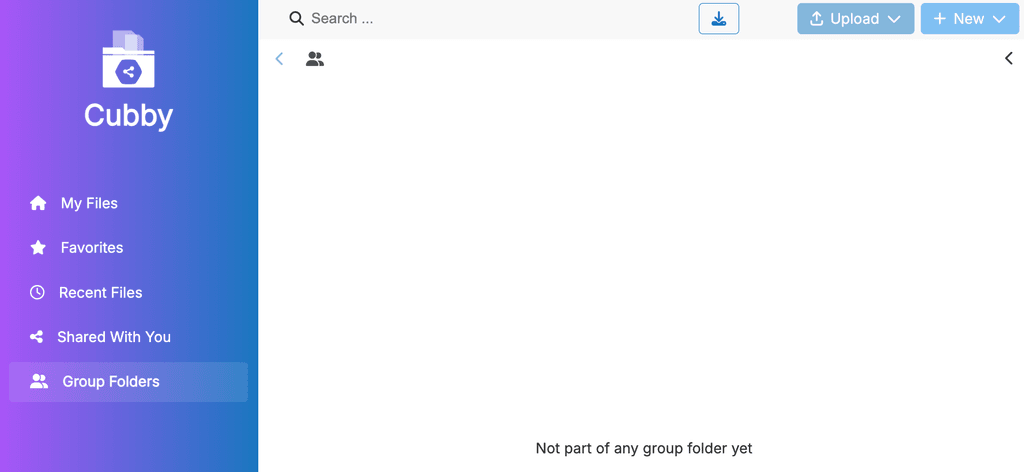
I put the Cubby data folder on a WebDav volume, but permissions should be fine. In "My Files" I can CRUD files and folders without issues.
Any idea?
-
Linkwarden 1.21.1: full-text search on archived content is silently unavailable@joseph any support here wished/needed? Would be happy to contribute and get the fulltext search to Linkwarden.
-
Linkwarden 1.21.1: full-text search on archived content is silently unavailable@joseph nothing can be done here? What about providing an optional meilisearch toggle somehow?
-
Linkwarden 1.21.1: full-text search on archived content is silently unavailable@girish I might have something ready and could create a MR - where can I get an account to http://git.cloudron.io/ ?
-
App Updates failed with "Error - Error setting up postgresql. Status code: 500 message:"