
Hi there, yes I saw this thread about it on github, I face the same issue in Firefox: https://github.com/dani-garcia/vaultwarden/issues/7462
I
Louis
@ikalou
Posts
-
Bitwarden clients no longer working with Vaultwarden -
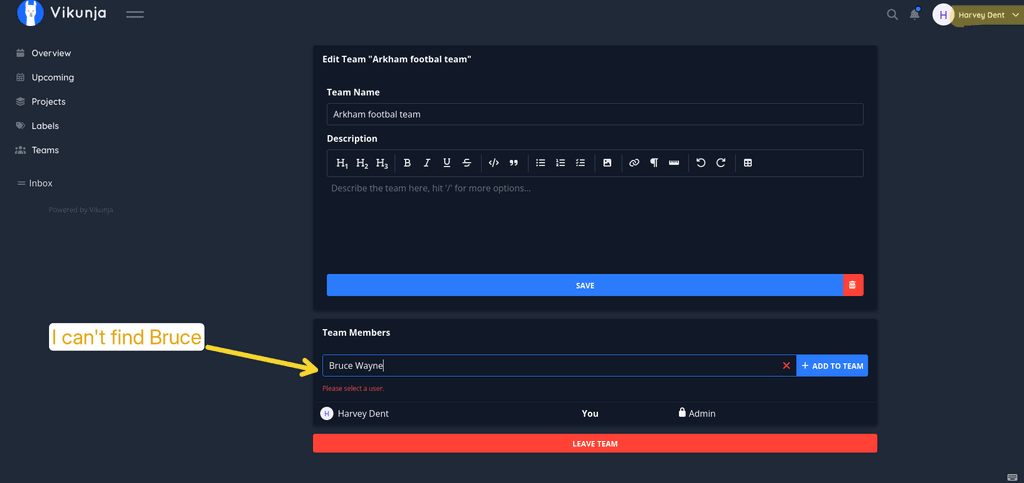
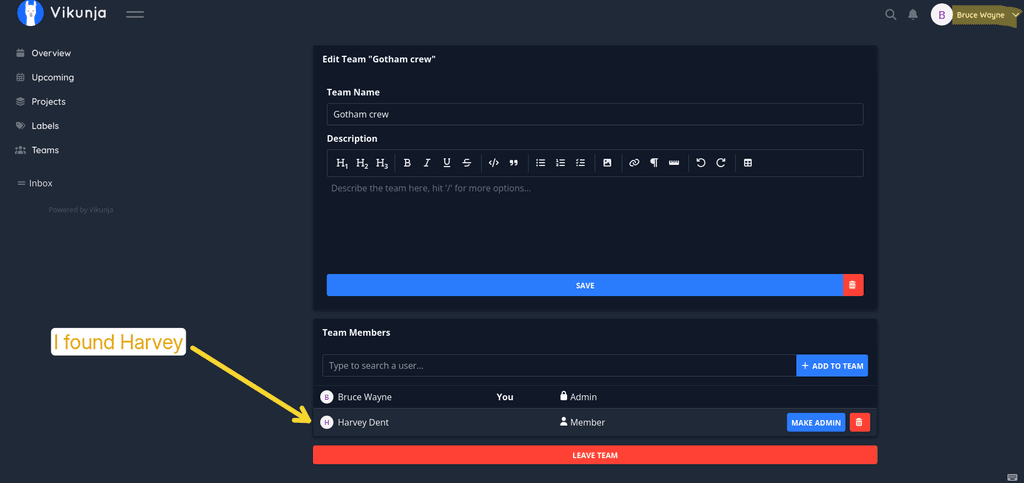
Can't list users in Vikunja with Cloudron access controlHi, I gave it another try, it is very weird on my side:
- I can add the other user from one account but not the other way around (with another team of course)
- Sometimes I can't find the user by entering its name, or I have to enter it completely, or even have to enter the username instead of the display name to find it
- I tried with 3 accounts in total, I manage to find the 2 other accounts only with one of those test accounts, for the others I can only find 1
- Also, when I find the user to add, clicking on it doesn't work, I have to press Enter
-
Does Cubyy support real time collaboration?Hi,
I've tried Cubby with Collabora and noticed that if I open a file at the same time as another user, each one of use can edit the file but independently, the changes aren't visible to the other user.
Is that the expected behaviour, or did I miss something to allow real time sync and editing for multiple users?Thanks
-
Can't list users in Vikunja with Cloudron access controlYes, it works if the app is installed independently from cloudron user SSO.
-
Can't list users in Vikunja with Cloudron access controlHi @james and @nebulon, I tried again and confirm that it is not possible to find any user within Vikunja when installing the app with cloudron access control.
Steps to reproduce I just did:- install vikunja
- log in using cloudron
- in another browser container or browser, log into cloudron as another user
- log into vikunja using cloudron as well
- create a team and try adding the other user: the list remains empty
Thanks
-
Can't list users in Vikunja with Cloudron access controlHi @james thanks for your reply, I tried creating a dummy user before/after installing vikunja, but I can't see any user when I log in (same from my normal account).
Thanks for having a look at it! -
Can't list users in Vikunja with Cloudron access controlHi,
I've just installed Vikunja and noticed that I can't find any other user in the app (when creating a new team), if I install Vikunja and let cloudron manage users.
If I reinstall it and tick "Leave user management to the app", then it works and I can see the other users who created an account in vikunja.
Is that normal?I thought it would be possible to use the cloudron access control and be able to work on projects with other cloudron users who are granted access to vikunja.
Thanks
-
Booking Page allows picking past datesHi there,
First of all great work with this new app, I'm happily surprised with it and will start using it
I noticed that when creating a booking page, it's possible to select which days of the week and the times of availability, but it doesn't prevent the user to then choose a date that's past (which obviously goes against the idea of booking a future appointment).
Maybe blocking past dates or adding a toggle to enable/disable the option would be a nice addition?
Thanks -
OnlyOffice 1.26.0: Document editor loads blank in Nextcloud integrationHi @james thanks for your reply.
I just removed and reinstalled the Onlyoffice app in my Cloudron, I checked and it's correctly running, so I changed the secret key in the production-linux.json on both places and then added the key in Nextcloud ONLYOFFICE app, and tried again in both Firefox and chromium without blocking app enabled but still get an error.I switched to Collabora and it seems to work fine, which is a good workaround so problem solved
-
OnlyOffice 1.26.0: Document editor loads blank in Nextcloud integrationHi @james and @jdaviescoates thanks for your help!
I've tried in both Firefox (my main browser) and Chromium, I encounter the same issue.
I also tried resaving the secret key under Nextcloud Administration Settings / ONLYOFFICE, but no luck either
-
OnlyOffice 1.26.0: Document editor loads blank in Nextcloud integrationHi,
After updating OnlyOffice to 1.26.0, the document editor stopped working when opened from Nextcloud. The editor iframe loads correctly, but the document remains blank.
Browser console showed:
Loading failed for the <script> with source
"https://<onlyoffice-domain>/9.4.0-7ccb82f2cfdf2a42bd640661c9759f9e/web-apps/apps/common/Analytics.js"
Along with CSP warnings blocking scripts from the OnlyOffice domain.
Setup:
Nextcloud hosted on Hetzner Storage Share version Nextcloud Hub 25 Autumn (32.0.9)
OnlyOffice 1.26.0 (Cloudron package), underlying OnlyOffice Document Server 9.4.0
Connected via the official ONLYOFFICE app for NextcloudResolution:
Downgrading back to 1.25.1 via Cloudron backup restore fixed the issue immediately, confirming the regression was introduced in 1.26.0.
Has anyone else experienced this?
Thanks -
Vaultwarden fails to start after update – DB migration error (SSO)Same here, I disabled automatic updates and reverted to 1.24.4.
-
How to create Sender from outbound mail ?Hi,
This is a bug report (except if I missed something!):
- create a new Keila instance
- log in with the generic admin account (admin@cloudron.local)
- head to the "Senders" menu
- there's a button to create a shared sender. Clicking on that button triggers a server error
I tried increasing the allocated resources for the app, but no change.
Thanks -
Plan to drop postiz package from CloudronHi,
It looks like the package is gone from the cloudron supported apps, has anyone tried self-hosting it by following the official method as presented in their doc, with success? (https://docs.postiz.com/quickstart) -
Extremely slow backups to Hetzner Storage Box (rsync & tar.gz) – replacing MinIO used on a dedicated CloudronThanks for this post, I was encountering similar issues using Hetzner object storage (backup of the cloudron server was taking hours, for only 20GB of data), then I switched to Hetzner storage box with the recommendations @nebulon indicated. The backup was done in a matter of minutes

For some reason my initial trial failed, and when I reconfigured the backup site settings with a new storage box it worked (maybe because this time I enabled External Reachability in Hetzner).