Cloudron makes it easy to run web apps like WordPress, Nextcloud, GitLab on your server. Find out more or install now.


Skip to content
  • Categories
  • Recent
  • Tags
  • Popular
  • Bookmarks
  • Search
Skins
  • Light
  • Brite
  • Cerulean
  • Cosmo
  • Flatly
  • Journal
  • Litera
  • Lumen
  • Lux
  • Materia
  • Minty
  • Morph
  • Pulse
  • Sandstone
  • Simplex
  • Sketchy
  • Spacelab
  • United
  • Yeti
  • Zephyr
  • Dark
  • Cyborg
  • Darkly
  • Quartz
  • Slate
  • Solar
  • Superhero
  • Vapor

  • Default (No Skin)
  • No Skin
Collapse
Brand Logo

Cloudron Forum

Apps - Status | Demo | Docs | Install
subvenS

subven

@subven
Unfollow Follow
About
Posts
510
Topics
20
Shares
0
Groups
0
Followers
3
Following
2

Posts

Recent Best Controversial

  • Custom fonts not working
    subvenS subven

    @james nothing font related in browser console, Nextcloud or Collabora logs. However what I figured was that the custom fonts at /app/data/fonts are never loaded. Seems like the directory is not even beeing looked at.

    root@e5fa3d92-8f21-4d3a-bfed-4f24403d76f3:/app/code# fc-cache -v
    Font directories:
            /root/.local/share/fonts
            /usr/local/share/fonts
            /usr/share/fonts
            /root/.fonts
            /usr/share/fonts/X11
            /usr/share/fonts/cMap
            /usr/share/fonts/cmap
            /usr/share/fonts/opentype
            /usr/share/fonts/truetype
            /usr/share/fonts/type1
            /usr/share/fonts/X11/Type1
            /usr/share/fonts/X11/encodings
            /usr/share/fonts/X11/util
            /usr/share/fonts/cmap/adobe-cns1
            /usr/share/fonts/cmap/adobe-gb1
            /usr/share/fonts/cmap/adobe-japan1
            /usr/share/fonts/cmap/adobe-japan2
            /usr/share/fonts/cmap/adobe-korea1
            /usr/share/fonts/opentype/urw-base35
            /usr/share/fonts/truetype/dejavu
            /usr/share/fonts/truetype/open-sans
            /usr/share/fonts/type1/urw-base35
            /usr/share/fonts/X11/encodings/large
    /root/.local/share/fonts: skipping, no such directory
    /usr/local/share/fonts: skipping, existing cache is valid: 0 fonts, 0 dirs
    /usr/share/fonts: skipping, existing cache is valid: 0 fonts, 6 dirs
    /usr/share/fonts/X11: skipping, existing cache is valid: 0 fonts, 3 dirs
    /usr/share/fonts/X11/Type1: skipping, existing cache is valid: 35 fonts, 0 dirs
    /usr/share/fonts/X11/encodings: skipping, existing cache is valid: 0 fonts, 1 dirs
    /usr/share/fonts/X11/encodings/large: skipping, existing cache is valid: 0 fonts, 0 dirs
    /usr/share/fonts/X11/util: skipping, existing cache is valid: 0 fonts, 0 dirs
    /usr/share/fonts/cMap: skipping, existing cache is valid: 0 fonts, 0 dirs
    /usr/share/fonts/cmap: skipping, existing cache is valid: 0 fonts, 5 dirs
    /usr/share/fonts/cmap/adobe-cns1: skipping, existing cache is valid: 0 fonts, 0 dirs
    /usr/share/fonts/cmap/adobe-gb1: skipping, existing cache is valid: 0 fonts, 0 dirs
    /usr/share/fonts/cmap/adobe-japan1: skipping, existing cache is valid: 0 fonts, 0 dirs
    /usr/share/fonts/cmap/adobe-japan2: skipping, existing cache is valid: 0 fonts, 0 dirs
    /usr/share/fonts/cmap/adobe-korea1: skipping, existing cache is valid: 0 fonts, 0 dirs
    /usr/share/fonts/opentype: skipping, existing cache is valid: 0 fonts, 1 dirs
    /usr/share/fonts/opentype/urw-base35: skipping, existing cache is valid: 35 fonts, 0 dirs
    /usr/share/fonts/truetype: skipping, existing cache is valid: 0 fonts, 2 dirs
    /usr/share/fonts/truetype/dejavu: skipping, existing cache is valid: 8 fonts, 0 dirs
    /usr/share/fonts/truetype/open-sans: skipping, existing cache is valid: 13 fonts, 0 dirs
    /usr/share/fonts/type1: skipping, existing cache is valid: 0 fonts, 1 dirs
    /usr/share/fonts/type1/urw-base35: skipping, existing cache is valid: 35 fonts, 0 dirs
    /root/.fonts: skipping, no such directory
    /usr/share/fonts/X11: skipping, looped directory detected
    /usr/share/fonts/cMap: skipping, looped directory detected
    /usr/share/fonts/cmap: skipping, looped directory detected
    /usr/share/fonts/opentype: skipping, looped directory detected
    /usr/share/fonts/truetype: skipping, looped directory detected
    /usr/share/fonts/type1: skipping, looped directory detected
    /usr/share/fonts/X11/Type1: skipping, looped directory detected
    /usr/share/fonts/X11/encodings: skipping, looped directory detected
    /usr/share/fonts/X11/util: skipping, looped directory detected
    /usr/share/fonts/cmap/adobe-cns1: skipping, looped directory detected
    /usr/share/fonts/cmap/adobe-gb1: skipping, looped directory detected
    /usr/share/fonts/cmap/adobe-japan1: skipping, looped directory detected
    /usr/share/fonts/cmap/adobe-japan2: skipping, looped directory detected
    /usr/share/fonts/cmap/adobe-korea1: skipping, looped directory detected
    /usr/share/fonts/opentype/urw-base35: skipping, looped directory detected
    /usr/share/fonts/truetype/dejavu: skipping, looped directory detected
    /usr/share/fonts/truetype/open-sans: skipping, looped directory detected
    /usr/share/fonts/type1/urw-base35: skipping, looped directory detected
    /usr/share/fonts/X11/encodings/large: skipping, looped directory detected
    /var/cache/fontconfig: not cleaning unwritable cache directory
    /root/.cache/fontconfig: cleaning cache directory
    /root/.cache/fontconfig: invalid cache file: 9b5b740b6269753c3eba86fc14d9c368-le64.cache-9
    /root/.fontconfig: not cleaning non-existent cache directory
    fc-cache: succeeded

    
    Collabora Online (CODE)

  • What's coming in Cloudron 10
    subvenS subven

    While I appreciate the upcoming mail related features and fixes, there is still one crucial feature left out that was talked about for years: Auto/Custom BCC for incoming/outgoing mail

    We need to make them archivable to comply with german GoBD law. Setting this at client level would not pass as the law requires seamless documentation without user influence. This is not limited to german law but is generally useful for any company that needs to document business processes comprehensively. I know a lot of companys and freelancers lacking DMS systems, mostly because its complicated and can be very expensive.

    Best case would be the ability to set global BCC per mailbox within Cloudron.

    Announcements

  • Custom fonts not working
    subvenS subven

    I'm aware of the original thread Adding fonts to NextCloud + Collabora.

    Docs say throw your fonts into (Collabora Server) /app/data/fonts --> restart app and you're done. However, I went the extra mile and also uploaded my tft (and otf) fonts to Nextcloud --> Admin --> Offce --> Custom Fonts.

    If I open up a text document (docx) I can choose my fonts but they are not rendered within the editor.

    Do I miss something? Does it work for anybody else?

    Collabora Online (CODE)

  • Zeiterfassung module included?
    subvenS subven

    Zeiterfassung is a separate app --> https://github.com/orgs/urlaubsverwaltung/repositories

    There are two Docker images so Zeiterfassung is not included.

    Urlaubsverwaltung

  • 5.8.2 / 33.0.4 breaks notifications
    subvenS subven

    Talk (Spreed) was unable to send messages because of this. Had to disable Notifications (and maybe Client Push) App.

    Nextcloud

  • Cloudron Demo
    subvenS subven

    @girish said:

    212.92.231.206

    Thats actually from UA/Mykolaiv, an active war zone which was bombed just yesterday. Perhaps someone simply let their AI run wild, which isn't such an unlikely scenario these days.

    Regardless of this very strange coincidence, it should be possible to block a few more of Cloudrons admin endpoints that could impair the functionality of the demo instance.

    Support

  • Backup crashed
    subvenS subven

    Replace your BIOS battery, go into BIOS and set current time, reboot and you should be fine.

    Support backups

  • Make apps in the dashboard hideable
    subvenS subven

    @timconsidine you can toggle visibillity for apps that have their own user management. If you use an SSO app, there is "user management" which manages access (and therefore an visible dashboard icon) but "dashboard visibility" is missing from the menu. Its well explained in the documentation.

    I guess what you could do is remove access for an user (within Cloudron), put the user inside a group X that has no access to said app and set up SSO manually within the app to grant access to users within group X.

    Basically, I want the "dashboard visibility" options to be available for all apps. To not make Cloudrons UI confusing, a "Hide for non admins/operators" checkbox would be fine.

    Feature Requests dashboard user interface

  • Make apps in the dashboard hideable
    subvenS subven

    @timconsidine app access is granted via Cloudrons SSO so the user has to have "access" to said app. It's already granted via Cloudron groups so every user just sees the apps he is supposed to use. But not every of these apps should be displayed in the Cloudron dashboard.

    @teiluj I could use any other landing page then. My obvious follow up feature request would be the ability to be redirected to another page after logging into Cloudron. You also have to keep in mind that app access can be individual per user so it's not solved by having a single dashboard you can fully control. I would rather have a cleaner Cloudron dashboard than another dashboard somewhere else.

    Feature Requests dashboard user interface

  • Make apps in the dashboard hideable
    subvenS subven

    I want to be able to hide apps in the dashboard for users that have no administrator rights for said app.

    My use case is pretty common:

    • unclutter the dashboard from app icons that are not necessary for the user (like Matrix server)
    • I use SSO only and for some apps (like Vaultwarden) I use a external link so I can link directly to something like https://domain.com/#/sso?identifier=login 😁 I have to hide the original app so users only use my custom link.
    My current hack is to remove the app icon and rename the app to "-" but it looks ugly 😧

    Feature Requests dashboard user interface

  • Vikunja - Desktop App error Could not find or use Vikunja installation
    subvenS subven

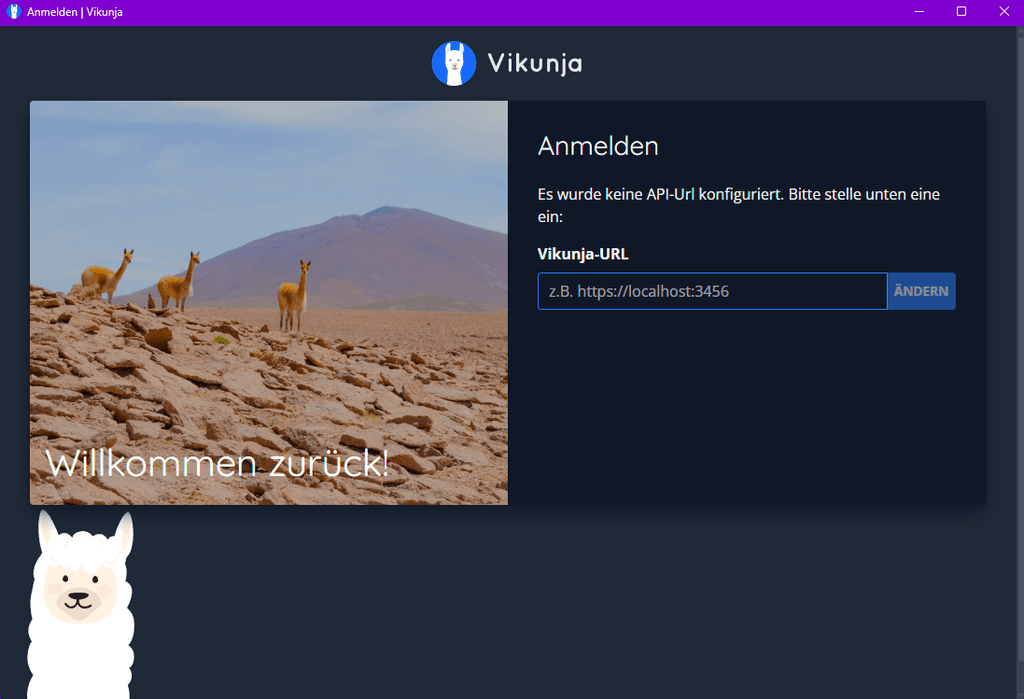
    @robi, you need to specify an API URL first. This is literally the first screen when you open the app:

    Screenshot 2025-10-22 163721.png

    Vikunja

  • Vikunja - Desktop App error Could not find or use Vikunja installation
    subvenS subven

    Hrrrrrmmmm I can't reach the API via desktop app. Browsing https://domain.com/api/v1/info gives me the correct response but the app's login screen always states "no installation found".

    curl -X GET https://domain.com/api/v1/info
    {"version":"v0.24.6","frontend_url":"https://domain.com/"~~~
    

    I tried:
    https://domain.com:3456/api/v1/
    https://domain.com/api/v1/
    https://domain.com

    What did you guys do to make it work? 😄

    Vikunja

  • Wordpress not able to Update
    subvenS subven

    Works now 🙂 Update showed up and worked as expected. Thank you @girish

    WordPress (Managed)

  • Wordpress not able to Update
    subvenS subven

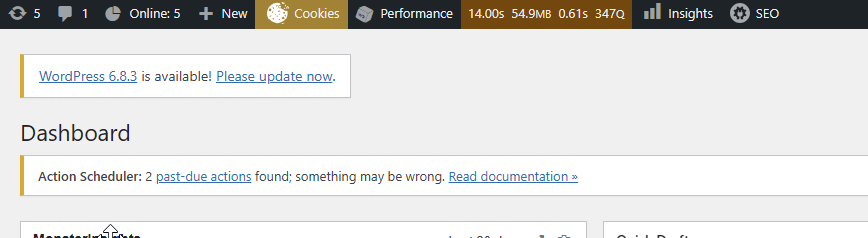
    Okay so Wordpress 6.8.3 was released 3 days ago. When Cloudron updated the package I got the little update button on all 4 of my (Managed) instances and everything seemed fine. I updated 3 of them and wanted to update the last one during night time. All of my instances have Cloudron auto update disabled.

    Now, 2 days later, the button is gone. If I check again via Cloudron UI it tells me that there is no update but the app is at org.wordpress.cloudronapp@3.13.3 / WordPress (Managed) 6.8.2.

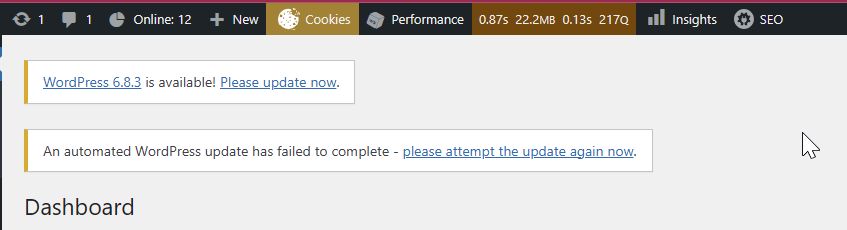
    Wordpress backend tells me "An automated WordPress update has failed to complete - please attempt the update again now." which does not make sense as WP can't update from within the container.

    I recovered to a backup from 01.10 and the backend looks like this:

    2025-10-03 10_54_10-2025-10-03 10_25_12-Dashboard ‹ LEIPZIG LiEBEN — WordPress.png - IrfanView.png

    After a minute of waiting (I pressed the Cloudron update check button inbetween) and a reload of the backend it shows the common error:

    2025-10-03 10_53_55-2025-10-03 10_28_25-Dashboard ‹ LEIPZIG LiEBEN — WordPress.png - IrfanView.png

    So I'm unable to update WP and I don't know what to do cause this does not make sense. Something within Wordpress triggered an automatic update which should not work and is turned off anyway? This should not influence Cloudrons update process as it is docker based.

    Cloudron app store tells me I can install 6.8.3 so its unlikely the WP update got revoked.

    WordPress (Managed)

  • Firefox Sync/Accounts Server
    subvenS subven

    @jdaviescoates I also use Vaultwarden (thanks to Cloudron). Just saw that with Firefox Sync, you can control what to sync. I don't want Mozilla to save my sessions, passwords, or confidential data, but I don't care about bookmarks ^^ Maybe this could work.

    App Wishlist

  • Firefox Sync/Accounts Server
    subvenS subven

    As of now, Manifest v2 will no longer work unless you hack your Chromium-based browser into managed mode, which is very tedious.

    I can host my own syncstorage-rs instance but I still belive it would be a nice and handy tool in addition to Cloudrons app portfolio.

    Does it really not matter to anyone to own and protect their and others critical data, such as passwords, browsing history, and sessions? How do you guys handle that besides using the build in Firefox sync function?

    App Wishlist

  • Cryptomator Hub - zero-knowledge key management solution that allows you to manage access to your vaults
    subvenS subven

    Cryptomator is the best FOSS solution I found while searching for ways to encrypt+mount folders/drives and share access among users. I ended up running Cryptomator Hub on a Synology Diskstation. Would appreciate to have it as a tool on Cloudron.

    App Wishlist

  • backup failed - 3 times in one week period
    subvenS subven

    @humptydumpty said in backup failed - 3 times in one week period:

    8 vCPUs 24GB 32GB RAM and barely use 1/3 of them

    Check your network speeds and if you really can use the CPU performance you're paying for. Maybe you have "noisy neighbors" on your VPS that constantly use up all ressources.

    Support

  • backup failed - 3 times in one week period
    subvenS subven

    22 minutes backup upload for a 700mb app seems too much even for a known weak performing hoster like Contabo. Upload speed of 1MBps also seems way too low. Does your server have enough RAM to perform the backup task? The error is just an box backup task crash.

    Have you benchmarked the server? Is your load, RAM and network speed fine? My guess is that your server lacks ressources or is under high load.

    If it's just weak performance from Contabo I would recommend to move to known good hoster like Hetzner or Netcup.

    Support

  • OrangeHRM
    subvenS subven

    Take my upvote! Dolibarr and ERPNext could be alternatives but OrangeHRM is focused on HR management only.

    App Wishlist
  • Login

  • Don't have an account? Register

  • Login or register to search.
  • First post
    Last post
0
  • Categories
  • Recent
  • Tags
  • Popular
  • Bookmarks
  • Search