Cloudron makes it easy to run web apps like WordPress, Nextcloud, GitLab on your server. Find out more or install now.


Skip to content
  • 1 Votes
    5 Posts
    67 Views
    SansGuidonS
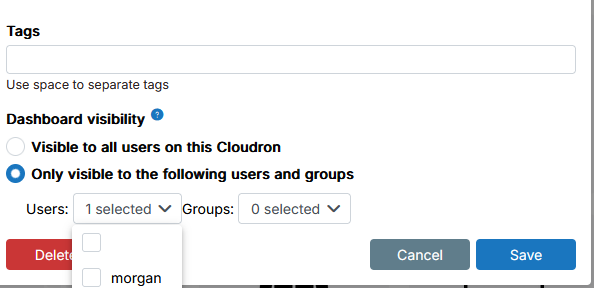
    @james said in Bug in user selection UX and dashboard visibility setting in external link configuration: Hello @sansguidon I have looked into the issue and fixed it. Will be part of the next Cloudron release. Thanks @james
  • 2 Votes
    3 Posts
    41 Views
    SansGuidonS
    Thanks @james
  • settings.yml missing from web file manager

    SearXNG filemanager dashboard
    6
    0 Votes
    6 Posts
    90 Views
    jamesJ
    Hello @user123456 We looked into it. Someone has disabled the SFTP service on the demo Cloudron Demo Server along with other services. Now that the SFTP service is enabled again the file is showing correctly.
  • Can't connect to NextCloud console

    Unsolved Support dashboard web terminal nextcloud
    16
    1
    1 Votes
    16 Posts
    398 Views
    potemkin_aiP
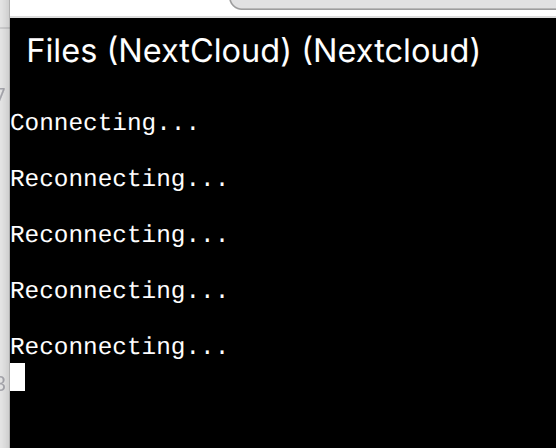
    you should have mentioned earlier @james I wish I was aware that it is the problem! The whole cloudron is behind a haproxy that does TCP level proxy. From my understanding it should not affect, as it's one level below the HTTP(S) and WebSocket is above HTTPS. And the console doesn't seem to work for all apps terminals. Any ideas how to narrow down the root cause?
  • External links: now mangles http URLs by prepending https

    Solved Support app link dashboard
    5
    4 Votes
    5 Posts
    143 Views
    girishG
    @oskarardolo 9.0.16 will be out possibly end of this week or early next week.
  • 5 Votes
    2 Posts
    101 Views
    girishG
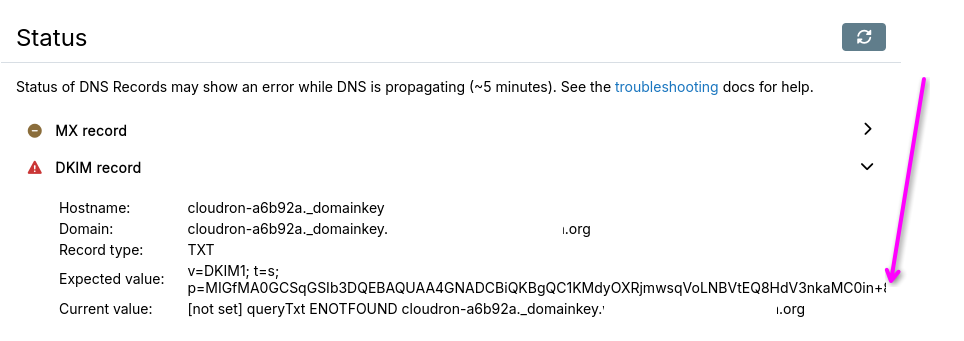
    Thanks for reporting. Fixed in https://git.cloudron.io/platform/box/-/commit/5107cd28c4a0b8b362e9ee5da7151a9271db9fa3 . It won't collapse anymore and you can select it. The link to http://www.barracudanetworks.com/reputation/?pr=1&ip= ... itself is broken, gets forwarded to https://www.barracuda.com/ which results in a 404. Working link is https://www.barracudacentral.org/lookups but I didn't manage to add the IP as parameter This is actually the raw TXT record that is in their DNS. It would not be safe to render it as a link, since it is random external data. But also their DNS simply has raw links like above which are i guess broken. For example: # host -t TXT 70.188.231.171.b.barracudacentral.org 127.0.0.150 Using domain server: Name: 127.0.0.150 Address: 127.0.0.150#53 Aliases: 70.188.231.171.b.barracudacentral.org descriptive text "http://www.barracudanetworks.com/reputation/?pr=1&ip=171.231.188.70"
  • 1 Votes
    12 Posts
    322 Views
    J
    @webmaster we do offer direct support for businesses. We have a business plan exactly for businesses such as yours. If you are on a business plan, you can contact us at support@cloudron.io and we respond in a day.
  • Clourdon 9 Password Reset - seems to cause an error

    Solved Support dashboard
    3
    1
    1 Votes
    3 Posts
    134 Views
    marcusquinnM
    @nebulon thanks, should have thought of that - yes, hard refresh makes it go away. prob needs some file versioning to force the new to load.
  • 6 Votes
    1 Posts
    140 Views
    No one has replied
  • Cannot access

    Solved Support dashboard troubleshoot
    6
    1 Votes
    6 Posts
    1k Views
    B
    Great that works I'm backup and running thanks for your help.
  • Unreachable Dashboard

    Solved Support dashboard
    3
    0 Votes
    3 Posts
    663 Views
    nebulonN
    The posted error logs do not seem to be related as far as I can tell. But anyways if some food solves it, even better, hopefully also stays that way
  • 0 Votes
    3 Posts
    705 Views
    nebulonN
    Glad it worked in the end. Otherwise for reference please follow the instructions at https://docs.cloudron.io/troubleshooting/ to troubleshoot this.
  • 2 Votes
    10 Posts
    3k Views
    B
    Disabling Cloudflare seemed to work. Thanks.
  • Can't access Cloudron Dashboard from the same network

    Solved Support dashboard network
    23
    1 Votes
    23 Posts
    6k Views
    necrevistonnezrN
    After a reboot, it seems fine for now. Let’s see if it persists
  • Hardware Refresh

    Solved Discuss dashboard
    3
    0 Votes
    3 Posts
    859 Views
    mpeterson0418M
    @BrutalBirdie Thanks for providing that information. Much appreciated!
  • Cloudron dash is stuck in reconnecting loop

    Solved Support troubleshooting dashboard
    27
    1
    1 Votes
    27 Posts
    5k Views
    J
    @mpeterson0418 I found that the root file system was either corrupt or "reset" . I don't know and unable to guess what happened to the disk (maybe power outage?), but I can explain what I did to recover. I found host MySQL to be empty. The box database had tables but was empty. The fact that it had tables meant that migration scripts were run on this . Maybe /home/yellowtent/box/setup/start.sh was run at some point on an empty (i.e no tables even) database. Usually, the last well known mysql dump is located /home/yellowtent/boxdata/box/box.mysqldump . One can also find the same inside the latest backup (inside the box.tar.gz) . To "restore", mysql -uroot -ppassword < /home/yellowtent/boxdata/box/box.mysqldump Then I found, docker won't start. In Cloudron, containers are throw away infrastructure since data is stored outside the containers. I tried cloudron-support --recreate-docker but this did not work. On investigating further, it seems /var/lib/containerd was also corrupt . Corrupt here means no docker commands work. So, I removed that directory as well. After that, cloudron-support --recreate-docker worked. The best way to migrate in Cloudron is not to do the above but instead just restore from backups. See https://docs.cloudron.io/backups/#move-cloudron-to-another-server .
  • 1 Votes
    2 Posts
    767 Views
    girishG
    @uwcrbc said in My App domain filter with unused domains / external domain: At the moment, filtering per domain shows the list of domains configured on the Cloudron server regardless whether there is an app using it or not. Right, this is how it works currently. The same is possible for All States / Groups as well. Just because there are no apps to list, the item does not get hidden. This can be confusing or not depending on user expectations. It also does not allow to filter for proxy app'ed "external" domains. In the common case, the proxy URL is an IP address and not a domain. In fact, the thing is a URL and not a domain (so we cannot put it in the filter).
  • Login to my.cloudron.io

    Solved Support appstore dashboard
    7
    1 Votes
    7 Posts
    999 Views
    girishG
    cloudron.io - this is Cloudron's website (the company) console.cloudron.io - this is the place where Cloudron's customers login to manage billing. you cannot manage apps or anything of that sort here yourdomain.com - this is the domain you gave when you installed Cloudron, the software, on your server. IMPORTANT: cloudron the company has no access to your servers. Cloudron the software is entirely selfhosted and only you have access to the server. my.yourdomain.com - this is your server's dashboard. this is where you manage apps and other things my.cloudron.io - this is actually Cloudron the company's, cloudron installation. you should not (and cannot) login here! With this in mind: When attempting to login us assigned IP it would redirect to my.cloudron.io. this cannot ever happen. how would I reach login when IP Changed/DNS is not available If IP changes, go to your DNS and then just change the IP address of my.yourdomain.com manually to the new IP. Are you talking about dynamic IP here? If so, use the Dynamic DNS feature. It will automatically update the DNS with a changing IP. Finally, if DNS itself is not available, I guess you have to use /etc/hosts . See also - https://docs.cloudron.io/troubleshooting/#unreachable-dashboard
  • Nginx fails to start, bad config.

    Solved Support nginx dashboard
    6
    1 Votes
    6 Posts
    2k Views
    girishG
    @philkunz
  • Can not restore/reinstall cloudron

    Solved Support dashboard restore reinstall backup
    2
    1
    0 Votes
    2 Posts
    778 Views
    girishG
    @privsec said in Can not restore/reinstall cloudron: I have set up cloudron to use the same 7.5.2 version of my current install. On the new install after I update the DNS records to the new IP address, I get this After the cloudron installation, did you do the domain/dns setup and create an admin account? If so, you should not do that. Setup new server with cloudron --version 7.5.2 Go to https://ip For good meaure, I would power off your old server. This prevents any dns caching issues wrt my.domain.com pointing to your old server. Start restore from the setup view Cloudron will automatically navigate to https://my.domain.com 'Already activated' means that you already setup admin account on that server. After that, you cannot restore anymore for security reasons. For example, if you find a cloudron installation in the wild and try to restore, it won't work. That route is completely locked.