Cloudron makes it easy to run web apps like WordPress, Nextcloud, GitLab on your server. Find out more or install now.


Skip to content
  • Installing Cloudron, Unbound exited with error

    Solved Support unbound install cloudron
    6
    0 Votes
    6 Posts
    2k Views
    girishG
    OK, I have fixed the unbound issue with IPv6. It's an upstream bug but I have made a workaround for the moment. Fix will be part of 7.3.5 (released next week).
  • 6 Votes
    4 Posts
    2k Views
    subvenS
    I use vaultwarden for business related secrets or where customer data come into play. For my private stuff I still use Chrome sync but also want to switch to vaultwarden. What came to my mind: By January, a lot of people will (hopefully) switch from Chromium sourced browsers to Firefox because of the manifest v3 implementation. Because I don't want to trust Mozilla nor Google, I tinker with the thought to host my own FFsync (Firefox Sync) server to be more independend with my "cloud" hosted data. Had to think about the risks because hosting something like vaultwarden might be safe but I was unsure if FFsync gets the same care.
  • 0 Votes
    2 Posts
    1k Views
    subvenS
    Depends on your use case / what apps you want to provide for your users. For best practice, I avoid the "Visible to all users on this Cloudron" option and remove all assigned groups from a user before deactivating the account. In case of Nextcloud for example, Cloudron groups can be used within the app to give permissions to shares and features. Certain apps can also be configured to give every user that is able to log in a certain amount of permissions (like Nextcloud Auto Groups or specific role managment in Bookstack). I have a "base" group (like <orgname>) giving normal access to apps like Matrix/Element, Nextcloud and Bockstack. Below that I have a group "<orgname>-internal" that give access to more specific apps like Freescout or Kimai. To go even further you can do <orgname>-<department> but for most apps you have to specify user permissions in addition. However it is useful to limit app access by Cloudron groups so users don't end up in a spot where they don't have permissions or no role to fulfill.
  • Cloudron vs Heimdall

    Discuss heimdall cloudron
    9
    0 Votes
    9 Posts
    4k Views
    L
    @timconsidine said in Cloudron vs Heimdall: @LoudLemur said in Cloudron vs Heimdall: Is there a good "How to" explaining how to run PHP applications (or similar) on the LAMP application? Because the range of applications that could be installed is large, I'm not sure it's easy to write a guide. But in overview : install a LAMP app from the AppStore as normal in the app dashboard (gear icon top right of app tile), use the File Manager to upload the files from the source app you want to add, probably into /app/data/public unpack if uploaded in zip formats FOLLOW APP_SPECIFIC INSTALL INSTRUCTIONS including to use File Manager (or possibly Terminal) to edit any config files re(start) the LAMP app once app is running, delete zip files uploaded Thanks, that doesn't look too much to try. Maybe we could create a thread/list of applications which have been tried on Cloudron's LAMP application and which ran well...
  • Error_Connection_Refused?

    Solved Support cloudron install proxmox
    2
    1
    0 Votes
    2 Posts
    1k Views
    nebulonN
    @madmaneighteen can you share a bit more about your environment? Also when the routing and possible portforwarding are correctly setup, you should hit nginx on your Cloudron there, so for a start check if nginx is running in your Cloudron server systemctl status nginx and also maybe try to curl localhost within the server to ensure nginx is also responding correctly there at least.
  • Most Loved / Dreaded Cloud Platforms

    Discuss cloudron stackoverflow survey
    7
    1
    1 Votes
    7 Posts
    2k Views
    d19dotcaD
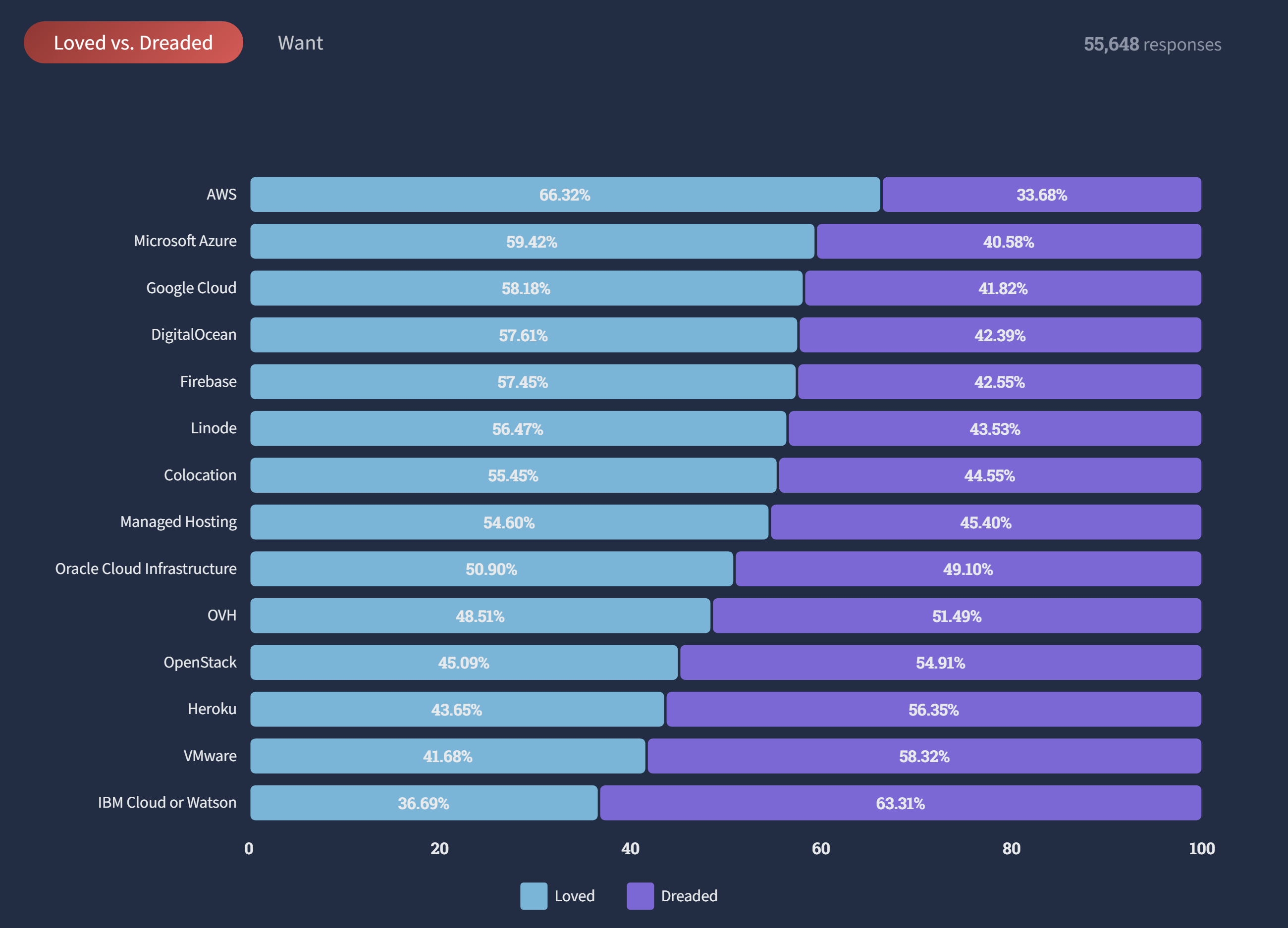
    @LoudLemur I'm surprised Vultr isn't on there. I'm definitely a fan of Vultr's pricing scales (they have many more instance types to choose from compared to DigitalOcean or Linode) for small businesses / freelance.
  • Delete Backup Button

    Feature Requests cloudron backups delete
    7
    2 Votes
    7 Posts
    3k Views
    jdaviescoatesJ
    @necrevistonnezr said in Delete Backup Button: @girish Or add a requirement to enter your password for such deletion? I think that's how I'd do it, like Nextcloud does with app updates etc.
  • Self-Hosted Meme Creator on Cloudron?

    Discuss memes meme cloudron content
    15
    0 Votes
    15 Posts
    6k Views
    L
    Cloudron supports Nextcloud, and now Nextcloud has a meme application: https://github.com/nextcloud/memegen
  • Submit Cloudron to Ubuntu for Publication

    Discuss ubuntu cloudron snaps publish
    18
    0 Votes
    18 Posts
    8k Views
    micmcM
    @bubonicfred said in Submit Cloudron to Ubuntu for Publication: You can install snapd on non-ubuntu systems. Though I have no idea if they have any advantage over flatpak or appimage. Yep, except it turns that we want to get away from snap instead of adopting it for some reasons mentioned here above, so well that's a choice
  • 1 Votes
    11 Posts
    4k Views
    jamesJ
    Closed due to inactivity
  • 0 Votes
    1 Posts
    529 Views
    No one has replied
  • Gource for Cloudron

    Discuss gource cloudron dataviz
    3
    0 Votes
    3 Posts
    2k Views
    luckowL
    @LoudLemur it is so easy to do it yourself Install gource and use the script from here https://gist.github.com/Gnzlt/a2bd6551f0044a673e455b269646d487 Find a repo and start the bash script. Example output (jitsi.app) [image: 1650728902685-2e0ba5d4-08f8-4e56-b707-e3f388a1078a-image-resized.png]
  • Cloudron on Fontawesome

    Discuss cloudron fontawesome linkin icon branding
    3
    2 Votes
    3 Posts
    2k Views
    girishG
    Having it upstream fontawesome would be quite an achievement But https://github.com/mlwilkerson/fa-custom-icon-demo has a demo on adding custom icons inside a custom app.
  • CAPTCHA options for Cloudron Applications

    Discuss captcha cloudron
    21
    0 Votes
    21 Posts
    9k Views
    robiR
    New option I came across called BasedFlare - https://gitgud.io/fatchan/haproxy-protection Might be useful for @staff
  • 0 Votes
    2 Posts
    1k Views
    humptyH
    @LoudLemur AFAIK, you need a new premium license for each server you want to run more than two apps on. The "premium" isn't for the "account" on Cloudron.io, it's for that specific server/vps. I have no idea how to transfer the premium license from one Cloudron to another but I'm sure it's possible. The Cloudron team is working on multi-host but I haven't read anything on how that would work.
  • Cloudron - Gateway to Free Software

    Discuss cloudron thanks love
    5
    13 Votes
    5 Posts
    3k Views
    robiR
    @nebulon Can you share the graph or numbers of growth, so we can rejoice too!
  • Cloudron Tutorials on Fireship?

    Discuss fireship cloudron tutorial lesson course
    3
    3 Votes
    3 Posts
    2k Views
    robiR
    It looks like any of the Firebase tutorials can be used on Cloudron by replacing Firebase with NocoDB or Baserow for a fully self hosted setup. @LoudLemur To your point, someone could create ShipOn.Cloudron.io and actually implement such solutions using Cloudron Apps, showing how or even deploying saved backups for a fast starting point. Fun and
  • Video Streaming for Cloudron

    Discuss streaming video cloudron self-host live
    15
    2 Votes
    15 Posts
    7k Views
    micmcM
    @timconsidine said in Video Streaming for Cloudron: @LoudLemur in my understanding, streaming (especially Live) is not so much a question of technology, but of scale and server/bandwidth resources to support dozens, hundreds, thousands of connections. It is necessary to consider use case and scale in order to answer effective performance. I think you have a pretty good idea of how that should be thought from the basis. So, in this regard, asking oneself for a start, what's the ultimate goal using video streaming or even podcasts or video sharing would be worth spending a bit of time on the question. As @luckow mentioned about the possibilities and limitations of a VPS using a 1G bandwidth, it is important to keep in mind that for live streaming to large audiences it will eventually take more than 1G of bw output to smoothly scale streaming to such audience, whatever output capacity you have on your server. When you get in the thousands of live viewers even increasing RAM on the server won't be sufficient, it will help but you will need a bigger pipe to push it out. OBS Ninja is a good example. Relatively simple to install/host. But how much does it support ? I don't know, but I would guess on most VPS servers or even small dedicated servers, it would be relatively limited. OBS is used on your local rig and so it depends on your local resources to reach the streaming service server. I know Peertube has live streaming capacities as well, however I haven't had the time to test it out yet. It would be interesting to learn about anyone else who might have tested this already, and if tested with OBS and well it works, or not lol Happy for someone to challenge this understanding. Would love to be proved wrong. Happy to prove you right
  • Reach out to Developers

    Discuss feedback developers cloudron forms
    10
    2 Votes
    10 Posts
    3k Views
    girishG
    @LoudLemur ah ok, I didn't actually watch the video External links always worry me, thanks for clarifying.