Cloudron makes it easy to run web apps like WordPress, Nextcloud, GitLab on your server. Find out more or install now.


Skip to content
  • Problem with Domain Setup

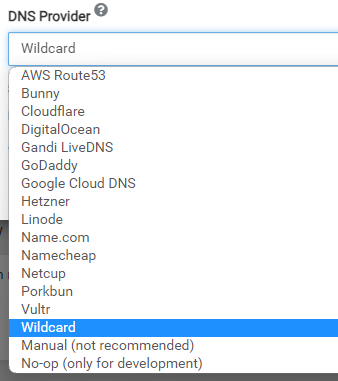
    Solved Support gcdns domains
    5
    0 Votes
    5 Posts
    1k Views
    S
    I had a similar problem recently. Here's what I had to do in order to be able to programmatically update DNS records for a domain in Google Cloud DNS: verify domain ownership: https://cloud.google.com/endpoints/docs/openapi/verify-domain-name. I did this by inputting a special DNS TXT record into DNS for the domain. in my case, I was using a Google Cloud Service Account with Terraform (not Cloudron) to modify DNS records in Google Cloud DNS, so in additional to verifying domain ownership, I had to actually add the Service Account I created as a verified owner of the domain as well. After doing these two things, I was able to programmatically update DNS records for the domain using the Service Account. So, assuming you've created a Service Account at Google, given it the "DNS Administrator" role, and added the Service Account email as a verified owner of the domain, you should be good to go. I just tested it with my Cloudron and it all worked. I'm attaching a screenshot of the Google domain verification screen showing where I added the Service Account as a domain owner. Hope this helps.[image: 1682509131953-cleanshot-2023-04-26-at-07.28.52-resized.jpeg]
  • DNS address could not be found

    Solved Support domains cloudflare linode dns
    2
    0 Votes
    2 Posts
    775 Views
    girishG
    @j_vmess your domain works just fine for me here. Maybe it's a browser cache issue? Have you tried another browser or after clearing the browser cache? I removed your domain from the original post, since it was showing the setup screen.
  • 0 Votes
    9 Posts
    3k Views
    girishG
    @scooke yes, it won't remove your existing records and won't touch things outside scope of Cloudron (which is basically app records and email records).
  • Setup with Hetzner DNS not working

    Solved Support domains nameserver hetzner
    9
    0 Votes
    9 Posts
    4k Views
    girishG
    @Fabix thanks. Strange stuff... I will put it in our docs that we only support Robot.
  • I cant acess my cloudron through the domain

    Solved Support domains troubleshooting
    2
    0 Votes
    2 Posts
    682 Views
    girishG
    @DAMO11-coder see https://docs.cloudron.io/troubleshooting/#expired-domain
  • Domain Configuration: External Site on Root Domain

    Solved Support domains
    3
    0 Votes
    3 Posts
    959 Views
    S
    I just jumped the gun. It was just DNS taking a while to propagate. All good now.
  • Add an A record manually for the domain

    Solved Support domains
    3
    1 Votes
    3 Posts
    1k Views
    girishG
    @Shaun-Snapp said in Add an A record manually for the domain: "Add an A record manually for www.abc.com to this Cloudron's public IP" I purchased the domain around 1/2 hour before trying to change an app to that domain. This is the error I received when the app failed to propagate. That message is saying that you have to add the A record manually in your domain provider (not in Cloudron). Cloudron cannot add/remove DNS entries for the domain because it's "manual" mode and thus has no programmatic access to your DNS. The place where you purchased your domain most likely has a Domain/DNS control panel where you can add/remove DNS entries.
  • change domain via ssh

    Solved Support domains dashboard
    3
    1 Votes
    3 Posts
    1k Views
    girishG
    Yes, see the instructions at https://docs.cloudron.io/troubleshooting/#expired-domain . If that's too technical, please feel free to mail us at support@cloudron.io and we can help switch it.
  • Rotation of AWS IAM credentials

    Solved Support aws route53 domains api
    12
    1 Votes
    12 Posts
    3k Views
    P
    Ignore me. This was an issue with PowerShell apparently. If run from linux it works fine. Thanks again
  • Adding a new domain already on iCloud+

    Solved Support domains
    3
    0 Votes
    3 Posts
    883 Views
    L
    @girish Thanks. All working perfectly.
  • Deleting invalid/expired apps Manually?

    Solved Support domains
    3
    0 Votes
    3 Posts
    826 Views
    Z
    Thank you that worked!
  • Manage several domains

    Solved Support domains cloudflare
    3
    0 Votes
    3 Posts
    1k Views
    J
    @girish ok, understood
  • Host email on cloudron not domain

    Solved Support domains email
    8
    0 Votes
    8 Posts
    2k Views
    P
    @girish Perfect, thank you!!
  • Expired domain, can not access my cloudron instance

    Solved Support domains
    3
    0 Votes
    3 Posts
    922 Views
    D
    @girish I was a little impatient, it's back. Thanks
  • Add more servers to one domain

    Solved Support installation domains
    10
    1 Votes
    10 Posts
    3k Views
    S
    @subven Thanks for the details I will also trying this later today.. I appreciate the help. It is different to wrap your head around the Cloudron way of thinking....
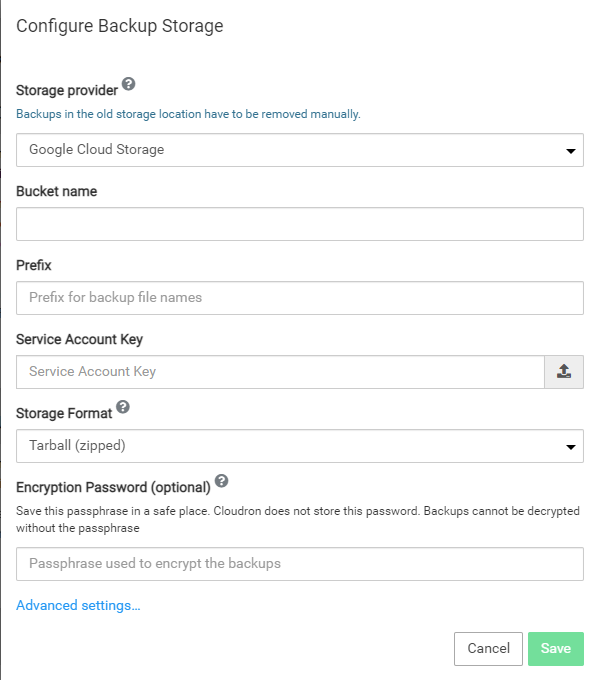
  • Load JSON on Google Cloud form

    Solved Support gcs domains
    5
    1
    0 Votes
    5 Posts
    1k Views
    CaporalStrategC
    @nebulon I haven't investigate but certainly some extension that blocked the ability to write there.
  • App store down? It won't load from dashboard.

    Locked Solved Support domains appstore
    6
    0 Votes
    6 Posts
    2k Views
    robiR
    I was just wondering why the forum was down, yet the many subdomains were working fine. Yay for more resilient features.
  • How to Publish Website on Main Domain Without Cloudron?

    Moved Solved Support domains
    2
    0 Votes
    2 Posts
    616 Views
    girishG
    @p998 You have to change the DNS entry of maindomain.com to your external server's IP.
  • multiple cloudron servers under one domain

    Solved Support domains multi-domain
    3
    1 Votes
    3 Posts
    1k Views
    P
    @fbartels ok, this makes sense, thanks!
  • apps don't install anymore

    Solved Support domains cloudflare
    7
    0 Votes
    7 Posts
    2k Views
    P
    @girish I did something slightly different (but maybe not SO uncommon). I created the server and put the clients domain into my own (developer) cloudflare account. After everything worked I created the domain in the client's cloudflare account and changed the NS entries (basically this: https://developers.cloudflare.com/fundamentals/get-started/basic-tasks/manage-domains/move-domain/). the situation was now, that the API key was still valid but changed the wrong domain entries at cloudflare. so, I imagine cloudron creates the NS entry, checks if this works (which it doesn't) -> brain freeze. Something like this?