Cloudron makes it easy to run web apps like WordPress, Nextcloud, GitLab on your server. Find out more or install now.


Skip to content
  • Problem migrating data

    Solved Support restore migration
    6
    3 Votes
    6 Posts
    224 Views
    J
    That worked, this is solved now. Thank you.
  • SSH remote copy always failed, falling back to sshfs copy

    Solved Support backup restore zfs sshfs
    17
    1 Votes
    17 Posts
    716 Views
    nebulonN
    This is now fixed for the next release with https://git.cloudron.io/platform/box/-/commit/a4ea80cf5eb26b08462430111e8b6f75175e749d
  • Help with migrating Cloudron to a new server

    Solved Support backup restore migration
    18
    1 Votes
    18 Posts
    440 Views
    jdaviescoatesJ
    @davejgreen said: I tried again with a fresh install of Ubuntu 24.04 @davejgreen said: Maybe different versions of Ubuntu do it differently? I think the only time I've had issues with migrations was when the provider of my VPS (I think it was Netcup) began using stripped down versions of Ubuntu that had stuff Cloudron needs missing. But I'm guessing you're pulling Ubuntu directly from Ubuntu?
  • 1 Votes
    8 Posts
    474 Views
    girishG
    I have fixed this for the upcoming release
  • Reset Cloudron Installation to migrate/restore

    Solved Support restore
    5
    1 Votes
    5 Posts
    293 Views
    robiR
    Reworking the installation flow a bit might help.
  • Restore backup failed after 20h - Error 70

    Solved Support backup restore
    3
    0 Votes
    3 Posts
    266 Views
    nebulonN
    There is also a Logs dropdown button in the backups view which opens the corresponding log file in the logsviewer, from there the full logs can also be downloaded, avoiding the need to ssh into the server.
  • Migrating Cloudron to New Host Provider

    Solved Support restore dns dns setup
    4
    1 Votes
    4 Posts
    463 Views
    J
    @samgreenwood are you following the steps in https://docs.cloudron.io/backups/#move-cloudron-to-another-server ? If you need access to your old server simply change DNS manually to point to the old server or modify your laptop's /etc/hosts . my.domain.com 1.2.3.4 (where 1.2.3.4 is your old server IP)
  • App restore not successful

    Solved Support backup restore storagebox disk space sshfs
    5
    1 Votes
    5 Posts
    441 Views
    J
    @tecbox thanks for the update!
  • Can't import backup: Error loading fsmetadata.json

    Solved Support backup restore
    15
    1 Votes
    15 Posts
    666 Views
    J
    @difficult222 I have replied to your ticket.
  • 1 Votes
    7 Posts
    2k Views
    I
    Hi @joseph . Thanks! Yes, the issue was with the encryption password. I successfully created a new app from the backup. However, one question remains: how can I restore a backup to NocoDB without recreating the app? The original restore (to the existing app) kept failing with the role already exists PostgreSQL error. Could this be related to memory limits? I checked and there seemed to be enough memory available everywhere. For context: my NocoDB has many records plus connections to external databases.
  • 0 Votes
    7 Posts
    552 Views
    dsp76D
    @james need to test backup and restore again to find out... will do.
  • Cannot restore backup Nextcloud

    Solved Support restore
    6
    2 Votes
    6 Posts
    672 Views
    jamesJ
    Hello @brambuijs Is this still an issue?
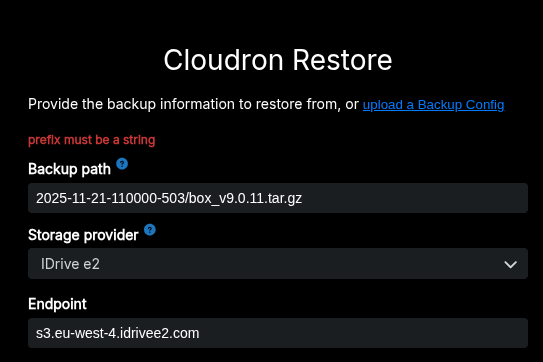
  • prefix must be a string

    Solved Support restore
    18
    2
    1 Votes
    18 Posts
    2k Views
    girishG
    @ghosted @mdc773 9.0.13 has the fix .
  • 1 Votes
    4 Posts
    433 Views
    d19dotcaD
    @girish said in Attempted to restore Cloudron 9.0.12, receiving error when loading backup configuration and hitting Restore button: @d19dotca I tried to reproduce this but I couldn't figure where to set this IP allowlist in iDrive e2. Maybe it's only for paying customers since I am on the trial plan ? Hi Girish. This link can help, assuming it isn’t gated to paying customers (I’m not sure if it is or not), but hopefully this provides some instructions for setting up an allowlist. https://www.idrive.com/s3-storage-e2/faq-buckets#ip-allowlisting I suspect you’re right though, that it is sending back a non-XML response to provide a response message that it’s forbidden from accessing it. I understand this use-case may be rare, but I think if there’s a way to improve that error handling, it may help others too because at first glance it’s really not clear where the issue could be coming from.

  • Restoring Backups fails

    Solved Support backups restore
    32
    1 Votes
    32 Posts
    4k Views
    girishG
    @dylightful If we can have access to your setup, can you write to me at support@cloudron.io ? Would love to debug and figure out why it's failing . Is this reproducible easily - meaning if you take a backup and restore, it fails?
  • 2 Votes
    7 Posts
    1k Views
    girishG
    I have updated https://docs.cloudron.io/backups/#restore-cloudron and https://docs.cloudron.io/guides/download-backups/#backup-file-names . Bit of a hasty edit but time is really right these days!
  • Nextcloud restore fails - out of memory

    Solved Support nextcloud support restore
    6
    0 Votes
    6 Posts
    1k Views
    J
    You can check if the server itself is particularly low on memory by running free -m . Can you give nextcloud much more memory (in the Resources section) ? What is it at currently ?
  • Wordpress - Unable to restore from backup

    Moved WordPress (Developer) restore
    5
    2 Votes
    5 Posts
    933 Views
    jamesJ
    Hello @jamie.mckenzie @jamie.mckenzie said in Wordpress - Unable to restore from backup: Does the automated backup not include files outside of the data folder? The Cloudron backup only includes the database and files in /app/data/ @jamie.mckenzie said in Wordpress - Unable to restore from backup: It doesn't get to restore the key files like wp-config.php - and these files are missing at the backup location (s3) This is indeed strange. For the WordPress Developer app the file wp-config.php is located in /app/data/public/wp-config.php, so it should be included in the backup. @jamie.mckenzie said in Wordpress - Unable to restore from backup: There is no memory issues as the server has plenty of available memory for restore. That the server itself has enough memory is not the point. The point made was that you might need to increase the apps memory limit. @jamie.mckenzie said in Wordpress - Unable to restore from backup: I have tried clearing down the cached files in the backup storage down to the bare minimum yet it still fails. I would strongly advise against tinkering with anything inside the backup. In Cloudron 9 backup integrity checks are added which will fail if you delete files by hand. @jamie.mckenzie said in Wordpress - Unable to restore from backup: Also is there a way to alter the back configuration so more than 10 files are downloaded concurrently Indeed, should we make this configurable @staff? @jamie.mckenzie Could you please share more details about your S3 provider?
  • Migrating active Server

    Moved Discuss backups restore
    5
    2 Votes
    5 Posts
    1k Views
    W
    yes @james I have also thought of using that. but manually running it on all mailboxes sounds like a pain I don't want to go through. I guess the current way I envision it is writing a script for imapsync that uses the api of cloudron to get all mailboxes and impersonates the users of the mailboxes to auto run imapsync on them. but then again maybe a block of the port is the way to go, so I don't have to write that script. the whole backup and recover process should be done quite quickly anyways. I am wondering though if this is not something others have gone through as well?
  • 0 Votes
    4 Posts
    1k Views
    nebulonN
    oh that is true, I forgot about Cloudron 7 not being supported/tested on Ubuntu 24. So then yes you have to first install Ubuntu 22, then restore Cloudron, then update Cloudron, then follow the guide at https://docs.cloudron.io/guides/upgrade-ubuntu-24/