Cloudron makes it easy to run web apps like WordPress, Nextcloud, GitLab on your server. Find out more or install now.


Skip to content

Support

Get help for your Cloudron

3.4k Topics 24.4k Posts
  • Confusing First Time Setup instrustions on imported app

    Moved Solved import
    4
    1
    0 Votes
    4 Posts
    1k Views
    nebulonN
    Fixed for next release with https://git.cloudron.io/cloudron/box/-/commit/93d4271bce299c1d3aba9036f8d15805adaa1f2e
  • accessing cloudron on lan

    Solved home
    4
    1 Votes
    4 Posts
    1k Views
    nebulonN
    Have you read through https://docs.cloudron.io/networking/#private-dns already? Seems like this outlines your situation.
  • This topic is deleted!

    6
    1
    1 Votes
    6 Posts
    55 Views
  • I never thought I'd be here with an email question!

    Solved mail mail-queue
    4
    0 Votes
    4 Posts
    903 Views
    girishG
    I have added a workaround in the next release to delete 0 length files on startup.
  • App Proxy Link revert error

    3
    1 Votes
    3 Posts
    567 Views
    D
    @girish no it was just on ip:port so i installed today nginx proxy and it worked through that with hrms.domainname.com wild card certificate
  • Setting sliders

    Solved
    8
    1
    3 Votes
    8 Posts
    2k Views
    girishG
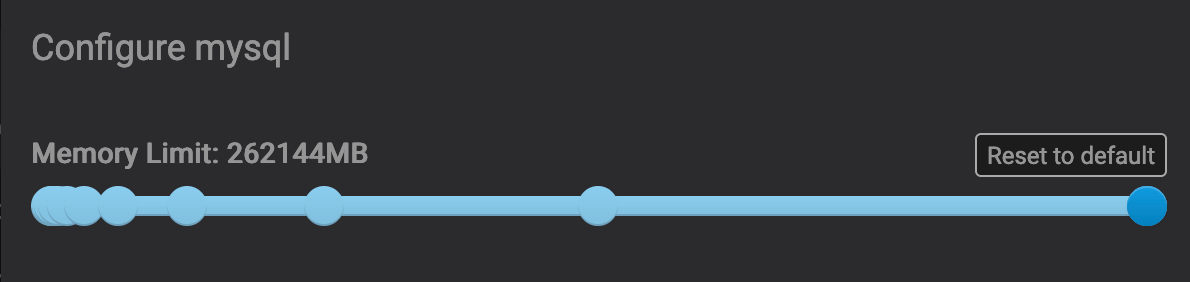
    Guess we have to improve the slider. I think entering exact values is too precise which might mislead people into thinking this important...
  • 500 error after 7.5.2. update

    Solved
    8
    0 Votes
    8 Posts
    2k Views
    WiseMetalheadW
    Suddenly, after 1-2 hours, everything started working by itself. My hosting provider confirmed that there is no IP blocking on their end. I'll email you if the problem occurs again.
  • How to remove all mail folder?

    mail
    7
    2 Votes
    7 Posts
    1k Views
    StardenverS
    @necrevistonnezr said in How to remove all mail folder?: Another thing is that - as usual with Apple - there’s no way to adjust or reset such suggestions. Even without the „all mail“ folder, it was hit & miss. And why would a folder that has been added later override all previously learned suggestions? It’s just stupid. (BTW, the same goes for login/password suggestions in Safari, even when using Bitwarden - for my Cloudron site, Safari suggests 30 login / password combinations that are out of date. No way to reset that). I hear you. Apple always does everything the apple way. In this case I think its not really related to "learning". I think its more of a scan and match system. You receive a mail and the mail app is looking up for the folder containing the most mails with the given sender. So in case of Amazon apps there are like two options: The Amazon folder and the all mail folder. As I may have missed a few mails in the past and probably just moved them into the archive, there may be a slightly higher amount of mails in the all mail folder. Also I tend to use folders like "cancellations" or "payments" which may also contain Amazon mails. The same goes for office mails. The same sender (f.g. boss@work) may end up in folder "Project A" and Project "B", according to its content and topic. But both mails will be found in "all mail". So no matter what, the all mail folder will - due to its nature - always have the biggest and max. possible amount of mails from every given sender and therefor get the highest "rank" from Apple Mail. At least thats what I assume.
  • Further Locking Down Email

    Solved mail spam
    20
    0 Votes
    20 Posts
    6k Views
    girishG
    @MisterJD yeah, I have seen that some kernels have an upper limit. I haven't found a way to query this limit to show a proper error.
  • Cloudron not reachable Ubuntu 18.04.6 LTS

    Solved upgrade
    6
    2
    0 Votes
    6 Posts
    1k Views
    S
    Done Thanks!
  • mdadm RAID monitoring not working

    Solved
    5
    0 Votes
    5 Posts
    2k Views
    StardenverS
    Update solved the problem. Will dig into the monitoring problem, which indeed seems to be not cloudron related. Thank you for the reply.
  • Restore App Failing with Cloudron 7.5.2

    Solved restore
    6
    1 Votes
    6 Posts
    1k Views
    girishG
    @firmansi You can change the memory limit in a couple of places: The service (mysql) in Services -> MySQL . Bump the limit there The app's memory limit . App -> Resources.
  • 0 Votes
    6 Posts
    572 Views
    micmcM
    @robi said in Backup failed: ENOENT: no such file or directory, open '/mnt/cloudronbackup/my.uniteddiversity.coop-netcup/snapshot/app_08388b1d-12c7-42c2-b6bd-a5c5be5cfcbb.tar.gz': It's odd that backups ran fine until they didn't with that same default all this time. What would make backups use more memory over time? It would be interesting to know a little more about that, indeed.
  • POST /api/v1/cloudron/reboot 404

    Solved api
    7
    0 Votes
    7 Posts
    2k Views
    C
    Good to know it should work. I will try it again later. Can't reboot now in the middle of the day. Maybe something got cached in the browser then.
  • Apps stopped functioning post failed updates

    Solved
    7
    0 Votes
    7 Posts
    2k Views
    joesitsolutionsJ
    @girish said in Apps stopped functioning post failed updates: However this does not resolve the fact that apps seem to not be responding externally/internally. Yet again my cloudflare changed its SSL/TLS encryption mode from Full (strict) to some other setting and broke my ssl side of things causing sites not to load. Tested other domains I have and those worked so the only setting remaining was that. Fixed my issue there. @girish said in Apps stopped functioning post failed updates: Interesting solution. How did you end up discovering this ? Is this because of some local network related issue ? In terms of this the only thing I can think of is maybe getting rate limited so I had to slow down... I was updating multiple apps all at once when the updates all failed.
  • why am i running nginx version 1.18.0?

    Solved
    5
    0 Votes
    5 Posts
    2k Views
    girishG
    Probably upstream but not in Ubuntu packages
  • 1 Votes
    6 Posts
    2k Views
    jdaviescoatesJ
    @necrevistonnezr said in Update from 7.4.3 to 7.5.2 fails on Ubuntu 18.04.4 with no notification/ clear reason.: @jdaviescoates Shouldn't the EOL of Ubuntu 18.04 last May be enough "notification", despite LTS? heh, yeah, I guess it should! This is a Cloudron I set up for others ages ago which I've barely looked at since, hence the oversight!
  • Would installing AWS Systems Manager interfere with Cloudron?

    Solved aws
    3
    0 Votes
    3 Posts
    851 Views
    S
    Thanks. I’ll give it a shot!
  • Strange message "Removing containers for upgrade" after Cloudron upgrade

    Solved
    4
    2
    0 Votes
    4 Posts
    968 Views
    girishG
    @Benoit /api/v1/cloudron/status is the correct path for health check. It only returns the version now and nothing else. There is no errorMessage anymore . That field was used for provisioning time status (i.e setup and restore time). That is available via /api/v1/provision/status . The errorMessage was related to errors during setup and restore and was never used to signal any post installation errors.
  • Backup Error after Server move and update to Cloudron 7.5.1

    Solved
    7
    1 Votes
    7 Posts
    1k Views
    L
    @girish don't know what happened but the auto-backups are working again