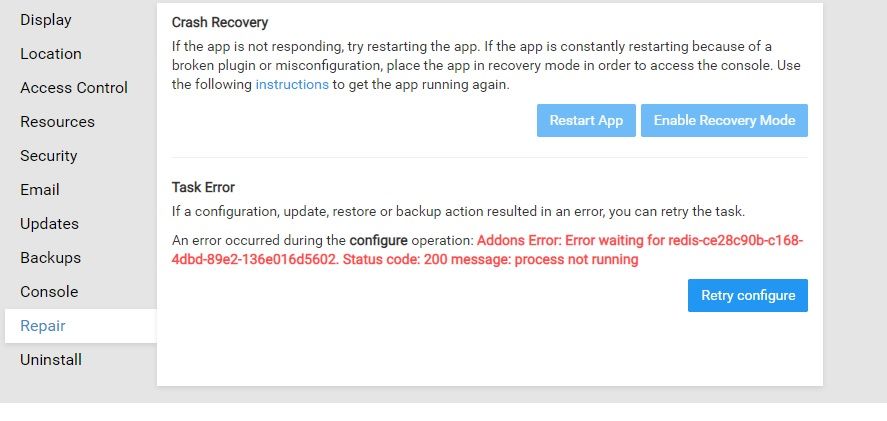
@girish Thanks, this fixed the issue! However, during subsequent testing I found that Redis goes down approx. 30% of the time when I stop the app. For testing I am using Scrumblr but I have seen similar issues with GitLab too. Is this an issue locally for me on my VPS, or could there be something else going on?
Cheers,
Ross
@nebulon Thanks for the quick reply and guidance!
And sorry for not spotting the response to the second question in the doc. Yes there is a sub associated so I'll also email you.
Many thanks
No worries, I will cancel the subscription and refund.
We are currently busy with Cloudron v6 which does not yet include that feature, so not clear timeline yet.
@alex-adestech That was quite some debugging session
Wanted to leave some notes here... The server was an EC2 R5 xlarge instance. It worked well but when you resize any app, it will just hang. And the whole server will stop responding eventually. One curious thing was that server had 32GB and ~20GB was in buff/cache in free -m output. I have never seen kernel caching so much. We also found this backtrace in dmesg output:
INFO: task docker:111571 blocked for more than 120 seconds.
"echo 0 > /proc/sys/kernel/hung_task_timeout_secs" disables this message.
docker D 0000000000000000 0 111571 1 0x00000080
ffff881c01527ab0 0000000000000086 ffff881c332f5080 ffff881c01527fd8
ffff881c01527fd8 ffff881c01527fd8 ffff881c332f5080 ffff881c01527bf0
ffff881c01527bf8 7fffffffffffffff ffff881c332f5080 0000000000000000
Call Trace:
[<ffffffff8163a909>] schedule+0x29/0x70
[<ffffffff816385f9>] schedule_timeout+0x209/0x2d0
[<ffffffff8108e4cd>] ? mod_timer+0x11d/0x240
[<ffffffff8163acd6>] wait_for_completion+0x116/0x170
[<ffffffff810b8c10>] ? wake_up_state+0x20/0x20
[<ffffffff810ab676>] __synchronize_srcu+0x106/0x1a0
[<ffffffff810ab190>] ? call_srcu+0x70/0x70
[<ffffffff81219ebf>] ? __sync_blockdev+0x1f/0x40
[<ffffffff810ab72d>] synchronize_srcu+0x1d/0x20
[<ffffffffa000318d>] __dm_suspend+0x5d/0x220 [dm_mod]
[<ffffffffa0004c9a>] dm_suspend+0xca/0xf0 [dm_mod]
[<ffffffffa0009fe0>] ? table_load+0x380/0x380 [dm_mod]
[<ffffffffa000a174>] dev_suspend+0x194/0x250 [dm_mod]
[<ffffffffa0009fe0>] ? table_load+0x380/0x380 [dm_mod]
[<ffffffffa000aa25>] ctl_ioctl+0x255/0x500 [dm_mod]
[<ffffffffa000ace3>] dm_ctl_ioctl+0x13/0x20 [dm_mod]
[<ffffffff811f1ef5>] do_vfs_ioctl+0x2e5/0x4c0
[<ffffffff8128bc6e>] ? file_has_perm+0xae/0xc0
[<ffffffff811f2171>] SyS_ioctl+0xa1/0xc0
[<ffffffff816408d9>] ? do_async_page_fault+0x29/0xe0
[<ffffffff81645909>] system_call_fastpath+0x16/0x1b
Which led to this redhat article but the answer to that is locked. More debugging led to answers like this and this. The final answer was found here:
sudo sysctl -w vm.dirty_ratio=10
sudo sysctl -w vm.dirty_background_ratio=5
With the explanation "By default Linux uses up to 40% of the available memory for file system caching. After this mark has been reached the file system flushes all outstanding data to disk causing all following IOs going synchronous. For flushing out this data to disk this there is a time limit of 120 seconds by default. In the case here the IO subsystem is not fast enough to flush the data withing". Crazy After we put those settings, it actually worked (!). Still cannot believe that choosing AWS instance is that important.
@nebulon
Ok I see. Thank you very much for the clarification! ^^
I'm going to move the image location to an external volume for the time being.
It looks like the last docker pull command of the previous test ate some space. Could you guys please tell me how I would clean up the remaining cruft?
EDIT:
Reporting back that it was installed successfully after changing the image location to an external volume offering enough disk space.
@girish said in E-Mail sieve scripts: "body" option not available:
@necrevistonnezr despite sieve being a standard, each app had a limited parser. So they setup separate filters so as to not step on each other. In my experience, just stick to one app for setting up sieve.
It goes beyond that, I think. If I set up a filter in Rainloop and click save, all filters in Roundcube are gone - and vice versa.
BTW Did anyone successfully setup their Carddav addressbook to sync to Roundcube?
EDIT: NVM, figured it out..
in fact in the directory only the dir data is left and it is empty but root:root is the owner
[image: 1603584552046-fe2b1d58-3d79-4c28-bc6d-17bc1821095b-image-resized.png]
after rmdir /home/yellowtent/appsdata/f266ef68-b01b-4a9e-954e-b8bc68010672/data
the uninstallation went well
@robi The fsmetadata.json is only used in rsync backups. It's used to keep track of empty directories and 'x' bit of files when using rsync mode. We do this because object storage services (like s3, gcs and friends) cannot track this since they are not a filesystem but an object store.
This is not needed in tgz because tgz format can encode this information inside the tarball.
In essence, fsmetadata.json is usually owned by root. If it's owned by yellowtent, it's probably because maybe you restored the Cloudron in the past or something. The restore logic changes the permission of all files to yellowtent after downloading so that restore can continue as non-root user.
@scooke said in Installation on an AWS EC2 server (T2.Micro) at AWS China hangs:
@andreas True, it doesn't matter where the host company, or head office is located. Anything in China, for China, is going to be under lots of scrutiny.
Unfortunately true, we must accept this learning curve.
I am trying to only do this from the Cloudron hosted versions of Metabase/Grafana.
I followed your instructions and this worked perfectly, took the username, password, port, host, and database name from the environment variables within the Wekan web console, entered them in Metabase, and was able to connect and see the data.
Thank you!
@mehdi Very much interested in this topic. I love my American friends, but the EU certainly isn't without capability to respond to the data-mining free-for-all antics of the last decade. I share occasional posts on Twitter on these subjects if anyone's interested.