Cloudron makes it easy to run web apps like WordPress, Nextcloud, GitLab on your server. Find out more or install now.


Skip to content
  • Cloudron's email server

    Discuss email
    23
    2 Votes
    23 Posts
    9k Views
    marcusquinnM
    @YurkshireLad Maybe try the Elasticmail DMARC voodoo generator and guide: https://elasticemail.com/dmarc
  • 4 Votes
    3 Posts
    2k Views
    32463
    +1 from me I currently use a custom domain and spreadsheet... plus lots of manual tracking of email addresses I set up
  • 0 Votes
    4 Posts
    2k Views
    jdaviescoatesJ
    @vova also, check your spam folder
  • Email not sending

    Solved Support email relay sendgrid
    8
    0 Votes
    8 Posts
    4k Views
    W
    @girish said in Email not sending: include:sendgrid.net Thanks!
  • Rainloop vs SoGo

    Discuss sogo rainloop email
    4
    0 Votes
    4 Posts
    3k Views
    girishG
    Only recently did Calendar and aliases start working reliably in the Cloudron SOGo package. I think mailbox sharing still doesn't work but it's in our TODO list. Because of this, my personal and cloudron.io email setup doesn't use SOGo. @nebulon and I both use thunderbird for day to day use. We have a rainloop installation just to manage our mail filters (in my personal install, I use roundcube for this instead just for variety ). This too was because thunderbird's sieve extension was previously not working with Cloudron Email. That problem has since been fixed but thunderbird's sieve extension is not very user friendly, so we stick to rainloop/roundcube. For calendar/contacts, we use our Nextcloud's caldav/carddav. Both Gnome and Thunderbird, have excellent integrations for caldav/carddav. One important consideration here is that we moved out of another provider which let us export carddav. Nextcloud has an importer that works, I haven't tested out the importers of other apps. Shared mailboxes (like sales@, support@) was quite complicated with thunderbird (because the mail read/unread flag is not per-user). You also have to configure thunderbird to bcc replies so that the other user can see the replies. Recently, we have moved our shared mailboxes to freescout to solve this. I don't know if this directly answers the question I do think if SOGo was in the state it was now when we started, we probably would have used that from the get-go.
  • 0 Votes
    11 Posts
    4k Views
    murgeroM
    @christiaan You can manually setup filters in SOGo, Rainloop, Roundcube, etc in Cloudron to do the exact same thing here. I can assist in a PM if you would like help setting this up.
  • JMAP

    Discuss email jmap
    8
    3 Votes
    8 Posts
    4k Views
    micmcM
    @girish said in JMAP: on dovecot side, JMAP support is not really being actively worked on - http://dovecot.2317879.n4.nabble.com/JMAP-support-td73445.html Yeah, kind of being ignored a little bit. lol AFAICS, JMAP does not seem to bring such great enhancements such as to shake the email servers industry, yet. That is very likely why there's seems to be not so much enthusiasm about this protocol. IMHO Andy
  • Signing in with username vs email

    Support usermanagement email
    2
    1 Votes
    2 Posts
    888 Views
    girishG
    @moonmeister I think it's better to use the username for login into all apps except the email apps like roundcube/rainloop/sogo (because they require email to know which mailbox to open). The email login was probably not a good idea to start with because the email can be changed unlike the username. These days when we bring in new apps, we don't bother much with email login.
  • 6 Votes
    37 Posts
    10k Views
    jimcavoliJ
    @girish To that end, perhaps this one is better locked at this point
  • Can we use Cloudron SMTP for Ghost email config

    Moved Ghost ghost email
    7
    2 Votes
    7 Posts
    3k Views
    iamdinakarI
    @girish new thread added for this here - ghost issue with signup email and mail configuration
  • Backup sieve filters

    Solved Support email backups
    2
    1 Votes
    2 Posts
    1k Views
    girishG
    @NCKNE Which app did you use the sieve filters in. Often, the filter in one app is not visible in another! The sieve filters are located at /home/yellowtent/boxdata/mail/vmail/<mailbox>/sieve. Can you check if they are there on the filesystem atleast?
  • E-Mail Server Error

    Support email
    8
    0 Votes
    8 Posts
    3k Views
    T
    @girish Okay. Would be nice to see in the future! E.g. "Ignore PTR".
  • SMTP rejected for some users

    Support email
    2
    1 Votes
    2 Posts
    650 Views
    P
    This appears to be a case of https://forum.cloudron.io/post/6533 . Applying the linked setting change fixed the issue.
  • Cant Recieve Mails from some Hosts

    Support email
    3
    1
    0 Votes
    3 Posts
    1k Views
    girishG
    @jensbee4 If you have reason to believe this is legitimate email that is getting dropped, can you please send me the IP address to support@cloudron.io. It looks like that server is mis-configured
  • Allow SSL /TLS in email outbound SMTP settings

    Discuss email port ssl
    7
    1 Votes
    7 Posts
    3k Views
    necrevistonnezrN
    @girish said in Allow SSL /TLS in email outbound SMTP settings: Are you hosting a custom domain on mailbox.org or do you have a @mailbox.org address? If it's the latter, mailbox is then not really an email relay. Generally, email relays are able to forward all addresses of a domain i.e anything@cloudrondomain.tld. BTW I figured out how to use mailbox.org as a relay: https://kb.mailbox.org/display/MBOKBEN/Using+e-mail+addresses+of+your+domain I obviously skipped the part setting the mx values but otherwise it’s been working well the past weeks.
  • AWS EC2 Dedicated IP blocked by Outlook

    Discuss email relay
    3
    0 Votes
    3 Posts
    2k Views
    girishG
    @rfg You have to setup a mail relay for your outbound mails. The big cloud providers like aws, gce, azure will all block emails from VMs directly. See https://cloudron.io/documentation/email/#relay-outbound-mails
  • sender rewriting when using external SMTP

    Discuss email relay
    4
    0 Votes
    4 Posts
    2k Views
    girishG
    @hendrikvl said in sender rewriting when using external SMTP: And no, my mail relay does not accept IP whitelisting. It's not a proper mail relay service to be exact, but just a regular mail service with outgoing smtp for authenticated users. Ah yes, someone was trying to do this with a gmail account as well sometime back (and more recently with a mailbox.org account). I think we have to implement this feature in Cloudron to make this use case work.
  • 0 Votes
    4 Posts
    2k Views
    Z
    thanks for the explanations. I have already contacted digital ocean requesting the release of port 25. at first, strangely, they claimed that there is no output block on port 25 (although I did the test with the command 'telnet' in the cli).
  • Rainloop - Can't add domain / account

    Moved Rainloop rainloop email
    14
    0 Votes
    14 Posts
    5k Views
    girishG
    To explain...: When you add a domain in Cloudron, you are just adding a domain for installing apps under that domain. The only DNS configuration it will do is to fix up the SPF record so that Cloudron can send mail on behalf of that domain (it adds itself to an existing SPF record). So, if you install say gitlab, gitlab can send mail to you. When you go to Email -> Enable Incoming mail, at that point, Cloudron will start receiving incoming email for that domain. It will setup DKIM/MX/DMARC records as well at this point. You can send/receive email without any of the webmail apps (rainloop, roundcube) installed. The webmail apps are really just frontends just like thunderbird or your android/ios mail client. On Cloudron, we pre-configure these apps to work only with Cloudron email. We could make a package that does not do this but that use case is quite rare because most email providers have their own web ui anyway. I think @necrevistonnezr just wants to add a domain into rainloop. This is the equivalent of adding an account in thunderbird. It has no effect on Cloudron mail server whatsoever.
  • 0 Votes
    6 Posts
    2k Views
    girishG
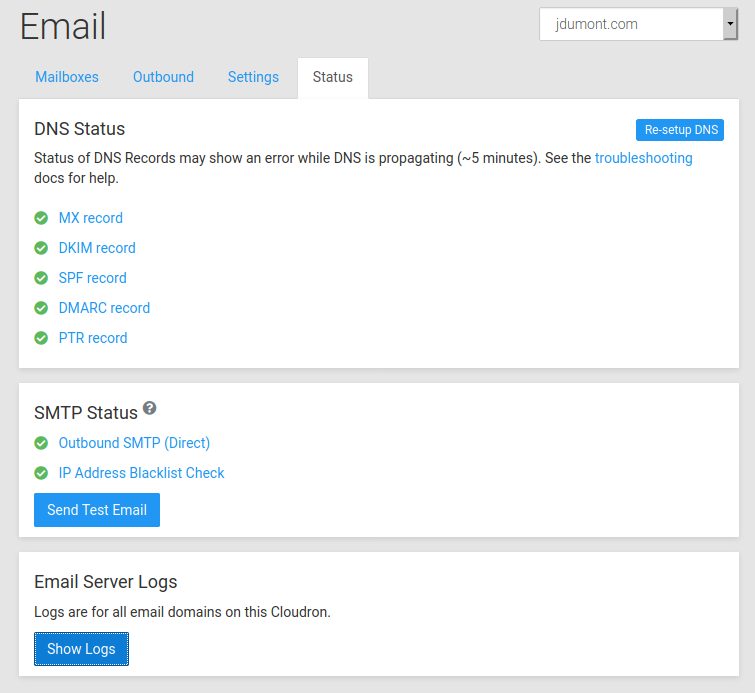
    @JOduMonT Currently, the 'email is not configured properly' notification is updated every 30 minutes. So, it's very much possible that those email settings are fine now and that notification will go away after 30 minutes. If you click on the notification, it should expand to give information on what exactly is not setup properly. Can you tell me what you see if you click the notification ? Also, zen.spamhaus.org being disabled is not good! Do you have a custom DNS setup by any chance? Under system -> services, is unbound running OK?